Classroom PDF is designed with unique features to fit your teaching workflow. Use it to grade worksheets and walk-through answers in class. *** LAUNCH PROMOTION: Free for 24 hours, one time only, ...
Via Dr. Joan McGettigan, Yashy Tohsaku

 Your new post is loading...
 Scoop.it! Classroom PDF is designed with unique features to fit your teaching workflow. Use it to grade worksheets and walk-through answers in class. *** LAUNCH PROMOTION: Free for 24 hours, one time only, ... Via Dr. Joan McGettigan, Yashy Tohsaku No comment yet.
Sign up to comment
Scoop.it!

Gilles Le Page's curator insight,
June 21, 2014 10:27 AM
Je viens de regarder le site de l'appli Movenote. Ce que j'ai trouvé, c'est l'appli pour Chrome, mais Movenote fonctionne aussi avec Ios. On trouve un descriptif sur le site outilstice Je vais tester, ça correspondrait bien à mes attentes : On passe des diapos (ou autres) et on est filmé en même temps en train de commenter ce que l'on présente.
Tutoriel : http://youtu.be/CYGMdEEjuJE Suite du commentaire : Pourquoi mettre de temps à autres ma tête en train de parler à côté du contenu qui semble a priori fondamental et auto-suffisant (des dias ou des schémas) ? En y réfléchissant, je m'aperçois que je le fais de temps en temps, pas très souvent, mais pas par hasard. Quand on travaille avec des personnes qui ne nous voient jamais, en "à distance" pur, il est très utile pour les apprenants à distance que leur interlocuteur soit vivant, qu'ils l'appréhendent comme une personne humaine. (Si on veut être compris/perçu, on parle à l'émotion avant de parler à l'intelligence). Une personne dont "le buste" parle avec des expressions de visage, des attitudes, etc. envoie du non-verbal en plus du verbal, je suis assez certain qu'il est petinent de le proposer de temps en temps. Il m'arrive donc de démarrer un "cours" avec une vidéo où je m'adresse aux apprenants par une vidéo d'intro. Il arrive que cette vidéo comportent des dias reprenant l'essentiel de ce que je dis pour ajouter un accès visuel à l'accès auditif... D'où mon intérêt pour Camstasia et pour Movenote... Mais je n'utilise pas ça pour toutes les présentations dans la suite du cours.
Scoop.it!
The Prezi Learn page is a library comprised of the Prezi manual, tutorials, and training prezis to help you get started. Via Gust MEES
Scoop.it!
sounds recorded from all over the world in high quality mp3 freely downlable on universal-soundbank for all djs, musicians or producers. Via Gust MEES, R.Conrath, Ed.D.
Scoop.it!

After ten years of development, Moodle has become an essential tool for any educational establishment needing to streamline processes, save time and engage learners more.
We’re sure that, with so many options, despite an established Moodle community, many Moodle users will not be aware of some of this versatile VLE’s great features. So, here are three Moodle features and why you should be using them. Via Miloš Bajčetić 
Rob Swain's curator insight,
June 21, 2014 9:37 AM
Brief article. The 3 tips are in the areas of: - open badges - course formats - glossary
Scoop.it!
From
vimeo

This video provides an overview of the features provided by the new "Elegance" theme for Moodle 2.6 and above.
This "Bootstrap 3" theme is a fully responsive theme designed for use on both desktop and mobile devices. With a streamlined design and clean typography, the theme is designed to appeal to those with a more creative/visual lean.
Via Miloš Bajčetić
Scoop.it!

If you share video online, you should learn how to use the free YouTube editor. This free, online video editor is easy to use, and has more features than you might expect! Via Timo Ilomäki 
Stefano Principato's curator insight,
June 17, 2014 3:23 AM
It might not always be your first choice, but if you take the time to learn how to use the YouTube video editor, you will soon appreciate the power and convenience that a tool like this offers. It's easy enough for both kids and adults to use, and it's freely available on the web as part of the world's largest video sharing website. 
Shreya's curator insight,
June 17, 2014 6:38 AM
Poonam Pandey dances to football fever http://www.eni.network24.co/photo-gallery/poonam-pandey-dances-to-football-fever-10914_10 
Dean Mantz's curator insight,
June 24, 2014 6:40 PM
In setting out to explore new Scoop.it resources, I came across Timo IImoki's page http://www.scoop.it/t/education-technology-theory-practice/ ; Timo has shared a wealth of resources and it was an easy decision to follow.
This article is one that has a personal flare for me. In using my YouTube channel to share screencasts and student projects, there are times I need to make adjustments to uploads. In addition, I like to share video editing tools with my students. Thus, this tool feature is one deserving of being integrated into projects.
Scoop.it!

Zukunft von E-Learning, Blog, bloggen, E-Learning Strategien, Blended Learning, E-Learning Didaktik, Interview, Lecturio.de Via Carola Brunnbauer
Scoop.it!

You can lock every door and window of your house, but if you use a skeleton key the odds are pretty good someone is probably going to end up robbing you blind. The same is true of your passwords. If your passwords are not unique and unbreakable, you might as well open the front door… Via Juan Jesús Baño Egea
Scoop.it!
Scoop.it!

Pam Colburn Harland's curator insight,
June 17, 2014 7:06 PM
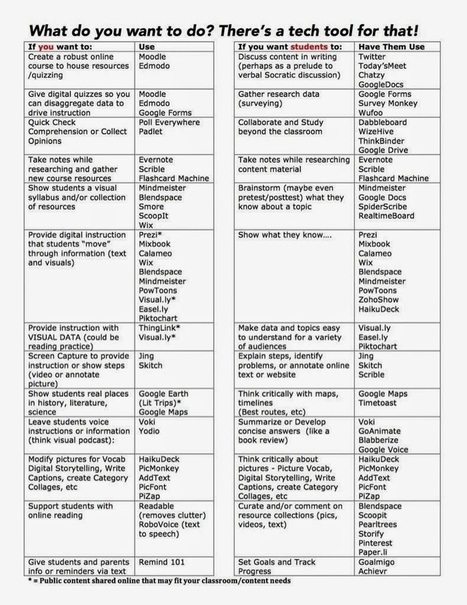
If you want students to... have them use... Makes a great list! 
Libchelle's curator insight,
June 18, 2014 6:25 PM
Fantastic table for students, teachers and parents. 
Glenda Rose's curator insight,
February 25, 2017 3:13 PM
I can add some more to this! Great start, though.
Scoop.it!

Die Entwicklungen im Medienbereich gehen rasend schnell voran. Online-Recht, Cybermobbing, Apps und Altersfreigaben... das alles sind Themen, an denen Via Guido Knaus
Scoop.it!
|
Scoop.it!
Anyone who has used the Prezi platform would know that creating a Prezi and uploading it to Prezi.com is easy enough, however when it comes to converting it to a YouTube video, there seems to be no native method of doing so... Via Baiba Svenca, Profdoc 
Louise Robinson-Lay's curator insight,
June 26, 2014 7:27 PM
Prezi makes wonderful slideshows. Converting them to video is explained here. 
Mary Reilley Clark's curator insight,
June 27, 2014 11:58 AM
Clear directions for converting Prezis into videos for the flipped library. (typos in the demo Prezi, though!)
Scoop.it!
Anyone who has used the Prezi platform would know that creating a Prezi and uploading it to Prezi.com is easy enough, however when it comes to converting it to a YouTube video, there seems to be no native method of doing so... Via Baiba Svenca, PuertoTICs, juandoming, Gust MEES, Ludmila Smirnova
Louise Robinson-Lay's curator insight,
June 26, 2014 7:27 PM
Prezi makes wonderful slideshows. Converting them to video is explained here.
Mary Reilley Clark's curator insight,
June 27, 2014 11:58 AM
Clear directions for converting Prezis into videos for the flipped library. (typos in the demo Prezi, though!)
Scoop.it!
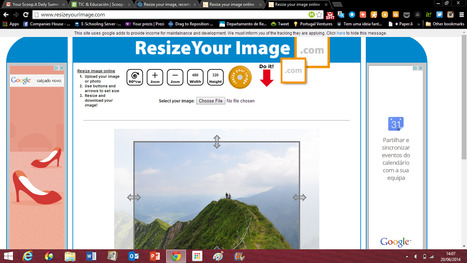
Resize your image online in three simple steps! Trouble mailing your images? Trouble putting your image online? Resize your images here; it's a free service.
Scoop.it!
Visual note-taking is a powerful tool for design professionals who want to capture ideas and communicate them effectively. Known as sketchnoting or graphic rec… Via Baiba Svenca 
Baiba Svenca's curator insight,
June 19, 2014 10:03 AM
Hand-written notes or drawings can be a perfect visual supplement to any textual message which you put in your presentation. This informative slideshow gives you tons of great examples and suggests ideas and methods how you can learn the visual note-taking. 
Lia Goren's curator insight,
June 21, 2014 10:06 AM
Me encantó esta guía e inspiración para trabajar contenidos de manera conectada! Para aprender uno mismo y para contar a otros, para abrir espacios de conversación.
Scoop.it!

In diesem Webtalk stellt Henrik Lohmann eine Unterrichtsreihe vor, die exemplarisch zeigt, wie mobile Geräte und digitale Arbeitsmaterialien genutzt werden. Via Guido Knaus
Scoop.it!

HTML to PDF est un service en ligne qui permet de convertir les pages Web en fichiers PDF. Il existe beaucoup d'autres du même style. Pour l'utiliser, il suffit d'entrer l'URL de la page et de cliquer sur le bouton "Get PDF". Via Freewares&Tutos, Juergen Wagner, Siani Katerina
Scoop.it!
Scoop.it!
Scoop.it!
A developmental framework for teacher adoption of interactive technologies in the language classroom
A developmental framework for teacher adoption of interactive technologies in the language classroom from Shona Whyte ... a collaborative action research project in French schools Keynote: PL-CALL,... Via Shona Whyte
Scoop.it!

Moodle (acronym for Modular Object-Oriented Dynamic Learning Environment) is an open source Learning Management System (LMS ) or a Virtual Learning Environment (VLE ). It is rising in popularity among the educators around the world, as a tool for creating dynamic websites for students. It is open source, since it is customizable, has no contracts or user costs to pay and is widely available for free use. It can be efficiently integrated with your management system and allows you to support personalized learning, which is effective even outside the classroom and encourages the involvement of the broader community of the institution.
Moodle has constantly maintained its top spot among the LMS tools and has been ranked 11th overall among the top 100 tools for learning in 2013 . Many factors have contributed to Moodle being highly successful. On top of being a great LMS, it is also free to use. Teachers can teach their own online courses using this and find it stable and easy to use and being customizable, it fits to its user’s needs with ease.
Moodle has several advantages over other LMSs, here’s the list of a few:
- It is an open source learning platform, which is utilized by millions of people worldwide. This open source nature allows anybody to tinker with its code or add new things. Users can share changes with the Moodle community for others to use for free. All this leads to the extension and reformation of the software. - It makes use of simple technologies, as a result of which its developers are easy to find. - It is built on some of the most reliable technologies, such as PHP, MySQL, Apache. - It has a fully cooperative development model which offers constant scope for improvement by allowing many high quality contributions to acquire new modules, features and enhancements. - It makes use of the more advanced programming approach, the object-oriented programming which makes its functionality all the more efficient and allows users to proceed at their own pace, as well as customize it according to their needs. - It focuses on making the learning and teaching experience constructivist. This process encourages the involvement of learners in the learning process, rather than letting them receive knowledge passively. The learning environment becomes more democratic with interactive and student-centered activities. - It is convenient for educational institutions and organizations for learning and course management. - It can be quickly deployed in your organization, without the requirement of any extra efforts. - It is highly cost-effective, since it has a low risk startup and a low initial investment. - It provides you with fast and reliable updates of information. - It provides you with regular support, all the time you use it. Its support feature is active twenty four hours a day, seven days a week and addresses to its developers, members and users. Via Miloš Bajčetić |