


January 3, 2015
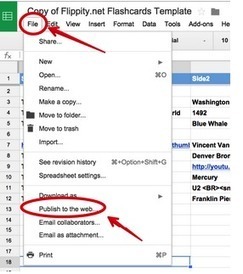
Flippity is a powerful web tool that you can use with Google Spreadsheets to perform a variety of tasks. In the last post we published here we talked about how to use Flippity to...
Via Yashy Tohsaku

 Your new post is loading...
 Scoop.it! January 3, 2015 Via Yashy Tohsaku No comment yet.
Sign up to comment
Scoop.it!
December 12, 2014 Via Gene Carboni
Scoop.it!

As a teacher, I use collaborative spreadsheets with students to have everyone in my class participate on the same document at the same time. Spreadsheets allow me to create multiple tabs to give each student their own sheet to work on within the same document. This gives me one document to open and assess. Via Gumersindo Fernández
Scoop.it!

“ Flippity is a very good tool that you can use on Google Spreadsheets to create flashcards and quizzes. The flashcards you create can be either printed or shared online through a generated link. The process to create a flashcard using Google Spreadsheet is pretty easy. Here is how to do it:” Via John Evans, Louise Robinson-Lay 
Louise Robinson-Lay's curator insight,
January 2, 2015 12:37 AM
Make your own flash cards with Google tools. Here is a how to guide.

Steve Vaitl's curator insight,
January 2, 2015 11:49 AM
I love the different scripts for Google Docs!!
Scoop.it!

From
pb21

Wofür steht das „open" in „Open Educational Resources“ (OER)? Und ab wann sind OER überhaupt „educational“? Dieses Video stellt eine Matrix als Antwort vor. Via Klaus Meschede
Scoop.it!

Consultants-E's curator insight,
December 31, 2014 12:29 PM
Useful for all those who use YouTube in class
Scoop.it!

"Most of us carry a smartphone around in our pocket without really thinking twice about just how impressive it is. These tiny little devices can do so many things, and they can do them for a (relatively) low price ..." Via Leona Ungerer
Scoop.it!

As social media become more and more predominant as platforms of connection and collaboration, the need for creating and maintaining a PLN ( Personal/Professional Learning Network ) becomes more pressing. As teachers and educators we are expected to be on top of the latest trends that can inform and enhance our classroom teaching as well as our professional growth.We are also expected to know the web tools that our students use and the new ones we can use with them in the future; but this is not always possible and because not all of our time constraints it becomes difficult to keep up the the new releases . It is at times like these that you can call upon your PLN.
Via Adelina Silva, juandoming, Edumorfosis, Dan Kirsch, Gust MEES, Claudio A. Clarenc, Mariano Sbert Balaguer
Scoop.it!

Mit dem Add-on EasyBib Bibliography Creator lässt sich in einem Google Doc auf einfache Weise eine Bibliographie erstellen. Zur Verfügung stehen die Zitierstile APA, MLA und Chicago style. Im Artik... Via Guido Knaus
Scoop.it!

Microsoft a mis fin au support de Windows XP, laissant des millions d'usager à la merci de failles de sécurité qui ne seront plus jamais colmatées. Heureusement, nous avons trouvé une solution qui nous semble viable : la dernière version LTS de Lubuntu. Via Profdoc, Frédéric DEBAILLEUL
Scoop.it!

La innovación en la tecnología no para, y su aplicación al entorno educativo tampoco. Por eso, durante los próximos meses (y también a más largo plazo) llegarán a nuestros hogares y aulas nuevos productos nos ayudarán a mejorar las clases, a aumentar la motivación de los alumnos o a hacer algunas tareas cotidianas más sencillas. ¡Aquí, algunos ejemplos! Via Francesc clavera i riera
Scoop.it!

Hive is a free URL shortener website to share and track links in real-time. So whenever someone will open your short link(s), it will immediately provide real-time notification on your free Hive account that someone has accessed your link from a particular country. You can also view stats for every single link in which you can check the total number of clicks, unique clicks, and top countries from where your links have been accessed. Via Frédéric DEBAILLEUL
Scoop.it!

Mobile cloud learning, a combination of mobile learning and cloud computing, is a relatively new concept that holds considerable promise for future development and delivery in the education sectors. Cloud computing helps mobile learning overcome obstacles related to mobile computing. The main focus of this paper is to explore how cloud computing changes traditional mobile learning. A case study of the usage of Moodle in the cloud via mobile learning in Khalifa University was conducted. Via Patric Lougheed |
Scoop.it!

The Moodle Wall for Moodle 2.x just got better. Much better. And the best part is that, in the spirit of Christmas and Open Source, I am giving away the prized source code to all Moodle developers and students. Via Miloš Bajčetić
Scoop.it!

Part of my work, at my school, is to create a framework for our Middle School that will take (already) blogging students from Elementary School and prepare a smooth transition for them, as they mov... Via Gene Carboni
Scoop.it!
Are you new to gamification? Or think it's all just a bunch of hype? Come join us in exploring the roots of gamification in psychology and how the lessons le... Via Arcanus, Javier Sánchez Bolado
Scoop.it!

Removing Backgrounds in PowerPoint Via michel verstrepen
Scoop.it!

One of the largest undertakings that most Moodle users will face is Moodle accessibility. Simply stated, as it relates to providing educational material, it is important for online training solutions to meet the needs of all students, especially for those that have unique needs. This is one of main goals and objectives of open source solutions like Moodle since it is an international development solution that has been designed for classroom needs all over the globe. Via Miloš Bajčetić
Scoop.it!

The year is about to end, and people around seem to have gone into a nostalgic mood. Via Yashy Tohsaku
Scoop.it!

Unsere ausführliche Schritt-für-Schritt-Anleitung zeigt, wie Sie Flyer mit Word erstellen. Via Elke Höfler
Scoop.it!
Beegit is a web application that revolutionizes how your team works together on content through a simple collaborative text editor. Via THE OFFICIAL ANDREASCY, Javier Sánchez Bolado
Scoop.it!

Pour chaque scénario, nous décrivons d’abord les étapes de sa mise en œuvre avec des exemples. Ensuite, nous montrons pas à pas comment créer, paramétrer et utiliser les outils nécessaires dans un espace de cours Moodle2. Il est important de savoir manipuler la plateforme Moodle 2 si votre institution propose ce LMS (Learning Management System) et si vous voulez l’utiliser en support à votre enseignement. Heureusement il existe bon nombre de ressources, imprimées et en ligne, pour aider à manipuler Moodle2 (nous en proposons une sélection au chapitre « Manipulations de base »). Mais cela ne suffit pas car un LMS ne remplace pas (heureusement) un(e) enseignant(e). Ce n’est qu’en mettant cet outil au service d’une intention pédagogique qu’il devient utile. Via Ressources pour les cours d'anglais, Michèle Drechsler 
HG Académie de Rennes's curator insight, December 9, 2014 1:59 AM
Des ressources complètes (un peu trop textuelles malgré tout) mais très utiles pour progresser. Liste des scénarios proposés : 
Armando's curator insight,
January 2, 2015 6:05 AM
Treize scénarios d’activités de cours avec Moodle 2 - Centre NTE / Université de Fribourg |






