Martin Dougiamas is best known as the founder of Moodle, and leading the team of software developers at the heart of the Moodle project. His major goal for the future is to improve the quality of education by encouraging social constructionist and collaborative practices within online learning communities.
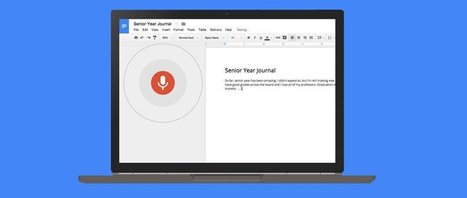
Google Docs acaba de renovarse completamente, con nuevas funciones que harán tu trabajo más sencillo. Ahora puedes dictar tu texto y olvidarte del teclado.
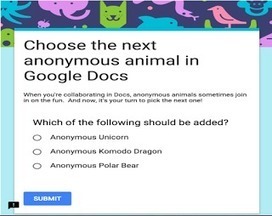
Passend zum Schulanfang, der auch in Amerika gerade wieder groß mit diversen „Back to School“-Aktionen beworben wird, nimmt Google einige Änderungen an der eigenen Productivity-Suite vor. Insbesondere Google Docs erhält einige neue Funktionen, die insbesondere für Nutzer unter Android nützlich...
Audiofy turns any article into audio and lets you listen to it, making it easier than ever before to keep up to date with your reading. It takes only 5 seconds to start listening to an article you’ve seen on Safari or Chrome or Pocket, using one of our 16 high quality voices.
There are many reasons to use Google Drive as an English teacher. Personally, I use it for all my documents and spreadsheets which make running my online teaching business much easier. But in the video below, I specifically look at how you can use Google Documents, Google Presentations, and a very special add-on to work with your students asynchronously. These tools can be used whether you teach online or offline, and I hope it gives you some ideas of how you can work asynchronously with your learners. Here is the video: Use Google Drive for Writing Projects, Audio, and Presentations In the video, I gave three examples of how you can use Google Drive with your learners. Google Docs I explained how to share a document (easy, right?), and then showed a project that one of my students worked on last year. The idea to do this came from my interview with Mark Barnes (see here), where I asked my learner what type of project he wanted to do. I left it open, explained that it would be a long-term project, and he came back to me with his idea for a book. Over the next few weeks, he added another chapter (about one page) to his book, and I corrected his work – which he could see through the revision history – and also commented on specific parts of the text to open up a discussion on certain points. Something that I didn’t mention was that after correcting his work, I formed some questions based on the mistakes he made so he could practice specific structures in the following one-to-one lesson. Kaizena Kaizena was recommended to me by Rich Kiker (see his interview here), and although I have only used it on a couple of occasions, I see huge potential with this add-on for Google Docs. Some ideas for using this with your learners are: – To give general feedback on a task or project – To collaborate with your learner on their pronunciation – To give more speaking practice If you’re looking for something a little more detailed for speaking feedback, I recommend SoundCloud (example below), Google Presentations One of my long-term students had a presentation to give for a job interview last autumn (did you notice American English creeping in during the video?). We used Google Presentations to work together on this. Firstly, he wrote his presentation and his notes, and I then corrected his mistakes in the slides and gave feedback using the comment feature. In addition, we used SoundCloud so I could give him feedback on his spoken presentation. (Note: He got the job!) Instead of taking a one-to-one lesson, it was much more efficient and effective for us to use Google Presentation and SoundCloud. Over to You Have you used Google Drive to collaborate with your students? If so, or if you have any thoughts on this at all, please leave a comment below. 0 Name: Email: Signing you up! You'll Want This! These are the tools I use for my online English teaching business. I imagine there will be some that you have never heard of (but will LOVE using!). Sign Me Up! We hate spam just as much as you Signing you up! You'll Want This! These are the tools I use for my online English teaching business. I imagine there will be some that you have never heard of (but will LOVE using!). Click Here to Sign Up! We hate spam just as much as you Signing you up! You'll Want This! These are the tools I use for my online English teaching business. I imagine there will be some that you have never heard of (but will LOVE using!). Click Here to Sign Up! We hate spam just as much as you
Retrouvez des débats sociétaux, l'actualité société en question et les débats d'opinion des chroniqueurs du Figaro sur FigaroVox, nouvelle tribune d'expression
Over the last 25 years, college instructors have increasingly turned to student-based teaching. The goal of this pedagogical trend is to encourage students to actively participate in learning, whic...
Charlie Reisinger takes a look at a few affordable and stress-free open source software tools to help students and teachers make learning fun and stress-free.
More back-to-school goodies. This time a collection of some interesting educational platforms to try with your students in class. These resources, curated by edshelf, are teacher-tested and can help you a great deal in your instruction. Check them out and share with your colleagues. Enjoy
An easy to follow step-by-step faculty tutorial outlining how to use Moodle and particularly how to create, use and configure forums in Moodle. Learn Moodle in ...
Sehr mäßig – so schnitten die deutschen Schüler unlängst bei der ICIL-Studie ab, die international Computer-Kompetenzen verglich. Seitdem liegt die Forderung auf dem Tisch: Lehrer sollen ihren Schülern Medienkompetenz vermitteln. Doch wie? Lehrer, das wurde bei einer Umfrage des VBE deutlich, wünschen sich dazu Fortbildungen. Die Landesmedienanstalt Mecklenburg-Vorpommern kommt dem Wunsch nach übersichtlichen Informationen, wie digitale Medien im Unterricht sinnvoll eingesetzt werden können, mit einem Medienkompass in Form eines Ringordners nach – gratis für jeden Lehrer herunterladbar.
You'll receive teacher training and professional development life skill courses from $26 with full one-on-one facilitation and support for a year or until you complete the course. The courses are led by Dr. Nellie Deutsch.
I scooped this one because as educators we sometimes feel like we have too much technology in the classrooms. This article does a good job of working through the concerns and suggesting ways in which teachers can incorporate technology into lessons. I hope that teachers who are feeling overwhelmed with technology in their classrooms will read this article and be able to breathe a sigh of relief and utilize it in ways that encourage student growth rather than just student use.
“ Looking at Facebook analytics, videos that are over one minute long receive far fewer views of the video. One minute is really your UPPER limit for a video length.”
30 Seconds…. OR LESS There are many great reasons to keep your videos to 30 seconds, or less. I create a collection of short videos into a playlist for students. Say one piece of information and stop the video. In and out. Sometimes my videos are only 8 seconds!!"
Jim Lerman's insight:
Keeler's takeaway for me from this post is her brilliant recommendation to use YouTube Playlists to keep your individual videos as short as possible. Her list of reasons to do so is quite persuasive for me.
As I work with educators to use video as a means to move in the direction of flipping the classroom, one of the biggest obstacles we run into is the seemingly almost universal inclination to make long videos. Use of YouTube playlists will now become my weapon of choice in combatting the enemy of long videos.
Technological progress, infrastructure deployment, and falling prices have brought unexpected growth in ICT access and connectivity to billions of people around the world. In 2015 there are more than 7 billion mobile cellular subscriptions worldwide, up from less than 1 billion in 2000. Globally 3.2 billion people are using the Internet of which 2 billion are from developing countries
To get content containing either thought or leadership enter:
To get content containing both thought and leadership enter:
To get content containing the expression thought leadership enter:
You can enter several keywords and you can refine them whenever you want. Our suggestion engine uses more signals but entering a few keywords here will rapidly give you great content to curate.


 Your new post is loading...