When students fill out information on a worksheet typically there is a line for the students to place their answer. When students fill out information on a digital document the line does not make a…
Via Dr. Tom D'Amico (@TDOttawa)

 Your new post is loading...
 Scoop.it! When students fill out information on a worksheet typically there is a line for the students to place their answer. When students fill out information on a digital document the line does not make a… Via Dr. Tom D'Amico (@TDOttawa) No comment yet.
Sign up to comment
Scoop.it!
Scoop.it!

"Quizzes, tests and exams are some of the best way to gauge a student’s grasp of a subject in school. Similarly, polls and surveys are great feedback tools for intelligence gathering and for marketing purposes ..." Via Leona Ungerer
Scoop.it!
Multisensory flashcards provide your brain with just that – multiple types of input! As a result, you easily connect new words and phrases with ones you already know. Via Nik Peachey 
Carolyn Quarterman's curator insight,
November 4, 2015 9:12 AM
Tool for creating vocabulary flash cards with audio. 
Rosemary Tyrrell, Ed.D.'s curator insight,
November 4, 2015 12:12 PM
This looks like a great tool for language learning. 
Annelies's curator insight,
November 5, 2015 3:59 AM
Heeft niet rechtstreeks met Latijn en Grieks te maken, maar kan voor de leerlingen een handige tool zijn om hun vocabularium te studeren.
Scoop.it!
“ Empowering every student to achieve more. Technology allows us to dream of what the future of education could be. Learning is changing and students today need to be able to collaborate, communicate and demonstrate flexibility in how they solve problems in order to thrive and achieve their goals. At Microsoft, we believe providing quality education to the 1.4 billion students around the world is essential to the future of our society. Effective, immersive learning experiences inspire students to demonstrate creative thinking. The right technology can empower education, inspire learning anywhere, and unlock the potential of students, educators, and schools. To make this technology available worldwide we partner with education communities, delivering solutions, services and programs that enhance learning and school management. Microsoft in education empowers educators to: • Inspire students to create and demonstrate critical thinking • Learn anytime, anywhere • Prepare students for their futures • Transform and modernize schools and college campuses” Via Tom Perran 
Tom Perran's curator insight,
November 4, 2015 6:05 AM
For those who owe Windows on a regular basis, these are some useful tips.
Scoop.it!

Veteran educator Ann McMullan offers her best advice for innovative teaching that all educators can try. Via EDTECH@UTRGV 
elearning at eCampus ULg's curator insight,
November 5, 2015 3:32 AM
6 sentences that can change some points of view
Scoop.it!

The table tool is one of the Google Docs tools that tends to get overlooked. It's a useful tool for quickly creating charts within a document. I have long used it to give organization to group note... Via Dr. Tom D'Amico (@TDOttawa)
Scoop.it!

Free teacher training tutorials on using ICT in our teaching and learning. Developed by Russell Stannard Via Elke Höfler
Scoop.it!

Upload an image to create your own online jigsaw puzzle, or link with your facebook account and use images from there. Via Ana Cristina Pratas
Scoop.it!
Microsoft schafft das uneingeschränkte Speichervolumen in der Cloud für Kunden seines Bürosoftware-Angebots Office 365 ab. Via Guido Knaus |
Scoop.it!

Zaption is a tool for creating video-based quizzes. Unlike some services like TED-Ed that have students watch a video then answer questions at the end, Zaption allows you to display questions for students to answer as they watch a video. Via Javier Sánchez Bolado
Scoop.it!
Scoop.it!

Formateurs et enseignants connaissent au moins de nom la plate-forme de formation à distance Moodle.
Scoop.it!
Scoop.it!
Free teacher training tutorials on using ICT in our teaching and learning. Developed by Russell Stannard Via Elke Höfler
Scoop.it!
A video explaining how to restrict access to sections or resources wihtin Moodle.
Scoop.it!
Scoop.it!

In dieser Unterrichtseinheit lernen die Schülerinnen und Schüler, zwischen vertrauenswürdigen und weniger glaubhaften Websites zu unterscheiden. Via Guido Knaus
Scoop.it!
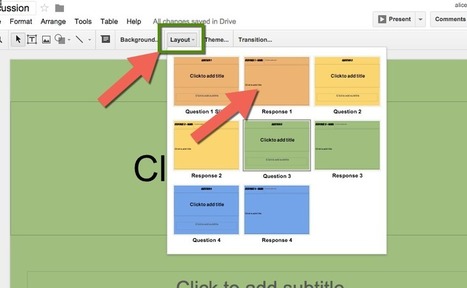
What can you not do with collaborative Google Slides? It is such a versatile tool, you can almost use it for everything. Google Slides are a great way to get started using tech and Google Classroom… Via Dr. Tom D'Amico (@TDOttawa) 
Tony Guzman's curator insight,
November 5, 2015 10:50 AM
Using Google Slides as an alternative approach to discussion threads in your courses. Anyone try this yet? 
FPPT's curator insight,
November 10, 2015 3:47 PM
Interesting of discussion templates in Google Slides. Another good (and FREE) resource for Google Slides Templates & Themes is http://freegoogleslidestemplates.com |