


|
Rescooped by
Juergen Wagner
from iGeneration - Humane Use of Technology in an AI world (Pedagogy & Digital Innovation)
February 6, 2016 11:54 AM
|


 Your new post is loading...
 Scoop.it!

The Evernote Web Clipper is a handy tool for teachers and students. I use it every day to bookmark websites. I also use it for creating annotated screenshots. Students can use it to clear distractions from web pages that they are reading. In the video embedded below I demonstrate how to do those three handy things with the Evernote Web Clipper. Via Gumersindo Fernández
Scoop.it!

On Sunday, Jan 31, Vance Stevens was invited to give a presentation for the ICT4ELT EVO session. As they were focusing on contrasting blog and wiki tools that week, the talk was about how Vance sets up and manages Learning2gether using the wiki here,
Scoop.it!

Clips is the simplest video editor in the world. Easily add music and dissolve transitions in this award-winning iPhone app. Also works great on iPad. Via Nik Peachey 
Marinhos's curator insight,
February 6, 2016 5:52 AM
Professor. Que tal criar cineastas para revelarem o mundo da escola e em volta dela? 
Rosemary Tyrrell, Ed.D.'s curator insight,
February 12, 2016 8:15 PM
Another great app for the iPhone. Also works on the iPad.
Scoop.it!

Using Internet & Instructional Technologies to Engage Students and Enhance Learning Outcomes. Includes Many Free Tools and Resources.
Scoop.it!

Annotation Studio - Annotate Shared Documents With Text, Video, and Images
Scoop.it!
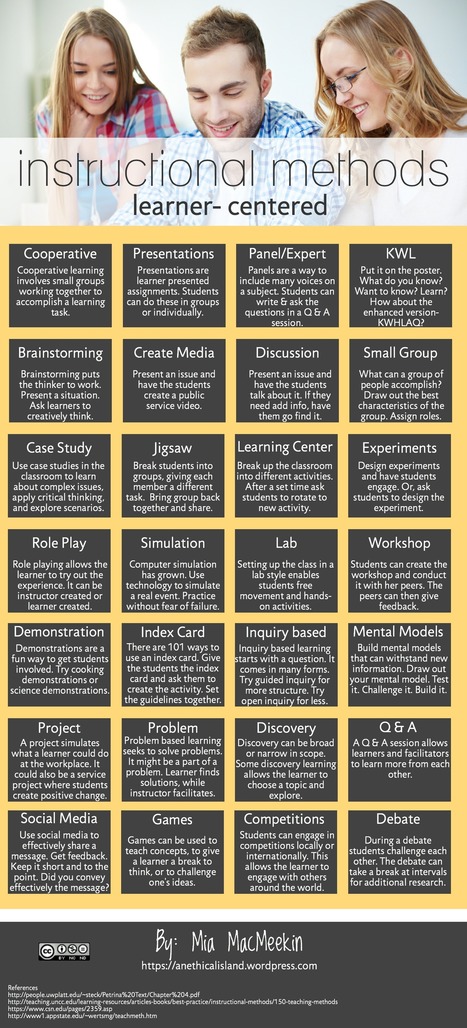
I'm a teacher. Now what do I do? There are several ways to engage learners in the classroom. Here are a few ideas if you get stuck. Additional resources: http://people.uwplatt.edu/~steck/Petrina%20Text/Chapter%204.pdf http://teaching.uncc.edu/learning-resources/articles-books/best-practice/instructional-methods/150-teaching-methods https://www.csn.edu/pages/2359.asp http://www1.appstate.edu/~wertsmg/teachmeth.htm ~Mia Via Ana Cristina Pratas, Norman René Trujillo Zapata 
María Dolores Díaz Noguera's curator insight,
January 26, 2016 4:26 PM
Como motivar a los estudiantes...Student Centered Instructional Methods (Infographic) | @scoopit via @AnaCristinaPrts http://sco.lt/... 
Mar Mbodj's curator insight,
January 29, 2016 4:09 PM
Déplacement de paradigme et les méthodes pédagogiques appropriées. 
Susanna Lavialle's curator insight,
March 25, 2016 5:14 PM
We often tend to carry on with our typical teaching methods, and sometimes believe that the trainer needs to stay in charge of the learning event. It can be useful to check out this list... stop and evaluate the different options out there that shift the weight from teacher to learner. Surely there is a part of the learning objective that could be covered better through a learner centered approach.
Scoop.it!
TEACHING)LANGUAGES)WITH)THE)INTERACTIVE) WHITEBOARD:)the)IWB)and)the)iTILT)project SHONA)WHYTE Université)Nice)Sophia)Antipolis University)of)Ottawa)))(MJJ)Ham… Via Shona Whyte
Scoop.it!

"Despite the ubiquity of IT and awareness of environmental issues, paper continues to be a huge part of office life ..." Via Leona Ungerer
Scoop.it!

This article reports on a school-based pro- ject that investigates the use of com- puter-assisted video communication in the primary English as a foreign langua- ge classroom. The project examines how an inter- active whiteboard can be used to engage langua- ge learners in collaborative projects in the target language (in this case English) with students from other countries. The Klösterleschule in Schwäbisch Gmünd and the French Ecole Boissier in Antibes have been involved in this project since the begin- ning of the school year 2012¬–13. Both schools see the project as an opportunity to pursue a number of educational aims, such as integrating the inter- active whiteboard into their curricula, preparing learners for authentic foreign language use and en- hancing learners’ motivation and autonomy. Video communication is also, of course, a valuable oppor- tunity for intercultural exchange. Via Shona Whyte |
Scoop.it!
Conférence / Table ronde de Bruno Devauchelle, Professeur associé à l’Université de Poitiers UFR Lettres Langues Via Brigitte Noirhomme 
Brigitte Noirhomme's curator insight,
February 6, 2016 10:44 AM
"Classes inversées" au pluriel, réflexions sur pourquoi ça apparraît aujourd'hui et sous quelles formes.
Scoop.it!

I’ve never been to a meeting with anyone where they said, “You know, I was wondering how I might put a little more work on my plate.” This holds for pretty much every profession out there, but as we all know, especially for the teaching community. Via Miloš Bajčetić, Laurent Picard
Scoop.it!

We've combed through thousands of resources to offer you our first official guide to flipped classrooms. It's a curated list just for you.
Scoop.it!

This digital text created by Jaswinder Singh based on Jason Cole & Helen Foster’s Using Moodle 2nd Edition is available for free to Moodlers who are using 2.7. The text is 350+ pages and …
Scoop.it!

We feel strongly that student work should always be completed on a platform that allows the student to archive their work or take it with them. So, we reviewed many of the most popular services cur...
Scoop.it!
Mit dem zunehmenden Einsatz unterschiedlicher Arten von Videos in Lehrveranstaltungen verbindet sich auch die Frage nach sinnvollen Konzepten zu deren Speicher… Via Klaus Meschede
Scoop.it!

by Russell Standard I am looking at the #EdTech tweet feed on my Twitter account as I write this article. The tweets are updating almost every second and most of them include words like transform, innovate and flip. Via Ana Cristina Pratas
Scoop.it!

Yesterday, I posted a video in which I demonstrated how to impose a time limit on a Google Form. In response to that post someone on Facebook asked me if there was a way for students to save their progress on a Google Form and come back to finish it later. Unfortunately, there is not an easy way to do that. My suggestion is to break-up long tests into multiple Google Forms. At the end of each Form include a link to the next Form in the series. For example, instead of giving one twenty question Form to students I might give them two Forms containing ten questions each. In the video embedded below I demonstrate how to do this. Via John Evans, Andrew 
Andrew 's curator insight,
February 1, 2016 12:35 PM
Great resource for those transitioning to Google Forms
Scoop.it!

In Moodle, a teacher has responsibility for the materials in their own course. They often also manage enrolments and are able to change the layout of the course page. This quick start guide introduces Moodle's features to those with the Teacher role. Via Miloš Bajčetić
Scoop.it!
Manager in a Moodle course free Moodle training for teachers webinar PowerPoint Presentation for Today's Webinar https://docs.google.com/presentation/d/1Gx56_l…;
Scoop.it!

‘Languagenut passes my high bar for excellent visual and audio input necessary for language acquisition. My students just think it is fun! Via Ana Cristina Pratas, Kelly Blair |







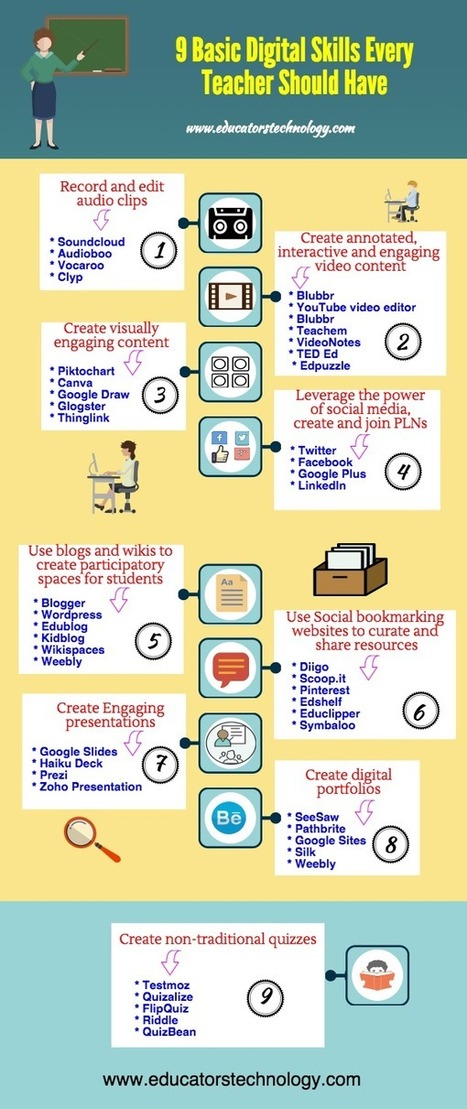
These and many other tools are available. But if you are a teacher, what do you think? Is it really necessary to have all these skills? There is so much content readily available online and if you can organise to prepare materials in teams, or have access to a PLN on or offline, then you can share the load.
Some teachers and content creators have specific skills and their expertise can be used or accessed by anyone. Personally, I think it's good for teachers to be aware of the digital possibilities for their teaching context, but it is generally unrealistic for anyone to expect all teachers to become skilled in so many different areas.
Is it not better to pick fewer areas more relevant to you and focus on them? Be a master of a few areas useful to you, not a jack of all trades feeling stressed that you are master of none.