Open Author helps you build Open Educational Resources, lesson plans, and courses (on your own, or with others) — and then publish them, to the benefit of educators and learners everywhere. Select one of our authoring formats to get started:
The information in the infographic is simply mind-boggling! It is clear that we are not running the internet, rather it is the other way round, the internet is running our lives!
Quizlet has added Diagrams! Diagrams are helpful for studying content that requires maps, charts, or images. You can find and study interactive diagrams on a variety of topics at Quizlet.com and in the Quizlet app. The best part about Diagrams is that you can create your own for free.
Photo created by Canva Inspired by Paul Raine's Tech Tips blog posts, I've decided to list the tech tools which are going to be introduced at EUROCALL 2017 mainly based on the abstract book, because my UK visa was denied three times for illogical reasons and I cannot attend the conference. Fortunately, I'll take part virtually via Virtually…
n the digital age, teacher discomfort in using some social media can have a direct effect on students’ digital literacy skills. Here are some solutions.
Take a look on Twitter or Facebook at any time and it’s clear that nowadays we express ourselves in a variety of media, from text to video. As a new participant in a Moodle course, you can introduce yourself in a forum with short description, a photo and -since Moodle 3.3 – some cool emojis. But wouldn’t it be even better if you can add a short video or sound file too? With a new plugin from the guys who brought us BigBlueButton – you now can!
Flash forward eight years and the classrooms look very different in my same school district. In the two years since my district began our 1:1 laptop initiative our classrooms have evolved once more. New technology, new standards, and new content. Throughout this process I have tried my best to stay on top of where education is headed and what are the emerging “next” practices. Now when I talk to teachers in my district and around the country, I try to focus on the key elements of innovative teaching. With technology, standards, and content continually changing…these “innovative commandments” give teachers a starting point regardless of their situation.
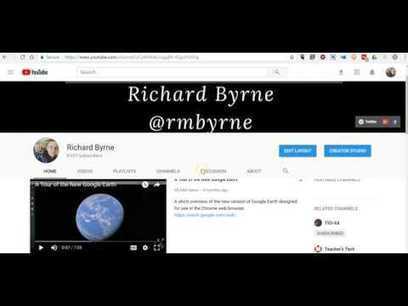
You might have noticed that YouTube made some layout changes. One of those changes included altering the sharing menu and moving the location of the embed codes for videos. Someone emailed me this morning asking for help on finding the location of the embed codes for YouTube videos. I made the following short screencast to explain where to find and how to use YouTube embed codes.
You simply cannot, as a teacher ignore the role of Social Media in the lives of students. Upcoming schools in India have started using Facebook to post surveys, home tasks, research topics and also to collaborate with others. In times of collaborative learning, learners from all over the world can work together on specific topics and Social Media sites like Facebook provide a platform for learning.
Es ist höchste Zeit für die digitale Revolution in den Schulen. Sie macht das Lernen leichter, sinnvoller und vor allem lustiger. Doch die Widerstände sind
As teachers we frequently promote ourselves in our modern role as facilitators rather than knowledge owners and yet when we get into the classroom so much of what we do tends to be telling rather than asking.
Crowdsourcing information is about doing the opposite. It’s about collecting information from the room and beyond and enabling our students to share what they already know and develop their knowledge together.
What platform should you use? Edmodo or Moodle? Russell Stannard has been working with platforms since 2001. In this video he talks about the difference
Playbuzz is an authoring platform that empowers brands, publishers and content creators worldwide to create engaging editorial and commercial content via multiple interactive formats.
This is an interesting tool for creating 'Buzzfeed' type media content. User can create quizzes and interactive stories with a range of embeded media types. Lots of ads on the site.
A tool for creating 'Buzzfeed' type media content. Users can create quizzes and interactive stories with a range of embedded media types. Lots of ads on the site, but fun to use regardless.
If at any point you have researched cloud hosted learning management systems, there’s a good chance you’ve come across both Moodle LMS, and Totara LMS. Moodle LMS is the world’s most popular learning management system, with over 85 million users across the globe. Totara LMS was built off... http://elearningfeeds.com/whats-the-difference-between-moodle-and-totara-lms-2/
Via Christopher Pappas
Moodle's improved course overview dashboard contains details about past, in progress and future courses, with radial progress indicator and upcoming deadlines. However, there is no way to alter the display options for the improved course dashboard.
Learning Works – New Zealand, along with Mathew May & Jeremy FitzPatrick contributed a new Moodle plugin – My Courses. The My Courses block provides an alternate dashboard for learners. It shows their enrolled courses and progress throughout the course if there is course completion enabled.
Moodle loves Open Educational Resources (OER) since Moodle likes an open world. You can share your Moodle courses and course activities like database presets, glossary entries, quiz questions etc. with other Moodle community members easily through Moodle’s OER portal – Moodle.net.
Moodle.net is the Moodle community platform which connects you with free courses and content shared by Moodle users all over the world. You will find various free open educational resources on Moodle.net.
Christopher Engelsma shared a free Moodle course on English Grammar & Syntax. The course is a foundational course and is focused for secondary level students.
To get content containing either thought or leadership enter:
To get content containing both thought and leadership enter:
To get content containing the expression thought leadership enter:
You can enter several keywords and you can refine them whenever you want. Our suggestion engine uses more signals but entering a few keywords here will rapidly give you great content to curate.


 Your new post is loading...














This looks like a great tool for building lessons and course from Open Educational Resources.