JavaScript for Line of Business Applications
606.6K views | +7 today
JavaScript for Line of Business Applications
Keeping track of current JavaScript Frameworks that help design your clientside Business Logic Layers.
Curated by Jan Hesse
Beam to my Inbox:
Your new post is loading...

Popular Tags - Filter using the Funnel

Scoop.it!

Happy 18th Birthday JavaScript! A look at an unlikely past and bright future.

Happy 18th Birthday JavaScript! A look at an unlikely past and bright future. | JavaScript for Line of Business Applications | Scoop.it

It was 18 years ago today that JavaScript was announced in a joint press release by Netscape and Sun. That week, Michael Jackson's "Earth Song" was in the charts, and in 17 days Ruby would launch its first version too.

Netscape and Sun aren't with us any longer, but JavaScript is most definitely still with us. As those titles suggest, its original corporate parents had absolutely no idea what they were doing or what JavaScript would become. But there's a lot to be said for being given the opportunity to succeed by being put straight into the browser back when a single company could make a decision like that.

* Timeline of an unlikely evolution

* JavaScript in Numbers

* What next for JS?

No comment yet.
Scoop.it!

jquery-mockjax

jquery-mockjax | JavaScript for Line of Business Applications | Scoop.it
jquery-mockjax - The jQuery Mockjax Plugin provides a simple and extremely flexible interface for mocking or simulating ajax requests and responses
No comment yet.
Scoop.it!

Why we use D3 and Ember for Data Visualization

Why we use D3 and Ember for Data Visualization | JavaScript for Line of Business Applications | Scoop.it

When visualizing data on the web, there are two things that we need to think of, the DATA and the DOM.

D3 is the go-to visualization library because it’s a flexible and data-driven approach to DOM manipulation; D3 does the complicated math so we can think more about data and visualization.

Ember is a MVC javascript framework for creating ambitious web applications. But, why should we use Ember with D3 for DATA and DOM manipulation? Ember gives you tools to easily manage things like async requests and the MVC architecture helps to manage complexity.

No comment yet.
Scoop.it!

Build a real-time polls application with Node.js, Express, AngularJS, and MongoDB

Build a real-time polls application with Node.js, Express, AngularJS, and MongoDB | JavaScript for Line of Business Applications | Scoop.it
Build a polling application that updates in real-time as votes roll in. The app I created has a simple architecture that uses JavaScript for everything. Node.js and Express power the back-end, and MongoDB stores the app's data.

I chose to use JazzHub to manage the source code for my project. Not only does it give me a full version control system for my code, but it also has an online IDE for editing my code in the cloud, and abundant agile features for project management. JazzHub also integrates easily with Eclipse, which has plug-ins to enable one-click deployment to platforms like BlueMix or Cloud Foundry.

No comment yet.
Scoop.it!

Knockout Projections – a plugin for efficient observable array transformations

knockout-projections is a new Knockout.js plugin that adds efficient “map” and “filter” features to observable arrays. This means you can:

* Write myObservableArray.map(someMappingFunction) to get a new, read-only array-valued observable containing the mapped version of each input item.

* Write myObservableArray.filter(someFilterFunction) to get a new, read-only array-valued observable containing a subset of the input items.

When the underlying myObservableArray changes, or whenever any observable accessed during the mapping/filtering changes, the output array will be recomputed efficiently, meaning that the map/filter callbacks will only be invoked for the affected items.

The point of all this: it can scale up to maintain live transforms of large arrays, with only a fixed cost (not O(N)) to propagate typical changes through the graph of dependencies.

No comment yet.
Scoop.it!

Real World HTML5 Mobile Apps

Real World HTML5 Mobile Apps | JavaScript for Line of Business Applications | Scoop.it

Mobile Apps built with HTML5 are great... when the mobile device you're targeting can support all of the features you need for delivering a top flight user experience. To help the rubber meet the road, you sometimes need libraries to access native OS capabilities like the camera and you could use an accelerated canvas to deliver powerful and responsive mobile apps!  Learn how the polyfill libraries and Intel’s accelerated canvas can do exactly what is needed!

No comment yet.
Scoop.it!

JavaScript Frameworks Panel: Which Is the Right Framework for Me?

JavaScript Frameworks Panel: Which Is the Right Framework for Me? | JavaScript for Line of Business Applications | Scoop.it
The panelists discuss JavaScript tooling: how to select them, benefits of compiling to JavaScript, differences between MVC solutions, using one framework for both client and server, etc..

With Robert Hanson, Brian Ford, Tim Branyen, Yehuda Katz, Avital Oliver, Lukas Ruebbelke.

No comment yet.
Scoop.it!

PhoneGap and AngularJs, Contacts

PhoneGap and AngularJs, Contacts | JavaScript for Line of Business Applications | Scoop.it

Welcome back to the PhoneGap and AngularJS series. In past articles we got your solution setup, dealt with the notification service, displayed some external web content, and next up we are going to search the contacts on your device.

The contacts API in phonegap is fairly extensive and has certain quirks depending on the device you are using so we are going to focus on a few simple actions which include finding, edit, and, creation.

PhoneGap and AngularJs, The Series:
1. The Start
2. Notification Service
3. In App Browser
4. Contacts

No comment yet.
Scoop.it!

Understanding JavaScript Object Creation Patterns

Understanding JavaScript Object Creation Patterns | JavaScript for Line of Business Applications | Scoop.it
This article explores the various ways you can create objects with the JavaScript language, and through this exploration finds that there is much to learn about the language!

* Introduction
* Plain old objects
* Constructor functions
* The inner workings of 'new'
* Exploring the prototype chain and instanceof
* When is a prototype not a prototype?
* The constructor property
* The confusing world of 'this'
* Private parts
* Using closures for private state
* Summary
* Conclusions

No comment yet.
Scoop.it!

Videogular | A video player for AngularJS

Videogular | A video player for AngularJS | JavaScript for Line of Business Applications | Scoop.it

* Videogular is developed with AngularJS and it will fit in your project like a charm.

* Videogular's directives are bindable, just try the demoand play with bindings.

* Thanks to our API you can develop your own plugins.

* Customize it with your own themes and change between them on the fly.

* Enjoy with native fullscreen support for Chrome, Firefox, Safari, iOS, Chrome for Android and Windows Phone.

* Videogular can detect mobile devices to show/hide components in case that aren't supported.

No comment yet.
Scoop.it!

Ember.js Components, Wrapping Content and Context

Ember.js Components, Wrapping Content and Context | JavaScript for Line of Business Applications | Scoop.it

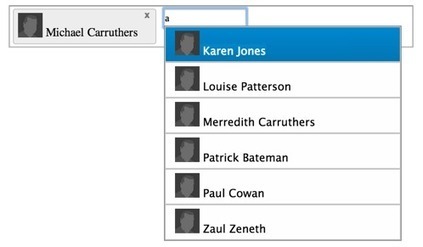
I have created this ember.js component that allows a user to hook up a data source that can be filtered via user input and then added to a destination...

You have most likely used something similar when you have been adding tags to some sort of entity.

The component is declared using the hyphonated convention like this...

No comment yet.
Scoop.it!

4 Ways to Pass Rails Data to AngularJS

4 Ways to Pass Rails Data to AngularJS | JavaScript for Line of Business Applications | Scoop.it

I’ve recently been working on a simple Ruby on Rails web app that uses AngularJS on the front end. Angular provides us with a number of nice client-side features (two-way data binding, form validations, easy to use UI widgets, etc.), but we chose to use Rails for routing the entire site. Therefore, the Angular app is embedded within a rendered Rails view. This choice raised a practical question: how do we expose the Rails data (instance variables, params, etc.) to the Angular app’s controller(s)?

I’ve seen many developers asking how to access Rails params and instance variables within their own Angular controller code (often to make calls to $resource and $http for their CRUD operations). The purpose of this blog post is to describe four approaches I found to solve this common question.

In these examples, I have a single Rails model: Item. Each item has a name, a cost, and an id value...

No comment yet.
Scoop.it!

Backbone.js Basics and Rendering Collection using View

Backbone.js Basics and Rendering Collection using View | JavaScript for Line of Business Applications | Scoop.it

In the current era of web application development, Single Page Applications (SPAs) are often demanded by customers. Currently there are lots of different frameworks available for developing web application, most of these are server side frameworks e.g. ASP.NET MVC. But one of the important aspects for Web development is to provide Rich user interface with UX (user experience). Thankfully there are several JavaScript client side frameworks available to get this thing done e.g. jQuery, Knockout, Backbone etc. Using these frameworks, a developer can develop Rich and better UX applications. 

No comment yet.
Scoop.it!

Practical Abstraction in Ember.js

Practical Abstraction in Ember.js | JavaScript for Line of Business Applications | Scoop.it

Ember provides a LOT of powerful abstractions. With all that power, it can be difficult to know what tools will best add meaningful functionality to your app while gaining leverage for the future. The Ember docs will walk you through the roles of templates, controllers, models, and all the other pieces you’d expect in a modern JavaScript app framework, but what they don’t cover are tactics for using some of the deeper concepts of Ember (and functional JavaScript programming) to help you write less, but better, code.

Here are a few tools we’re using on my current project, a non-trivial Ember.js application, to do just that.

* Ember.computed Macros
* Inheritance
* Injecting other Objects
* Mixins
* Computed Property Generators
* Mixin Generators
* Further Reading

No comment yet.
Scoop.it!

infect.js - Infectiously simple dependency injection for any project

infect.js - Infectiously simple dependency injection for any project | JavaScript for Line of Business Applications | Scoop.it

When working on a large codebase there are often services, utility methods, endpoints, etc that are shared across the whole application. When a reference to one of these is needed within a module, we will often alias the global namespace to a variable to easy referencing. Dependency injection makes this easier and more maintainable.

infect.js brings the magic of DI to any JavaScript application in the form of a tiny (sub 1kb min+gz) library that can be included in your code.

No comment yet.
Scoop.it!

Node JS Seamless Deploy

Node JS Seamless Deploy | JavaScript for Line of Business Applications | Scoop.it

Those coming in from the Ruby world are probably well familiar with Unicorn. You start a few workers, you update your code, send a USR2 signal to the master process and boom a new set of workers are running with the new code.

Node JS makes this a little more painful, but there is a very nice solution to it - Naught. https://github.com/superjoe30/naught

We have been using Naught in production for a while now, it gives us a very clean deploy with Zero down and happy users.

I've created a simple Template repository -https://github.com/AvnerCohen/node_template

It includes a stack of best-of-breed node.js modules of what we've found to be stable and performant on top of express for a production service node service.

No comment yet.
Scoop.it!

Two Simple JavaScript Dependency Injection Techniques

Recently I have been involved in a discussion about let's just say modern JavaScript techniques. In the discussion a point was made about how difficult it is to perform dependency injection, which I completely disagree. Not only is JavaScript dependency injection (DI) relatively easy, JavaScript's dynamic nature makes it extremely easy to stub and mock objects and their members.

To me the harder part is writing or finding a library that is a testable mock, this is one of the strengths Angular has over other libraries, shipping with testible mock objects, at least that is what I have read. My favorite to actually test dependencies is with sinonjs, a mocking and stubbing library. Sinon does not do anything with dependency injection, instead it leverages JavaScript's dynamic nature and replaces dependencies with mocks, stubs and spies.

I tend to design my libraries with natural DI capabilities, which can be very handy if you do want to replace an entire object dependency. It is actually a product of designing my libraries to depend on an implied interface (remember JavaScript has no real interface concept) so I can swap out libraries later.

There are effectively 2 places I can inject a mock library when I design a module. Let me show with my SPA library’s code.

No comment yet.
Scoop.it!

Roll your own Ember.js identity map

Roll your own Ember.js identity map | JavaScript for Line of Business Applications | Scoop.it

The first step of any debugging process is to understand where the bug lies. In order to do that we have to understand how highlighting a link as active works in Ember.js.

I wrote about this topic in detail in a guest post so let me just quickly summarize it here.

The artist links are rendered using the link-to helper. When active routes change (that includes the moment when the app is loaded from scratch) the isActive property for each link is recomputed. If it is found to be active, the activeClass is added to the view’s tag and that enables it to be displayed differently.

When is a link-to active? When its route name matches one of the current route names. This is pretty straightforward for static links but what about dynamic ones with context objects? In those cases, all the context objects have to match in order for the link to be considered active.

No comment yet.
Scoop.it!

Considering Speed and Slowness in AngularJS

Considering Speed and Slowness in AngularJS | JavaScript for Line of Business Applications | Scoop.it

Under the hood only a few line items are important from a speed point of view in the average AngularJS application:
* DOM manipulation.
* The digest cycle that creates DOM updates when data models change.
* Latency for REST requests to the backend.


Vanilla AngularJS is usually fast enough on a desktop: modern browsers are very efficient when it comes to DOM manipulation, and small HTTP requests are fast over today's internet. Running the digest to process and update simple partials, directives, filters, and other code associated with the current view is also usually fast enough. When one of more of these items stop being fast, then that is when you start to run into issues and the need to spend time on optimization.

No comment yet.
Scoop.it!

Does Meteor Scale?

Does Meteor Scale? | JavaScript for Line of Business Applications | Scoop.it

Most people considering Meteor for a production deployment are wondering if it can scale. Some say Meteor is a good framework for prototyping, but not for production. After you read this article, you’ll be able to decide for yourself.


Scaling Myth

With the emergence of cloud computing (and specifically Heroku), many have come under the impression that scaling means adding more instances of an application. That’s completely wrong.

Routing, sessions, job processing, static file serving, and database optimization are key concerns when it comes to scaling, among other things. Any Meteor app that intends to deploy into production needs to address–or at least consider–these issues. On top of that, Meteor has its own issues.

No comment yet.
Scoop.it!

Building Large, Maintainable, and Testable Knockout.js Applications

Building Large, Maintainable, and Testable Knockout.js Applications | JavaScript for Line of Business Applications | Scoop.it

* Using Knockout.js and Require.js Together
* Single- vs Multi-Page Apps
* Sample Application

* Pages

* ViewModels

* Inheritance and a BaseModel

* The “this” Problem

* “this” in Bindings and Unit Tests

* Conclusion


No comment yet.
Scoop.it!

Tale of Two -ends

This post is unlike many, where I’m trying to just spout off an opinion and convince you that I’m right and you… well, aren’t. Here, I’m just trying to explore something that is frustrating me with app architecture and UX.

I’m much more interested in what you have to say than what I have to say, so please speak up in the comments section below.

The web is full of back-end-driven single page apps, and plenty of front-end-driven single page apps, too. But what about in between? What about the hybrid-driven apps (see below)? Specifically, how do architecture and UX concerns intermix when you have rendering that occurs in both the server and the client?

This post is not a rant. It’s an invitation for useful and constructive feedback and exploration. Please don’t troll it. Please don’t just fawn over your favorite framework as if that’s a magic bullet. Let’s actually work throughthe UX and architecture pros/cons of these issues.
No comment yet.
Scoop.it!

Using Mongoose ODM to Connect to MongoDB In Your Node.js Application

Using Mongoose ODM to Connect to MongoDB In Your Node.js Application | JavaScript for Line of Business Applications | Scoop.it
Mongoose ODM simplifies the process of connecting to your MongoDB database in your Node.js application and working with the data.

If you are a JavaScript developer, using MongoDB as your backend database is a joy. If for no other reason, you get to think of and interact with data as JSON objects. This serves to solidify the case for Node.js: those of us who live and breathe JavaScript on the client side, can now extend our skill set to include server-side development using the language we love.

The quickest way to get up and running with MongoDB in your Node.js application is to leverage Mongoose ODM. The Mongoose website defines it as a : “…straightforward, schema-based solution to modeling your application data…”. That’s a little deep for me. Suffice it to say, it makes interacting with MongoDB incredibly simple.

In this article, our goal is extremely simple: connect to MongoDB, create a record and then show that record in a web page. While we will barely scratch the surface of what is possible, we will, at minimum, accomplish our modest goal. I’m sure that, as a programmer, you’ll get halfway through this code and realize how much more is possible. You can then take this very basic code, copy and paste it into your own application and then build a more robust solution.

No comment yet.
Scoop.it!

Unit testing with angularjs, grunt, karma, and travisci

Unit testing with angularjs, grunt, karma, and travisci | JavaScript for Line of Business Applications | Scoop.it

If you’ve done much reading about angularjs you’ve no doubt come across mention of karma, a test runner recommended especially for use with angularjs applications. The angular-seed project is a great way to get started with the basics of angular testing using karma, but for projects of any significant size you will soon hit the cieling in terms of organization complexity. What I want to share in this article is the approach I have taken using Grunt and the grunt-karma plugin to sustainably manage my projects’ client side unit tests and run them via TravisCI.

No comment yet.
Scoop.it!

Creating Desktop Applications With node-webkit

Creating Desktop Applications With node-webkit | JavaScript for Line of Business Applications | Scoop.it

Web applications are useful, but there are some cases where it’s not desirable or necessary to host an application on a remote server. As HTML5 provides low-level functionality to modern browsers, such as the ability to read and write files, it’s now possible to create offline, single-page, JavaScript applications using a web browser as a platform.

The node-webkit project, which was created at Intel and open sourced in 2011, is an attempt to take the pain out of offline single-page application development.

The project provides a WebKit browser that has been extended with the the ability to control user interface elements normally off-limits to web developers. The browser’s security configuration is relaxed, assuming that the application code you’re runnning is trusted. And, most interestingly, the browser integrates Node.js, allowing node-webkit applications to leverage a wide array of functionality other than what HTML5 APIs provide.


No comment yet.