


Backbone is in Drupal Core* Introduced mid October 2012* used in edit - inplace editing for fields* should lead to better dev experience

JavaScript for Line of Business Applications
606.6K views |
+10 today

Keeping track of current JavaScript Frameworks that help design your clientside Business Logic Layers.
Curated by
Jan Hesse
 Your new post is loading...
  Scoop.it! I've recently refactored out a couple of uses of jQuery's data method, and I'd like to explain why. In case you've not seen it before, data gives you access to a key/value store attached a single element. You use it with the same kind of get/set syntax found in other jQuery methods:... There are a few problems with this method, and I'd advise against using it. Unlike most other jQuery methods, if you call data on a list of elements, it affects only the first one. This makes reasoning about code that uses data hard: you must ask, "might this be a list? Which element is this affecting?"  Scoop.it! 
The purpose was not to create a physics engine from scratch., There are already a few good physics engine written for JavaScript by the community (This is one of the reason why I love JavaScript: there is always a .js project for what you want to do ^^). From the point of view of a web developer, physics engine can give you a lot of cool features among which we can get for instance: * Realistic simulation of basic shapes (Box, Sphere, compound, etc…) * Simulation of friction and bounciness * Link between objects (to simulate chains for instance)
Jan Hesse's insight:
using babylon.js & cannon.js
Scoop.it!

A few months ago we released client libraries for PHP, Ruby, Python, and Perl and today we add another to the family, JavaScript! This new client runs in Node.js and modern browsers, and aims to solve the same problems that the others do: * provide access to the entire Elasticsearch REST API
Scoop.it!

One of the most exciting developments in web technology of the past year is, in my opinion, the development of cross-browser javascript socket libraries and the addition of web sockets as part of the HTML5 standard. Although push communication has been available for a long time, it was hard to implement, used proprietary technologies and was hindered by performance and scalability problems. But libraries like socket.io and services like Pusher have changed this and have made implementing two-way communications on the web very simple. I feel that we are just at the beginning of a new generation of exciting web applications. For our cloud auction project, we want to use web sockets to send price, availability and product updates from the server to all active clients. It’s important that these updates are synchronized as much as possible, so that every user sees the same price at the same time. We want to avoid users hammering our servers by refreshing the page in their browser, pressing F5 every second. We are starting from our ASP.NET MVC cloud auction website, a standard website based on the MVC Internet Website template. I described several parts of it in other posts in this series.
Scoop.it!

It really surprises me that there are people arguing that writing controller tests doesn’t make sense. Probably the most common argument is that actions are covered in acceptence tests along with checking if views are properly rendered. Right? Right…well that’s just wrong! Are you trying to say that your slow acceptance tests are covering every possible controller action scenario? Are you trying to say that, for instance, every redirect that should take place is tested within an acceptance test? Are you also checking every invalid request in acceptance tests? Are you telling me that your acceptance test suite takes 27 hours and 13 minutes to finish because you fully test your controllers there?! Oh I’m sure that your acceptance test suite runs faster and you probably cover only ‘the happy scenarios’ there…which basically means you miss A LOT of test coverage.
Scoop.it!

So you know about React and how to build your own components. And you know you can run JavaScript inside PHP scripts, thanks to v8js. So nothing can stop you from rendering React components on the server side in PHP. Which means you send the first view from the server and then continue from there. Part 1 ended with todos. The first one was to couple the server-side generated code with the client-side React, so that any updates past the initial page load will be handled by React's client JS, which is where React shines. Let's see how you can do just that.
Jan Hesse's insight:
Scoop.it!

The brilliant Stoyan Stefanov, in promotion of his book, “JavaScript Patterns,” was kind enough to contribute an excerpt of the book for our readers, which details the essentials of writing high quality JavaScript, such as avoiding globals, using single var declarations, pre-caching length in loops, following coding conventions, and more.
This excerpt also includes some habits not necessarily related to the code itself, but more about the overall code creation process, including writing API documentation, conducting peer reviews, and running JSLint. These habits and best practices can help you write better, more understandable, and maintainable code—code to be proud of (and be able to figure out) when revisiting it months and years down the road.
Jan Hesse's insight:
concise summary
Scoop.it!

Matthew Beale explains how messages are passed between views, controllers and routes in Ember.js.
Scoop.it!
This entry continues exploring TypeScript by examining the code from one of the samples. Today, I’ll look at the TypeScript version of the MVC TODO sample. This sample is a TypeScript version of an MVC / JavaScript sample. The samples are now getting longer, and have more features in them. I’ve also posted some samples and explained some of the basic syntax. From here on out, I’m only going to extract small bits of the code, and explain the features that I haven’t yet explained. As always, the samples are online both as a working example and as code. This sample has a simple TODOD checked list. You can see it running here. You can add new tasks. and mark any of those tasks as complete.
Scoop.it!

... or Cross-Browser Add-ons for Fun or Profit Browser add-ons are clearly an important web browser feature, at least on the desktop platform, and for a long time Firefox was the browser add-on authors’ preferred target. When Google launched Chrome, this trend on the desktop browsers domain was pretty clear, so their browser provides an add-on api as well. Most of the Web DevTools we are used to are now directly integrated into our browser, but they were add-ons not so long time ago, and it’s not strange that new web developer tools are born as add-ons. Web DevTools (integrated or add-ons) can motivate web developers to change their browser, and then web developers can push web users to change theirs. So, long story short, it would be interesting and useful to create cross-browser add-ons, especially web devtools add-ons (e.g. to preserve theweb neutrality). With this goal in mind, I chose Ember Inspector as the target for my cross-browser devtool add-ons experiment, based on the following reasons: ...
Scoop.it!

This pro tip will guide you through the steps of implementing an end to end test using CasperJS. Although there's no code specific to Backbone in this tutorial, I do make assumptions on how an app will operate within the context of a Backbone app. This tutorial is therefore suitable for anyone who would like a 0 - 20 getting started guide to CasperJS. CasperJS has its own handy test runner. Let's begin by writing a quick little script to get used to the boilerplate.
Scoop.it!

HTML5 is great. jQuery is cool. Node.JS is awesome. Base them on the solid, powerful basement of pure JavaScript and you can rock the web! * JavaScript: from the Ground to Closures
|
Scoop.it!

Since AngularJS does not provide any built-in features for using inheritance, in this blog post I’ll describe how the general JavaScript inheritance patterns can be applied to AngularJS components. First, lets talk about controllers. Actually it is very unlikely to inherit from parent controller. This is the case because by implementation the scope in the child controller will inherit prototypically from the scope of its parent. So when you need to reuse functionality from the parent controller, all you need to do is add the required methods to the parent scope. By doing this the child controller will have access to all these methods through the prototype of its scope i.e.:...
Scoop.it!

Backbone.js is a lightweight framework that let us create single page applications in a structured manner. It is based on the Model-View-Controller (MVC) pattern. It is best suited for creating single page applications using a RESTful service for persisting the data. Marionette.js is a composite application library built on top of backbone.js and it allows us to build large scale javascript single page application. Backbone.js does not enforce the use of strict MVC pattern but backbone marionette enforces the use of strict MVC pattern. marionette also provides us View classes that we can create and extend simple view, collection views and composite views. It also gives us the possibility of creating Controller classes and eventing mechanism across the application.
Scoop.it!
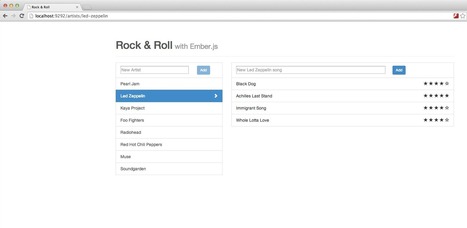
By default, Ember.js uses the hashchange event in the browser to change URLs. This is the most widely supported way but it feels like a hack and there is a better way, introduced in HTML5: the History API. Bear in mind that the History API has a lower browser support rate than the hashchange event does (~70% vs. 89%), so there is a tradeoff involved that you should decide to make or not to make. Ember.js makes it really easy to change the URL type. All you have to do is add the following lines to your client app: Seems too good to be true (that is just the way Ember is), but provided you did not assemble any routes manually and only used Ember’s tools to transition between routes (e.g link-to, transitionTo, etc.), that is all the client-side code changes you had to make. The server side needs to be adjusted, too, though, since the server now gets sent the client-side routes, too. How to do this can vary depending on the application server you use.
Scoop.it!

konacha - Test your Rails application's JavaScript with the mocha test framework and chai assertion library. It is similar to Jasmine and Evergreen, but does not attempt to be framework agnostic. By sticking with Rails, Konacha can take full advantage of features such as the asset pipeline and engines.
Scoop.it!

POOF.js is not a new language. It does not require compilation. It is a JavaScript framework providing advanced, powerful and highly efficient features known from other object-oriented languages like Java or C#, such as classes, interfaces, inheritance, accessibility specifiers, constants, static fields and many more. It enforces a clean syntax to help keeping the code maintainable even when large team works on it and provides runtime error checking for those who don't obey.
Jan Hesse's insight:
POOF.js is a step towards higher quality, faster, cleaner and more maintainable JavaScript object-oriented code.
Scoop.it!

AngularJS has always had a Scope.$watch() function as means to observe [and react to] changes in a given value. With AngularJS 1.1.4, however, they added the Scope.$watchCollection() function as a means to observe changes in a collection (either as an Array or an Object). Between the two current functions, there are three unique ways to watch a value for changes. And to be honest, it can get a bit confusing. As such, I wanted to take a quick look at these three different watch-configurations and nail down what kind of changes each one will track.
Scoop.it!
Scoop.it!
i2ui.js is independent JavaScript library that helps to represent your HTML content differently. You can emphasize more important elements and understate the less valuable ones.
Scoop.it!

Working with asynchronous code is one of the best features of JavaScript. With Ajax, it's very simple to request some JSON API, add a callback and update the UI with the result of that request very easily. Especially when using jQuery. However, writing an application that is testable, decoupled, and manageable, is a whole other beast. The typical approach to making Ajax requests in an application is to use jQuery's Ajax, pass a success callback and update the DOM with the response. That's great if you have some small application that doesn't need a lot of updates and manageability. What happens in an enterprise environment when someone writes that kind of shortcut Ajax code, makes a mess of the DOM in the success callback? You've just coupled your DOM directly to your request. What if the new boss comes in and says, "I HATE TEH JQUERY!"? Well, at that point you have to find the code in the success callback that messed with the DOM, rip it out, rewrite your Ajax logic, etc... It's a mess. A great way to solve this problem is through messaging. A great open-source JavaScript messaging library is postal. Take a look at how 3 objects having separate responsibilities can use postal and not know that each other exist, thereby decoupling the application, and making it testable as well!
Scoop.it!
If you are using Ember as your client-side web framework, I may just save you a lot of trouble. Ember is still being heavily developed, so I never expected it to work perfectly out of the box, but today's ordeal with setting up fixtures (using Ember Data) was impressively hair-pulling. I will be fair and preface that most of these issues arose from Ember Data itself and not Ember, but I don't consider that a valid excuse. These were the main points that fucked me today: * Not much documentation. * Data store adapters handle data differently. I'll walk you through a few of the pitfalls I faced: ...
Scoop.it!

Follow along in this two part series as we walk through the steps to test for bugs in AngularJS. First, we will write unit tests that reflect the intended behavior and then fix the bug so these tests pass. The goal is to improve code maintainability and reduce regression bugs.Download or clone the repo to follow along – each step has a corresponding branch to checkout. We are going to focus on the play/pause functionality of the player. By right-clicking on the video element, we can see that the video will play and pause. We will write tests for both the controller and the directive for this button in order to make sure our tests are small, consistent and maintainable.
Scoop.it!

Staring with Twitter Bootstrap and mod_pagespeed, how hard is it to get a perfect PageSpeed Insights score? Well…there is only one way to find out! Let’s begin by generating a PageSpeed score from the off the shelf Bootstrap example. This will act as a baseline for the rest of the test. So it seems Bootstrap scores much better in desktop then mobile, along with a DOMContentLoaded of 833ms. Not to shabby to start off with, so let’s see how we can improve.
|





