

EmberJS Designing Composable Components

JavaScript for Line of Business Applications
606.5K views |
+14 today

Keeping track of current JavaScript Frameworks that help design your clientside Business Logic Layers.
Curated by
Jan Hesse
 Your new post is loading...
  Scoop.it! For a recent project, I was discussing with @johnshew about the way JavaScript developers can embed private members into an object. My technique for this specific case is to use what I call “closure space”. As you can see, closure space properties can be a great way to create really private data. You may have to deal with a small increase in memory consumption but from my point of view this is fairly reasonable (And at that price you can have a great performance improvement over using the regular way).
Jan Hesse's insight:
 Scoop.it! Let’s have a look at my top 5 features that we can look forward to using next year. The ES6 spec is evolving even as I write this, so not everything I describe below may end up in the real world.
Scoop.it!

From
github

Machina.js is a JavaScript framework for highly customizable finite state machines (FSMs). Many of the ideas for machina have been loosely inspired by the Erlang/OTP FSM behaviors. Finite state machines offer a way to structure web client code in a very organized manner, and can make it much simpler to extend behavior for all or only key edge cases.
Scoop.it!

After reading Google's AngularJS guidelines, I felt they were a little too incomplete and also guided towards using the Closure library. From my experience with Angular and working in teams, here's my opinionated styleguide for syntax, building and structuring Angular applications.
Scoop.it!
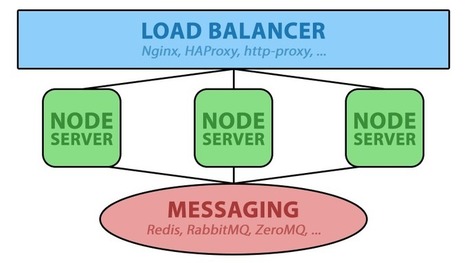
The Node.js cluster module is a common method of scaling servers, allowing for the use of all available CPU cores. However, what happens when you must scale to multiple servers or virtual machines? That is the problem we faced when scaling our newest HTML5 MMORPG. Rather than trying to cluster on a single machine, we wanted to get the benefit of a truly distributed system that can automatically failover and spread the load across multiple servers and even data-centers.
Scoop.it!

Yesterday I was stumped on how to effectively set up nested transition animations in AngularJS with ui-router. I didn't want to use javascript and muck up controllers, so I found a very simple and clean solution using LESS.
Scoop.it!

AngularJS implements dirty checking for two way data binding on $scope variables. Unlike dynamically setting up setters and getters, which is how Ember.js does two way data binding, dirty checking allows Angular to watch for variables that may or may not exist.
Scoop.it!
So you're working with a web service that doesn't play nice with Ember Data, that's okay! Using Ember Data 1.0.0-beta we will normalize ugly JSON feeds into something that Ember understands and loves.
Scoop.it!

Ember has a rich API and while initially the learning curve can be daunting, the payback is great. In general, the hardest part can be learning how the constituent parts work together, especially the whole convention over configuration paradigm as sometimes it seems all too magical! Thankfully the documentation and guides (emberjs.com/api) are very comprehensive and well written, so happy hacking!
Scoop.it!

This time I would like to show you how to implement a simple sorting and filtering of a collection on a Ember.jsapplication. I want to highlight that sorting and filtering collections are functionalities very easy to accomplish with Ember.js
Scoop.it!

TypeScript might not be as popular as CoffeeScript, but it seems to be catching on with a highly productive niche of developers that are building interesting open source projects. TypeScript is very much of the new school of Microsoft developers: it embraces Node, open standards, open source, while building on interesting influences from Microsoft Research and .NET. If you’re excited by technologies like C# 5.0’s asynchronous support and ReactiveUI, then TypeScript will help you to be more productive with JavaScript. There’s even Visual Studio support! If you’re from a JavaScript client-side or server-side background, however, then it might be harder to appreciate why TypeScript is interesting. The first thing to consider is that TypeScript adopts ideas from ECMAScript 6, while compiling down to ES3. This includes features like classes, modules, and a succinct lambda syntax:
Scoop.it!

This article provides the source code to enable you to easily configure a web page containing multiple SELECT controls used to filter a collection of records (usually displayed in a grid or table). In the example, we use a collection of ficticious residential addresses representing homes for rent. The page will allow the user to filter this list by state, city, zip code, # of bedrooms and residence type. The page relies on the data binding provided by Knockout.js library. This binding causes a change in a user's selection to be immediately reflected in the options available in the other controls. For example, if the user selects Philadelphia in the City control, then the Zip Code control will only display zips that are in Philadelphia, and so on.
|
Scoop.it!
Session from GIDS 2014, showing tips and tricks for using AngularJS for creating production-ready JavaScript applications

Maxime Rouiller's curator insight,
August 6, 2014 12:59 PM
Super interesting slide deck with lots of very good hints! Highly recommend!
Scoop.it!
Unit testing is all about isolation and dependency injection makes isolation a breeze. Seasoned Java developers have known this for years. The Spring framework, ubiquitous in Java backends today, introduced dependency injection (or at least popularized it) and brought a great number of benefits in terms of decoupling, modularity, flexibility and testability. Simply put, dependency injection lets you swap out real implementations for mock ones and it damn near forces you to decouple every component.
Scoop.it!

ES6 classes are syntactical sugar over the Objects and prototypes that we're used to working with. They simply offer a much nicer, cleaner and clearer syntax for creating these objects and dealing with inheritance. To show this in action we're going to build our own small (and very simplified) framework for building web applications to demonstrate using classes. We're going to have two classes, one to represent a view, and another to represent a model.
Scoop.it!

This is the first tutorial on creating an application with Sails JS and Angular JS. So let us get into the topic . There are two big thinks which we should notice . We have selected Sails as well as Angular, why? This will be briefed in coming tutorials :) .
Scoop.it!

I have to admit I was extremely skeptical when I first saw the concept of creating a view model in a browser. As much as I loved XAML’s data-binding it felt like a square peg and a round hole. What really concerned me the most was the extra work involved to take an ordinary JavaScript object (JSON) and turn it into a view model using things like ko.observable. This has been vastly improved and simplified, and as I began to adopt the strategy for the web I realized quickly it made sense.
Scoop.it!

This tutorial walks through BDD‘ing a feature with Ember CLI, Mocha and Chai. The feature I’ll build here in baby-steps will be Posting a New Initiative. In Participate, a user can post proposals for civic initiatives, to which other users can then suggest changes, and then vote on. In this first installment it’ll involve nothing but filling out a simple form with a title and a description, and submitting it. The next installment will add validation checking both fields are filled-in.
Scoop.it!

Preloading, or bootstrapping, data resources from the server via HTML is a common technique used in JavaScript web development. This technique allows the application to avoid making an extra HTTP request to get that initial data for rendering on the page. Unfortunately, there isn’t a mechanism built into AngularJS that allows for preloading resources into the initial HTML page. Yet, the following implementation can be utilized for such a purpose.
Scoop.it!

One of the most exciting new features coming in JavaScript ES6 is a new breed of function, called a generator. The name is a little strange, but the behavior may seem a lot stranger at first glance. This article aims to explain the basics of how they work, and build you up to understanding why they are so powerful for the future of JS.
Scoop.it!

We want to get tasks from a project hosted on Microsoft Project Online. We have a lot of Javascript code written for Node for handling that data once we get it. We have .NET dlls that provide an API for working with Microsoft Project Online. So how can we tie the two together? How can our Node application communicate with a .NET library? Well we could create a web service interface to act as a facade for communicating with the library and consume that in our Node application. That’s a decent option and one we considered. Instead we decided to take a look at Edge.js.
Scoop.it!

his article aims to introduce Ember.js to newcomers who want to learn about this framework. First, we will clarify the main concepts of the framework. Next, we’ll go in depth with a step-by-step tutorial that teaches you how to build a simple Web app with Ember.js and Ember-Data, which is Ember’s data storage layer. Then, we will see how views and components help with handling user interactions. Finally, we will dig a little more into Ember-Data and template precompiling.
Scoop.it!
A person logs in with their credentials, and sees their stuff. Should be straight forward. That said, it took me some experimentation to find an elegant solution. I’ll document it here, since I didn’t find my approach detailed anywhere else. I won’t discuss authentication — that’s been covered in a number of posts. I want to cover what happens next. Just to add a little flair, I’ll make this a self-referencial model where users connect to each other.
Scoop.it!

Components allow you to build HTML+JS snippets that can be reused just like old server side controls of yester-years or like Directives in AngularJS. They actually mimic an upcoming web standard called Web Components.
Jan Hesse's insight:
|




