JavaScript for Line of Business Applications
606.5K views | +14 today
JavaScript for Line of Business Applications
Keeping track of current JavaScript Frameworks that help design your clientside Business Logic Layers.
Curated by Jan Hesse
Beam to my Inbox:
Your new post is loading...

Popular Tags - Filter using the Funnel

Scoop.it!

Video: Evolving your JavaScript with Backbone.js

Video: Evolving your JavaScript with Backbone.js | JavaScript for Line of Business Applications | Scoop.it

This presentation looks at several ways to integrate Backbone.js into your WordPress themes and plugins, including a step-by-step demonstration of how Backbone improves the quality of your existing jQuery code. It also walks through other exciting ways to use Backbone alongside WordPress, including how to make a standalone Backbone application that only uses WordPress for its data.


No comment yet.
Scoop.it!

Testable JavaScript

Testable JavaScript | JavaScript for Line of Business Applications | Scoop.it
Mark Ethan Trostler conducts a tutorial on getting started with JavaScript testing.
No comment yet.
Scoop.it!

Meteor for Front-End Engineers

Meteor for Front-End Engineers | JavaScript for Line of Business Applications | Scoop.it

As part of my daily web browsing routine, I follow a number of front-end blogs. I'm always amazed at how far good front-end engineers can push JavaScript and CSS, and how well they are able to master the intricacies of web browsers.

Yet I also can't help but notice that a lot of front-end developers seem to limit themselves to, well, the front-end.

On one hand this makes sense. With new JavaScript frameworks and browser versions popping up every day, client-side development already offers more than enough to keep you occupied for a lifetime.

Yet the fact remains that it's often hard to build functional web apps without involving a back-end environment at some point, if only to communicate with a database.

Up to now, adding a back-end to your app meant learning a back-end language such as Ruby, Python, or PHP. And that new environment came with its own set of patterns and quirks that had to be learnt from scratch.

But things are changing. Node.js introduced JavaScript on the server, and for the first time developers could code their whole app in a single language.

Meanwhile, backend-as-a-service offerings like Parse and Firebase now make it possible to add persistent data to an app with little more than a few lines of JavaScript.

But to day I'd like to talk about yet a third approach: Meteor, an up-and-coming JavaScript framework that bridges the gap between client and server.

No comment yet.
Scoop.it!

An Ember.js beginners tutorial

An Ember.js beginners tutorial | JavaScript for Line of Business Applications | Scoop.it

There are a lot of TODO tutorials out in the wild, and I'm certainly not going to write up another one. What we're going to build today is something altogether more exciting, something never before seen in the world of introductory tutorials. Wait for it... today we are going to build a DICE ROLLER.

Hopefully our Dice Roller is going to show a couple of the interesting Ember features in an application which does not require a server backend.

The first thing that needs to be done is to build an HTML file to serve the application. For starters, this is just a matter of building a basic HTML document with the jQuery, Emberand handlebars scripts included. Handlebars is a templating language which lets you write out data bound templates that are rendered into the browser.

Ember uses a lot of convention over configuration. This basically means that when it goes to a URL, it expects a number of objects to exist with very specific names. If it doesn't find these objects, it can often create default ones.

In this case when we load our application, Ember looks for a handlebars template calledapplication. This template is loaded for every url or request and wraps up and displays the entire application. For now, this template can be quite simple, but when you build a more complex application it can include things like menus, headers and footers.


No comment yet.
Scoop.it!

Remotely databind a Collection with Spike & Knockout.js

Remotely databind a Collection with Spike & Knockout.js | JavaScript for Line of Business Applications | Scoop.it

This article presents a custom control that allows to easily create a data-bound an HTML Table to a remote, server-side ObservableCollection:

* An ObservableCollection is used on the server in order to notify remote clients of updates.
* It uses knockout.js library for client-side databinding.
* It uses websockets internally, but abstracted by Spike-Engine, will fallback to flash sockets for older browsers.
* It is cross-platform and with a minimized packet payload and message compression.
* The application server is a self-hosted executable and the client is just a plain HTML file.

Few weeks before writing this article I had an interesting idea, I wanted to abstract client-server networking and create a nice API that would maintain an HTML Table automatically populated by being data-bound remotely on an ObservableCollection. Essentially, allowing data-bound views be updated in real-time whenever a change occurs and a new item is added or removed from the collection. This would allow people to build seamlessly and easily very dynamic and great looking websites, providing users with a great user experience.

No comment yet.
Scoop.it!

Maintaining and Organizing UI Dependencies with Knockout.JS: Part 2

Maintaining and Organizing UI Dependencies with Knockout.JS: Part 2 | JavaScript for Line of Business Applications | Scoop.it

If you are experienced with JavaScript, you know about the ongoing war between scope, context and dealing with the this keyword. Previously, we used this on propertiesthis.studentsName = ko.observable('') to refer to the ViewModel object itself. That was all well and good because we didn’t have to worry about tracking what this meant in a nested function within studentsName.

The problem arises when our ViewModel starts becoming more complex. Say, for example, our computed observable function this.challengeCompletedCount uses a nested internal function. Internal functions create a new, separate context with a new this variable. The newthis variable is completely different from the one outside of our internal function.

So far, our little app has been easy to maintain with only one ViewModel and a couple of models, but projects inevitably get larger and more complex. Code becomes quickly cumbersome and hard to maintain, not to mention prone to global variable conflictons. To truly leverage the perks of using an MVVM (model-view-viewmodel) or MVC pattern, you must separate your code into logical modules and decouple the layers. It may take some additional time at the onset of a project, but it will save you and your team headaches (and quite possibly an Anchorman-style street brawl) in the future. So unless tridents and hand grenades are your thing, I suggest using RequireJS to modularize your code.

No comment yet.
Scoop.it!

OJ - A JavaScript library to build websites with objects.

OJ - A JavaScript library to build websites with objects. | JavaScript for Line of Business Applications | Scoop.it

OJ is a JavaScript library with the goal to make objects that create and live edit the web.

When making a website you have to keep in mind HTML, CSS, and JavaScript code. In OJ, all three parts are unified into objects. OJ can render to HTML and CSS as well as bind JavaScript events.

The benefit is that OJ objects have no dependencies. There is no need to read the docs to be sure the HTML is correct, or see if the CSS is included. Everything just works.

* Abstracts the web into view objects that create and change websites
* Unifies templating of HTML, CSS and JS
* A library written entirely in JavaScript
* Backbone support built-in with two-way model and collection binding
* Includes the simple smart objects: List, Table, Button, and form elements
* A growing collection of plugins: VimeoVideo, AceEditor, and more!
* DOM manipulation client-side
* HTML and CSS creation server-side
* Node server-side support (in progress)


Tyler Richendollar's curator insight, September 17, 2013 9:31 AM

Looks pretty neat.

Scoop.it!

Five Helpful Tips When Using RequireJS

Five Helpful Tips When Using RequireJS | JavaScript for Line of Business Applications | Scoop.it

RequireJS – a "JavaScript file and module loader" – is a powerful way to organize, manage, build and load JavaScript in your web application. I've been using RequireJS for a couple of years, and while it's admittedly difficult to limit myself to only five, these five tips are things I really wished I'd known sooner rather than later. Heads up – I'm assuming you havesome knowledge of RequireJS, or at least are aware of what AMD, CommonJS and script loaders are. TheRequireJS site is a great resource to get familiar with both the "why" as well as the API.

In this post, we're going to focus on using RequireJS itself, and not r.js (the optimizer). (I plan to write a follow up post on using r.js.)

* Know Your Options When Defining Modules
* How to Work with Non-AMD Libs
* CDN Fallbacks
* Plugins!
* Some Tricks for Troubleshooting

No comment yet.
Scoop.it!

Concurrently Testing JavaScript

Concurrently Testing JavaScript | JavaScript for Line of Business Applications | Scoop.it

You’ve heard of nCrunch, right?  It’s a continuous integration plugin for Visual Studio that tracks changes to your code and then automatically builds and runs your unit tests in the background whilst you type.  Once the results are back it decorates every line of code with a red or green light to indicate whether the tests are passing or failing.

Where are you going with this?
Good question. nCrunch is fantastic…for .NET development. I do a fair bit of work in .NET but more and more I find myself working in JavaScript and desperately missing the constant feedback.

So how can we get something similar for our JavaScript tests? By using grunt of course!

GruntJS (which I’ve been playing around with recently) can be setup to run QUnit tests using the headless PhantomJS browser and to feedback the results.  In fact, this is all nicely packaged up in the grunt-contrib-qunit package for you, so it’s pretty simple to set up.

No comment yet.
Scoop.it!

D3 on AngularJS

D3 on AngularJS | JavaScript for Line of Business Applications | Scoop.it

D3, the javascript library for manipulating document-based data is insanely expressive and helps bring data to life through HTML, SVG, and CSS. It has a large, growing community and there are tons of examples for what can be done with it.

Combining the power of D3 and Angular can be challenging and confusing. We constantly get asked how to integrate the two in our classes. In this post, we aim to clear the confusion and bring you the best documentation on how to integrate AngularJS and D3.

The Angular way of integrating D3 into AngularJS is by using a directive. If you’re not familiar with directives, they are Angular’s way of extending the functionality of HTML. They are, at their core functions that are executed on a DOM element that give the element functionality. All tags in AngularJS are directives. For more information, see our post about how to Build custom directives with AngularJS.

* Using d3 with dependency injection
* Creating our first basic d3 directive
* Data binding to the svg
* Handling click events
* Dynamic data over XHR
* Extending your own d3 directives


No comment yet.
Scoop.it!

Introduction to the MEAN Stack, Part Two: Building and Testing a To-do List

Introduction to the MEAN Stack, Part Two: Building and Testing a To-do List | JavaScript for Line of Business Applications | Scoop.it

This time we’re going to take that shiny new MEAN Stack and put it to good use by building a very simple to-do list. We’ll also set up a basic automated testing suite. This process will take 12 steps and you can follow along here. I will link to the diff on github for each step below as well. The mean-stack-todo repo started off as a direct duplicate of the mean-stack-skeleton repo from last week.

Over the course of this tutorial, you’ll see some of the key features and concepts that make the MEAN stack such a powerful development tool. Here are a few highlights to keep in mind:


* The MEAN stack comes with a very powerful suite of testing tools. Javascript’s flexibility makes writing tests extremely easy, Jasmine syntax makes your tests into aset of stories that help lower the barrier to understanding your code base, and tools like Karma and Nodeunit enable you to have unit test coverage of your entire stack. Even if you decide to not write unit tests for your application, AngularJS’s end-to-end test runner enables you to fully automate your integration testing.

* You can include dynamic Javascript directly into your templates. The first rule of writing AngularJS code is that your Javascript should never reference the DOM. In the AngularJS world, $(‘input#inputName’).val(‘vkarpov’) is (almost) always the wrong thing to do. Your Jade templates should be the definitive guide to all of your app’s UI/UX decisions, while your client Javascript should simply maintain the state of your data.

* You use the same language all the way through. MongoDB stores your objects in a format that is very similar to JSON and the database shell uses Javascript-like syntax. NodeJS queries MongoDB using JSON queries, then passes the resulting objects to AngularJS as JSON objects. What does all this mean? All Javascript, all day. This streamlines the code itself and makes coordinating development across your team way easier.

No comment yet.
Scoop.it!

Minimizing initialization time in AngularJS

Minimizing initialization time in AngularJS | JavaScript for Line of Business Applications | Scoop.it

One of the most common complaints against client-side JavaScript frameworks is the slow initial load time. There’s definitely some truth in this, but probably not for the reason you’d expect.

Rendering the view with JavaScript is usually quite fast, it’s the extra HTTP requests which tend to slow things down.

* Preloading HTML templates
* Preloading non-HTML resources
* Why not preload everything?


No comment yet.
Scoop.it!

Is Angular.js or Ember.js the better choice for Javascript frameworks?

Is Angular.js or Ember.js the better choice for Javascript frameworks? | JavaScript for Line of Business Applications | Scoop.it

Tom Dale's answer: As one of the authors of Ember.js, I frequently get asked: "Should I use Angular or Ember?"
I think the answer to that question has a lot more to do with what kind of application are you building?


While there are a few superficial similarities—they both use bindings and are more helpful for writing web applications than, for example, Backbone.js—they quickly depart from one another in how they expect you to approach building apps.

We want developers to be able to build ambitious web apps that are competitive with those native apps. To do that, they need both sophisticated tools and the right vocabulary of concepts to help them communicate and collaborate.

With Ember.js, we've spent a lot of time borrowing liberally from concepts introduced by native application frameworks like Cocoa. When we felt those concepts were more hindrance than help—or didn't fit within the unique constraints of the web—we turned to other popular open source projects like Ruby on Rails and Backbone.js for inspiration.

Ember.js, therefore, is a synthesis of the powerful tools of our native forebears with the lightweight sensibilities of the modern web. 

No comment yet.
Scoop.it!

Rolling your own Meteor js environment

Rolling your own Meteor js environment | JavaScript for Line of Business Applications | Scoop.it
Use Meteor's hosted solution


You can use “meteor deploy myapp.meteor.com” in your project root directory to spin up your app in a development environment that’s maintained by the awesome folks at Meteor. It’s a simple process. The problem is that it is explicitly stated that this is not for Production apps and you don’t get multiple hosts. So pretty quickly, you’ll need to find a new solution once you go live.

Note: Meteor’s hosting platform Galaxy is coming to beta in the coming months. It’ll likely stay in beta for a while with a disclaimer that it’s not for Production apps. When it’s ready, it’s going to be glorious, but until then, you’ll have to find an alternative solution.


Use a node.js platform hosted solution


Use “demeteorizer” to bundle up your application as a standalone node app and deploy it to one of the several Node hosting platforms like Heroku, Nodejitsu, or Modulus. This will certainly work if you only need one server (dyno, servo, or whatever each person calls it). But once you need to scale beyond that, you’ll bump up against the fact that none of them offer sticky sessions in a way that your Meteor app needs.

Don’t let their marketing fool you. Some claim to offer sticky sessions. They are lying and when you run into problems and in the face of proof (an ip log showing the same visitor hitting multiple servers), they’ll shrug their shoulders and say, “we don’t know Meteor”.


Roll your own solution on the cloud platform of your choice


If none of this sounds attractive to you, then you do have another option. It’s the place we ended up at: we just rolled our own stack. And it was easier than you might think.

No comment yet.
Scoop.it!

Surviving Big JavaScript Projects

Surviving Big JavaScript Projects | JavaScript for Line of Business Applications | Scoop.it
Anton Kovalyov provides an inside look into a large JavaScript project, presenting techniques for maintaining code quality while allowing the team to push lots of changes every day.
No comment yet.
Scoop.it!

Client Sync for the REST of Us

Client Sync for the REST of Us | JavaScript for Line of Business Applications | Scoop.it

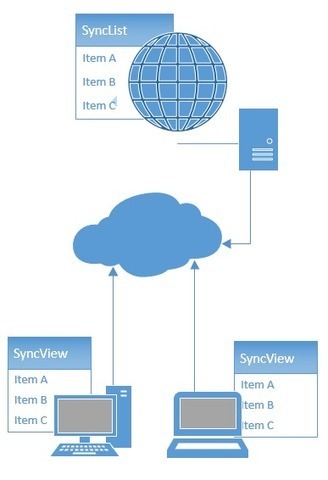
It is no surprise that streaming technologies such as meteor have taken the spotlight over the last year. They present a compelling real-time way of keeping the client in sync with the server. One interesting result of thinking in real-time is that things like conflicts become top of mind: what is supposed to happen when two separate users modify the same data at the same time?

When dealing with traditional websites and basic REST API's, however, less thought is given to these concurrency scenarios. Real-time aside, in an age where client-heavy applications are becoming commonplace, this behavior can be problematic. In this post, I explore this inadequacy and also explore a possible solution.

No comment yet.
Scoop.it!

Developing with AngularJS - Part IV: Making it Pop

Developing with AngularJS - Part IV: Making it Pop | JavaScript for Line of Business Applications | Scoop.it

The last mile of development for the My Dashboard feature was to spice things up a bit and make it look better. We hired a design company to come up a new look and feel and they went to work. Within a week, we had a meeting with them and they presented a few different options. We picked the one we liked the best and went to work. Below are screenshots that I used to implement the new design.

The last feature I had to implement was the "Show More" bar that appears when widgets are hidden. This was the most difficult thing to implement and I tried many different things before arriving at a solution that works. First of all, the widgets bars that can be expanded are put into their original (collapsed) state using max-heightand overflow: hidden. From there, I look at the list inside the bar and compare the height's of the two elements. If the list is taller than the bar, the Show More bar is added.

Jan Hesse's insight:

Part I - The Basics: 

http://raibledesigns.com/rd/entry/developing_with_angularjs_part_i

Part II - Dialogs and Data:

http://raibledesigns.com/rd/entry/developing_with_angularjs_part_ii

Part III - Services: 

http://raibledesigns.com/rd/entry/developing_with_angularjs_part_iii

No comment yet.
Scoop.it!

Ask Not What JavaScript Can Do For You

Exploring how hard it is to write well structured and error safe code in vanilla JavaScript.

No comment yet.
Scoop.it!

Maintaining and Organizing UI Dependencies with Knockout.JS: Part 1

Maintaining and Organizing UI Dependencies with Knockout.JS: Part 1 | JavaScript for Line of Business Applications | Scoop.it

We all know that the larger a project gets, the harder it is to maintain and organize UI dependencies. “What if the user does this, or this? That needs to change that and that.” This can be tough to deal with, especially when a different developer comes onto the project and doesn’t quite understand how you manually set up these dependencies.

Among the plethora of different Javascript libraries that help UI developers create responsive UIs, Knockout.JS has been a pleasure to work with. It knows what it needs to do to help you but also when to get out of the developer’s way.

Knockout aims to help with this by providing the developer with a way to “make elegant dependency tracking, declarative bindings, and be trivially extensible.” Knockout uses the MVVM (model-view-viewmodel) pattern, so if you’re familiar with any other MV* pattern, it should be easy to pick up on. The pattern allows developers to keep the logic in the Javascript and the HTML5 view is left solely to render the logic. What I’ve enjoyed the most about using Knockout.JS is that it makes the web page reactive to the user, like a native desktop app, easily.

No comment yet.
Scoop.it!

Using AngularJS and D3 to Create a WordCloud Directive

Using AngularJS and D3 to Create a WordCloud Directive | JavaScript for Line of Business Applications | Scoop.it

One of AngularJS’ most sophisticated and unique features is directives. Directives allow you to extend the vocabulary of HTML, such that complex DOM structures and corresponding behavior can be hidden behind a new HTML tag, attribute or a CSS class.
Here, I want to present a simple yet powerful project aiming at creating an AngularJS directive to enable an easier usage of D3 for people without deep knowledge of JavaScript. This project is based on a module that provides D3 as an AngularJS service. This service can be injected via the AngularJSinjector. It enables you to inject the D3 service e.g. into a directive and use D3 in an isolated scope instead of a global variable. As an example I used a basic implementation of the world cloud visualisation by Jason Davies to demonstrate the power of D3 in AngularJS directives.

No comment yet.
Scoop.it!

Working With IndexedDB

Working With IndexedDB | JavaScript for Line of Business Applications | Scoop.it

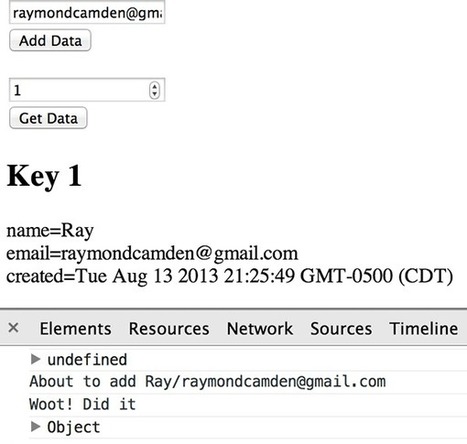
One of the more interesting developments in web standards lately is the Indexed Database (IndexedDB for short) specification. For a fun time you can read the spec yourself. In this tutorial I’ll be explaining this feature and hopefully giving you some inspiration to use this powerful feature yourself.

In a nutshell, IndexedDB provides a way for you to store large amounts of data on your user’s browser. Any application that needs to send a lot of data over the wire could greatly benefit from being able to store that data on the client instead. Of course storage is only part of the equation. IndexedDB also provides a powerful indexed based searching API to retrieve the data you need.

We’ve covered the specification and support, now let’s look at using the feature. The very first thing we should do is check for IndexedDB support. While there are tools out there that provide generic ways to check for browser features, we can make this much simpler since we’re just checking for one particular thing.

No comment yet.
Scoop.it!

Tutorial - Getting Started With Node.js, Express, MongoDB

Tutorial - Getting Started With Node.js, Express, MongoDB | JavaScript for Line of Business Applications | Scoop.it
HE DEAD-SIMPLE STEP-BY-STEP GUIDE FOR FRONT-END DEVELOPERS TO GETTING UP AND RUNNING WITH NODE.JS, EXPRESS, JADE, AND MONGODBSET UP THE FULL STACK AND HAVE A WEBPAGE RUNNING IN 30 MINUTES. MAKE IT TALK TO YOUR DB IN ANOTHER 30.

In my experience, the "next level" tutorials out there seem about 30 levels further along. We go from "Hello, World!" to building out an entire blogging system with comments. Which is also great, but a lot of times those tutorials assume the reader has done a whole bunch of intermediate fiddling, and they often drop a bunch of big functions on you all at once. I tend to learn best by making lots of smaller, intermediate steps, and I don't think I'm the only one.

Well, good news, everyone! I've done the fiddling and read a bunch of tutorials and shouted at my command prompt until things finally worked. I have a web project up and running which uses Node.JS, the Express framework, the Jade HTML pre-processor, and MongoDB for data. I can read to and write from the DB. From there, the sky's the limit.

Here's the deal: I'm going to show you how to get all of this stuff set up. I'll be assuming that you're a front-end developer who knows HTML5/CSS3/JavaScript well enough that I don't have to explain those. If that's you, then this should be a solid primer.


No comment yet.
Scoop.it!

X-Tag - Web Components Custom Element Polylib

X-Tag - Web Components Custom Element Polylib | JavaScript for Line of Business Applications | Scoop.it
X-Tag is a small JavaScript library, created and supported by Mozilla, that brings Web Components Custom Element capabilities to all modern browsers.

Web components is an emerging group of specifications under the banner of the W3 that provide developers with a serious, browser-integrated mechanism for creating reusable components for the web platform. X-Tag is focused on making a foundational piece of the Web Component spec, Custom Elements, available to all recent browsers.

X-Tag was developed at Mozilla by Daniel Buchner and Arron Schaar, working directly to help shape and advance the W3 specs in partnership with various key individuals at Google (most notibly, Dimitri Glazkov and Alex Komoroske).

No comment yet.
Scoop.it!

How to Easily Validate Any Form Ever Using AngularJS

How to Easily Validate Any Form Ever Using AngularJS | JavaScript for Line of Business Applications | Scoop.it

If you’ve ever tried to build any kind of website, odds are you’ve had to create some way of validating and saving input from a form.  Back in the bad old days this used to be a huge pain, because there were no good frameworks to help get the job done right.  The three primary pain points that you have to deal with when trying to validate a form without the aid of a framework are:

* Pain Point #1. How to avoid writing a wall of if-statements for validating each data item
* Pain Point #2. How to handle adding and deleting data items as your code base evolves, i.e. how to avoid having to make changes in several different locations when you want to add/remove a data item
* Pain Point #3. How to display validation errors to your client
Thankfully there are now multiple frameworks available to help make the entire form process easier. But how do you decide which one to use for your shiny new web application? I’d personally recommend using the MEAN stack, because it addresses all three of the Pain Points listed above better than any framework I’ve ever worked with. You shouldn’t just take my word for it though, so we’ll start by walking through each Pain Point and why other solutions fall short in dealing with them. Then we’ll wrap up with a walkthrough of how to build some very reusable MEAN stack middleware and get you on your way toward implementing it.

No comment yet.
Scoop.it!

AngularJS Performance Tuning for Long Lists

AngularJS Performance Tuning for Long Lists | JavaScript for Line of Business Applications | Scoop.it

AnglarJS is great! But when dealing with large lists containing complex data structure, things can get very slow! We ran into that problem when migrating our core admin screens to AngularJS. The screens were supposed to work smoothly when displaying some 500 rows. But the first approach took up to 7 seconds to rende. Terrible!

We discovered two main performance issues for our implementation. One is related to the ng-repeat directive, the other was related to the filtering.

The following article summarizes our experiences with different approaches to solve or mitigate the performance problem. It will give you ideas and hints, what you can try out yourself and what is maybe not be worth a try.

Why is ng-repeat in AngularJS slow with large lists?

The ng-repeat directive of AngularJS is getting slow above 2500 two-way data bindings. You can read more about this in a post by Misko Hevery (See further reading no 2). This is due to AngularJS watching for changes by “dirty checking”. Every watch consumes time, so large lists with complex data structure will slow down your application.

No comment yet.