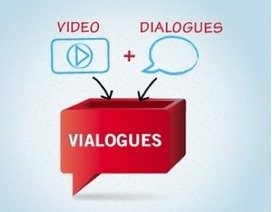
Nik Peachy describes, and then illustrates in a video, how to create a "vialogue": a video with questions and polls inserted to make a video more of a two-way exchange between its creator and its viewer(s). This seems like a pretty nifty tool to liven up the videos in flipped classroom settings.
It seems to me that in order to really foster a dialogue between creator and viewer (or among viewers), all questions should not be just at the recall or explanation level. Otherwise the learning experience (what we used to call a lesson) is not a lot more than the old "read the book and answer the questions."
The vialogue seems like a step in the right direction, and the makers of the questions need to challenge themselves to create questions that are interesting and engaging, in order to maximize the value of the tool. -JL
"This year, our K-6 staff began learning in a new virtual way using Twitter. After a couple staff in-service trainings and after school workshops, parents and teachers ventured into this new educational Twitterverse. As we enter the final week of school, I’d like to share it’s initial impact on teaching and learning from my principal’s lens.
"Our staff’s “learning by Twitter” has occurred in multiple formats this school year:
-From each other
-From classroom to classroom
-From our school parentsFrom their developing Personal Learning Networks (PLNs)
-From local & national conferencesFrom our district hashtag (#nped)
"Below are five examples of collaborative and transparent learning compliments of @KnappElementary staff and parents. Without the efforts of teachers AND parents “trying” social media at school, something very new to most of us, none of these benefits would be possible."
"There are sound effects libraries that cost more than a small car, and they're probably worth it to certain kinds of users — like movie studios or audio production houses — but not to me. In search of interesting, appropriately licensed sounds for personal amusement, some google searching led me to Freesound.org, which has many thousands of freely usable, user-contributed sound recordings, all Creative Commons licensed. Some of them are tiny snippets, the audio equivalent of the icons on a computer screen, and some are lengthy field recordings. (Many of the sounds here are purely synthetic, too, or remixes that the CC licensing facilitates.) Last Halloween, I set up a playlist for my family's "haunted condo," consisting of screams, clanks, and creepy laughter (but also repurposed sounds like foghorns and musical instruments I thought sounded ominious), with sounds drawn entirely from this site."
"In individual person portraits the main subject was a single person and her or his personality. In comparison, couple photography is more about connection, interaction and above all – feelings between two people. And most probably those are very deep and passionate feelings, which makes couple photography so delightful and positive.
"Generally a couple should be easy to engage in a photo shoot. If they are initially a bit shy or feeling uncomfortable, just ask them to show you how they felt and looked when they met for the first time. You will invoke them on an emotional level, providing you with natural and loving expressions in their portraits."
"If you ever run out of ideas, get stuck in creativity or simply need some guidance when shooting female subjects, you may use following posing samples as a “posing cheat sheet”. Many pro photographers use such a technique when preparing for and during the photo shoot.
"The poses in this article are selected as initial reference. I would advise to look at the poses together with your subject, especially if she’s inexperienced. During a photo shoot don’t hesitate to discuss with the subject which pose is or isn’t working in any particular situation. It’s usually very productive and you both will feel more confident in what you are doing."
"There are usually three kinds of group shots. First are just formal shots with a large number of people. Second are more informal shots with a group of friends. And finally, photographing a group or family members. In this order, let’s look at some sample poses and posing ideas."
Free Webinar, Tuesday June 12, 2012 3-4 pm Eastern.
"Flipped Learning is when educators actively transfer the responsibility and ownership of learning to their students. It happens when the teacher’s lecture is delivered to students via video outside of the classroom. Then traditional class time is used for active problem solving and one-to-one or small group tutoring with the teacher. The flipped class allows teachers to have more face-to-face time with students, allows for real differentiated or personalized learning to occur, causes student to take responsibility for their learning, and allows students to master material at their own pace.
"Join Jonathan Bergmann and Aaron Sams, co-authors of Flip Your Classroom: Reach Every Student in Every Class Every Day (ISTE/ASCD, 2012) as they walk through their transformation from classroom lecturers to flipped learning pioneers. Take the journey with them as they show how the flipped class can transform today's educational climate."
"Whether you realize it or not, you're designing every day. It might be a simple document, an updated resume, or a presentation, but either way you're making design choices, in particular about typefaces and layout. These decisions can have a significant impact that makes your work more compelling, or they can turn it into a boring, lifeless turd. Here's how you can use a few simple design principles to quickly improve the way you use type and layout in your everyday work."
"Dropmark is a service offering a simple platform for private and public file sharing. Dropmark is similar to DropCanvas that I reviewed on Tuesday but it offers some features that DropCanvas does not offer.
"To use Dropmark you do have to create an account. Once you have your account established you can simply drag files from your desktop onto a blank collection screen in your account. Once your files are in a collection you can make that collection public and share the url assigned to it. Alternatively, you can keep your collection private and share it only with people you invite. Within your Dropmark account you can create multiple collections."
"Whether you have an unlimited data plan or you're interested in carefully monitoring the mobile data you use, Android users have plenty of options when it comes to tools that keep track of their mobile data usage. Some carriers pre-load their own apps, but if you're looking for a better one, you can't go wrong with Onavo Count. Its widgets, support for 3G and 4G devices, and per-app display makes it the most useful app in the category.
"Let's say every time your significant other sent you a text that said "Where are you?", your phone automatically replied with your location. Or maybe you want your phone to automatically send an "I'm on my way" text when you leave work. Or, perhaps in an effort to get in better shape, you tell your phone to bug you if you haven't been to the gym in the last three days. All of these (and many more) handy, automated processes are possible with on{X}.
"Here's how it works. In this post, we'll walk through how to use on{X}'s easy to use pre-made rule templates to get your phone to do things automatically, like remind you to take an umbrella if it's going to rain. Here's how to get more out of on{X} using those "recipes", and if you're so inclined, we'll also walk through how to code your own JavaScript instructions for your phone."
"Sure we love numbers, and we love working through problems, but we are mostly a visual group. We draw pictures, boxes and lines on the whiteboards to work through problems. It is so much easier for everyone to see in colors and lines how a project is doing than looking for a green, yellow and red numbers on a long list of tasks. There is a place still for our spreadsheets, as there is a place for our project plans, but projects start and track so much quicker when they are done with a Gantt Chart.
"Till today, this has meant we did those on our notebooks and desktops then transferred HTML versions or images of those charts to reference on our iPads when buzzing through our day. The folks at OmniGroup have ‘finally’ released a version of OmniPlan specific for the iPad… happy days!"
"What is it like to teach a free online course to tens of thousands of students? Dozens of professors are doing just that, experimenting with a format known as Massive Open Online Courses (MOOC). In addition, there are more providers than ever, some working with elite universities, and others that allow professors to join in.
"In this series, The Chronicle of Higher Education asked four U.S. professors, teaching on different platforms, to share their thoughts on the experience:
-Peter Struck: associate professor of classical studies, University of Pennsylvania, teaching via Coursera
-David Evans: associate professor of computer science, University of Virginia, teaching via Udacity -Margaret Soltan: associate professor of English, George Washington University, teaching via Udemy
-Curtis Bonk: professor of education, Indiana University at Bloomington, teaching via Blackboard
Sal Khan, originator of Khan Academy, goes out on a limb and makes predictions regarding what education will be like in about 50 years. Interesting video. -JL
"If you find that one of your iPhone apps is hanging and causing your device to stop working, you don't have to reboot it entirely. Here's how to force quit the current app if it stops responding."
"Little ones are definitely fun and very positive subjects to photograph! Getting those real and authentic emotions and showing through your pictures the joy of a childhood is a very warm and sincere feeling.
"However dealing with kids sometimes can be quite challenging. You have to be ready that they often have their own thoughts on their mind and you need to be very patient and adapt to their natural behavior. Don’t assume that they will listen carefully and follow your instructions exactly. That’s why you most probably won’t be able to use these samples as posing cheat sheet. Use them rather as a reference for ideas and different scenarios for you photo shoot."
"It is always a good idea to prepare before the photo shoot. Just one more peace of advice – involve your subject in the process! He will feel more confident knowing the plan, what he has to “do” and what kind of outcome is expected. Showing this kind of posing cheat sheet to your model is indeed a very good way to prepare your subject for a photo shoot and make him feel more relaxed and confident at the same time."
"4th and 5th graders show how NOT to conduct a peer review. Show this video to your class to help them make better use of peer review opportunities. Please visit http://www.timbedley.com for more teaching ideas. I understand that "real" peer review is done by the scientific community. However; in my elementary school class we stole the term to refer to a one-on-one critique of each other's writing."
"If James Bond logs on to a computer, he doesn't want to leave a bunch of files, cookies, or his IP address out there for someone to find. It might seem extreme, but sometimes it's a good idea to take the same precautions yourself.
"In this post, we'll walk through how to use a USB stick or DVD to anonymize, encrypt, and hide everything you do on a computer no matter where you are. When we say "browse without leaving a trace", we truly mean it. Using the Linux-based, live-boot operating system Tails (The Amnesiac Incognito Live System), you can use any computer anywhere without anyone knowing you were ever on it."
"Personal cloud services are growing rapidly and they can be quite useful. However, they open up various security concerns and people can be a bit wary of using them. The DataLocker suite of products is free, and it can encrypt and store secure files in any local file system or cloud storage system, including Dropbox. First-time visitors can check out a tutorial on this website to decide whether they wish to download the application. This version is compatible with all operating systems."
"Firefox: Typing Stats is an add-on designed to help you improve your typing skills and, thus, your productivity. The add-on shows statistics about your typing speed and accuracy, and even which fingers made the most mistakes.
"Typing Stats runs in the background while you type in the browser (e.g., typing up emails or a Google Doc). Its analysis is pretty comprehensive, with data on how many keystrokes you type correctly per minute, how many characters you correct using the backspace per minute, your total typing time, and the characters you've had to correct the most. If you're a start-and-stop-again type of typist, the "histogram of intervals between keystrokes" will show you that."
"I recently received an email from a media and tech teacher from a school district in Wisconsin. The questions she has asked are awesome and could be helpful to others. My answers to her questions are followed with actual video clips from my classroom. Enjoy and may this be helpful!"
To get content containing either thought or leadership enter:
To get content containing both thought and leadership enter:
To get content containing the expression thought leadership enter:
You can enter several keywords and you can refine them whenever you want. Our suggestion engine uses more signals but entering a few keywords here will rapidly give you great content to curate.


 Your new post is loading...