Your new post is loading...
Professor Word is a useful browser plugin to help you develop your vocabulary. It enables you to click on words in a text on any webpage and get a definition. It also shows related words. Good tool for vocabulary building.
Via Nik Peachey, Lynnette Van Dyke

|
Scooped by
Jim Lerman
October 14, 2012 1:05 PM
|
Website maintained by Sheli Blackburn, an ICT coordinator at a primary school in the UK. It is highly recommended by Dr. Jo Badge. -JL
|
|
Rescooped by
Jim Lerman
from :: The 4th Era ::
October 14, 2012 1:37 AM
|
If you are an teacher, student, parent, or administrator, you should be following education blogs. Why? Simply because blogs are an ever-increasing way to spark ideas, creativity, and innovation. The following list is a compilation of blogs for those interested in education.
Written by parents, administrators, businessmen, teachers, and administrators, these blogs stand out with their unique style and excellent content.
Take a look. Read more: http://newsroom.opencolleges.edu.au/features/50-education-blogs-you-may-not-know-about-but-should/#ixzz28vpmJvBg
Via adpcenter, Jim Lerman
|
|
Rescooped by
Jim Lerman
from :: The 4th Era ::
October 14, 2012 1:25 AM
|
"Rethinking the approach to learning with an iPad was one of the key points that arose from our recent iPad study tour in Queensland.
Many of the schools talked about the development of 'Learning Workflows' where work is created in one app, then built on in another App and so on."
Via John Evans, Jenny Smith, John Rudkin, Digital Maverick, eLearnNZ, Jim Lerman
|
|
Rescooped by
Jim Lerman
from :: The 4th Era ::
October 14, 2012 1:20 AM
|
What will schools look like in 25 years? Educator and parent Will Richardson sees profound changes beginning to bubble up in classrooms around the world. In the past, knowledge was bounded — both in books and in classrooms. But today, the internet provides nearly endless learning opportunities for anyone who is interested. Which means that education should no longer focus on dates and facts, all just a Google search away, but instead on critical thinking.
Via Nik Peachey, Jim Lerman
|
|
Scooped by
Jim Lerman
October 14, 2012 1:02 AM
|
By Robin Rhys "Does Siri ever frustrate you? Does she ever call the wrong person? Yeah, we’ve all cursed Siri’s name one time or another, but soon that’s going to change. Today we’re starting with part one in our Make Siri Smarter series, where we will show off small tips on how to make Siri more intelligent and usable. On today’s edition we talk about ways to get Siri to know you better, how to create phonetic first names in order to increase her calling skills, and how to use cute nicknames to win points with friends and make Siri’s life easier." Via Jon Samuelson
|
|
Scooped by
Jim Lerman
October 14, 2012 12:54 AM
|
There are methods and models for implementing blended learning -- from the flipped classroom, to the flex model. There are methods and models for implementing blended learning -- from the flipped classroom, to the flex model. All of them are on the continuum of just how much time is spent online and in the online classroom. Blended Learning can provide a unique way of not only engaging students in collaborative work and projects, but also personalizing and individualizing instruction for students. However, there is still one piece that is missing from a great blended learning environment: engagement!
|
|
Scooped by
Jim Lerman
October 14, 2012 12:42 AM
|
From the website "iPad art is a new phenomenon. When the iPad first launched it was pegged squarely as a media consumption device. To create professional art and design, you'd still need a fully-fledged laptop or desktop system running a full-fat operating system like Mac OS or Windows. Making art on the iPad was a crazy idea. Right? "Wrong. The iPad art apps in this list prove that Apple's tablet has moved beyond just being for media consumption and is fast becoming ripe for content creation. If you're an illustrator, artist or graphic designer, you can now work effectively on the move - sketching, painting, prototyping, and annotating photos. Invest in a good quality stylus and try one of these amazing apps for creating art on the iPad ."
|
|
Rescooped by
Jim Lerman
from Digital Presentations in Education
October 14, 2012 12:33 AM
|
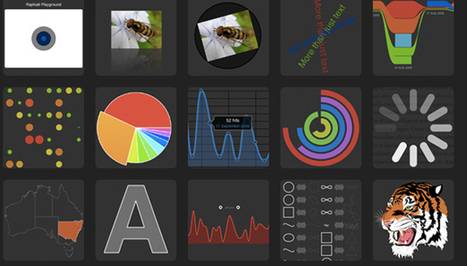
From simple charts to complex maps and infographics, Brian Suda's round-up of the best – and mostly free – tools has everything you need to bring your data to life... A common question is how to get started with data visualisations. Beyond following blogs, you need to practice – and to practice, you need to understand the tools available. In this article, get introduced to 20 different tools for creating visualisations...
Via Lauren Moss, Baiba Svenca
|
|
Scooped by
Jim Lerman
October 13, 2012 2:08 PM
|
Description by the Internet Scout Project "The National Renewable Energy Laboratory (NREL) believes that "educating students, teachers, and consumers is the other key to finding new renewable ways to power our homes, businesses, and cars." This site is full of important educational resources such as classroom activities, online quizzes, and fact sheets that deal with renewable energy technology and applied sciences. In the Educational Resources area, visitors can make their way through several dozen lesson plans, including "History of Solar Cells," "Teacher's Guide to Wind Energy," and "School Energy Audit." Moving on, the DOE Undergraduate Internships & Graduate Fellowships area gives interested parties access to application forms for the Science Undergraduate Laboratory Internship Program and the Graduate Fellowship Program. The site is rounded out by information on the annual Junior Solar Sprint & Hydrogen Fuel Cell Car Competition."
|
|
Scooped by
Jim Lerman
October 13, 2012 2:00 PM
|
Description by Internet Scout Project "Have you ever wanted to tweak the appearance of your Gmail account? This is now possible, courtesy of BrandMyMail. First-time users can watch the short video on the homepage to learn about the functionality of the program, gather some insights into how one might best utilize its primary features. Visitors can add social media links to their emails, create different layouts, and tweak the colors for individual expression and uniqueness. This version is compatible with all operating systems." There are free as well as premium versions of this service. -JL
|
|
Scooped by
Jim Lerman
October 12, 2012 1:34 AM
|
By Suzie Boss "If your students are prone to asking, “When will we ever need to know this?”, then maybe it’s time for a dose of reality. "By sparking students’ interest in real issues that affect them and their peers around the world, you will give them cause to think more critically about what they are learning. Better yet, you may give them a head start on becoming tomorrow’s problem-solvers. "Fixes, a series that is part of the Opinionator section of The New York Times, focuses on some of today’s most pressing social problems and the innovators working to solve them. These global dispatches offer ready entry points for projects that challenge students to propose their own solutions to issues that may strike close to home.... "Project-based learning, or P.B.L., offers a framework for investigating these real-world issues while also addressing academic learning goals."
|
|
Scooped by
Jim Lerman
October 11, 2012 3:54 PM
|
By Ariel Schwartz "SimCity, a city-building simulation series that was first released in 1989, has always been a virtual sandbox for aspiring urban planners, with a seemingly endless array of options--you could lay down roads; zone houses, industrial complexes, and commercial real estate; put up nuclear power plants; adjust taxation; and more. In the end, you could destroy your whole empire with a UFO or a well-placed asteroid strike. The newest version of SimCity, set to be released in February 2013, retains most of the game’s previous elements (including its addictive quality) while bringing a whole new level of complexity to the tilt-shift inspired world. You might not even notice how Maxis is subtly teaching you about the pros and cons of renewable energy, preserving natural resources, and cooperating with neighboring cities." Two versions will be available, one for $60 and one for $80. -JL
|
|
|
Rescooped by
Jim Lerman
from :: The 4th Era ::
October 14, 2012 1:18 PM
|
The following presentation is an overview of the what, the why, and the how to transition to blended learning.
Via Esther Wojcicki, Jim Lerman
|
|
Scooped by
Jim Lerman
October 14, 2012 12:57 PM
|
Simon Haughton is an ICT coordinator, of growing reputation, at a primary school in the UK (read elementary school in the US) . His blog, linked from this page, contains a great number of useful and creative suggestions for using technology in these grades. He also maintains a well-regarded spreadsheet of iPad apps (http://bit.ly/RpnlER) that you may wish to review. -JL
Project-based learning is one of the most popular terms in education innovation today. We talk about PBL all the time and how it, combined with flipped classrooms, can basically change the way education works. It’s an exciting time to be sure. But I love to actually see how this kinda stuff works in real life. It’s easier to just say ‘try out Project-Based Learning!’ to a teacher asking for innovative ideas … but it’s better to actually see how it all works. I stink at making videos but luckily others don’t. So I’ve compiled a few videos that act as simple windows into the PBL world.
Via adpcenter
|
|
Rescooped by
Jim Lerman
from English teaching & Learning
October 14, 2012 1:22 AM
|
In the age of the Internet, privacy is a luxury and you have to constantly be on your heels to maintain it. Facebook makes it particularly hard for users to guard their personal data.
Via Cyndi Danner-Kuhn, Jason Dargent
|
|
Scooped by
Jim Lerman
October 14, 2012 1:06 AM
|
TBy Robin Rhys "Today we have part two in our Making Siri Smarter series. On today’s show, we learn how to add Related People, how to stalk your friends using Siri and Find My Friends, and how to edit her responses. We have a great show, so don’t miss it. Do you have any Siri tips? Let us know in the comments!"
|
|
Rescooped by
Jim Lerman
from BYOD iPads
October 14, 2012 12:58 AM
|
" CELL PHONES IN THE CL A SSROOM: A BOON OR BLIGHT?
It’s a question many educators are facing these days. The Common Core State Standards call for students to develop digital media and technology skills. One way to help them reach that goal: incorporate gadgets they’re already familiar with — cell phones, tablets, and smartphones — into their learning environment. “The big potential with mobile is that it really is the primary portal for social communication right now,” says Mimi Ito, a cultural anthropologist in the departments of anthropology and informatics at the University of
California Irvine and John D. and Catherine T. MacArthur Foundation chair in Digital Media and Learning. “Young people learn best when it’s relevant to them, when there’s social connection tied to it, and when they actually have a personal interest.” "
Via Cyndi Danner-Kuhn, Amy Reilly, Jenny Smith
|
|
Scooped by
Jim Lerman
October 14, 2012 12:50 AM
|
By Joanna Zhou "Instagram is a great app for sharing pictures, but there are only so many hipster jokes you can listen to before yearning for an alternative to those unmistakably garish filters. So here is the definitive guide to the best iPhone photo apps for designers. Some you won't have heard of, others you'll be more familiar with. But they're all great at what they do - and best of all, they won’t cost you a penny!
|
|
Scooped by
Jim Lerman
October 14, 2012 12:38 AM
|
From the website "Typography isn't just about communication, it can also add subtle references to the message you're trying to convey. Whole books have been written on the craft and nuanced world of typography and type design, but we're keeping things simple. "In this article we've scoured the web to present you with a fine and varied selection of the best free fonts. Including scripts, serifs and a range of ligatures, these fonts will give you greater flexibility in your designs, and add to your arsenal of design tools."
|
|
Scooped by
Jim Lerman
October 13, 2012 2:12 PM
|
Description by the Internet Scout Project "Looking to do some quick photo editing? PicMonkey can make that happen, and it's fun to use. The site allows visitors to check out some craft scissor frames, which can give every photo that "hand-made" look. First-time users can click on the "Edit a Photo" tab to start working on their own imag"e. Some of the tools here include a crop feature, along with rotate, exposure, and sharpen. Also, the Create a Collage feature is quite fun, and a nice way to play around with a variety of photos. This version is compatible with all operating systems.
|
|
Scooped by
Jim Lerman
October 13, 2012 2:03 PM
|
Description by the Internet Scout Project "Based at the Lansing Community College, the Center for Teaching Excellence helps to support instructors committed to expanding their own teaching capabilities. Visitors can click on the Teaching & Learning Resources area to get started. Here they will find resources like "Classroom Strategies for Fostering Student Retention," "Dealing with Classroom Incivilities," and additional links on Internet copyright issues and academic journals. The Teaching Tips area contains 14 different categories of tips, including "Active Learning Strategies," "Assessment, Evaluation and Testing," and "Creating an Inclusive Classroom." All told, there are over 40 different activities and fact sheets here. Some of the overall highlights include "Tips for Teaching to a Diverse Student Body" and "Developing a Good Syllabus." The site is rounded out by the Self-Paced Online Workshops area which features directed workshops on course planning, development, and other topics that are available for all."
|
|
Rescooped by
Jim Lerman
from iEduc
October 13, 2012 11:29 AM
|
Since the time YouTube allowed individuals to create their own channels and start sharing their own videos with the world, we noticed a remarkable surge in the educational video ' industry'. More and more teachers from all corners of the world are creating their own channels and there is a growing community of educational video makers that is gaining more popularity and atop of them is TED Edu.
Via NikolaosKourakos
|
|
Rescooped by
Jim Lerman
from Tools for Teachers & Learners
October 11, 2012 8:40 PM
|
Video ripper is a very simple to use free online service for you to rip videos from YouTube, Metacafe, Vimeo, MySpace, Justin.tv, etc. It also allows you to rip online videos and convert local video files to MP4, AVI, 3GP, WMV, MKV, MP3 etc. Very useful.
Via Nik Peachey
|