"Twitter. People use a variety of ways to filter through that noise, from following specific lists, finding like-minded people through third party sites, or using a variety of servicesand websites to find the information that matters to them on Twitter.
"Another interesting way to filter through what is being said on Twitter, and better yet, analyse it, is to visualize it. This is certainly not a new idea, and we’ve written about some services in the past that will allow you to do just that. With the world around Twitter constantly growing and developing, it’s no surprise that since then there are a ton more services allowing you to visualize your followers, Twitter stream and your own personal Twitter stats."
"Show off any search on Twitterfrom your TV screen. Visible Tweets is a web app that offers large, crisp text, quick search and beautiful animations, and is perfect for displaying tweets from across the room. Maybe you want to show off tweets about your business, at your business. Maybe you want to passively keep up with a certain topic. Or maybe you just enjoy seeing live information in the comfort of your own home.
"Whatever your reason for wanting to put Twitter onto the big screen, Visible Tweets is a great tool for the job. In my opinion this is particularly interesting for business owners, because feedback is displayed publicly in real-time. It points out to people that you’re active on Twitter, and gives customers a reason to interact with you. There are risks, sure – someone could tweet nasty things just to see them on a screen – but if you’re okay with that, this service is worth checking out."
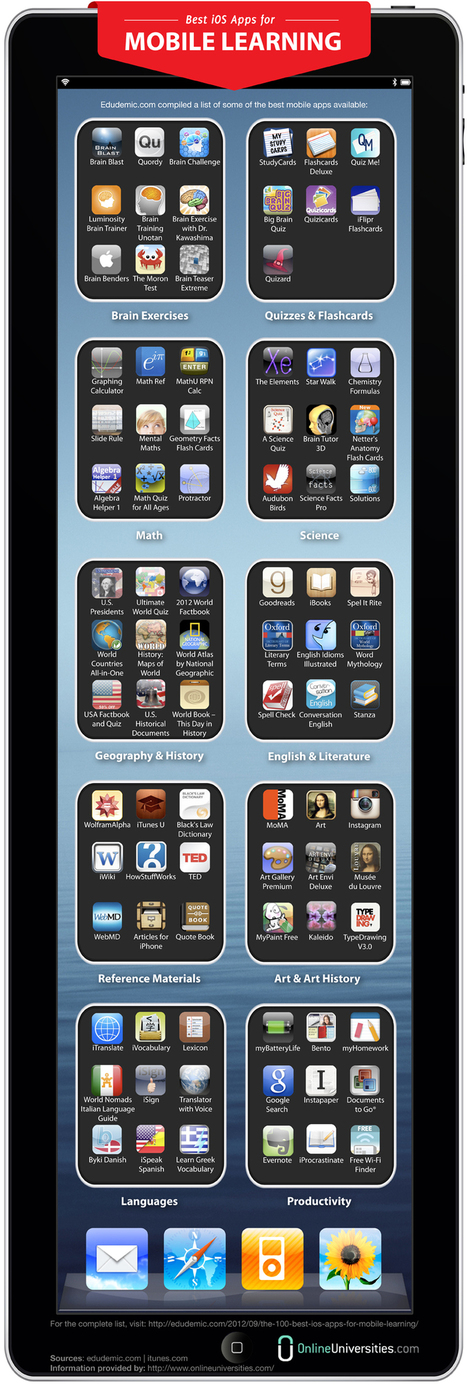
Learn how cellphones, e-book readers, and tablets are getting kids engaged with learning, focused on working smarter, and ready for the future.
KF: While the focus is K-12 many of the learning principles still apply in higher education. This guide is a useful stimulus towards rethinking and expanding gthe vision (and practice) of mobile strategies for learnign in higher ed.
by Larry Ferlazzo, with Carol Dweck and Lisa Blackwell
Summary by MiddleWeb SmartBrief
"Larry Ferlazzo compiles in this blog post a list of tips from "growth mindset" experts Carol Dweck and Lisa Blackwell, co-founders of Mindset Works, on how teachers can nurture students' belief that they can improve their intelligence, which research shows gives students greater motivation to achieve. Their suggestions include giving detailed feedback on what students can control, such as their effort on an assignment, and setting high expectations for what they can learn."
Robin Good: Loopster is a web-based free video editor which allows you to easily upload, edit, share and download your favorite video clips.
The service utilizes a traditional timeline and offers the option to edit individual clips by trimming their start and ending point, to add text captions and overlay titles, transitions, and audio effects and a soundtrack.
The final edited clip can be downloaded in .MPG format or shared directly on anyone of the major social networks.
"According to a recent MSNBC article, 69% of high school currently ban cell phones. But you’d be hard-pressed to find a school anywhere that has enacted a blanket ban on pens and pencils. Here are 10 reasons to reconsider the widespread acceptance of these distracting and potentially dangerous implements."
From Prezi to Google Docs to PowerPoint, there's no shortage of ways for teachers to put together a dynamic presentation. But Klowd wanted to take a different approach to help improve the presentation experience for both the person at the front of the classroom and in the back row.
David Truss shares his Inquiry Hub model and a Slideshare presentation on the 7 Ways to Transform Your Classroom along with audio recordings of the Classroom 2.0 Show "Inquiry Learning and Empowering Students" on September 29th. Here is just a glimpse of the 7 Ways to transform your classroom.
> Transforming Classrooms with Inquiry: It starts with educators asking really good questions.
> Transforming Classrooms with Voice: Be it a presentation to a small group, the entire school, the local community or online (with the world), work with students to craft their message in thoughtful, well represented ways.
> Transforming Classrooms with Audience: Through the use of blogs, wikis, digital portfolios and social media tools, you can invite the world to be a participatory audience in the work that our students do.
> Transforming Classrooms with Community: Provide opportunities for projects to extend beyond age-group peers to include younger and/or older students, parents and teachers, community members, subject area experts, and students from around the globe.
> Transforming Classrooms with Leadership: Buddy up with students in younger classes. Create activities and events which truly allow students to ‘run the show’.
> Transforming Classrooms with Play: There is a lot of pedagogy in play (at all ages). Do we provide “gaps” in our teaching? Time and spaces where students can be creative beyond the scope of the content we are teaching?
> Transforming Classrooms with Networks: Skype is a great tool to bring classes from across the country or across the globe together.
Thank you David for sharing your model and vision to transform learning!
A free book that looks at iOS6 for the iPad. Jac de Haan states that this is a "bare-bones intro to iPad & iOS 6 for my students – just enough to get comfortable with basic iPad use and get organized." The book is geared to middle and high school students, with a focus on iOS productivity apps and basic troubleshooting. It is available for free in the iTunes store. To go directly to the book in iTunes - https://itunes.apple.com/us/book/student-guide-to-ipads-ios/id570579620?mt=11.
Robin Good: The Logitech Broadcaster is a 720p resolution wifi webcam which allows for wireless transmission from 50 feet away to any Mac computer, iPhone or iPad.
The Broadcaster features an instant Ustream-supported live streaming ability as well as a one button toggle between itself and your computer/iPhone/iPad integrated webcam.
The webcam plastic carrying case which sports an elegant magnetic lid doubles up as an alternative webcam stand.
Expected retail prices: $200 in the US and €180 in Europe
Stéphane, I agree with you 100%. Thanks for pointing this out to everyone.
Steve Troletti's comment October 18, 2012 8:45 AM
A quick search reveals the following from Logitech's site: Take the Broadcaster everywhere thanks to a hard plastic carrying case that doubles as a stand. A magnetic base on the lid makes mounting your camera effortless and lets you easily adjust it for the perfect angle. For more versatility, the lid also attaches to your favorite tripod. (http://www.logitech.com/en-us/webcam-communications/webcams/broadcaster-wifi-webcam)
HOW SOCIAL LEARNING NETWORKS BUILD FOR EDUCATION DRIVE INNOVATION
Thursday, Oct 8 at 2 PM Eastern
Presented by: Alan November of November Learning Tim DiScipio of ePals
"How can principals, technology directors and curriculum coordinators ensure students and teachers are armed with the full suite of tools required for 21st century innovation? Join education thought leaders Alan November of November Learning and Tim DiScipio of ePals on October 18th for a discussion on how education networks honed through years of educator feedback are maximized to promote digital-era collaboration, content curation, streamlined workflow, and a generally efficient digital school ecosystem, in ways mainstream tools aren't designed to do."
This site provides a easy to use platform to create branching stories. Add a new story thread at the touch of a button and you can even add images from the web. Preview your story as a map, publish online and share with the link with others.
"If you want to secure your tweets against any issues that might happen to Twitter and its servers, consider backing up your Twitter shares. If you use Twitter as a bookmarking tool sharing the most interesting links you come across, you may want to create a searchable archiveto be able to quickly find a link you remember sharing a few days or months ago.
"Twitter search could be a good solution (there is also a handy from: operator that allows you to find all tweets from any user) but it is only able to work for recently shared links. Twitter search only stores tweets for up to 10 days. If you want to be able to search through older tweets, consider using one (or all) of these tools to create a searchable archive of your tweets or any other Twitter-powered databases."
For a long time now I have been looking for a tool that enables instant polling in the classroom or in the lecture room. I specifically wanted something that; doesn't require registration (especially from the people I'm polling), updates very quickly, works on any platform from computers to mobile devices
It looks like I have finally found what I've been looking for and best of all it's free. The tool that I have found is Mentimeter and it does all of the above.
"Students are getting first-hand knowledge of what it takes to be a teacher through a project in which students create video tutorials and teach concepts to their peers. The Web platform, called the Upside Down Academy, was part of a pilot program in which the Khan Academy model was used as the inspiration for a project-based curriculum for Envision schools, Kiera Chase, blended learning coach for Envision schools, writes in this blog post."
" I heart Twitter. If you haven’t yet, follow @edudemic to keep up with what we’re doing, working on, and seeing (like last night’s tech event with GDGT in downtown Boston!). Twitter has become a massive hit in education and it’s too big to ignore. So that’s why we helped assemble the 2012 A-Z Guide To Twitter Hashtags. It’s been an invaluable resource for educators around the world.
"But that’s a very lengthy list. Lucky for you, our friends at Online College Courses repurposed our lengthy list and made it a whole lot less, well, difficult. The following visualization should be a handy resource for any teacher looking to make the dive into Twitter. Trust me, it’s a bit daunting but worth taking the plunge. Just don’t be surprised if you become an addict!"
"For our new “What’s Going On in This Picture” feature, we’ll collaborate weekly with Visual Thinking Strategies (V.T.S.). In this video, Philip Yenawine, one of the founders of the organization, conducts a live V.T.S. discussion about a work of art."
------------------------------------------
"How do you make sense of what you see when you look at an image, especially if that image comes with no caption, headline, links or other clues about its origins? What can constructing meaning from an image teach you?
"That’s what we hope students will figure out together through our new feature, one that focuses on Times photojournalism, visual literacy and critical thinking by asking viewers to think about one interesting photograph a week.
We’ll be working with a program used in schools across the country called Visual Thinking Strategies, choosing the images and experimenting with running a virtual discussion about them on the blog together. Typically, V.T.S. centers on live classroom discussion of works of visual art, so attempting to do something similar online, and with photojournalism instead, will be an experiment for us both.
"A while back I wrote about Skype and how to get started using it. If you are new or thinking about starting definitely check out that post.
"Then yesterday I saw this:
"Calling classes in North Carolina, USA or nearby states to join a book club http://t.co/cnmm1IBx #wsfcs"
"So when I saw that tweet I immediately passed it along to all my NC folks. Then I got to thinking. There are lots of great projects out there that need a partner and people ask all the time how to get connected via Skype.
"I headed over to the Skype In The Classroom website and discovered there are loads of great projects going on that any class with a Skype account can join. Here are just a few:"
Discussion boards, or threaded discussions, are one of the most commonly used tools in online teaching. Discussion forums provide the ability for asynchronous discussion to occur over a period of time. The ability to learn asynchronously is one of the primary benefits of online learning. Students are able to reflect upon their ideas before sharing them with the class, leading to more reflective responses and in-depth learning.
This guide has been designed to provide some practical suggestions to assist you in making the most of this versatile tool. A number of topics have been addressed, including: facilitation tips, content area suggestions, time management strategies and much more.
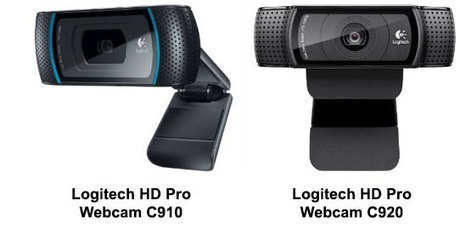
Robin Good: If you are about to be interviewed online, or need to record a quality video talk with a prestigious special guest, here is a good and comprehensive guide to everything you need to know.
From quality webcam alternatives, to microphones, lighting and backdrops, and recording software, Houston Neal has put together a useful reference that is useful for both PC and Mac users alike.
"We need to think of the Common Core State Standards as the different colored squares of a Rubik’s Cube with which we are constantly working. Solving a Rubik’s cube requires the puzzler to consider the whole puzzle, to plan the long term, and to constantly work with a vision of the end goal. If you focus on one color/side of a Rubik’s Cube, you can solve it in isolation, but beyond that, you have to constantly think about the ways the color sets are connected. Similarly, if you want to teach beyond a very rudimentary implementation of the Common Core and surface understandings from students, then you have to step into more complex approaches to reading, interpreting, and teaching the standards. The standards may be a list on paper, but in our minds they need to operate as a three-dimensional array, with different pieces of the puzzle activated in every lesson. The alignment question then evolves from “Which standards does this lesson cover?” to “Which standards are integrated and activated in concert within this lesson, and how deeply?” It’s the Rubik’s Cube equivalent of saying, “How many squares on how many sides of the Rubik’s Cube get closer to the right place with this series of adjustments?”
Robin Good: If you have an iPad and you are looking for a better way to find, discover, browse, search and consume news stories, the new Rockmelt browser for iPads is definitely worth a road test.
Unlike other popular browsers, "rather than showing you a big, empty window--or just whatever site you were looking at the last time you used it--Rockmelt offers up a visual stream of personalized content, culled from friends on Facebook and Twitter, RSS subscriptions, and sites that fall into your designated categories of interest.
Posts, articles, images, and the rest take the form of big, tappable tiles in two endless columns--an infinitely scrolling stream of content.
Touch one of the items, and, when possible, it pops open in a stripped-down reader view.
As you’re checking out that content, you can jump to a full view of the website it’s hosted on, follow links, or just dip back to your stream to find something else to look at."
"Overall, it’s a fairly radical take on what a tablet browser should be, one that starts with the go-anywhere, find-anything utility of the browsers we’re familiar with and grafts a visual, content-curation element on top of it all.
In this sense, the new Rockmelt is sort of like a mash-up of Pulse, Flipboard, and Safari--a browser that’s also a news reader, with a dash of social network to round it out."
To get content containing either thought or leadership enter:
To get content containing both thought and leadership enter:
To get content containing the expression thought leadership enter:
You can enter several keywords and you can refine them whenever you want. Our suggestion engine uses more signals but entering a few keywords here will rapidly give you great content to curate.


 Your new post is loading...