"I love picture collage makers but I think Loupe Collage is the best one so far as it includes three different applications in one website.
"What you do with this site is pretty simple. Choose your pictures from your desktop or Facebook or any other social media website. Then, choose a shape that you want to see your pictures. If you like, you can write a text or draw a picture; and the text will be in the shape or the word that you have written. You can also change the background color, shuffle the pictures, add more photos or add a border. Then, you can save it as a picture and use it wherever you like.
"You can also choose to draw a live card with your pictures and drawing a picture or text. The website will animate it itself. You can also try Waldo which is a picture hunt game. You have to find a picture among a picture collage.
"We were about to distribute iPads to 800 teachers. The timeline and our number of staff members would not allow us to do multiple-hour in-person trainings with all of them. Yet we felt based on our fall experiences that five to six hours of "the basics" was vital to giving this initiative the basis it needed to get off to a successful start. Online training was the only viable solution.
"Thankfully, in the bank of resources we had been collecting was this iPad training page from Comal ISD which included this proficiency checklist. Comal graciously gave us permission to adapt their materials, and thus iPad Basic Training for Teachers online was born.
Training Plan
"We took our fall experience and Comal's checklist and divided the basics into five one hour modules. Only the first module is delivered in a face-to-face format. Here is how it is organized:"
A very comprehensive training program, complete with 4 training videos as well as a proficiency checklist. A wonderful resource for beginners and more experienced users, alike.
"The Smithsonian Institution is sometimes referred to as "America's attic." In true form, it offers a treasure trove of fine educational resources and lesson plans based on its vast collections. Fortunately for educators, these materials are now available online via this well-designed and useful site. Visitors to the site can browse the lesson plans by subject area, grade level, or keyword. To get started, visitors can scan the This Month's Top 10 list of plans to see what other users are enjoying. Some of the plans featured recently include "The Music in Poetry," "Abraham Lincoln, the Face of War," and "Prehistoric Climate Change And Why It Matters Today." The IdeaLabs bring history, science and art to life for young people. These stand-alone units are meant to be used by younger students to learn about the history of sculpture, geology, the Apollo 11 mission, and much more."
"The Learning Games Network is a highly regarded organization committed to helping teachers use games and game-design for learning. Participants in this mini-course will benefit from the resources of the Design Corps Program and its Game Design Tool Kit — an innovative and free online resource to help teachers integrate game design across the curriculum. The toolkit has been specifically refined for STEMx teachers within this exclusive mini-course, and the content will also build a bridge to a larger set of game-based learning resources and introduce teachers to the Playful Learning knowledge network. Teachers who currently implement project-based instructional activities will find adapting the GDTK a breeze!"
"The Media History Digital Library is a massive archive of documents about the history film, television, and radio. The library can now be searched and the documents viewed online through MHDL's new site called the Lantern. On Lantern you will find reviews and critiques of movies, books and playbills, many periodicals about the movie, television, and radio industries. Your search can be refined according to date, language, and publication type. You can also browse through collections curated by MHDL.
Applications for Education
"Two thoughts came to mind as I browsed through MHDL's Lantern. First, it's obviously an excellent resource for students studying the history and development of media. Second, through MHDL's Lantern you could find some good examples of how to write a critique. Your students could use those as models for writing their own critiques of movies or even of books."
Interesting description of the Media History Digital Library, which is a massive archive of documents about various forms of media including film, television and radio. This would be a great resource for those wanted to research pop culture or media history.
The archive site is called the latern and has many documents regarding media pieces including critiques and and evaluations. Could be a good tool for students to pick up pointers on how to compose a critique or media studies.
"Comparing five different styluses is not an easy task. Each has a completely different packaging, shape and style, each is made for different devices (although most are “made for iPad”), and each excels at different tasks. But this is why we’re here today, to help you find out which one of these great styluses will be the best choice for you, your needs, and your devices."
"The Saylor Foundation has opened its Media Library to the public, providing thousands of open educational resources, videos, articles, and full-length textbooks.
"The Saylor Foundation is dedicated to providing free and open education, with complete courses offered at the K-12 and post-secondary levels. It provides a total of about 300 academic courses, along with workplace skills courses.
"Its online Media Library, built on the open source DSpace repository platform, provides a growing list of about 6,000 total resources, including 3,000 open educational resources, 1,300 videos, 124 full-length textbooks, and 2,500 articles. Resources cover the arts, sciences, humanities, social sciences, engineering, business, and test prep. Materials include primary texts (such as Beowulf and Hamlet), references (such as the Catholic Encyclopedia), textbooks (such as The Electronic Introduction to Old English), maps, presentations, audio recordings, assessments, assignments, data sets, and others."
"Whether you're an individual making your own or a facilitator helping others to make theirs, here's a set of how-to guides that we hope you'll find useful. We cover the technical, the editorial, the storytelling, and more. We hope you find these guides useful. Happy storytelling!"
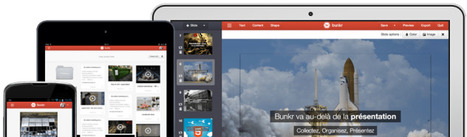
French startup Bunkr is focused on one simple task: killing PowerPoint. To achieve this goal, the company’s well-designed web app will help you collect visual content and organize it into slides. The result is a very visual HTML5 presentation that works on your computer, phone or tablet. You can export your work in PDF or PPT as well.
Cocorico, un groupe français qui innnove dans le domaine des outils de présentation, peut-être pas la fin de PowerPoint mais au moins une alternative intéressante.
Web-based presentation tool that you can develop on the fly (evernote style) and have multiple contributors - however there is a subscription fee after two presentations. HTML5 back end
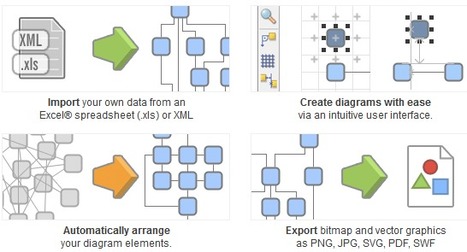
yEd is a powerful desktop application that can be used to quickly and effectively generate high-quality diagrams. Create diagrams manually, or import your external data for analysis. Our automatic layout algorithms arrange even large data sets with just the press of a button.
yED software is free to download, it works on all platforms and helps you create beautiful diagrams using ready-to-use elements. Import your data, including from Excel, and export your diagrams in a wide range of graphics formats.
Today's guest blog post by Cathy Mere will help you jump on the electronic record-keeping bandwagon. Learn how to use Evernote to keep conferring notes on all of your students.
"We learn so much sitting beside writers as they work in our workshops each day. Two years ago I gave up my spiral notebook I used to keep records of writing conference conversations for a digital system. Saying goodbye to my spiral notebook with tabbed sections for each student was easier than I anticipated. The time was right. More and more often I found myself wanting to do more than record handwritten snippets of evidence, thought, and conversation. More and more I found myself wanting to take pictures of student work or record student voices. More and more I found myself wanting to link to digital pieces students were creating. More and more I seemed to have a device in my hand instead of a pen. After learning about Evernote I decided to see if I could use it as a tool to record notes from across the day. I found myself enjoying the seamlessness of Evernote. It seemed Evernote was a tool to allow me to capture the learning journeys of the young writers in my classroom.
"To begin I created a notebook for each student and then placed them in a class stack. Each time I confer with a writer during writing workshop I use Evernote. Before I begin our conversation I glance through the last few notes, watch the work the writer is doing, and wait for an appropriate moment to chat. For me, it has worked to create a new note inside the student’s notebook each time I have a conference with a writer. My conferences are often structured like this:"
A well documented description of how one teacher has developed her own method to maintain digital notes for all her students in Writers' Workshop by using Evernote.
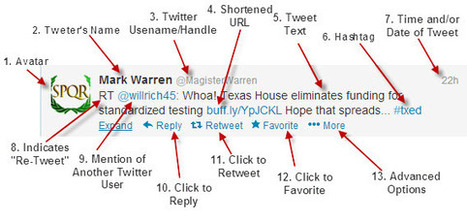
"When you first start using Twitter, one of the things you have to figure out is how to decode Tweets. What does each part represent? What does it mean when a word starts with a #?
"Below is a Tweet as it might be displayed on the Twitter website when viewed on a computer. Note that not all Tweets might include all of these exact attributes. If you are using an app or third-party service like Hootsuite or TweetDeck to read your Tweets, they might look slightly different, but the parts will still be there somewhere. Scroll on down under the sample Tweet to see brief explanations of the parts! (Accurate as of the time of this post. Twitter has a habit of rearranging these things once in a while!)"
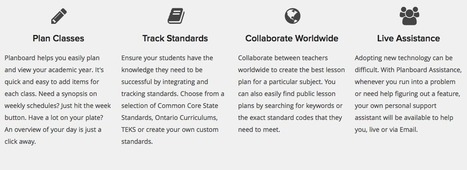
Even though I am a technology fan, I still use papers to create plans for my lessons and to write notes for my own use. There are lots of digital applications but none of them has made me feel comfortable so far. Yesterday I discovered a new tool, the “Planboard”
Planboard is a very simple tool that you can use to create your daily, weekly and monthly plans. Signing up and creating a template takes only 3 minutes.
With Planboard you can; - print or e-mail your plans or save them as PDF files, - add memos, sticky notes for yourself, - add Standards for each lesson period, - attach files for every lesson, - set off-days or shift your schedule without any change.
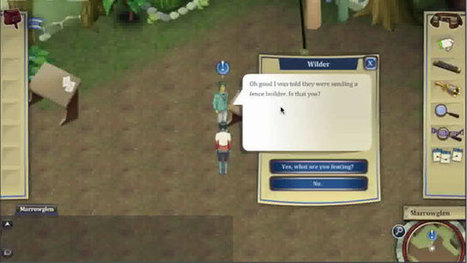
"Now, a group of researchers in MIT’s Education Arcade are trying to harness the power of MMO games to teach high school students to think like scientists and mathematicians. Their game, The Radix Endeavor, is designed to be an educational game, and capitalizes on the interactions students can have as a way to build their knowledge and skills.
"Radix, as it’s known, is aligned to the Next Generation Science Standards for biology, focusing on topics like genetics, evolution, ecology and human body systems. In math, the game is aligned to the Common Core and has particular focuses on algebra, probability and statistics, as well as geometry. The researchers worked with Filament Games and are funded by the Gates Foundation for the three-year project."
"Once upon a time, it might have seemed a bit curious to screen feature films in the classroom. With today's technology, it is quite common, and the Teach With Movies site is a great resource for those looking to integrate moving pictures into their classroom environments. On this website, visitors will find Snippets & Shorts, Sciences, Movie Worksheets, and a substantial variety of other areas. The Snippets & Shorts area is a particular gem, as it offers suggestions for using a range of popular films to teach concepts in science, history, English, and other subjects. Visitors will also want to look at the Age area to review appropriate films for different ages. The Movie Worksheets area includes film study worksheets addressing several different themes, including Hero's Journey, Cinematic and Theatrical Elements, and Historical Fiction. While the site does not provide direct access to copyrighted film material, it is an excellent source of support materials for teachers who will have access to the suggested films through their local or school libraries."
"Everyone has a Story to Tell Do you have a story you would like to share? Do you enjoy reading short stories?Narrativs believes that everyone has a story to tell and aims to connect people all over the world through storytelling. Narrativs has created a digital space where aspiring writers can gain support for their work and receive constructive criticism. On the Narrativs website everyone is invited to submit a poem or short story – fiction or non-fiction. The Narrativs editing team provides feedback on the submission and the author is encouraged to make the necessary changes. After the piece goes through the editing process the story is then published on the Narrativs site and readers can rate and write comments in reaction to the story. This new publishing format allows one to learn about the world from many different perspectives by reading this diverse collection of stories.
"Social Entrepreneurship Narrativs aims to give everyone a voice, not only by creating a platform for writers to share their work, but also by financially supporting non- profit projects that promote literacy. Founder, Rachel Ngoc Anh Bui was inspired to develop Narrativs after listening to a global responsibility-focused speech by the prince of Norway. Narrativs plans to gather the best stories from the site to publish in a book. The money that the book generates will be given to groups that aid education in developing countries. The Narrativs team hopes to inspire others to find ways to develop businesses that make the world a better place. The team has been visiting schools in the United States and motivating students to create businesses that are socially responsible. Narrativs is creating a valuable narrative around both digital authorship and global citizenship."
I love this idea because it is true. What I love even more is the idea of sharing narratives because that experience is what connects us to each other.
"The University of Southern California (USC) Libraries has partnered with the Digital Public Library of America (DPLA) as a content hub and has contributed more than 250,000 items from its own digital library to the DPLA.
"The DPLA, which launched in April, provides scholars, students, and public researchers from around the world with a single point of access to photographs, manuscripts, books, sounds, videos, and other items from the country's libraries, archives, and museums. The DPLA contains more than 2.8 million items, and the addition of USC Libraries' collections more than quadruples the DLPA's number of items related to the history of Los Angeles and Southern California.
“USC Libraries have such rich and deep collections, and they are at the forefront of digitizing and preserving an incredible range of materials,” said Dan Cohen, executive director of DLPA, in a prepared statement. “It is wonderful to welcome USC Libraries as a content hub and to add their unique subject strengths to ours.”
SOCIAL MEDIA (AP) - Free PLR infographic - Manage Your Online Reputation in 5 easy steps. (SOCIAL MEDIA (AP) - Free PLR infographic - Manage Your Online Reputation in 5 easy steps.
" If you don't manage your online reputation someone else might do it for you, and you may not like the results."
Good Point! This article has really made me think about what my online reputation is and looks like. Here is a summary of the 5 easy steps to getting known on the internet and keeping a good reputation while doing so:
1. Asses your current reputation - search for yourself online
2. Identify the changes needed - anything negative needs to be deleted or pushed down in the search results
3. Determine your best areans - publish more content on the places you are most popular, you will hsve the most influence there.
4. Decide what type of content and topics you will publish about to promote the reputation you want to builld.
5. Start building - Publish and promote valuable content. Track your reputation by measuring and mointoring the success of your publishing and modify and make changes as necessary
Announcing Flip Your Classroom Day: A Global Initiative
September 6, 2013, the Flipped Learning Network™ hosts Flip Your Classroom Day.
On 9-6-2013 educators across the globe will take a pledge to flip one lesson to experience Flipped Learning, with the expectation this leads to further flipped units or an entire course. Based on a survey conducted by the Speak Up National Research Project (Fall, 2012), we estimate that only 3% of teachers in the U.S. know about or "do" flipped learning. Yet 27% of principals indicated their teachers wanted to try it this year! So thank you for joining the growing ranks of educators who are moving from a teacher-centered classroom to a student-centered learning environment.
To get content containing either thought or leadership enter:
To get content containing both thought and leadership enter:
To get content containing the expression thought leadership enter:
You can enter several keywords and you can refine them whenever you want. Our suggestion engine uses more signals but entering a few keywords here will rapidly give you great content to curate.


 Your new post is loading...


 Scoop.it!




















Nice single page handout that gives a good overview of Twittter!