Your new post is loading...

|
Scooped by
Jim Lerman
September 13, 2013 6:40 PM
|
by Richard Wells
"After getting lots of positive feedback about a visual interpretation I did of a blog postby Holly Clark (@HollyEdTEchDiva), I also had a small number of requests and suggestions for other ideas that would be ideal for a visual summarising. I’m currently working through them but one came from the talented Beth Holland, who let me know she was writing apost for Edutopia.com based on the theme of “First 5.” This idea can be applied to many scenarios and asks experts to consider what one might do in the first 5 minutes, 5 days and 5 weeks when introducing a new initiative or technology. I loved the idea and got to work immediately. Here’s the result and I hope it helps some classrooms get going in the new academic year."
|
|
Scooped by
Jim Lerman
September 13, 2013 6:12 PM
|
by Marisa Kaplan
"During the pitches I was seated next to Devindra Hardawar of VentureBeat, who did a brilliant job of giving concise descriptions of the startups here. But while most of the audience members were viewing the pitches for business models and growth rates, I was looking for something else: which ones would I actually use?
"The accelerator targeted companies building solutions for formal and informal learning, which meant that only a handful of the ten tools were designed specifically for the classroom. Here are the ones that are most relevant to my classrooms and personal learning."
|
|
Scooped by
Jim Lerman
September 13, 2013 5:30 PM
|
by Steve Wheeler
"Teachers are constantly searching for new ways to promote good learning. If those ideas can also encourage creative thinking, they are even more welcome in the classroom. Technology can provide some of those creative solutions. Here are just five ideas for using technology to support learning, while promoting creative thinking, and I'm sure that with a little thought you will be able to adapt them to your own subject area."
|
|
Scooped by
Jim Lerman
September 12, 2013 6:10 PM
|
This is our methodology at The Design Gym.
|
|
Scooped by
Jim Lerman
September 12, 2013 10:06 AM
|
|
|
Rescooped by
Jim Lerman
from Digital Presentations in Education
September 12, 2013 1:53 AM
|
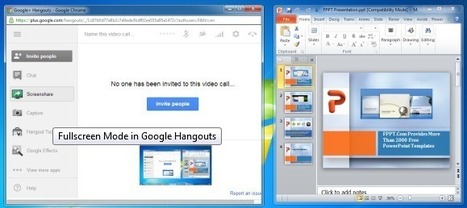
Google Hangouts is one of the best platforms for video calls, conference meetings and even small scale webinars. But Google Hangouts is not just limited to video call functionality, as you can perform a wide range of tasks via Hangouts, including providing online support or presenting presentations. In this post we will show you how to present a PowerPoint presentation using Google Hangouts. You can also use the below mentioned method for presenting your ideas using other applications, be it via a PDF Presentation, Excel Spreadsheet or even a video (e.g. a video presentation).
Via Baiba Svenca
|
|
Rescooped by
Jim Lerman
from Digital Presentations in Education
September 12, 2013 1:44 AM
|
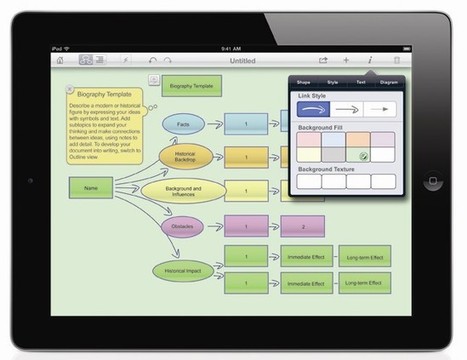
Inspiration Maps is an iPad app that allows you to visually organize information. Inspiration Maps makes it easy to create clear mind maps that can help organize information for an essay or walk a student through a multi-step science experiment. The app comes with number of great looking templates for all different subject areas. If none of the templates meet your needs you can create your own.
Via Baiba Svenca
|
|
Rescooped by
Jim Lerman
from Digital Presentations in Education
September 12, 2013 1:40 AM
|
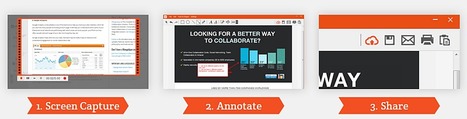
Make the most of your screen captures. TinyTake gives you all the tools to capture, annotate, and share screen captures and screen casts for free.
Via Baiba Svenca
|
|
Rescooped by
Jim Lerman
from Digital Presentations in Education
September 12, 2013 1:37 AM
|
Follow our guide and learn how to use Keynote's presentation tools to make sure the polished and well-designed project you created is presented how you intended.
Via Baiba Svenca
|
|
Rescooped by
Jim Lerman
from iPads in Education Daily
September 12, 2013 1:33 AM
|
|
|
Rescooped by
Jim Lerman
from iPads in Education Daily
September 12, 2013 1:21 AM
|
by Nik Peachy
"Recently, while dong a workshop on mobile learning, I had a participant who had just bought an iPad and was upset because he couldn't easily switch between a website he was reading and a word processing program. He wanted to do what many of us do on a desktop or laptop computer and copy paste sections and quotes or take notes.
"After some research I found the Side by Side browser. This is a simple free app that you can download to your iPad (Sorry, no Android version) which allows you to have a browser window open in one half of the screen and a note taking app in the other half. You can type notes then send them to who ever you want or store them in DropBox."
Via Jon Samuelson
|
|
Scooped by
Jim Lerman
September 12, 2013 12:27 AM
|
by Cassandra Khaw (TechHive)
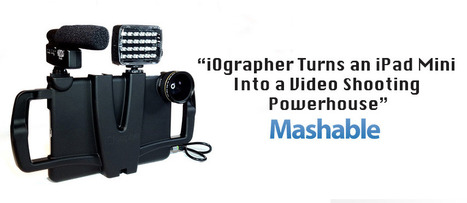
"Teacher Dave Basulto knows first hand what shrinking budgets can mean to school arts programs. His solution? Pair an inexpensive iPad mini with theiOgrapher (funding through April 13), a mounting system he’s developed for Apple’s tiny tablet.
"The iOgrapher is a rigid plastic molding sporting wide, loopy handles intended to facilitate steadier operation of your device. Three accessory shoes, allowing you to attach equipment like lights or microphones, sit on the upper ridge. An attachment point placed underneath the iOgrapher enables you to mount the assemblage on various tripods, stands, and dollies. And a 37mm lens mount will let you add different lenses.
"Basulto plans to lunach a companion site, iOgrapherU.com, alongside the mount with tutorials for both the iPad and his creation, as well as related apps, workflow techniques, editing, and other information helpful for those engaged in audio/visual media production. Only those who’ve purchased an iOgrapher or one of Basulto’s other planned products will be granted access."
|
|
Rescooped by
Jim Lerman
from Digital Delights for Learners
September 11, 2013 3:40 PM
|
from the Animoby blog:
AniMoby is an app for iPads that allows users to record voice while using design tools on an interactive whiteboard. This combination makes AniMoby the perfect product for the creation of user-friendly presentations and lessons - which teachers can send to any student with internet connection to view anytime, anywhere. Unlike other interactive whiteboard apps, AniMoby does not use video file formats – so file sizes are small and can be saved/shared with ease.AniMoby also features a clipart library designed to help teachers make lessons. Two versions of AniMoby are available – AniMobyPro and AniMobyStandard. AniMoby Pro provides the most enhanced AniMoby experience, and includes unlimited recording durations and access to a larger library of templates and clipart. In theProVersion, animations can also be sent privately to others, and use of the app is free of advertisements.
In the Standard version, recordings are limited to two minutes, the template\clipart library is limited, and advertisements will be featured. AniMoby Pro is now being offered for a one-time payment of $7.99.
Via Ana Cristina Pratas
|
|
|
Scooped by
Jim Lerman
September 13, 2013 6:36 PM
|
by Richard Byrne
"One of the things that I always do in my Google Apps workshops and webinars is teach people how to create self-grading quizzes through Google Forms and Spreadsheets. Depending upon the pace of the group we'll often look at creating image-based and multiple page quizzes too. I've recently put all of the screenshots of those processes into one PDF. You can view the PDF below."
|
|
Scooped by
Jim Lerman
September 13, 2013 5:39 PM
|
by Fred Delventhal
"Tellagami allows you to create a single slide presentation, digital story, etc. You get a customizable avatar that is animated on a background of your choosing. You then can record a voice or type in words for your avatar to speak."
|
|
Rescooped by
Jim Lerman
from :: The 4th Era ::
September 13, 2013 9:56 AM
|
by Dan Rowinski
"Take the just-announced iPhone 5S, for example. It will support both Bluetooth Smart and Wi-Fi Direct, and has capabilities built in to perform new functions such as AirDrop local sharing. Behind it stands Apple's thriving ecosystem, which will continue to churn out new apps that take advantage of those functions. All that makes the iPhone 5S not just Apple’s latest and greatest device, but one of the first devices available that has the potential to be a true universal remote."
|
|
Rescooped by
Jim Lerman
from :: The 4th Era ::
September 12, 2013 4:41 PM
|
by Kate Meersschaert
HacKIDemia is a mobile invention lab that enables future changemakers to access and create a hands-on STEAM education that will enable them to solve specific challenges by developing and testing creative solutions and physical artifacts. (from the Hackidemia site)
Curiosity, Empathy and Play "With a focus on fostering "curiosity, empathy and play" and combining science, technology, storytelling and art HacKIDemia is helping the next generation of "autonomous" thinkers discover the STEAM (Science, Technology, Engineering, Fine Arts and Math) fields. Through the group's mobile "maker" workshops, toolkits, mentor training and support of local grassroots entrepreneurship efforts, HacKIDemia is going above and beyond what most "maker" programs offer by attempting to engage a wide range of stakeholders in not only the traditional STEM subjects, but also the fine arts and crafts. HacKIDemia is also uniquely focused on helping young children to discover STEAM fields ranging from 3D printing, micro-electronics, programming, robotics, crafting, biotech and even physics."
|
|
Scooped by
Jim Lerman
September 12, 2013 9:56 AM
|
"In 2012 Pixar Story Artist Emma Coats tweeted 22 storytelling tips using the hashtag #storybasics. The list circulated the internet for months gaining the popular title ‘Pixar’s 22 Rules of Storytelling’. We reposted this list two weeks ago and the response has been phenomenal with thousands of likes, shares, comments and emails.
"Since posting the story, a number of people have contacted us regarding rule number 4 on the list, also know as ‘The Story Spine’: Once upon a time there was ___. Every day, ___. One day ___. Because of that, ___. Because of that, ___. Until finally ___."
|
|
Rescooped by
Jim Lerman
from Digital Presentations in Education
September 12, 2013 1:50 AM
|
|
|
Rescooped by
Jim Lerman
from Digital Presentations in Education
September 12, 2013 1:42 AM
|
For when you need a little more than static words on a screen for your presentation, we present to you five sweet digital alternatives to PowerPoint.
Via Baiba Svenca
|
|
Rescooped by
Jim Lerman
from Digital Presentations in Education
September 12, 2013 1:38 AM
|
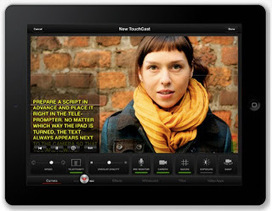
TouchCast is an iPad app that I downloaded recently and have been exploring a bit over the last couple of weeks. It's not often an app come along which really shakes up and existing genre like video, but I think TouchCast does and in a way that can be very beneficial for learners.
Via Baiba Svenca
|
|
Rescooped by
Jim Lerman
from Digital Presentations in Education
September 12, 2013 1:36 AM
|
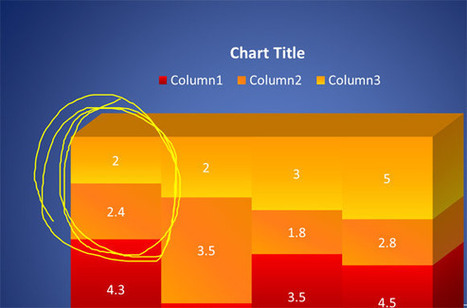
During a PowerPoint presentation you may be tempted to apply some changes to the presentation slides. Even if you can close the slideshow and go directly to the slide where...
Via Baiba Svenca
|
|
Rescooped by
Jim Lerman
from iPads in Education Daily
September 12, 2013 1:24 AM
|
An iPad app lets you interact, literally, with Josef Albers’s theories of color.
Via Jon Samuelson
|
|
Rescooped by
Jim Lerman
from iPads in Education Daily
September 12, 2013 1:17 AM
|
This slick list app is lightning fast and makes it easy to share your lists with others.
Via Jon Samuelson
|
|
Rescooped by
Jim Lerman
from :: The 4th Era ::
September 11, 2013 10:27 PM
|
by Christina Quattrocchi
"Silicon Schools Fund CEO Brian Greenberg believes that blended learning is about “reconceiving the role of the student, the teachers, and how you define schools.” But such cosmic shifts require guidance, coaching, and encouragement. With edtech coaches and coordinators still a relatively new field, teachers often have few direct resources on how to get started.
"The emergence of a new blended learning MOOC, compliments of Coursera’s new focus on teacher professional development, could provide such guidance--for free.
"To deliver the course, blended learning connoisseurs Greenberg and Michael Horn (Co-founder, Clayton Christensen Institute) will join forces with teacher training expert Rob Schwartz of the New Teacher Center.
"Aimed at educators and parents with access to some form of a classroom, the six-week course will focus on implementing blended learning models, looking at factors like physical space, budget and how to choose the right software. "Students" will focus on case studies at KIPP Los Angeles, Summit Public Schools and Navigator Schools in Gilroy,CA, described by Greenberg “the best school you never heard of.” These studies will serve as a guide through the questions, obstacles, and decisions that come up when implementing various versions of blended learning models. By the end of the course, educators and parents will be expected to launch blended learning pilots in their own schools, however big or small."
|