"Recently, MasteryConnect unveiled a cool, social bookmarking feature for standards aligned resources. Much like the Pinterest paradigm of social bookmarking, teachers find or upload any resource on the web, align it to a state or Common Core standard, and “pin” it to a board or collection. Like MasteryConnect’s community of teacher-created formative assessments, it seems that MasteryConnect is at it again, working to create the biggest collection of resources for the Common Core."
"Topics include abstraction, algorithms, encapsulation, data structures, databases, memory management, security, software development, virtualization, and websites. Languages include C, PHP, and JavaScript plus SQL, CSS, and HTML. Problem sets inspired by real-world domains of biology, cryptography, finance, forensics, and gaming. Designed for concentrators and non-concentrators alike, with or without prior programming experience.
"Harvard has made this course available free to anyone—via YouTube, iTunes, and the course page—with a series of lectures filmed during the Fall 2011 semester. The class is led by David J. Malan, an enthusiastic young professor and Senior Lecturer on Computer Science at Harvard, and himself a product of Harvard’s Computer Science program. Professor Malan has also offered Harvard’s CS50 as a MOOC through edX. In the introductory lecture to CS50 (above), Malan promises that “this is one of those rare courses that actually squeezes your brain so much and your schedule so much that by the end of the semester you actually feel smarter.”
Using Edmodo in the library for Teen Learning 2.0 activities, library skills assessment, and book clubs. Bonus for students, free cloud storage/digital portfolio.
Katie Salen, executive director of nonprofit design studio Institute of Play, offers a look inside the ground-breaking school in New York City that she co-founded, Quest to Learn.
In the spirit of ideas worth spreading, TEDx is a program of local, self-organized events that bring people together to share a TED-like experience. At a TED...
McLeod, in my opinion, has made some of the best presentation videos on the role of technology in education. This one, from TEDxDesMoines, was published on Sept. 9, 2013. In it, he gives examples of numerous young people who are accomplishing amazing feats using the power of the Internet...all in settings outside of, rather than inside, school. His compelling argument...why do school seem to fear, rather than encourage, this type of learning?
If you like this 8 min. video, you might also like at TEDx preso he made in 2010 years ago at the American School of Bombay, India: http://www.youtube.com/watch?v=-yA6oTU1emM
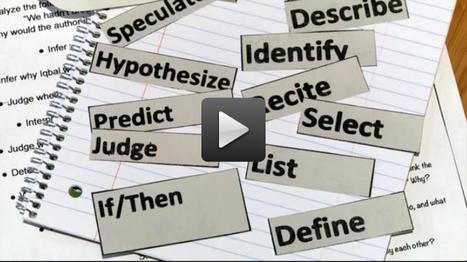
Having students develop better questions, or even higher order questions, allows for a deeper understanding of a subject. Watch as Ms. Francisco uses a variety of strategies to encourage higher order questioning from her students.
Quite an impactful 2-minute video in which the teacher, Ms. Fancisco, empowers who students to learn to ask higher order questions as a means to improve their abilities to engage with complex text.
"Google docs has made it possible for me to go paperless. The decision to remove paper from my life has been liberating! Whenever I train teachers, I share my enthusiasm for a paperless classroom. My cries of joy and excitement are sometimes met with grunts and skeptical looks. I’ve met several teachers using Google docs, who still collect hard copies of assignments and essays to grade by hand. They are concerned that grading online will take longer than grading by hand. I disagree.
"I want to share three tips and tricks I’ve used to make grading digital writing more efficient than hand grading student work."
Although this post comes from and English teacher, there's no reason these techniques couldn't be used in any learning situation where significant amounts of writing take place.
I particularly like the idea of making links to YouTube videos that illustrate various points of grammar or usage.
"Over the last two weeks I've introduced a lot of teachers to using Padlet, TodaysMeet, and Socrative in their classrooms. All three of these tools can be used as backchannel and informal assessment tools. I've written about various ways to use each of these tools in the past. (Click here for TodaysMeet, here for Padlet, and here for Socrative). Here are some of the key benefits of using backchannels in your classroom. "
"TodaysMeet.com is a completely free service for hosting backchannel discussions. Over the years I’ve used it in a variety of ways including as a real-time discussion during a classroom viewing of a video, as a tool for quickly polling my students, and as forum for students to anonymously ask questions. "
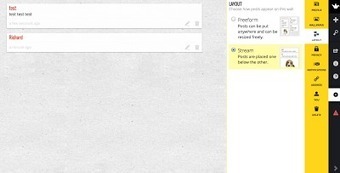
Padlet (formerly known as Wallwisher) is one of my favorite tools to use to have students quickly share ideas, questions, and multimedia notes on one page. Until today all of the notes that were added to a Padlet page appeared wherever a visitor double clicked. You can still use that free form format, but now you can also use a chronological format that Padlet is calling "streams." Streams places all notes into a chronological order based on the timestamp of when each note is written.
"When 13-year-old Tahoe native Logan LaPlante takes the stage for his TEDx talk at the University of Nevada, what follows are 11 minutes of eloquent, confident wisdom on his style of education, which he calls “hackschooling.” Here’s a sample:
'I’m not tied to one particular curriculum, and I’m not dedicated to one particular approach. I hack my education. I take advantages of opportunities in my community and through a network of my friends and family. I take advantage of opportunities to experience what I’m learning, and I’m not afraid to look for shortcuts or hacks to get a better, faster result. It’s like a remix or a mashup of learning. … And here’s the cool part: because it’s a mindset, not a system, hackschooling can be used by anyone, even traditional schools.'
"He touts the virtues of having the hacker mindset:
'A lot of people think of hackers as geeky computer nerds who live in their parents’ basement and spread computer viruses, but I don’t see it that way. Hackers are innovators. Hacker are people who challenge and change the systems to make them work differently, to make them work better. It’s just how they think, it’s a mindset.
I’m growing up in a world that needs more people with the hacker mindset, and not just for technology. Everything is up for being hacked, even skiing, even education. So whether it’s Steve Jobs, Mark Zuckerberg, or Shane McConkey, having the hacker mindset can change the world.'
"He emphasizes the importance of being happy:
'We don’t seem to make how to be healthy and happy a priority in our schools; it’s separate from schools, and for some kids it doesn’t exist at all, but what if we didn’t make it separate? What if we based our education on the practice of being happy and healthy because that’s what it is: a practice, and a simple practice at that. … Education is important, but why is being happy and healthy not considered education? I just don’t get it.''"
Excellent mesage from Logan on the importance of being creative, doing things diffferently, taking personal responsibility for education and realizng there is choice outside of traditional education....
"Have you ever walked by a busy street corner and wondered what was there 20, 30, 50, or 60 years ago? If you have, the WhatWasThere site may be able to provide you with answers. The premise of the site is simple: the team at WhatWasThere has provided a platform where anyone can upload a photograph with two tags (location and year) so that others can learn more about the built environment. Visitors can Navigate Through Time to look around at different cities or they can use the Explore Photos area to do that in more detail. Over 30,000 photos and sites are available here and the coverage is particularly strong in San Francisco, Seattle, St. Louis, Chicago, Detroit, and the Northeast."
"CaptionTube is a utility for adding closed captions to YouTube videos. After you import a video, you play the video and add captions as needed. When you are done, you export the captions and then upload to YouTube."
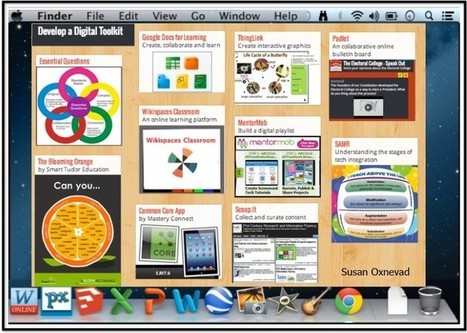
"The key to successful technology integration is the efficient use of digital tools tools that are appropriate for the task. Technology provides us all with the ability to develop our own toolkit of flexible resources for use when needed. Here is a toolkit I assembled that is filled with tools I frequently use for designing flexible student-driven learning experiences. Starting with a good toolkit is essential.
"Explore this interactive image to take a closer look at my collection of resources for use with these 10 terrific tools. Try them yourself and remember to start with something simple."
Oxenvad has curated wonderful collections of resources and presented them in highly creative ways. Educators are well advised to check her work frequently.
Susan Oxnevad has a really nice blog for teachers looking for speedy and smooth ways to integrate tech tools into their practice. She is both knowledgeable about the various web 2.0 tools that are freely available, AND thoughtful about providing strategies for their integration. Her work is very influenced by UDL, which I find powrful in this age when so much online curriuclum is essentially digital worksheet completion.
Project-Based Learning is a 21st century approach to learning that acts both as a curriculum and instruction tool, as well as a new way for students to think about school. Rather than strictly academic lessons and units, real-world problems can be solved, and students gain experience with long-term management of the learning process, and the possibility of self-direction.
Project-Based Learning allows naturally embedding of “school” in authentic environments whether those are digital or physical. It is a way of learning that is as much about the process as the project, allowing for the seamless integration of technology, and the inclusion of digital and social media to solve relevant personal and social challenges.
"Google+ for Schools is a short guide created by Eric Curts, a Google certified teacher. I have just finished reading it now and thought you might be interested in having a glance as well.This document walks you through a step by step process to learn everything you need in order to start leveraging the power of this social networking platform in schools."
"At The College Preparatory School (College Prep) in Oakland, California, student collaboration happens on a daily basis, from group-centered math assignments, to student-led discussions in English. Below are documents provided by College Prep English teacher Julie Anderson and Math teacher Betsy Thomas."
While there is no magic bullet of practice, program, or framework that automatically produces progressive and effective learning, what makes project-based learning exceptional is its flexibility.
"YouTube is a favourite past-time for many of us; the chance to lead your own TV station. From you, for you. And yet, for all the time we spend on this web site, we know very little about it. It’s not surprising, seeing the size of this site, that there are a lot of back doors. A lot of ways to do things you wouldn’t expect.
"If you like YouTube, as many of us do, it’ll pay off to look into these secrets. With this knowledge, it’s easier to get what you want, when you want it; to enjoy YouTube in its full glory."
"...students like Sam Blazes and Wilfried Hounyo, two winners in the 2012 National STEM Video Game Challenge, say they see their passion for computer programming is potentially leading them into a wide range of future professions.
“There’s no specific place you can plan on going because there are so many different things you can do with programming,” Blazes told an audience during a panel discussion at The Atlanticmagazine’s Technologies in Education Forum earlier this month. “You can do pretty much anything with it that you can program.”
"That’s because computer programming is a study of languages more than of technology or mechanics. And command of those languages allows programmers to control the functionality of anything that is driven by a computer.
"For example, Blazes and Hounyo, both now high school students in the Washington, D.C. area, each won acclaim for helping to design educational video games. But they both said they initiallyembraced programming through school robotics clubs, where students not only build robots, but work to write code that can control robots’ movements and reactions. And as Blazes pointed out, the same skills could also be used for a wide range of career purposes, such as constructing meteorological simulations, making financial predictions, or creating personalized online learning curricula."
"Back in January I published a guide to using backchannels in the classroom. Shortly after I published that guide Wallwisher changed its name to Padlet. This weekend I updated the guide to include the Padlet name as well as some updated directions. The guide includes ideas and directions for using Padlet, Socrative, and TodaysMeet. You can download the guide here and view it as embedded below."
"The last part of the short presentation about backchannels and informal assessment that I gave at the Texas Library Association's conference was spent on Socrative. Just as I did for Padlet and TodaysMeet, I shared three ways that Socrative can be used in school. Those ways are outlined below. "
"This afternoon at the Texas Library Association's annual conference I gave a short presentation about backchannels and informal assessment. Some of you may have seen the Padlet wall that I posted here for a few hours as a part of that presentation. During the presentation I mentioned three ways to use Padlet in schools. Those ways are described below."
Import•io enables you to extract data from the web simply
"Find an online source for your data, whether it's a single web page or a search engine within a site. Import•io doesn't discriminate; it works with any web source.
"When you have identified the data you want, you can begin to extract it. The first stage is to highlight the data that you want. You can do this by giving us a few examples and our algorithms will identify the rest. The next stage is to organise your data. This is as simple as creating columns to sort parts of the data into, much like you would do in a spreadsheet. Once you have done that we will extract the data into rows and columns."
"Last year we published a list of 60+ blended learning articles. With the extensive use of blended learning in classrooms and lots of shared success stories, we doubled that total. Following are 125 blogs by category. Point us to stories we missed."
A great list of blended learning resources. Just looking at the categories they have created provides a useful frame for those venturing into this space: Innovative Secondary Blends, Policy, Elementary, Tools, Competency-based Blends, Think about Space, etc.
To get content containing either thought or leadership enter:
To get content containing both thought and leadership enter:
To get content containing the expression thought leadership enter:
You can enter several keywords and you can refine them whenever you want. Our suggestion engine uses more signals but entering a few keywords here will rapidly give you great content to curate.


 Your new post is loading...























Looks promising and getting it from Susan Oxnevad (http://d97cooltools.blogspot.com/p/about-me.html) makes it even more convinsing!