


Webinars, Web events & Web casting made easy. Set up Webinars quickly and easily for up to 1,000 attendees. Try it free today!
Via Dr. Tom D'Amico (@TDOttawa)

 Your new post is loading...
 Scoop.it! Webinars, Web events & Web casting made easy. Set up Webinars quickly and easily for up to 1,000 attendees. Try it free today! Via Dr. Tom D'Amico (@TDOttawa) 
No comment yet.
Sign up to comment
Scoop.it!
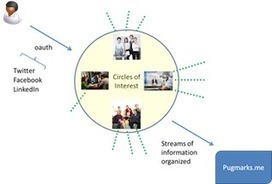
From Robin Good's insight: "Pugmarks is a Chrome web extension which allows you to get in-context references and complementary reading suggestions to any web page you are viewing.
Pugmarks leverages your network of Twitter, LinkedIN and an optional set of RSS feeds (which you must provide in OPML format) to filter and select the most relevant reading resources that it will suggest to you..."
Read full Robin Good's insight below.
Try it out now: http://pugmarks.me Robin Good's Insight: Pugmarks is a Chrome web extension which allows you to get in-context references and complementary reading suggestions to any web page you are viewing. Pugmarks leverages your network of Twitter, LinkedIN and an optional set of RSS feeds (which you must provide in OPML format) to filter and select the most relevant reading resources that it will suggest to you. When you are on any web page you can click the Pugmarks footprint icon on the Chrome browser extension bar and a strip of relevant information is displayed over the top (or bottom) of your screen. The extension can be paused and the user has the option to select whether to see the Pugmarks bar appear on top or on the bottom of his browser screen. When you open a new empty tab Pugmarks suggests relevant content items to check out. My comment: Useful to find additional, relevant content resources just-in-time, as you browse. Free to use. Try it out now: http://pugmarks.me/ Intro video: http://youtu.be/v4rGEu0hsGQ + more info: https://pugmarks.me/pugmarklet
Via Robin Good, Giuseppe Mauriello, juandoming

Robin Good's curator insight,
September 22, 2013 4:37 PM
Pugmarks is a Chrome web extension which allows you to get in-context references and complementary reading suggestions to any web page you are viewing. Pugmarks leverages your network of Twitter, LinkedIN and an optional set of RSS feeds (which you must provide in OPML format) to filter and select the most relevant reading resources that it will suggest to you. When you are on any web page you can click the Pugmarks footprint icon on the Chrome browser extension bar and a strip of relevant information is displayed over the top (or bottom) of your screen. The extension can be paused and the user has the option to select whether to see the Pugmarks bar appear on top or on the bottom of his browser screen. When you open a new empty tab Pugmarks suggests relevant content items to check out. My comment: Useful to find additional, relevant content resources just-in-time, as you browse. Free to use. Try it out now: http://pugmarks.me/ Intro video: http://youtu.be/v4rGEu0hsGQ + more info: https://pugmarks.me/pugmarklet
Scoop.it!

The Top 100 Tools for Learning 2013 list (released today, 30 September 2013) was compiled from the votes of over 500 learning professionals (from education and workplace learning) from 48 countries... Jim Lerman's insight Jane Hart's list is always interesting to read and learn about new apps from. Trends are also fascinating to watch. This is a lot of fun if you're in the right mindset. Via Timo Ilomäki

Sandra Carswell's curator insight,
October 2, 2013 4:01 PM
A great list to share with our teachers as we embark on Bring Your Own Device adventure in junior high.
Scoop.it!

Sometimes it is easy to disregard something that’s available and accessible for free. Google Drive fits that bill. It’s there connected like a relationship to whatever we do with Google. Via Ana Cristina Pratas
Scoop.it!

Helping students learn how to learn: That’s what most educators strive for, and that’s the goal of inquiry learning. That skill transfers to other academic subject areas and even to the workplace where employers have consistently said that they want creative, innovative and adaptive thinkers. Via Andrea Zeitz

Audrey's curator insight,
October 1, 2013 1:47 PM
Tools to help learning are everywhere. No educational instiitution should limit learning to reading, writing, arithmetic, and science in confined spaces. The arts, cooking, games, languages, debating, gardening, playing cards, flower arranging expands the brain as much as everything else we learn.
Education and learning do not belong to schools, colleges or universities. There are lot of spaces in city buildings housing banks where youngsters can spend part of their week learning to add and multiply real figures.
How about teaching youngsters about healthy nutrition by spending half terms on farms. Nutrition incorporates science, biology and expands the brain......................... 
Say Keng Lee's curator insight,
October 7, 2013 3:09 AM
That's right! Inquiry learning works best on longer, deep dive projects when students have to create something of their own out of what they’ve found.
Scoop.it!

From
dedwards

Stage 1 Sign up to twitter following persuasion/pestering by colleagues. Follow Stephen Fry, a famous sportsman/popstar and a news channel. Read a few tweets, don't understand what the fuss is abou... Via Felix Jacomino

Linda Lim's curator insight,
August 21, 2013 10:36 AM
twitter stages?? PLN stages....? which paradigm? 
Steve Miletto's curator insight,
August 30, 2013 4:30 PM
Great read...right on the money...insightful...
Scoop.it!
Scoop.it!

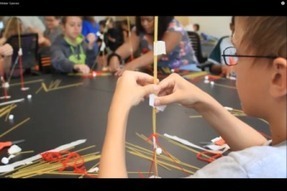
by Richard Wells "I’m assuming you’ve seen at least one of the eight Harry Potter films. In the films, one everyday magical experience is that photos are always moving as if they were video screens, even though they are ‘printed’ on paper. Newspaper photos act out the news event as film too, whilst you walk down the road reading. It seems so magical and yet, like so many things these days , there’s an app for that! "The Aurasma App (free) allows you to create what’s known as Augmented Reality (Real life with extra info added) "Here’s a great intro into the world of Augmented Reality."
Scoop.it!
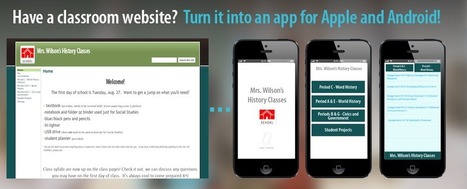
Comment by Vicki Davis "This cool website will use your website and turn it into an app on Apple and Android. This is cool and may be a nice answer for teachers who have a website but don't have a full LMS with an app."
Scoop.it!

"I love using Google presentations! I use Power Point or Keynote when I present, but the collaboration feature and ability to easily publish Google presentations to the web make it my presentation tool of choice when working with students. "That said, students need to know how to begin a Google presentation. I love creating video tutorials for my students walking them through new routines online. I record short screencasts of online procedures, especially if students are completing work outside of class. I use Quicktime on my Mac or Screencast-O-Matic on a PC to do my screen recordings, then I upload them to my YouTube channel!"
Scoop.it!

Kids can do amazing things when they are provided with an encouraging environment. They can transcend the barriers adults put around their thinking and come up with innovative ideas and create...
Scoop.it!

"To make sense of your data, you need stories. Great analysts tell great stories based on the results of their analyses. Stories, after all, make results user-friendly, more conducive to decision-making, and more persuasive. But that is not the only reason to use stories. Time and time again in our experience, stories have been more than an afterthought; they have actually enabled a more rigorous analysis of data in the first place. Stories allow the analysts to construct a set of hypotheses and provide a map for investigating the data."

Joseph McCaleb's curator insight,
September 29, 2013 7:29 AM
"In a world that’s flooded with data it becomes harder to use the data; there’s too much of it to make sense of unless you come to the data with an insight or hypothesis to test. Building stories provides a good framework in which to do that.:
Scoop.it!

description by The Scout Report "If you're a designer, small business professional, or other independent minded soul you might do well to take a look at the Logo Design site. Users can quickly make their own professional logo quite easily here and it doesn't require a design background to get started. Visitors can click on the Sample Logos area to see what others have done and there's also a Logo Design Tips area that offers a nice primer on the subject. This version is compatible with all operating systems"
|
Scoop.it!

How narrative intelligence can help everyone design solutions and generate useful data. Karen Dietz's insight: I really like how this author, Denise Withers, talks about how our narrative intelligence (our knowledge of story structure, and our story thinking ways) can be applied in business to solve problems, help decision making, and be used as another design process to improve innovation. Love it, love it. These points apply to any business or nonprofit. Withers shares anecdotes to make her points, and offers great advice. As an aside -- my friend and story colleague Madelyn Blair and I were just talking the other day about narrative intelligence and a book she'd like to write about it with another story colleague Denise Lee. Get busy Madelyn and Denise! We need that book :))

Michael Allenberg's curator insight,
October 4, 2013 7:34 PM
I am becoming a HUGE advocate of designing experiences in conjunction with contextual storytelling! 
malek's curator insight,
November 5, 2013 7:17 AM
story design process can offer an intuitive planning framework that makes it easier for us to wrangle and resolve complex challenges.
Scoop.it!
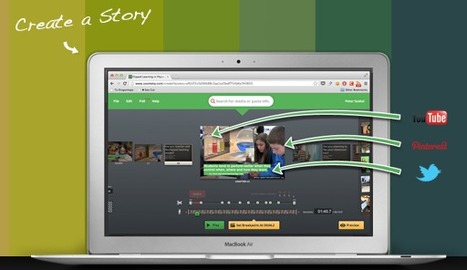
Metta helps turning stories into short movies out of pictures, videos, text and sounds that are already published on the web. Polls and quizzes can also be embedded anywhere inside a video presentation to get controlled responses from viewers. Baiba Svenca's insight: Metta (which is the former Soo Meta) is a versatile web application that lets you create presentations with text, images, videos and voice recordings, as well as create polls and stories. Metta is integrated in Edmodo. It is a great tool for flipped classrooms. Via Baiba Svenca, Robin Good

Ricard Garcia's curator insight,
November 12, 2013 2:47 AM
Some more info about Metta (old Soo Metta). More reasons to use it! 
Ingrid Cristina Florence Yamine's curator insight,
November 19, 2013 1:14 PM
very interesting and useful one! I'll preset on it next monday!
Scoop.it!

by Med Kharbach "Things to Think About provides 100 prompts to spark thinking for written responses and encourage conversations about ideas and issues for kids. Created by students and teachers in Michigan, it can be used in classrooms or with families by allowing children to explore the prompts and by using them to guide a discussion or lesson." Via Dr. Tom D'Amico (@TDOttawa)
Scoop.it!

posted by Karl Kapp "How do you get in the “creative mood”? As someone designing a learning game, gamification event, classroom instruction or eLearning…there are times when we need to put on our creativity hat and get going. But sometimes we are stuck." Via Ana Cristina Pratas
Scoop.it!

2013 REFORM SYMPOSIUM E-CONFERENCE (RSCON4) October 11 - 13, 2013
Scoop.it!

As a teacher, I relish the days of summer because I am given the opportunity to learn, rethink, design, and fine tune my teaching with the hope of being able to inspire students and teachers in the... Via Inge Wassmann, Felix Jacomino, Jim Lerman

meera vaidyanathan's curator insight,
November 10, 2013 12:16 PM
How can we incorporate the tools mentioned here into tenmarks? That is, create a toolkit, allow teachers to create their own content or curate/organize the the content to their liking, and add a exploratory aspect for student users....
Tonya D Harris's curator insight,
January 6, 2014 6:09 PM
Straight Forward, Simple Steps to Implement Technology - Under Tab EdTech
Scoop.it!

Paired with iPads the Structure Sensor creates 3D images of reality. Read this post by Brian Bennett on Smartphones. Via Sylvia Martinez

Christy P.Novack's curator insight,
September 23, 2013 9:20 PM
Slated to come out in February 2014. For use with a 3D printer.
Scoop.it!

by Terri Eichholz "According to the article on PR Web, “Educade provides a one-stop shop for K-12 teachers and parents seeking to understand how to effectively use 21st century teaching tools, such as apps and games, as well as low and no tech tools that focus on hands-on making.” It is a site that is in Beta right now, but looks very promising as a resource for educators who are looking for ways to engage learners with non-traditional methods. "As you can see from the screen shot, the lessons include all sorts of tools, includingaugmented reality ( I am definitely going to add some of these to my Flipboard magazine!), games, apps, etc… It also includes one that I hadn’t heard of, “Embodied Learning,” which I had to look up! (Here is a link to an explanation of “Embodied Learning” just in case you are wondering…)"
Scoop.it!

"Last year, I decided to experiment with Google’s 20% time during our literature circles unit. I love the idea of giving students time to pursue their passions and work on something that is meaningful to them. Some students chose to work on their own, while others banded together to focus on shared interests. It was fascinating to see the myriad projects that were born from this 20% time. Students composed and performed pieces of original music, they designed intricate board games, and others built worlds using Minecraft and used their virtual worlds as inspiration for creative writing. "This year, I’m bringing that 20% philosophy to student blogging. I’ve always wanted students to blog, but organizing that many blogs felt overwhelming. I also worried about student buy in. What would get them excited to design and write a blog? This is where the 20% time philosophy comes into play. "I asked myself, “Why do I want my students to blog? What do I hope they would gain from the experience?” I identified the following as goals for their blogging:
Scoop.it!

by Kellie Arnold "One of the main tools I use is a combination of Edmodo and ClassCharts. I love that Edmodo has apps like ClassCharts built in so it takes less of my time to input data. Edmodo allows my students to self-enroll and join my class. I have them include a picture so my ClassCharts is updated with a student picture. ClassCharts is a great program that combines the effectiveness of a data rich seating chart with a motivating points behavior management plan! I personally use it to keep track of my ELLs, Lexile scores, etc. Plus since the students have iPads, they can keep track of their points from which I base a reward system (weekly, monthly, etc.). Plus it has a randomization option that I find quite useful in class discussions. I do appoint a different student each week to be in charge of the "ClassCharts iPad" so I am free to use my other apps on my iPad while teaching." Via Jon Samuelson
Scoop.it!

You can start organizing your crazy Twitter stream by figuring out how to create a Twitter List. It's a big time and stress saver! Via Sheila Fredericks

LundTechIntegration's curator insight,
September 29, 2013 11:02 AM
Another great tool for connected educators. 
Donna Meehan's curator insight,
September 29, 2013 4:48 PM
I am a big fan of Twitter and learned a lot about Twitter from Edudemic, thank you:)
Scoop.it!
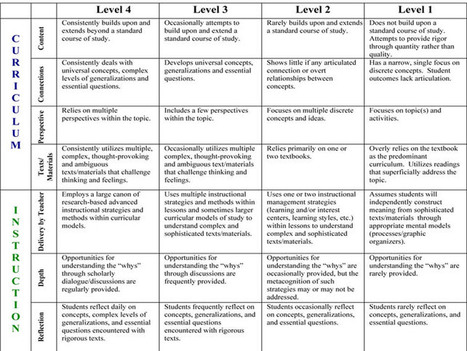
Why Rigor Matters "Rigor matters because it imposes cognitive load on students, forcing them to confront misconceptions, reconsider positions, separate the implicit from the explicit, and other critical thinking practices that distinguish shaky familiarity from true understanding. "Simply put, if students can’t consistently negotiate rigorous tasks, either understanding or thinking habits should be more closely examined. But if work is beyond their Zone of Proximal Development, students are only being setup for disengagement, frustration, and ultimately failure. 10 Strategies To Add Rigor To Any Lesson, Unit, or Assessment "Several common classroom tasks are inherently rigorous, including reading idea-dense literature, taking notes, and using the writing process itself, but these are rarely engaging, and don’t always fit with a given academic standard or task. But the following 10 strategies can be used to add rigor to almost anything." Jim Lerman's insight This post dispels 5 common myths about rigor and then demonstrates how to add it to just about any learning situation. Contrary to what I expected, this is not about adding quantity or making things harder, it's about getting learners to think, critically and clearly, and to become metacognitive.
|






