Your new post is loading...

|
Scooped by
Jim Lerman
November 4, 2013 2:47 PM
|
by Caitlin Tucker
"Last Thursday, my students engaged in a Listen Edition Blast. I love public radio and was super excited to try it out. “Blasts” are Twitter-like engagements limited to 140 characters. They invite students to participate in a larger conversation with other StudySync students to discuss real world issues or topics.
"I selected an public radio Listen Edition titled “Creep. Crawly. Dinner?” This Blast presented the question, “What do you think of insects as the next food craze?” which I thought would be a light hearted complement to our Lord of the Flies unit.
"My students began their Blast assignment, and my room erupted in the sound of crickets. I had 32 students with a hodgepodge of devices listening to a public radio clip about eating insects. Their eyes lit up when they heard the sounds and their noses wrinkled as they imagined dining on creepy crawly insects! It was fun to just observe their reactions. They respond instantly to media!"
Jim Lerman's insight: Tucker comes up with so many creative ideas. It must be great to be a student in her classes.
|
|
Scooped by
Jim Lerman
November 3, 2013 9:13 PM
|
by Sandy Kendall
"In case you are ever in the position of trying to describe Twitter for personalized professional development, here are my favorite videos for introducing Twitter to teachers. I find that after sharing videos like these, I am able to better move the conversation forward and share tips for finding and sharing quality content on Twitter. I hope these videos are helpful to you as well!"
|
|
Rescooped by
Jim Lerman
from Technology in K-12 Education
November 3, 2013 5:06 PM
|
"Being creative means setting free your imaginative powers to experiment with new worlds and experiences. The art of comic creation is one of the best representation of creativity at work.
Via seilts
|
|
Scooped by
Jim Lerman
November 3, 2013 12:28 PM
|
by Terry Heick
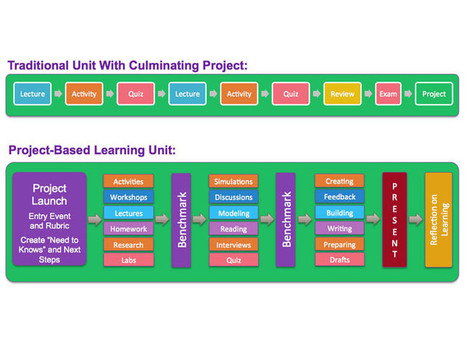
"We’ve clarified the difference between projects and project-based learning before. Projects are about the product, while project-based learning is about the process.
"Projects are generally teacher-directed, universal, and tangent to the learning, while project-based learning is student-centered, personal, and the learning pathway itself. Put simply, it is an approach to learning rather than something to complete.
"Paul Curtis recently shared this excellent visual on twitter that takes a different approach to clarifying the difference, looking at it from the perspective of curriculum planning and instructional design. A non-PBL unit will see a linear series of often tightly-scripted activities (whether lecture or not) that will ultimately culminate in a project. In PBL, there is constant checking, revising, feedback, and reflection on quality, research, literacy efforts, and quick assessment results."
|
|
Scooped by
Jim Lerman
November 3, 2013 2:20 AM
|
Imgur is home to the web's most popular image content, curated in real time by a dedicated community through commenting, voting and sharing.
|
|
Scooped by
Jim Lerman
November 3, 2013 12:47 AM
|
by Jersey Jazzman
New Jersey's governor, Chris Christie, has a long history of teacher bashing - not just teachers union bashing, but teacher bashing. Even when he's clearly in the lead, he can't help himself: he has to take a swipe at teachers whenever he can. It's almost pathological: even when he's up by a sizable margin, Chris Christie just can't turn down a chance to bash a teacher who gets too uppity - as he proved today:
- See more at: http://jerseyjazzman.blogspot.com/2013/11/exclusive-govchristie-to-teacher-i-am.html#sthash.Vyfnwa4M.dpuf
|
|
Rescooped by
Jim Lerman
from EdTechReview
November 2, 2013 4:19 PM
|
EdTechReview™ (ETR) is a community for educators and learners where they can find useful news, trends & insights, research, product reviews, events, training and consultation on education technology to improve teaching, learning and hence education.
Via EdTechReview (@etr_in)
|
|
Rescooped by
Jim Lerman
from iPad learning
November 2, 2013 4:13 PM
|
“ Great presenters understand how people think, learn, and react. In this video Dr. Weinschenk shares 5 Things from her book, "100 Things Every Presenter Needs To…”
Via Pippa Davies @PippaDavies , Jenny Smith
|
|
Scooped by
Jim Lerman
November 1, 2013 11:49 PM
|
"Gmail and Docs offer wide language support, however in some cases using the keyboard is less than ideal. Whether you’re a student trying to include a foreign phrase in your paper or an international consultant hoping to begin your message with a friendly local greeting, now you’ll be able to use your own handwriting to input words directly into Gmail and Google Docs with your mouse or trackpad. To try it out, enable input tools in Gmail orDocs and select the handwriting input (represented by a pencil icon) of the language you want to use. "You can write single or even multiple characters at once in the panel to see them show up in your message or document. Currently, handwriting input is available in Google Docs for over 20 languages and in Gmail for over 50 languages, including Chinese, Japanese, Hindi and Russian. "
|
|
Scooped by
Jim Lerman
November 1, 2013 11:34 PM
|
by Jennifer Krzystowczyk
"While it is still early in our school year, I can't wait to watch all of these things happen as I know they will. And I will be ready to listen, to question and to guide. It's an exciting time here in Bellevue!
"The next time you are in a discussion about iPads in the classroom, ask yourself and your team two questions: - How do you see iPads changing the way teachers teach?
- How can you ensure that iPads will be implemented in a way that will guarantee increased engagement and improve instruction?"
|
|
Scooped by
Jim Lerman
November 1, 2013 5:01 PM
|
Presented by Marc Seigel, Chemistry Teacher, Middletown High School, Middletown, NJ This three-part webinar series shows teachers how to use flipped learning techniques to meet Common Core State Standards across-the-curriculum. Hear from experienced educators as they share specific strategies and tips on how they are using flipped learning to meet the new standards.
Educators are implementing the Common Core State Standards in English language arts and math classrooms throughout the nation, along with the new Next Generation Science Standards. Flipped learning can be used by any teacher, in any subject, at any grade level, to create a more student-centered, differentiated learning experience. Flipped learning supports inquiry-based learning and teaches media and digital literacy.
|
|
Scooped by
Jim Lerman
November 1, 2013 4:56 PM
|
"Zany math teachers Steve Kelly and Zach Cresswell create possibly the funniest, yet informative, videos for their students. With costumes, props and nicknames, the duo works collaboratively at the Mt. Pleasant High School in Mt. Pleasant, MI. Wednesday, December 11 at 4:00 pm ET/1:00 PM Free"
|
|
|
Scooped by
Jim Lerman
November 3, 2013 9:16 PM
|
by Sandy Kendall
"Through a teacher and an educational technologist in my school district, I've recently discovered the Tellagami app for creating short animated videos. The video below is only the third Gami (the app maker's term for a finished product) which I have created. I was able to learn the app very quickly this weekend in preparation for introducing it to secondary fine arts teachers from my school district this morning. I won't take time in this post to teach you how to use Tellagami, because the app gives you a very nice tutorial the first time you launch it. There are also good instructions included on the Tellagami website. "
|
|
Scooped by
Jim Lerman
November 3, 2013 9:03 PM
|
by Troy Hicks
"As the inputs continue to multiply, how can we help students find, evaluate, and synthesize information from a variety of sources? More importantly, how can we help them craft digital writing in effective ways, utilizing the information that they have found to develop multimedia texts? Bring your favorite device, because in this interactive keynote we will explore a variety of web-based tools and mobile applications to help students mix together a variety of sources and amplify their digital voices."
|
|
Rescooped by
Jim Lerman
from Play Serious Games
November 3, 2013 5:05 PM
|
The technical frame behind airECONsim made it possible to create a second site very fast, offering shorter games for teaching economics. These games are free, ready to play and there is no registration. Teachers simply choose the game they want to run, enter the number of players and the game can start
Via AvatarGeneration
|
|
Scooped by
Jim Lerman
November 3, 2013 2:32 AM
|
"The hero's journey is an ancient story pattern that you can find in texts from thousands of years ago or in newly released Hollywood blockbusters. This interactive tool will provide background on the hero's journey and give you a chance to explore several of the journey's key elements. Use the tool to record examples from a hero's journey you've read or viewed, or to plan out a hero's journey of your own."
|
|
Scooped by
Jim Lerman
November 3, 2013 2:16 AM
|
by Larry Ferlazzo
"EDpuzzle is a new innovative site that lets you take just about any video off the web, edit it down to the portions you want, add audio notes and questions for students, and create virtual classrooms where you can monitor individual student work.
"For free."
|
|
Scooped by
Jim Lerman
November 2, 2013 4:25 PM
|
by Saomya Saxena
"For the flipped model to have the biggest impact possible, it’s essential for teachers to put careful thought into how they spend the class time. The activities that take place after the learning has been flipped should link deeply with the content of the videos, audio, etc., that the students have watched before class – and success in these classroom activities should build upon, and reinforce the learning that students have done at home."
1. Project based learning 2. Collaborative group projects 3. Practical tasks 4. Student-centered content 5. Personalized learning 6. Reflecting on learning 7. Teacher circulation
|
|
Rescooped by
Jim Lerman
from Digital Textbooks K12
November 2, 2013 4:14 PM
|
“ You've written and designed your ebook - now to share it with the world. Daniel Kemp of Red Jumper Studio walks you through the process from start to finish.”
Via Jon Samuelson, Jenny Smith
|
|
Rescooped by
Jim Lerman
from Edu-Connect
November 2, 2013 4:13 PM
|
T-Charts Pros and Cons is a free iPad app designed to help you organize your thoughts about a question or dilemma. This simple app provides a clean layout in which you can write your pros and cons ...
Via Dan Ferreira
|
|
Rescooped by
Jim Lerman
from Moodle and Web 2.0
November 2, 2013 12:08 PM
|
|
|
Scooped by
Jim Lerman
November 1, 2013 11:36 PM
|
by Richard Byrne
"Common Core, love it or hate it, if you're teaching in the United States there is a good chance that you'll have to work with it. If that describes you, take a look at these five tools that can help you create lessons aligned to Common Core standards."
|
|
Scooped by
Jim Lerman
November 1, 2013 10:24 PM
|
by Med Kharbach
"BYOD and/or BYOT are (a) trend that is making the news in different sectors including education. Bring Your Own Device/Technology is an initiative meant to increase students learning opportunities through technology. Given the importance of technology in today's learning and knowing that school districts do not always have the financial means to enable them to provide schools with the needed technology, some schools now are trying the BYOD strategy to compensate for this shortage of technology resources.
"However, BYOD is not only about students bringing their own technology to school, it is rather a structured process of teaching and learning through the mediation of digital devices. There are rules and conventions students and teachers have to pay heed to in order to make the BYOD experience successful. I have already featured here in this blog a plethora of resources on what teachers need to know about BYOD and today I am sharing with you some excellent videos that would help you better understand this concept."
|
|
Scooped by
Jim Lerman
November 1, 2013 4:59 PM
|
Engaging Families in Flipped Learning on Wednesday, November 6 at 4:00 pm ET/1:00 pm PT. Free with Steve Kelly and other VIPs at the St. Louis High School (MI). Sponsored by Schoolwires.
|