


Ever wondered how to make one of those fun QR codes you see in stores and online? It’s actually not that tough!
Via John Evans

 Your new post is loading...
 Scoop.it! Ever wondered how to make one of those fun QR codes you see in stores and online? It’s actually not that tough! Via John Evans 
Scoop.it!

"This website was designed to help all classroom teachers find apps and resources for using an iPad in their classrooms." Via John Evans

Lori Wilk's curator insight,
December 6, 2013 10:56 PM
The proliferation of new devices is leading to the explosion of apps to use on them#apps#mobile 
Reg Corney's curator insight,
December 8, 2013 3:51 PM
Have a look at this website. There are some good ideas for apps.
Scoop.it!

Code.org is a non-profit dedicated to growing computer science education by making it available in more schools, and increasing participation by women and underrepresented students of color. Our vision is that every student in every school should have the opportunity to learn computer programming. We believe computer science should be part of the core curriculum in education, alongside other science, technology, engineering, and mathematics (STEM) courses, such as biology, physics, chemistry and algebra. Via Frédéric DEBAILLEUL
Scoop.it!
Scoop.it!

Hackety Hack will teach you the absolute basics of programming from the ground up. No previous programming experience is needed! With Hackety Hack, you'll learn the Ruby programming language. Ruby is used for all kinds of programs, including desktop applications and websites.
Via Frédéric DEBAILLEUL
Scoop.it!

Teachers and students aren't limited to what's in the classroom as Google offers new tools to bridge them to people and resources elsewhere. Via Dr. Tom D'Amico (@TDOttawa) , Becky Roehrs
Scoop.it!

For the past couple of weeks, I’ve spent some time addressing my earlier commitments to flipping at least some portion of my Language Arts classes. (You can learn about my ongoing saga at “4 Ways Flipping Forces Fundamental Change” and at “Why I Haven’t Flipped…Yet”). Reading FlipYour Classroom by Jonathan Bergmann and Aaron Sams provided practical advice and a justification for flipping, Learning about the Stanford studies that suggest better results from flipping your flipping (that is, doing hands-on work in the classroom first, reinforced by flipped lessons at night) But, ultimately, what I needed to do was to dive in and try out some tools with my kids and my curriculum in mind. The unexpected result: I’ve had to acknowledge something I hadn’t really thought about — I am a video-phobe. Via Kim Flintoff, Jarrod Johnson, Kay Lehmann

Ulrike Grabe's curator insight,
December 3, 2013 7:56 AM
from the text: "Bergmann and Sams are quick to point out that simply transferring a boring lecture to video will not transform anyone’s teaching in a way that dramatically benefits students."
so true
Scoop.it!
Scoop.it!

In the spirit of Thanksgiving we decided we would share a short list of tech tools we are thankful for. Most who have met us know we like to discuss only a few apps or tools that we know make a difference. In the spirit of Thanksgiving we decided we would share a short list of tech tools we are thankful for. Most who have met us know we like to discuss only a few apps or tools that we know make a difference. Via Jamie Forshey
Scoop.it!
Scoop.it!

Louise Robinson-Lay's curator insight,
December 2, 2013 12:07 AM
some great ideas here to use when students are proofreading their writing.
Scoop.it!

Kids' Things to Think About provides 100 prompts to spark thinking for written responses and encourage conversations about ideas and issues for kids. Created by students and teachers in Michigan,... Via Dean Mantz

Dean Mantz's curator insight,
November 26, 2013 3:45 PM
There are not too many better projects or app options out there than those created by students for the benefit of other students. Checkout the student made app done in partnership with Jackson Area Career Center and county students.
The app provides writing prompts, 12 categories of questions, and more.
Scoop.it!

This is a round-up of the ways that you can add interactive elements to your videos. Via Becky Roehrs
|
Scoop.it!

Exposure enables photographers to easily tell vibrant stories with their photos. Assemble a more complete narrative than you could with a feed or lonely photo on a permalink page. Via Ana Cristina Pratas

Ana Cristina Pratas's curator insight,
December 8, 2013 5:00 AM
Free Plan - up to 3 published posts
Monthly Plan - unlimited posts & premium features
Yearly Plan - same as above but billed once yearly
Scoop.it!

Denver Leigh Watson, M.Ed, LDTC's curator insight,
December 16, 2013 7:48 AM
Nice! #EdTechChat #EdChat 
Susan's curator insight,
June 3, 2015 8:16 AM
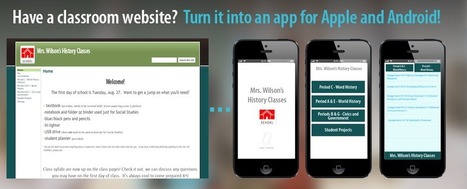
Easier than you think and handy to have your school's website turned into an app for easy access! #edtech
Scoop.it!

"The use of iPads in the classroom brings a multitude of advantages. Here are 5 of them:" Via John Evans
Scoop.it!

You'll find high-quality web design training, covering HTML, CSS, JavaScript and more, on these trusted and authoritative sites.
Scoop.it!

From
briqs

Build responsive websites in no time. With Bootstrap and multi-page support. From prototypes to clean, production-ready code. Available for free from the Mac App Store. Via Nicolas Deloyer, michel verstrepen
Scoop.it!

One of the issues I talked about in Teachers' Guide to Digital Footprint is the use of students' pictures while creating profiles in social networking ( or any other ) platform. There are several alternatives students can use and one of which is to try creating and uploading avatars. These web tools are ideal for creating avatars. There is also the possibility of creating a cartoon out of one's own pictures. Creating a cartoon out of your real picture is a good way to disguise your real identity while in the same time preserving your own feel and touch. The web tools below are really helpful for cartonizing your pictures. Try them out with your students a. ( Please note that there are several other websites to create cartoons but I personally do not recommend them for students and that's why I limited this list to only 5 tools ) Click headline to read more and access hot links to tools-- Via Chuck Sherwood, Former Senior Associate, TeleDimensions, Inc, Dean J. Fusto, John Purificati
Scoop.it!

Lydia Gracia's curator insight,
November 30, 2013 3:28 AM
Zeek it est un outil dé curation de vidéos youtube. Grâce a sa bookmarklet vous pourrez créer des collections de vidéos prêtes a être insérées dans un post ou être utilisées sur d'autos supports. 
Dan Aldridge's curator insight,
November 30, 2013 12:36 PM
This is kind of like a ScoopIt for video curation on YouTube. More at www.Zeeik.com. Thanks for the heads from Robin Good! 
Prof. Hankell's curator insight,
December 2, 2013 8:33 AM
Robin Good's insight:
"Zeeik It" is a new bookmarklet from Zeeik, a video curation app, that allows you to easily collect and save into discrete collections all of the YouTube videos found on Twitter or on most any web page.
Zeeik video collections are a good way to create valuable content that can be embedded in any article or guide and that can be served according to multiple categories and criteria as you can see from this specific example:http://zeeik.com/zeeik/-21828800 ; (click "Cool Colors" or "Warm Colors").
You can find the new Zeeik It bookmarklet on the top right of the Zeeik home page here: http://zeeik.com/ ;
Free to use.
My previous review of Zeeik: http://sco.lt/7FPJXF ;
More info: http://zeeik.com/ ;
Scoop.it!

With iPads, once we begin thinking beyond the confines of a page, anything is possible. Consider the video below created several years ago by two of my students. First they wrote plot summaries. Then they wrote character sketches. From there, they crafted paragraphs about theme, tying the visual and auditory elements of their videos back to the books. Finally, they created storyboards and bibliographies before producing and publishing their final product. Via Nik Peachey

Training in Business's curator insight,
December 3, 2013 12:56 PM
Redefining the Writing Process with iPads
#elearning http://goo.gl/BRqvr0
Scoop.it!

We’ve introduced you to a variety of quality image sites where you can find Creative Commons images, but the Creative Commons license goes far beyond just images. Different types of content are licensed online using Creative Commons — videos, music, and even blog content. You’ll find plenty of it online to share, remix and use commercially. When it comes to Creative Commons music — there are certainly no shortage of websites with audio you can use for any occasion. Via Elizabeth E Charles
Scoop.it!

Scoop.it!
Susan's curator insight,
December 2, 2013 2:39 AM
I have often used this site for finding tools for my classes. There are some good links and they are quite well categorized in order to find tools for specific tasks. I don't like the esthetics of the page but the info is worth a look. 
Gary Harwell's curator insight,
December 3, 2013 12:04 AM
A great site for finding tools to use in the classroom.
Gary Harwell's curator insight,
December 10, 2013 11:35 PM
Many engaged teachers are using these "Cool Tools" for their classes.
Scoop.it!
|












My students love doing scavenger hunts, but I've never tried one like this before. This could be really cool for reviews.
Thank you John Evans for sharing this infographic on creating QR code scavenger hunts via iPads on your scoop.it/t/ipads-in-education page.