The iPad continues to give new ways for individuals and businesses to communicate and collaborate. A new crop of apps this year have continued to push the evolution of connecting with other employees and colleagues.
Via Dr. Tom D'Amico (@TDOttawa)

 Your new post is loading...
 Scoop.it! The iPad continues to give new ways for individuals and businesses to communicate and collaborate. A new crop of apps this year have continued to push the evolution of connecting with other employees and colleagues. Via Dr. Tom D'Amico (@TDOttawa) 
No comment yet.
Sign up to comment
Scoop.it!

“ Editor’s Note: This paper is released in conjunction with the event Mobile Learning: Transforming Education and Engaging Students and Teachers hosted by the Center for Technology Innovation at Brookings on September 17, 2013. ADDITIONAL RESOURCES PAST EVENT Mobile Learning: Transforming Education and Engaging Students and Teachers September 17, 2013 Education in the United States Education is at a critical juncture in the United States. It is vital for workforce development and economic prosperity, yet is in need of serious reform. American education was designed for agrarian and industrial eras, and does not provide all the skills needed for a 21st century economy.[i] This creates major problems for young people about to enter the laborforce. Mobile learning represents a way to address a number of our educational problems. Devices such as smart phones and tablets enable innovation and help students, teachers, and parents gain access to digital content and personalized assessment vital for a post-industrial world. Mobile devices, used in conjunction with near universal 4G/3G wireless connectivity, are essential tools to improve learning for students. As noted by Irwin Jacobs, the founding chairman of Qualcomm, Inc., “always on, always connected mobile devices in the hands of students has the potential to dramatically improve educational outcomes.”[ii] ”This paper, part of our Mobile Economy Project, looks at ways that mobile devices with cellular connectivity improve learning and engage students and teachers. Wireless technology is a way to provide new content and facilitate information access wherever a student is located. It enables, empowers, and engages learning in ways that transform the learning environment for students inside and outside of school. Read more Via Jenny Smith
Scoop.it!

Agenda Overview of what iPads are being used for… ("Using iPads to Support Inclusive Learning" http://t.co/uig7Eyfah5 Good list of resources. Via AgileBelma
Scoop.it!
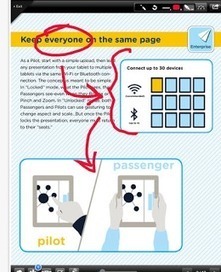
As is the case in every last two weeks of December, Educational Technology and Mobile Learning posts a series of articles featuring the best articles and apps that have been reviewed and shared in... Via Tom Perran

Tom Perran's curator insight,
December 17, 2013 6:38 AM
10 iPad presentation you may not be using (and how to use them)!
Scoop.it!

Pixiclip's web-based whiteboard makes it easy to create and share sketches online Via Kathleen Cercone
Scoop.it!

Massimiliano Cammuso's curator insight,
December 19, 2013 3:35 AM
I've find this tool via @Robin Good, it is very powerful. It is a sort of Skype but you can have channels and you can search in simply way . Channels created has the integration with the services like Twitter, Dropbox, Google Drive and more. Slack seems to be one of the best solution for online collaboration with less mail less kilometers Skype chat and always in sync I started using this tool with my team and seems they like it a lot! Let me know if you start to use this tool and if you like it! 
paul babicki's curator insight,
February 5, 2014 7:18 PM
http://netiquetteiq.blogspot.com #email #netiquette iq
Tom Perran's curator insight,
December 16, 2013 6:09 AM
Sets up in seconds, no login or registration required! Simply launch a classroom enter your information and share!
Scoop.it!
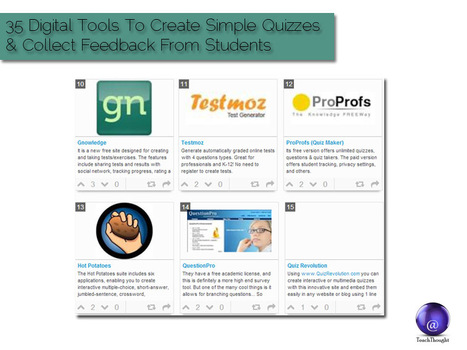
35 Digital Tools To Create Simple Quizzes And Collect Feedback From Students If there is one thing teachers lack, it’s time. And while using technology to automate learning has been frowned upon by many, using... Via Timo Ilomäki

Alfredo Corell's curator insight,
December 13, 2013 2:52 PM
A good compilation of on-line tools for assessments 
Melissa Marshall's curator insight,
December 20, 2013 7:12 AM
Creating a quick quiz is a good way to get quick feedback on students and to help adjust your teaching. Here are some free tools that may help make this effective on an iPad.
Scoop.it!

"One of the components of Close Reading is annotation, in which the students read short, complex text adding annotations as they read. Students might circle words or phrases that are powerful, underline those that are confusing, indicate big events or when a character shows strong emotion, and write questions or thoughts. They use metacognitive markers or “Thinking Notes” as a means to move beyond just highlighting..." Via Beth Dichter

Beth Dichter's curator insight,
December 10, 2013 9:36 PM
Close Reading covers a wide range of materials: poems, news articles, short stories, plays, photos, paintings, videos and more. This post provides five tools to help students annotate a wide variety of media. They are listed below, More detailed explanations are found in the post. * Doctopus - this program is great if you use Google Apps (and therefore Google Drive). * Diigo is a great tool for annoting text and images found online. Drawing tools are also available. * Markup does not require an account. "It provides tools for drawing, highlighting, adding text, and sharing via a link. It does require the installation of a bookmarklet or the Chrome extension." * PDFzen is a free tool that works with Google Drive. It will open the following types of files: pdf, doc, docx, xls, xlx, odt and rtf. * VideoAnt allows you to annotate videos hosted on YouTube as well as HTML5 and flash videos and works in a number of browsers. As we begin to prepare our students for new testing the ability to annotate is critical. These tools provide a variety of options that you may want to explore and use in your classroom.
Scoop.it!

"Not long ago, a teacher had nothing more to rely on than knowledge, textbooks and a few markers. Technology has slowly changed that in the past few years, with the Internet, multimedia programs and computers increasing their presence in the classroom. But with the rise of tablet tech, the student-teacher experience is facing a subtle revolution: joining the trend makes students feel as if they’re part of an environment that’s desirable because people speak their native languages. As the iPad becomes a teaching tool, classrooms are transformed into contemporary settings." Via John Evans
Scoop.it!

Here are some great new ideas to use your iPad in your classroom, K-12 and beyond! The iPad, as we all know, is a great tool for education. We l are hoping that you can use at least a few of these ne... Via Dr. Joan McGettigan, Jenny Smith
|
Scoop.it!

I had the pleasure of being at SLATE (technology conference here in Wisconsin) the last two days, and beside the wonderful people I got to connect and re-connect with, there was also one session th... Via Cornélia Castro
Scoop.it!

“ Creating digital learning content has never been easier. In these pages you'll find eleven tools that make it fun to bring together different types of digital media - text, images, audio, video - to "mash up" your own online learning materials.” Via Baiba Svenca, Tom Perran
Tom Perran's curator insight,
December 23, 2013 5:56 AM
lots of new tools here! Excellent way to create materials for the #flipped classroom!

Tonya D Harris's curator insight,
January 13, 2014 8:11 PM
This shows a video of how you can use video, audio, and content with different apps.
Scoop.it!

Share audio content online and completely free and post it anywhere on the internet
Scoop.it!

A group of instructional coaches and tech specialists from IU12 in South-Central Pennsylvania have been collaboratively posting apps using Pinterest. Check them out! Via Jamie Forshey
Scoop.it!
Massimiliano Cammuso's curator insight,
December 19, 2013 3:35 AM
I've find this tool via @Robin Good, it is very powerful. It is a sort of Skype but you can have channels and you can search in simply way . Channels created has the integration with the services like Twitter, Dropbox, Google Drive and more. Slack seems to be one of the best solution for online collaboration with less mail less kilometers Skype chat and always in sync I started using this tool with my team and seems they like it a lot! Let me know if you start to use this tool and if you like it!
paul babicki's curator insight,
February 5, 2014 7:18 PM
http://netiquetteiq.blogspot.com #email #netiquette iq
Scoop.it!

Apple has got a jump on its 12 Days of Gifts app by offering a freebie 11 days early. Launch the app to find a free mini album from Lorde featuring her Via Jon Samuelson
Scoop.it!

Did you know that computer science is a top paying college degree and computer programming jobs are growing at two times the national average? Yep, it has been projected that by the year 2020 there will 1,000,000 more jobs than there are students to fill them! Via Jamie Forshey
Scoop.it!
Scoop.it!
Scoop.it!
|

|
Rescooped by
Bhushan Thapliyal
from Rapid eLearning
December 8, 2013 5:42 AM
|
Scoop.it!

Teachers create grids of short discussion-style questions that students respond to through recorded videos. Flipgrid boosts community and social presence in face-to-face, hybrid, and online classrooms.