


© 2010 fRandi-Shooters, Flickr | CC-BY | via Wylio
The Edublogger has just published a very useful post: Our 3 Favorite Free Online Image Editors For Education.
Via Elke Höfler, Juergen Wagner, michel verstrepen

 Your new post is loading...
 Scoop.it! © 2010 fRandi-Shooters, Flickr | CC-BY | via Wylio Via Elke Höfler, Juergen Wagner, michel verstrepen 
No comment yet.
Sign up to comment
Scoop.it!

Instructional designers, trainers and educators have long realized the true value of animated videos as one of the main techniques that should be used to increase the audience’s engagement and retention during an eLearning course. Would you be interested in a list of the top animated video software in the eLearning market? Via Marcel Lebrun
Scoop.it!

Audio is being used in clever ways to fit into the content plans of some of the top forward-thinking websites and blogs. Via Kamal Bennani, Vincent Martinet
Scoop.it!

The feature-rich e-reading app Mantano has just received its biggest update yet. Released on the last day of last year, Mantano has just been updated to version 2.0 with support for a new e-book format and other enhancements.
Scoop.it!

"If you don’t have a YouTube channel as an education provider, there’s a good chance you’re behind the times. Nearly every major educational institution in the world now hosts its own collection of videos featuring news, lectures, tutorials, and open courseware. Just as many individuals have their own channel, curating their expertise in a series of broadcasted lessons.
These channels allow instructors to share information and blend media in unprecedented and exciting new ways. From teaching Mandarin Chinese to busting myths about Astronomy, the educational possibilities are virtually endless pun intended!
Because we can now sift through thousands of resources while navigating a single repository, the potential for inspiration and growth in the field of education has reached a new height.
Here are the top channels worth following based on views, subscriptions, and quality of content:" Via John Evans

Mirta Liliana Filgueira's curator insight,
July 15, 2014 6:58 AM
Canales De You Tube para educadores
Scoop.it!

July, 2014 Instead of heading to the library to bury your face in the stacks, use these search engines to find out which libraries have the books you need, and maybe even find them available... Via AgileBelma
Scoop.it!
Bhushan Thapliyal's insight:
Great video !
Scoop.it!

So, you need an image for your blog? We’ve spent some time categorizing our favorite sources for free images and organizing them in such a way as to help you find what you’re looking for. Here are ... Via Beth Dichter

Beth Dichter's curator insight,
July 10, 2014 3:39 PM
Finding great images that are free can take time. This post provides an amazing number of resources that will help you with this task. They have also included five pieces of information for each site: * Subject - does it focus in a particular area or not * Description * High resolution - many images available today may be of low resolution * License - Creative Commons, Public Domain, or specific attributions that may be required * Safety - is this a site that is appropriate for students or may there be cause for concern The post then splits the list into a variety of areas: * Large Crowdsourced Collections * U.S. Government Collections * Unique Collections, including - Getty - Pixabay - and approximately 20 more sites * Specific Subjects * Clip Art You will find many great images as you explore these collections.
Scoop.it!

Training in Business's curator insight,
July 11, 2014 5:15 AM
Excellent Web Tools for The 21st Century Learner
Scoop.it!

Ludmila Smirnova's curator insight,
July 11, 2014 7:19 AM
Free web tools for engaging students in creativity! 
Ness Crouch's curator insight,
April 4, 2015 10:08 PM
Great list of tools. Some I need to go back and have a new look at.
Scoop.it!
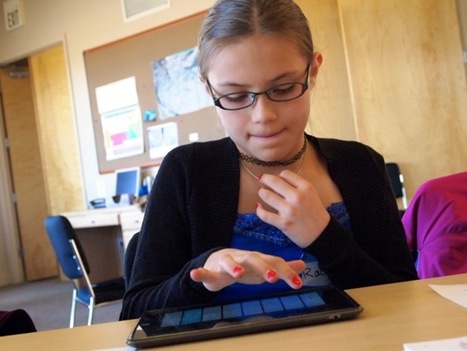
The researchers found that "personal 'ownership' of the device is seen as the single most important factor for successful use of this technology." They found ownership is fundamental for increasing students levels of motivation, interest, and engagement. Personal ownership promotes greater student autonomy and self-efficacy. Best of all, ownership encourages students to take more responsibility for their learning. Via John Evans, Ilkka Olander, Jenny Smith, Juergen Wagner
Scoop.it!

Scoop.it!
This session takes you beyond "cool apps" for the iPad to how to best use the mobile device in your classroom for authentic learning. Participants will be imme… Via Dr. Tom D'Amico (@TDOttawa) , Juergen Wagner
|
Scoop.it!

"Teachers interested in trying the flipped classroom model often ask me for recommendations for video creation tools. They also often ask me for ideas on sharing videos without using YouTube. One answer to both of these questions is to useeduClipper. Via John Evans, Jamie Forshey, GwynethJones, kathy pryor, Juergen Wagner

Juan Fernández's curator insight,
July 17, 2014 5:46 AM
A couple of good tols to create instructional videos,. Especially interesting the first one , as you can create videos with your iPad.
Ness Crouch's curator insight,
April 5, 2015 12:53 AM
I've used educlipper before but haven't even thought about it for a while. Time to reconnect and see why I used it in the first place.

Jose Barrera's curator insight,
September 10, 2023 6:56 PM
The article on how to flip a classroom using eduClipper and PixiClip offers tools that could enhance my teaching methods. EduClipper allows me to create instructional videos and share them directly with my students, which could be a useful addition to my algebra courses. PixiClip provides an alternative for creating simple instructional videos, giving me options to engage students in different ways.
Scoop.it!

"Reading is just the communication of ideas through alphanumeric symbols. I’m not sure what this represents such hallowed ground for teachers, but it does. Personally I’d be more concerned with reading habits, reasons for reading, the quality of reading materials, etc. Symbols change, forms change, media change. See the gif animations that demonstrate how a student feels when “bae won’t respond to them.” This is your audience, and these are the symbols they gravitate towards.
In the apps-for-close-reading post, I said that this “interaction” between reader and text during close reading “doesn’t require technology, but can be changed by it.” So it made sense, I thought, to guess at some ways this happens. Or should be happening, anyway.
With more personalization, more access, and more connectivity, we should be creating a generation of close-readers that can’t get enough. So if we’re not, the question is, why isn’t that happening? The pieces are there." Via John Evans

Willemijn Schmitz's curator insight,
July 17, 2014 2:37 AM
Wat gebeurt er toch veel op technologisch gebied. Dat we over 10 jaar denken: deden we dat ooit op papier???
Scoop.it!
When they are directly involved in planning and steering projects, students are more invested in their learning. Get ideas for empowering your students to work independently. Via Elizabeth E Charles
Scoop.it!

"Storybird is a great platform for visual storytelling. Students can easily use it to create visual stories in few steps. Storybird provides students with artwork curated from illustrators and animators from all around the world and invite them to use those images to create engaging stories. Besides being able to create their own storybooks, students can use Storybird library to access and read a wide variety of books written by others. They can also interact with these works through hearting and commenting on books they like." Via John Evans
Scoop.it!
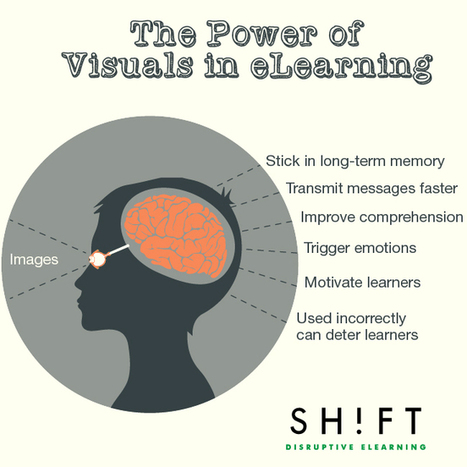
We are now in the age of visual information where visual content plays a role in every part of life. As 65 percent of the population is visual learners, images are clearly key to engaging people in eLearning courses.
Moving and still images have been included in learning materials for decades, but only now has faster broadband, cellular networks, and high-resolution screens made it possible for high-quality images to be a part of eLearning visual design. Graphic interfaces made up of photos, illustrations, charts, maps, diagrams, and videos are gradually replacing text-based courses.
In this post, we will dig deep into some statistics and facts to further convince of why eLearning developers should embrace visuals when creating their courses.
Via EDTECH@UTRGV, Adelina Silva, Michèle Drechsler, CECI Jean-François, Gust MEES

DTLLS tutor's curator insight,
July 15, 2014 5:00 PM
Not just in e-learning, but as part of any learning. I have seen excellent use of visuals as back grounds to talks as part of an e-learning course, so definitely something to remember... 
Julia Echeverría's curator insight,
July 16, 2014 4:02 PM
No estaba tan descaminada cuando defendía la tremenda importancia de incorporar imágenes, vídeos y todo tipo de medios visuales en la educación, he aquí un interesante artículo
Scoop.it!

"The camera is one of those apps on the iPad that we sometimes take for granted. We forget it is there or don’t always use it to its full potential in the classroom. This week I am presenting at iPadU: Slide to Unlock Learning, and I wanted to highlight some of the many ways that you could use the iPad camera, so I put some ideas together and added some I had seen on the web or learned from others. The result? iPadography: Photo Projects for the iPad Classroom.
So, if you are looking for ideas for using the iPad camera in the classroom, take a look at some of the slides below, and feel free to share it with others who might be interested!" Via John Evans, Suvi Salo, Timo Ilomäki
Scoop.it!

"iBooks Author is a powerful tool for creating interactive textbooks for your students. Whether you work together as a class to gather content or simply curate resources to share with a class, the possibilities are endless.
If you’re looking to check out high quality content that is designed for the iPad, you’ll want to download E.O. Wilson’s set of interactive biology textbooks. You’ll see just how powerful an interactive textbook can be! These iBooks might supplement your science curriculum or just inspire you to dive into iBooks Author to create your own."
Via John Evans
Scoop.it!

More Fun Free Tools for Collaborative Classroom Assignments In May, we published the post, 20 Fun Free Tools for Interactive Classroom Collaboration. Given the Via Luísa Lima, kallen214, Lynnette Van Dyke
Scoop.it!

At the 2014 ISTE conference in Atlanta, Georgia, last week, Common Sense Media staff and Graphite Certified Educators presented a series of engaging, informative, and hands-on lightning-fast sessions. These 15-minute workshops showcased practical and engaging ways to use specific... Via Beth Dichter
Beth Dichter's curator insight,
July 10, 2014 8:51 PM
Are you looking for "practical and engaging ways to use specific technology tools to enhance student learning"? You might want to check out this link from graphinte (a part of Common Sense Media). There are 23 workshops that were each 15 minutes in length and covered 3 apps, games, websites or Common Sense Media resources. Below are some of the workshops. * Best Elementary ELA Common Core Apps and Websites (also one on Math and one on Science Apps and Websites as well as one for middle/high school in the same three areas). * Ready for Research - Best Websites Across K-12 * Formative Assessment Tools to Rock Your World * Digital Passport: Digital Safety Games for Kids (This is a free game from Common Sense Media that is great for students in grades 3 - 5.) * Digital Citizenship + PBL = Cool Programs for Teens You will find many great resources that may be of use to you during the next school year. Have fun exploring! 
niftyjock's curator insight,
July 15, 2014 6:07 PM
15 minute workshops, is that enough time or is it just the right amount. This review of the conference has some very good apps to try.
Scoop.it!

We all have to use a browser to surf the web. Regardless of which one you use, there are always shortcuts you can learn to become more productive. Via Frédéric DEBAILLEUL

Axel Bartorello's curator insight,
July 15, 2014 10:13 AM
Facilitez votre navigation sur Internet avec ces raccourcis clavier!
Scoop.it!

Judith Morais's curator insight,
July 7, 2014 6:19 AM
A great way to engage learners. I love the interactive nature of the quizzes.
Scoop.it!

From
smallpdf

Smallpdf - the platform that makes it super easy to convert and edit all your PDF files. Solving all your PDF problems in one place - and yes, 100% free. Via Ana Cristina Pratas
|






