DIGITAL LEARNING
20.7K views | +0 today
DIGITAL LEARNING
Learn and teach in a digital world I  EN
Your new post is loading...
Rescooped by Bhushan Thapliyal from Android and iPad apps for language teachers
September 2, 2014 6:15 AM
Scoop.it!

Tablet use in primary schools: the benefits and downsides

Many educators have pointed out that computer skills are becoming increasingly important in today's reality and, consequently, that children should be encouraged to enter this kind of learning environment as early as possible – preferably in the primary schools.

Via Adelina Moura, Juergen Wagner
No comment yet.
Rescooped by Bhushan Thapliyal from Android and iPad apps for language teachers
September 2, 2014 5:08 AM
Scoop.it!

14 Apps to Help Students Create & Collaborate on iPads

14 Apps to Help Students Create & Collaborate on iPads | DIGITAL LEARNING | Scoop.it
The iPad so much more than a content consumption device!  This year turn your students into creators using these fantastic iPad apps.  Most of the tools on this list are free and you can learn more...

Via Juergen Wagner
No comment yet.
Rescooped by Bhushan Thapliyal from Digital Delights - Images & Design
August 27, 2014 7:44 AM
Scoop.it!

QuickPics Photo Manager

QuickPics Photo Manager | DIGITAL LEARNING | Scoop.it

Via Ana Cristina Pratas
Ana Cristina Pratas's curator insight, August 26, 2014 11:45 PM

QuickPics Photo Manager allows you to take a pic, name it, tag it (virtual album) and then quickly and easily find it by using the search bar and sort features. You can even name and/or tag the pics already on your device.

Rescooped by Bhushan Thapliyal from Education 2.0 & 3.0
August 27, 2014 7:34 AM
Scoop.it!

Webcam Toy

Webcam Toy | DIGITAL LEARNING | Scoop.it
Take photos with your webcam using over 80 free fun effects. Save photos to your computer or post to Twitter, Tumblr and Facebook!

Via Yashy Tohsaku
No comment yet.
Rescooped by Bhushan Thapliyal from Connectivism
August 18, 2014 11:45 PM
Scoop.it!

Learning online: massive open online courses (MOOCs), connectivism, and cultural psychology

Learning online: massive open online courses (MOOCs), connectivism, and cultural psychology | DIGITAL LEARNING | Scoop.it
(2013). Learning online: massive open online courses (MOOCs), connectivism, and cultural psychology. Distance Education: Vol. 34, No. 1, pp. 129-136. doi: 10.1080/01587919.2013.770428

Via Dr. Susan Bainbridge
No comment yet.
Rescooped by Bhushan Thapliyal from Ipad pedagogy for 21st Century skills
August 18, 2014 11:34 PM
Scoop.it!

iPads at Burley: Keep It Simple: With Apps, Less is More

iPads at Burley: Keep It Simple: With Apps, Less is More | DIGITAL LEARNING | Scoop.it

Via Fiona Tavares
Fiona Tavares's curator insight, August 18, 2014 7:43 PM

Advice after 4 years of working with ipads

Rescooped by Bhushan Thapliyal from iPads, MakerEd and More in Education
August 18, 2014 11:30 PM
Scoop.it!

How to move your iPhone and iPad backups to an external drive -iMore

How to move your iPhone and iPad backups to an external drive -iMore | DIGITAL LEARNING | Scoop.it

"If you sync your iPhone, iPad or iPod touch on your Mac, you know that the first thing iTunes does is back it up (unless you've told it not to). Depending on the size of your device and how much data you have stored on it, this can gobble up dozens of gigabytes of space. Did you know you can move those backups to an external hard drive? You can, and we can walk you through how. "


Via John Evans
Rescooped by Bhushan Thapliyal from Eclectic Technology
August 17, 2014 1:43 AM
Scoop.it!

Seven Web-based Tools for Delivering Flipped Lessons

Seven Web-based Tools for Delivering Flipped Lessons | DIGITAL LEARNING | Scoop.it

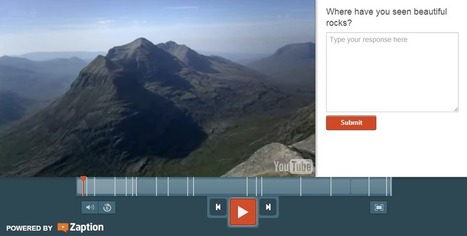
"This fall there will be teachers trying the flipped classroom approach to lessons for the first time. In the right setting the flipped classroom model can work well. My favorite tools for creating flipped lessons include the option to insert questions for students to answer while watching the video instead of waiting until the end to answer a series of questions. I also like tools that provide students with the opportunity to submit questions to their teachers while they are watching videos. These tools offer those options."


Via Beth Dichter
Beth Dichter's curator insight, August 16, 2014 7:10 PM

The tools covered in this post by Richard Byrne are:

* eduCanon

* Teachem

* VideoNotes

* Blubbr

* Zaption

* EdPuzzle

* Blendspace

You will find a video tutorial both eduCanon and Blendspace. Bryne describes each tool in detail in his post, making it easier for you to choose which ones will meet your needs.

Rosemary Tyrrell, Ed.D.'s curator insight, August 17, 2014 11:31 AM

The tools covered in this post by Richard Byrne are:

* eduCanon

* Teachem

* VideoNotes

* Blubbr

* Zaption

* EdPuzzle

* Blendspace

You will find a video tutorial both eduCanon and Blendspace.Bryne describes each tool in detail in his post, making it easier for you to choose which ones will meet your needs.

Ness Crouch's curator insight, September 1, 2014 5:55 AM

There are a couple of tools here I haven't tried. 

Rescooped by Bhushan Thapliyal from 21st Century Concepts-Technology in the Classroom
August 17, 2014 1:14 AM
Scoop.it!

50 Special Needs Tools

50 Special Needs Tools | DIGITAL LEARNING | Scoop.it
So much available to differentiate for every student's special need. Here are 50 apps and websites: General Chrome apps--download to the Chrome browser to assist with special needs students Diction...

Via Tom Perran
No comment yet.
Rescooped by Bhushan Thapliyal from Information and digital literacy in education via the digital path
August 16, 2014 2:41 PM
Scoop.it!

How To Add Live Web Pages to a PowerPoint Presentation

How To Add Live Web Pages to a PowerPoint Presentation | DIGITAL LEARNING | Scoop.it
Have you ever wanted to demonstrate a live website during a PowerPoint presentation?  Here’s how you can insert a live webpage into a PowerPoint presentation so you can show the exact content you’re talking about.

Via Elizabeth E Charles
Ruedi Grob's curator insight, August 18, 2014 2:14 AM

good instruction for live PowerPoint site.

Heinz Krettek's curator insight, August 20, 2014 2:42 AM

Powerpoint in Echtzeit

Rescooped by Bhushan Thapliyal from iPads in High School
August 16, 2014 2:38 PM
Scoop.it!

9 Outstanding Apps for Adding Text to Your Photos

9 Outstanding Apps for Adding Text to Your Photos | DIGITAL LEARNING | Scoop.it
Text on images — that’s the idea behind messaging, poster art, greeting cards and scenic displays. And font freaks (you know who you are) will always be on the lookout... Keep reading →

Via Dr. Tom D'Amico (@TDOttawa) , Suvi Salo, Timo Ilomäki
kathymcdonough's curator insight, August 16, 2014 6:29 PM

Good to know about these!

Rescooped by Bhushan Thapliyal from Education 2.0 & 3.0
August 16, 2014 2:28 PM
Scoop.it!

Authoring Tools for Flipped Language Classrooms | Language News

Authoring Tools for Flipped Language Classrooms | Language News | DIGITAL LEARNING | Scoop.it
Transparent Language Online now includes a teacher portal equipped with lesson authoring tools to facilitate flipped language classrooms.

Via Yuly Asencion, Juergen Wagner, Yashy Tohsaku
No comment yet.
Rescooped by Bhushan Thapliyal from Android and iPad apps for language teachers
August 12, 2014 12:22 PM
Scoop.it!

Can you run a classroom with an iPad? - Daily Genius

Can you run a classroom with an iPad? - Daily Genius | DIGITAL LEARNING | Scoop.it

When talking about the iPad in education, the tendency is to think of it as a tool for the ‘end user’. Or ‘pupils’ as they are often known. As a tool of consumption, the iPad is pretty special – easy to use and driven by apps, it’s a great way for pupils to research, read, watch and learn. It’s no wonder that many schools have taken to it, and take to offering ‘an iPad on every desk’ as the new status symbol of schooldays.

The iPad also has its uses for teachers – as a way for them to drive their professional lives. With some attention to the app store, and some experience in selecting the quality tools from the ‘me-too’ apps, digitally adept teachers (and we’ve talked about them before) can use it to show pupils the tools they’ll need to accelerate their learning; to manage the classroom and projects the pupils do; assessing students’ work, and interacting with them; creating new media for pupils to learn from; and learning things for themselves (imagine that!).

There’s plenty of ways that the iPad can greatly improve your productivity in the classroom. You just need a route map, such as this, from LearninginHand.

And once you’re up and running, you can do a lot worse than refer to this list of apps for educators too.


Via Alfredo Calderón, Juergen Wagner
Rescooped by Bhushan Thapliyal from Digital Delights for Learners
September 2, 2014 5:11 AM
Scoop.it!

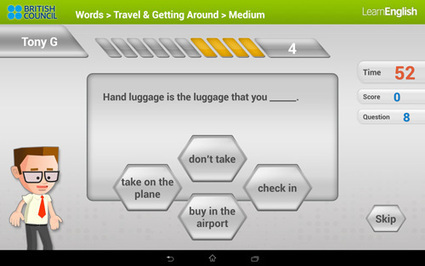
10 Free Mobile Apps To Help You Learn English Faster

10 Free Mobile Apps To Help You Learn English Faster | DIGITAL LEARNING | Scoop.it
Learning a language is one of the most rewarding things you can do. There are a lot of ways you can learn or improve your skills in a particular language, from attending classes to teaching yourself through traditional methods such as reading and practice. But have you realized that you ... Continue reading »

Via Ana Cristina Pratas
Gary Harwell's curator insight, September 2, 2014 2:56 AM
Students could use these with their iPads.
Rescooped by Bhushan Thapliyal from Android and iPad apps for language teachers
September 2, 2014 5:07 AM
Scoop.it!

Teachers Handbook on Creative Commons and Copyright ~ Educational Technology and Mobile Learning

Teachers Handbook on Creative Commons and Copyright ~ Educational Technology and Mobile Learning | DIGITAL LEARNING | Scoop.it

"Integrating technology in your classroom is not only about knowing the technicalities part of the process, it is also, most importantly, about knowing how and what to do with that technology.
Issues of copyright and  proper use of digital materials always comes to the forefront in such discussions and teachers usually face serious problems concerning the legality of the digital materials they use from the net.
To clear out some of the confusion surrounding copyright in education, I created a section entitled " Copyright Resources for Teachers" where teachers can have access to a wide variety of copyright tutorials, guides, tips and tools."


Via João Greno Brogueira, Juergen Wagner
No comment yet.
Rescooped by Bhushan Thapliyal from Digital Delights for Learners
August 27, 2014 7:44 AM
Scoop.it!

Free Time Lines with TimeRime

Free Time Lines with TimeRime | DIGITAL LEARNING | Scoop.it
Search, compare and make free time lines on TimeRime.com. The time lines can be filled with audio and video fragments such as MP3 and YouTube.

Via Ana Cristina Pratas
Dorian Love's curator insight, August 27, 2014 2:46 AM

Looks good!

Mark Sheppard's curator insight, September 3, 2014 12:19 PM

This tool could have uses for modeling a sequence of events and/or concurrent activities within a workplace.

Rescooped by Bhushan Thapliyal from E-Learning-Inclusivo (Mashup)
August 24, 2014 6:12 AM
Scoop.it!

Converting ILT Material into E-learning – Things to Consider – An Infographic - e-Learning Feeds

Converting ILT Material into E-learning – Things to Consider – An Infographic - e-Learning Feeds | DIGITAL LEARNING | Scoop.it
How can you convert your classroom training material into good eLearning courses? What are the aspects that you need focus on? Well, here are some …

Via NikolaosKourakos, juandoming
No comment yet.
Rescooped by Bhushan Thapliyal from Information and digital literacy in education via the digital path
August 18, 2014 11:42 PM
Scoop.it!

The Ultimate Directory Of Free Image Sources

The Ultimate Directory Of Free Image Sources | DIGITAL LEARNING | Scoop.it
So, you need an image for your blog? We’ve spent some time categorizing our favorite sources for free images and organizing them in such a way as to help you find what you’re looking for. Here are ...

Via Elizabeth E Charles
No comment yet.
Rescooped by Bhushan Thapliyal from iPads, MakerEd and More in Education
August 18, 2014 11:30 PM
Scoop.it!

Six Second Schooling - Using Vine in the Classroom - FRACTUS LEARNING

Six Second Schooling - Using Vine in the Classroom - FRACTUS LEARNING | DIGITAL LEARNING | Scoop.it
While six seconds does not sound like much time for learning, you may be surprised just how inventive students need to be to use Vine in the classroom.

Via John Evans
No comment yet.
Rescooped by Bhushan Thapliyal from Education 2.0 & 3.0
August 18, 2014 11:29 PM
Scoop.it!

Low Tech Organization Strategies and Tools

Low Tech Organization Strategies and Tools | DIGITAL LEARNING | Scoop.it
Assistive Technology (AT) is any item or piece of equipment that is used to increase, maintain or improve the functional capabilities of individuals with disabilities in all aspects of life, including at school, at work, at home and in the...

Via Yashy Tohsaku
No comment yet.
Rescooped by Bhushan Thapliyal from 21st Century Concepts-Technology in the Classroom
August 17, 2014 1:24 AM
Scoop.it!

10 Remarkably Free Digital Tools for Educators and Students

10 Remarkably Free Digital Tools for Educators and Students | DIGITAL LEARNING | Scoop.it
1) Hemingway Editor This is a free Web-based app that lets you paste in your writing to be analyzed and edited for optimal readability. The app quickly ide

Via Ana Cristina Pratas, Tom Perran
Rosemary Tyrrell, Ed.D.'s curator insight, August 17, 2014 11:29 AM

Not all are free, but there are some wonderful apps on this list. 

Maryalice Leister's curator insight, August 17, 2014 8:48 PM

Some new ones listed I hadn't heard of or used. I am off to try them out and you'll have some great new tools if you do too. Easily learned and creates the impact you want. Not just for teachers either. Enjoy!

Jennifer Lowton's curator insight, August 24, 2014 7:49 AM

Nice list from Ana Cristina Pratas. I'll have to try Hemingway Editor, Zooburst and GIFBoom soon. 

Rescooped by Bhushan Thapliyal from Collaboration in the 21st Century classroom
August 17, 2014 1:14 AM
Scoop.it!

20 Excellent Free Tools for Interactive Collaboration Experiences in …

These Free Applications can Enable a Tremendous Variety of Collaborative Teaching and Learning Interactions and Activities

Via Grant Montgomery
Jack-Connor Hinchliffe's curator insight, May 6, 2015 5:17 PM

some of these tools are really useful, being able to use tools that are similar to google docs but on your ipad and other handheld devices, will remove the old argument of oh i didn't see that being posted. 

Rescooped by Bhushan Thapliyal from Digital Delights for Learners
August 16, 2014 2:39 PM
Scoop.it!

The World's Easiest Video Calls - Gruveo

The World's Easiest Video Calls - Gruveo | DIGITAL LEARNING | Scoop.it
Instant, secure and anonymous video calls. No downloads or registration required.

Via Ana Cristina Pratas
Mark Sheppard's curator insight, September 3, 2014 12:30 PM

An alternative to Skype or Google hangouts

Rescooped by Bhushan Thapliyal from Education et TICE
August 16, 2014 2:32 PM
Scoop.it!

60 iPad Productivity Apps For Modern Teachers

60 iPad Productivity Apps For Modern Teachers | DIGITAL LEARNING | Scoop.it
60 iPad Productivity Apps For Modern Teachers

Via Laurent Blanquer
No comment yet.
Rescooped by Bhushan Thapliyal from Information and digital literacy in education via the digital path
August 12, 2014 12:27 PM
Scoop.it!

Seven Web-based Tools for Delivering Flipped Lessons | Free Technology for Teachers

Seven Web-based Tools for Delivering Flipped Lessons | Free Technology for Teachers | DIGITAL LEARNING | Scoop.it

This fall there will be teachers trying the flipped classroom approach to lessons for the first time. In the right setting the flipped classroom model can work well. My favorite tools for creating flipped lessons include the option to insert questions for students to answer while watching the video instead of waiting until the end to answer a series of questions.


Via Elizabeth E Charles
No comment yet.