 Your new post is loading...
An AMA (Ask Me Anything) is a two way conversation first conceived on the social networking and news website Reddit. Essentially an AMA is an opportunity for people of interest to host their own Q&A session where users are encouraged to ‘ask them anything’. Questions can range from deadly serious to utterly ridiculous, and are voted up or down by users so that the most popular questions are answered first. More than just a fad on Reddit, there are a heap of ways you can run your own version of an AMA with interesting guests in your own classroom.
Via John Evans
Students need to have a balance of literature and informational text. If you’re looking for sites that include nonfiction passages or high-interest articles here are a few worth exploring:
Via John Evans
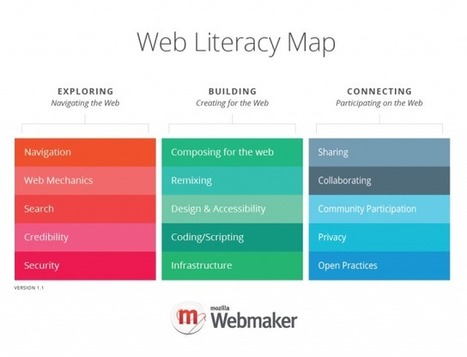
Where do you go if you want to get better at your web skills? How do you even know what's important to learn? The Web Literacy Map contains the competencies and skills that Mozilla and our community of stakeholders believe are important to pay attention to when getting better at reading, writing and participating on the web. The Web Literacy Map is part of Mozilla’s ongoing goal to create a generation of webmakers – those who can not only elegantly consume but also write and participate on the web. Read more Learn more: - http://www.scoop.it/t/21st-century-learning-and-teaching/?tag=EDUcation+4.0
Via Gust MEES
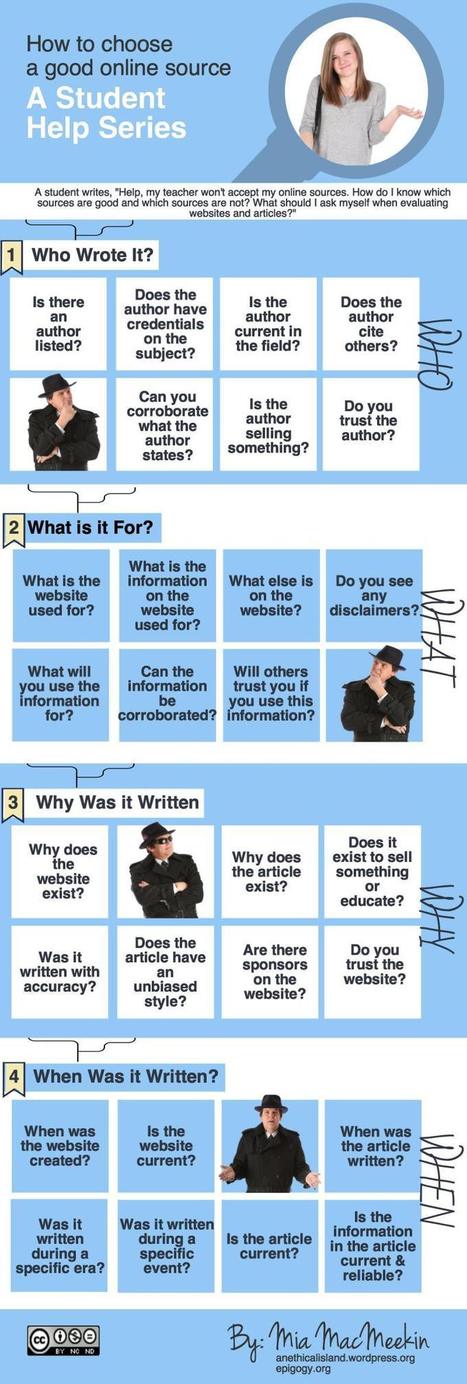
Students often ask how to determine which websites and articles are good sources to cite. My answer is always, "Well, what do you think?" Students need to be able to think on their own. So, if your...
Via Beth Dichter, Jocelyn Stoller
It’s not easy for students to stay on task these days. From Facebook to Instagram and Twitter to instant messaging to pop up, there are so many distractions. Some study aid sites even offer a ‘study break’ where students can take five minutes to check out the latest celebrity news. But it’s never really five minutes, is it? So why not use technology to fight technology? There are some fabulous study aid apps out there designed especially to help students stay on track and stay focused.
Via John Evans

|
Rescooped by
Dennis Swender
from Into the Driver's Seat
February 16, 2015 2:12 AM
|
“Use Smithsonian and other published resources to help students judge the quality or reliability of evidence, evaluate scientific claims, and construct scientific arguments. In a live, interactive format, try out an instructional strategy and an online annotation tool. This webinar will address inquiry skills and CCSS ELA standards for informational texts in scientific and technical subject areas. Provided materials focus on real-world, curriculum-relevant topics such as fracking and the Asian carp invasion. Target Audience: Designed for high school science teachers, but all are welcome. When: Part 1: Tuesday, February 17, 2015 Part 2: Monday, February 23, 2015 (Note: the course takes place over two sessions and attendance at both, along with completion of the evaluation, is required to receive a certificate) Time: 7:00 p.m. ET/6:00 p.m. CT/5:00 p.m. MT/4:00 p.m. PT Duration: 60 minutes each session Where: The event will take place online via the Google+ platform. Registrants will receive links to the two sessions prior to the event. The webinar is archived and available for viewing after the live event has occurred. Presenters: Michelle K. Smith is Associate Director for Digital Media in the Smithsonian Center for Learning and Digital Access. She oversees content development for instructional materials and web-based programs based on the Smithsonian’s collections and expertise. Dr. Victor Sampson is an Associate Professor of STEM Education in the Department of Curriculum and Instruction at The University of Texas at Austin. He is the author of a growing series of books about engaging students in scientific argumentation, a key practice of science that helps students master content while they write about and discuss claims and evidence. Certificate of Participation: Webinar participants earn a certificate of participation for attending both sessions and completing the evaluation form at the end of the program. For more information: Contact learning@si.edu. Underwritten by the Arthur Vining Davis Foundations”
Via Lynnette Van Dyke, THE OFFICIAL ANDREASCY, NikolaosKourakos, Jim Lerman
|
|
Rescooped by
Dennis Swender
from Neuroanthropology
February 14, 2015 8:40 AM
|
Welcome to Field Notes. Field Notes is a new section launching as part of the Fieldsights section of the new SCA website which will be organized by Grant Otsuki and Ali Kenner. We see it as an experiment in engaging the SCA community in a discussion on the themes and issues that occupy us as we try to make sense of what we see, hear, and experience as ethnographers, teachers, and public scholars.
Via Greg Downey
|
|
Scooped by
Dennis Swender
February 13, 2015 10:10 AM
|
Most amazing of all, Google made this tool available for free. This despite an educational -- and, let's be honest, entertainment -- value that's virtually impossible to measure.
What you maybe didn't know is that Google has long offered a Pro version of Earth as well, one that cost a hefty $399 per year. Now, however, you can get Google Earth Pro absolutely free.
First things first: The words "free trial" still appear in that URL, but as you'll see when you click through to the sign-up page, "Sign up is no longer required for Google Earth Pro." All you have to do is download the installer, run it, then sign in using your e-mail address (as your username) and license code GEPFREE.
|
|
Rescooped by
Dennis Swender
from Into the Driver's Seat
February 12, 2015 10:08 AM
|
I just came across this timely poster shared on a Google Plus post by Mickey McFetridge. This visual, titled Qualitative Formative Assessment Toolkit, features four practical ways to document learning using mobile technology. Two days ago I shared here a list of some of the best iPad apps to help students document and show their learning and this poster clicks in perfectly with that post.
What I liked the most about this poster is the last line in it which reads “the process is the product”. This statement sums up the essence of using technology in learning. The emphasis should be placed on the process, the procedures and the ways students use technology in their learning. Any preoccupation with the product per se can not see the forest for the trees. As I was reading through this poster I thought of some good iPad apps to add to this work in order to provide students with more options to choose from when documenting their learning. Here are some of them :
Via Jim Lerman
Trying to get all of your students to the same set of websites at the same time can be a frustrating experiences. Just a couple of mistyped characters can create a frustrating experience for everyone. One way to avoid this situation is to post all of your links on one course webpage or in a blog post. Another solution is to use a link bundling service that will group all of your links together into one package. Then instead of sending out a bunch of individual links you can just send one link that will open all of the bundled links for your students. Here are two services that you can use for just that purpose.
Via John Evans
If you’re look for a way to support your students as writers or simply would like an extra tool to check your own work, you’ll want to check out Grammarly. It is an automated grammar checker web application that is already used by over four million people around the world. Grammarly helps users detect grammar errors in their writing, detect plagiarism, and use better vocabulary words.
Via John Evans
|
|
Rescooped by
Dennis Swender
from Into the Driver's Seat
February 3, 2015 3:38 AM
|
Certainly, as we turn to online reading, the physiology of the reading process itself shifts; we don’t read the same way online as we do on paper. Anne Mangen, a professor at the National Centre for Reading Education and Research at the University of Stavanger, in Norway, points out that reading is always an interaction between a person and a technology, be it a computer or an e-reader or even a bound book.
Via Nik Peachey, Jim Lerman
|
Here are the best note taking apps for your iPhone and iPad. You can choose to any of these note taking apps for your iPhone, iPad and iPod touch according to your needs.
Via John Evans
|
|
Rescooped by
Dennis Swender
from Tools for Teachers & Learners
February 26, 2015 7:21 PM
|
Teachers sometimes hesitate to assign writing tasks because of the correction work it creates. However, students benefit from frequent writing practice and the corrective feedback they receive. One solution is for teachers to work longer hours. Another is to find ways to integrate automatic corrective feedback into second language pedagogy.
Via Nik Peachey
|
|
Rescooped by
Dennis Swender
from Into the Driver's Seat
February 16, 2015 2:24 AM
|
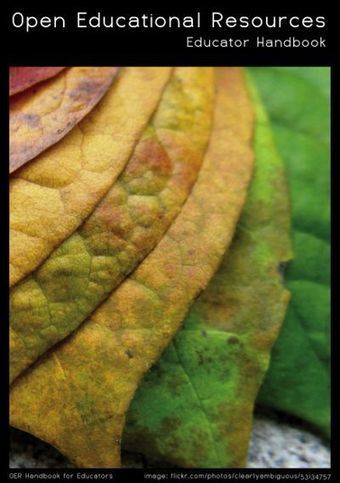
Welcome to the world of Open Educational Resources (OER). This handbook is designed to help educators find, use, develop and share OER to enhance their effectiveness online and in the classroom. Although no prior knowledge of OER[1] is required, some experience using a computer and browsing the Internet will be helpful. For example, it is preferable that you have experience using a word processor (e.g. Open Office[2] or Microsoft Word) and basic media production software, such as an image editor (e.g. Gimp[3], Inkscape[4] or Photoshop). The handbook works best when there is some sort of OER you would like to create or make available to others, but it is also useful for the curious reader. There are several ways to use this handbook.
Via Ana Cristina Pratas, Miloš Bajčetić, Jim Lerman
|
|
Scooped by
Dennis Swender
February 14, 2015 9:51 AM
|
Barbie has a dream house, and it seems only fair that book nerds should have one too. Here's a collection of houses that showcase their owners' love of literature.
|
|
Rescooped by
Dennis Swender
from Neuroanthropology
February 14, 2015 8:35 AM
|
A run of poor sleep can have a dramatic effect on the internal workings of the human body, say UK researchers.
Via Greg Downey
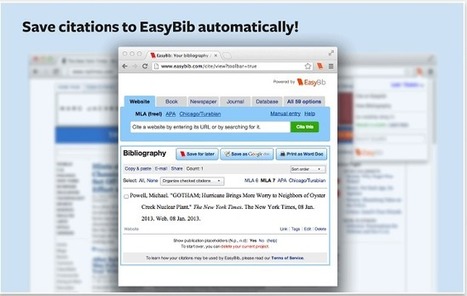
EasyBib Tools is definitely a must have app for college and research students. With one click you can generate citations for websites and create bibliographies. It is a time saving tool for sure but I would not trust it one hundred per cent, always go through the citations and make sure they are properly formatted.
Via John Evans
|
|
Scooped by
Dennis Swender
February 13, 2015 10:05 AM
|
Most of us turn to the internet when we are looking for resources to use for a presentation, report or article. The internet holds the key to so many robust resources.
Yet how many of these resources can you legally use for free? How many of them can you adapt?
That’s where Open Educational Resources (OER) can help. Here’s an infographic from the Center for Open Educational Resources and Language Learning (at the University of Texas at Austin) that can help.
|
|
Rescooped by
Dennis Swender
from Into the Driver's Seat
February 12, 2015 10:06 AM
|
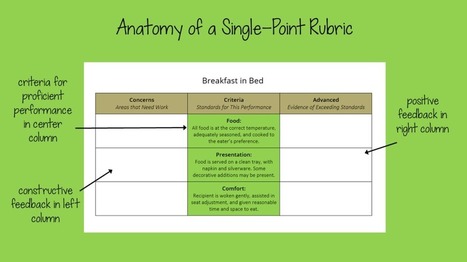
"The practice of using single point rubrics is slowly but surely catching on. The simplicity of these rubrics — with just a single column of criteria, rather than a full menu of performance levels — offers a whole host of benefits:
-Teachers find them easier and faster to create, because they no longer have to spend precious time thinking up all the different ways students could fail to meet expectations. -Students find them easier to read when preparing an assignment. With only the target expectations to focus on, they are more likely to read those expectations.
-They allow for higher-quality feedback, because teachers must specify key problem areas and notable areas of excellence for that particular student, rather than choosing from a list of generic descriptions."
Via Jim Lerman
As I reviewed all the photos, conference records, and feedback I’ve received over the years, one thing really struck me: Our writing looks more like making, and the tools we use influence this greatly.
Via John Evans
In a perfect world students would understand that education is for their benefit and put their all into every assignment. Unfortunately, every educator working today knows how far off the reality is from that ideal.
Cheating isn’t just something that a few bad apples do every now and then, it proliferates. In a 2010 survey of high school students, one in three admitted to using the web to plagiarize. That makes it a problem no teacher can ignore.
Via John Evans
|


















![How To Find Openly Licensed Educational Resources You Can Use [Infographic] | ED 262 Research, Reference & Resource Skills | Scoop.it](https://img.scoop.it/UEhtZjmMpwB5jMfdGK4baTl72eJkfbmt4t8yenImKBVvK0kTmF0xjctABnaLJIm9)








Not sure if it will motivate the students to ask another questions if their questions before were not popular
I have to try one of these....