Your new post is loading...

|
Scooped by
Jim Lerman
January 19, 2015 3:14 AM
|
Being able to write clearly is an essential skill for all students. It can be hard for kids to pen what they mean, though. With simple online writing tools and blogs like these, students get practice writing informally in settings that aren't too daunting. Get them writing with their peers and they may soar even more.
|
|
Scooped by
Jim Lerman
January 17, 2015 2:56 PM
|
Tactics practiced by big thinkers, artists, and innovators. (Looking for writing inspiration? Check out these 11 Imagination-Jarring Tips From Creative Geniuses.
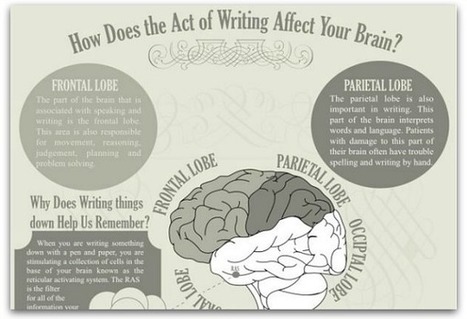
This infographic explains how writing helps your memory, how your brain reacts when it hears a story, why clichés are forgettable and more.
Via Jeff Domansky
|
|
Rescooped by
Jim Lerman
from Into the Driver's Seat
January 11, 2015 8:32 PM
|
by Maria Popova
"Enduring ideas for personal refinement from Seneca, Thoreau, Virginia Woolf, Carl Sagan, Alan Watts, Emerson, Bruce Lee, Maya Angelou, and more.
"At the outset of each new year, humanity sets out to better itself as we resolve to eradicate our unhealthy habits and cultivate healthy ones. But while the most typical New Year’s resolutions tend to be about bodily health, the most meaningful ones aim at a deeper kind of health through the refinement of our mental, spiritual, and emotional habits — which often dictate our physical ones. In a testament to young Susan Sontag’s belief that rereading is an act of rebirth, I have revisited the timelessly rewarding ideas of great thinkers from the past two millennia to cull fifteen such higher-order resolutions for personal refinement."
Jim Lerman's insight:
This is why I love Popova's blog; she's a curator's curator. She does so much heavy intellectual lifting and is so willing to share her knowledge and reflections. A wonderful collection of thoughts, ideas, and observations from a pantheon of brilliant people...extremely worth the time to stop and ponder."
|
|
Rescooped by
Jim Lerman
from Tools for Teachers & Learners
January 11, 2015 11:42 AM
|
At Write About, we believe that writing should be fun and sharing should be easy, so we built a social publishing platform for classrooms.
Via Nik Peachey
|
|
Rescooped by
Jim Lerman
from Tools for Teachers & Learners
January 9, 2015 3:50 PM
|
Google Keep lets you quickly capture what's on your mind.
Via Nik Peachey
|
|
Rescooped by
Jim Lerman
from :: The 4th Era ::
January 5, 2015 7:20 AM
|
A good public speaker takes their audience on a journey, leaving them feeling inspired and motivated. But structuring your speech to get your ideas across and keep your audience engaged all the way through is tricky. Try these eight storytelling techniques for a presentation that wows.
Via Kevin Watson, Jim Lerman
|
|
Rescooped by
Jim Lerman
from Ed Tech Chatter
January 4, 2015 10:38 PM
|
A few months ago Educational Technology and Mobile Learning posted a detailed guide on how Teachers can Use Blogging in Education. We are glad this post has received a wide interaction from...
Via Jon Samuelson
|
|
Rescooped by
Jim Lerman
from :: The 4th Era ::
January 1, 2015 3:56 PM
|
FutureLearn is an online learning platform that offers a variety of free courses from leading institutions and universities around the globe. The private company has over 40 years of experience in distance learning and online education and has partnered with institutions in the UK, Africa, Europe, Asia, and the Middle East. Most classes range from six to ten weeks but can be as short as two weeks. Classes are organized into categories based on the topic and each class contains a detailed description of the material to be covered. Additionally, each course provides an estimated number of hours per week that should be dedicated as well as whether the class offers a certificate of mastery following its completion. All FutureLearn educators have a profile that details their expertise in the field and other courses they offer.
|
|
Rescooped by
Jim Lerman
from Into the Driver's Seat
December 28, 2014 8:00 PM
|
by Maria Popova
"I consider my annual best-of reading lists a kind of Old Year’s resolutions in reverse — unlike traditional resolutions, which lay out an aspirational list of priorities for the new year, these represent a look back at the books that proved themselves most worth prioritizing over the setting year. After such reverse-resolution reading lists for the best children’s books, art, design, and photography books, science books, philosophy and psychology books, best biographies, memoirs, and history books, here comes the annual wholly subjective selection of the fourteen most rewarding books of 2014 overall, in no particular order. (See last year’s selections here.)"
|
|
Rescooped by
Jim Lerman
from iPad Teachers Blog
December 28, 2014 12:16 PM
|
Writing for a purpose with the iPad and QR Codes- March 2014 Blog Post
Last week during World Book Day, my school had a Dr Seuss themed week. As I teach each class ICT during the one day, I decided to develop pupils awareness of their audience during a short book review activity. I told the pupils that not only would their class teacher be reading their book reviews but the rest of the school and parents would be listening to them. After a few blank faces glared back at me, I explained that their reviews had to be recorded into their iPads and could not be longer than 30 seconds. We used Croak It app to record the reviews (it limits the recordings to 30 seconds) and then shares that recording as a web-link. These links were then put into the QR code creator app, printed and put with the front covers of the books. If you want to record longer than 30 seconds and have images displayed while you listen to them then you could use Shadow Puppets which also creates a web-link or AudioBoo which makes a QR code for you. If you want pupils to attach a GarageBand song to a QR code then you can save the song into something like box.com app using the open in tool and create a web link from there.
We then displayed the finished front covers around the school, in the weekly newsletter and library.
Via iPad Teachers
|
|
Rescooped by
Jim Lerman
from Into the Driver's Seat
December 28, 2014 3:48 AM
|
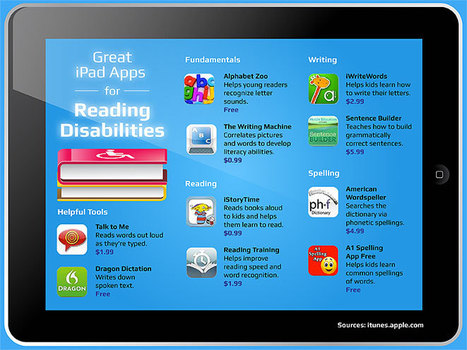
"Whether you’re the parent of a child with a reading disability or an educator that works with learning disabled students on a daily basis, you’re undoubtedly always looking for new tools to help these bright young kids meet their potential and work through their disability. While there are numerous technologies out there that can help, perhaps one of the richest is the iPad, which offers dozens of applications designed to meet the needs of learning disabled kids and beginning readers alike.
"Here, we highlight just a few of the amazing apps out there that can help students with a reading disability improve their skills not only in reading, writing, and spelling, but also get a boost in confidence and learn to see school as a fun, engaging activity, not a struggle."
|
|
Rescooped by
Jim Lerman
from Embracing secondary ELA
December 28, 2014 1:08 AM
|
|
|
|
Scooped by
Jim Lerman
January 18, 2015 2:14 AM
|
The ability to write with clarity and coherence is fundamental to student success in both school and the workplace. We are excited to have the opportunity for teachers in Union County to partner with teachers throughout the state and nation on a project to improve student writing.
— Cindy Langley, Director of Secondary Education for Union County Schools, Union, South Carolina
|
|
Scooped by
Jim Lerman
January 17, 2015 2:43 PM
|
When looking to organize your writing projects, whatever they may be, Scrivener for Mac and Evernote for all platforms can easily make this possible.
|
|
Scooped by
Jim Lerman
January 17, 2015 2:39 PM
|
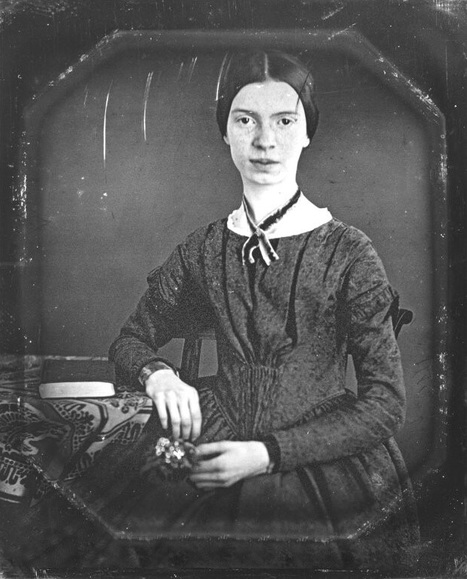
From all the jails the Boys and Girls Ecstatically leap— Beloved only Afternoon That Prison doesn’t keep They storm the Earth and stun the Air, A Mob of solid Bliss— Alas—that Frowns should lie in wait For such a Foe …"
|
|
Rescooped by
Jim Lerman
from Tools for Teachers & Learners
January 11, 2015 11:49 AM
|
Crumbles are kinda like reaction GIFs with a way bigger vocabulary... and all you have to do to make one is type
Nik Peachey's insight: This is an interesting tool for creating composite video sentences made up from a collection of clips. You can type in a sentence or select words from the dictionary. .
Via Nik Peachey
|
|
Rescooped by
Jim Lerman
from Tools for Teachers & Learners
January 9, 2015 3:51 PM
|
The hassle-free way to broadcast retina-quality presentations on smartphones, tablets, and computers in real-time, anywhere in the world
Via Nik Peachey
|
|
Rescooped by
Jim Lerman
from New media & Education
January 8, 2015 8:36 PM
|
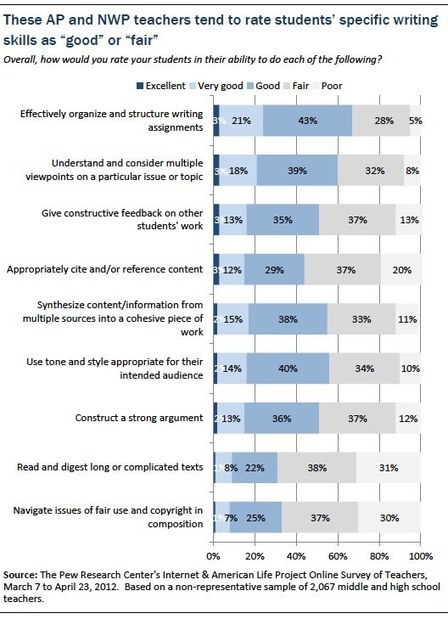
These teachers see the internet and digital technologies such as social networking sites, cell phones and texting, generally facilitating teens’ personal expression and creativity, broadening the audience for their written material, and encouraging teens to write more often in more formats than may have been the case in prior generations. At the same time, they describe the unique challenges of teaching writing in the digital age, including the “creep” of informal style into formal writing assignments and the need to better educate students about issues such as plagiarism and fair use.
Via Nik Peachey, Marta Sponsiello
|
|
Rescooped by
Jim Lerman
from Writing and Other Crazy Stuff
January 4, 2015 11:35 PM
|
|
|
Rescooped by
Jim Lerman
from Into the Driver's Seat
January 3, 2015 9:12 PM
|
Critical thinking requires a special set of questions that have the ability to activate higher order thinking skills and therefore enable students to evaluate, synthesize, apply, analyze and interpret information. These questions are usually open in nature and tend to foster divergent thinking. Prince George’s County provides a very good explanation of each of these kinds of questions with examples of each category.
|
|
Rescooped by
Jim Lerman
from Into the Driver's Seat
December 29, 2014 8:39 PM
|
Rebecca Alber offers tips for teaching vocabulary that include letting students select the words, putting away dictionaries, and creating time for talk and play with new terms.
|
|
Rescooped by
Jim Lerman
from iPad Teachers Blog
December 28, 2014 12:17 PM
|
Using Book Creator as an Assessment Tool
Book creator has probably been the app I have used most, in my teaching, with pupils and in my training. The blank canvas aspect means it can be used across the whole curriculum and the addition of the pen tool in the last few weeks has added to that. We use Showbie at school for pupils to share their work, including books made with Book Creator from the iPads and home to the teachers for assessment. Recently, we have used both the Pen Tool and Record feature to give feedback on the pupils' eBooks. The pupils send their books using Showbie and the teacher opens them up on his/her iPad. They can then annotate with their voice, pen and text. The book can then be sent back to the pupils using Showbie. The pupil can either change the original book and delete the annotated one or change the annotated book and delete the original. The screenshot shows a book of a Science experiment. The teacher can annotate with arrows but also add audio feedback. All elements of Book Creator can be deleted so the pupil can restore any annotated book to the original. This is obviously not a new idea but the pen tool has certainly made this quicker in a widely used app such as Book Creator.
Via iPad Teachers
|
|
Rescooped by
Jim Lerman
from iPad Teachers Blog
December 28, 2014 12:15 PM
|
Inspiring Writing using Adventure Game Creation with Book Creator App - Sept 2014 Blog Post
This term I have been working with upper Key Stage 2 pupils to develop interactive adventure style games in Book Creator. One of the features of the app is it allows you to link objects such as images and text to other pages within the book. For images, tap on the image to select it, then tap on the Info icon and use the hyperlink box to type in the page number. For text, highlight the text withIn the text box and you will see a hyperlink option.
This has enabled us to create games where choices, questions and decisions are asked of the user/player throughout. We have then used this as a stimulus for writing, not only creatively but also instruction and advertising. Above are a few screen shots of an example book I made but I didn't want to show the pupils too much as I wanted them to come up with their own ideas.
Via iPad Teachers
|