Your new post is loading...

|
Scooped by
Jim Lerman
July 2, 2015 12:21 AM
|
www.familymobileapps.comCreate your own fairy tale or fantasy adventure with beautiful HD illustrations and amazing multi-touch tools. Combine together any combination of castles, princesses, queens, knights, dragons, wizards, and other characters and props to create your own unique piece of art. Then, become the author as bring your story to life by adding text.
|
|
Scooped by
Jim Lerman
June 26, 2015 12:12 AM
|
Sarah Tantillo's popular MiddleWeb post, Socratic Seminars in the Middle, gets a tweak that improves student participation, based on an MS teacher's suggestion.
|
|
Rescooped by
Jim Lerman
from Into the Driver's Seat
June 13, 2015 2:16 AM
|
Pretty sure you can't do this to a Kindle.
Jim Lerman's insight This is sure to blow your students' minds (and a lot of other people's too). What a great way to start off the school year in September!
|
|
Scooped by
Jim Lerman
June 7, 2015 11:35 AM
|
There’s no shortage of nit-picking gamers who feel they could easily make better video games than what’s being released every week. And thanks to a new iPad app called Toy Engine, they can put their money where their mouths are and design their own side-scrolling video game, even if they’ve never written a single line of code.
|
|
Rescooped by
Jim Lerman
from Into the Driver's Seat
June 4, 2015 4:33 PM
|
Strong apps and fun working materials are key to great stop-motion projects with kids. But good planning and inspired book tie-ins can carry the day.
|
|
Rescooped by
Jim Lerman
from Into the Driver's Seat
June 1, 2015 10:27 AM
|
Composing a story from scratch comes naturally to some people. For the rest of us creating a story from scratch can be a struggle. Over the years I’ve found that using pictures helps a lot of students get started on crafting stories. In some cases I’ve had students create collages to represent elements of a story. In other cases I’ve had them choose five pictures and write two hundred words about each. Being asked to write two hundred words about five pictures feels a lot less daunting than being asked to write one thousand words in one shot.
The PDF embedded below (click here if you can't see the embedded document) outlines how to use ten of my favorite free tools to create image-based stories.
|
|
Rescooped by
Jim Lerman
from Into the Driver's Seat
June 1, 2015 10:21 AM
|
Make Beliefs Comix is a great service that offers comic strip templates and writing prompts in seven languages. The templates and prompts can be completed online or you can print them out to give to your students.
The latest release from Make Beliefs Comix is a free ebook called Something to Write About (link opens a PDF). The free ebook contains dozens of writing prompts. Students can write in the ebook online and print their work. Alternatively, you can print all or part of the book to give to students.
|
|
Rescooped by
Jim Lerman
from Into the Driver's Seat
May 18, 2015 6:54 AM
|
Last week at the Riding the Wave conference in Gimli, Manitoba someone asked me for suggestions on sites that her students could access to find story prompts. StoryToolz.com was the first thing that came to my mind then. I also suggested Make Beliefs Comix. Those are two of the ten options that are included in my slideshow of suggestions embedded below.
|
|
Scooped by
Jim Lerman
May 13, 2015 7:34 PM
|
Write About is a new social publishing platform designed for students to share creative responses to engaging images. Building background knowledge is essential when it comes to student learning, and children of all ages learn more about the world around them when they see and discuss interesting photographs. That said, Write About is chock-full of over 500 visual writing ideas, and students and teachers have the option of adding more!
|
|
Rescooped by
Jim Lerman
from Into the Driver's Seat
May 8, 2015 4:28 PM
|
Educator Mia MacMeekin made this infographic about ways to inspire students to think more deeply about how innovation applies to them. It’s a helpful way to begin a conversation about what it means to innovate, a word that sometimes seems to belong in the adult domain of business and is estranged from how students think about living their lives.
Excellent! - JL
|
|
Rescooped by
Jim Lerman
from Into the Driver's Seat
April 27, 2015 9:20 AM
|
Last Saturday I reviewed Analyze My Writing. That post proved to be one of the most popular posts of the week. It also prompted a bunch of questions from readers looking for other tools like it. Here are some more good tools that students can use to analyze their own writing.
|
|
Scooped by
Jim Lerman
April 17, 2015 2:25 PM
|
|
|
Scooped by
Jim Lerman
April 16, 2015 5:21 PM
|
Neither freezing weather nor a record number of snow days in some places could deter nearly 4,500 of you from entering this winter’s Second Annual Student Editorial Contest. And, just like last year, we were bowled over by the breadth of topics you chose and the passion with which you wrote about them.
Four hundred and 23 of you — about 10 percent — made our finalists list, then we reluctantly winnowed that down to the 56 winners, runners-up and honorable mentions you can find below.
|
|
|
Rescooped by
Jim Lerman
from K-12 School Libraries
June 21, 2015 3:54 PM
|
“Stories … are genuinely symbiotic organisms that we live with, that allow human beings to advance.”
Stories have shapes, as Vonnegut believed, and they in turn give shape to our lives.
Via Susan Grigsby @sksgrigsby
|
|
Rescooped by
Jim Lerman
from :: The 4th Era ::
June 10, 2015 4:15 PM
|
"Whether you’re practicing flipped or blended learning in your classroom, set the occasional video assignment, or have just observed that your students are part of the Netflix generation, you’ve likely seen what a powerful tool video can be for teaching and learning. And, while there’s certainly a wealth of great educational content available online, sometimes you — and your students — will want to create your own.
"Terrific news: It’s never been easier to create great video content! We know that quality matters; viewers rarely find shaky, inaudible and poorly lit video terribly engaging. But, an understanding of commonly available software, tools and basic production techniques is all you (and your students) need to create great quality video content. Best of all, you probably have most of the tools you need sitting on your desk right now. In this guide we’ll cover everything you need to know to produce educational and instructional videos using your PC and webcam. Why create your own video content?"
02 What you need to get started 03 Webcam and screen recording software 04 Upgrading your microphone 05 Upgrading your camera 05 Recording video on a smartphone or tablet 06 Production 06 Planning your video 07 Recording crystal–clear sound 08 Getting the most out of your webcam 09 Post–production 10 Adding titles 10 Adjusting volume levels 1 10 Removing background noise and fine–tuning your voiceover 11 Adding closed captions for accessibility
Jim Lerman's insight: Free with registration. Very comprehensive, especially for such a short and user-friendly document.
Via Jim Lerman
|
|
Rescooped by
Jim Lerman
from Into the Driver's Seat
June 6, 2015 9:36 PM
|
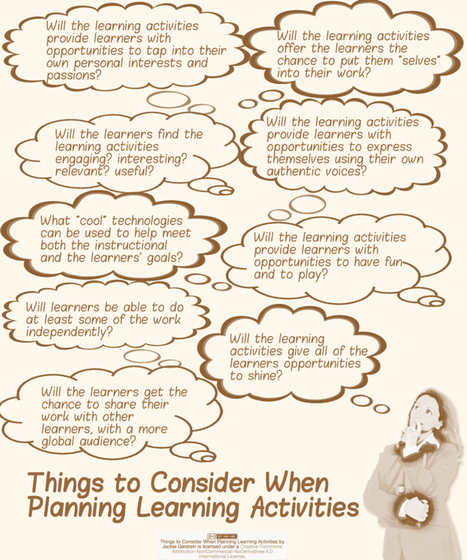
"I absolutely love planning lessons from scratch. I just got a job teaching technology units for a summer camp for elementary age students. I can design and teach whatever I want – planning for a different theme each week. Some of the themes I am planning are: Expanding and Showing Your Personal Interests Through Blogging, Photos, and Videos; Coding and Creating Online Games; Tinkering and Making – Simple Robotics; Hacking Your Notebook; and Creating Online Comics, Newspapers, and Magazines. I have begun the process of planning these classes through reflecting on what the lessons will look like. Here are some questions I ask myself as I go through this process:"
|
|
Scooped by
Jim Lerman
June 1, 2015 7:39 PM
|
As we do after Memorial Day each year, this week we are looking back and collecting the year’s teaching materials for each subject area, so teachers can find them all in one place.
On Wednesday, we posted a list of all of our social studies, history, geography and civics ideas. Below, all our E.L.A. and arts-related posts. On Friday, you’ll find our science, health, math and technology collection. Finally, on June 11 we’ll publish a list of all of the Student Opinion questions we have asked this year.
And if you’d like to go further, here are five more years’ worth of lesson plan collections for English language arts, from 2010, 2011, 2012, 2013 and 2014.
To find all our roundup posts in every subject area and going back to 2010, click here.
Happy summer, and if we’re missing topics, skills, authors or ideas you wish we’d covered, please tell us below.
|
|
Scooped by
Jim Lerman
June 1, 2015 10:24 AM
|
Wideo is a neat service for creating animated, Common Craft style videos in your web browser. I've been using and talking about the service for a couple of years now. Recently, Wideo added a new feature that allows you to generate presentations from your videos.
|
|
Scooped by
Jim Lerman
May 31, 2015 7:19 AM
|
Feral Vector is “a festival about making games and gamelike things” that ran this Friday and Saturday in Hebden Bridge, Yorkshire. It was staged in a wonderful building with pew-like benches for watching the talks, and a big open space that was often taken up with beanbags and players of JS Joust.
Some favorite talks:
"People have always loved participating in stories. Charles Dickens was one of the first to serialise his novels and take input from readers before the next chapter was released. But, increasingly, the audience wants to be part of the story and, for the rabid fans, to be given a more detailed back story, not just consume it passively. Accenture recently showed that 87 percent of individuals watch TV with their devices within arm's reach. And Mills says Australian murder mystery Secrets and Lies tapped into this very cleverly by offering those who downloaded a mobile app additional insight into the show, like letting them listen to a phone conversation that couldn't be heard on the live broadcast. Those who didn't have the app didn't miss out on anything, but those who did had their experience enhanced. And she says it's one of the best examples of dual-screen meshing she's ever seen. "
Via The Digital Rocking Chair
|
|
Rescooped by
Jim Lerman
from Into the Driver's Seat
May 13, 2015 7:32 PM
|
Paste your text into Analyze My Writing and it will generate a ton of information about your writing. Analyze My Writing will give you a break-down of the readability of your writing on five indices. The analysis will include listings of the most common words and most common word pairs in your writing. A listing of how frequently you use punctuation and punctuation types is included in the analysis provided by Analyze My Writing. Finally, a word cloud is included at the end of the analysis of your writing.
|
|
Scooped by
Jim Lerman
May 8, 2015 3:29 PM
|
If you want to learn how to write an article in seven (7) minutes, you do not need to know how to write well, only how to follow a formula well.
I found the ideas behind this piece interesting. It certainly gives we educators a moment's pause regarding the place of writing in the workplace. - JL
|
|
Rescooped by
Jim Lerman
from Into the Driver's Seat
April 23, 2015 10:29 AM
|
"A host of new apps are available to jump-start creative thinking and spark new ideas."
|
|
Rescooped by
Jim Lerman
from Into the Driver's Seat
April 16, 2015 7:16 PM
|
Last month we announced Education on Air — our free online conference taking place May 8-9, 2015 — and asked what you wanted to hear about. Today we released the schedule of sessions, based largely on what we heard from you. We’ll emphasize innovation — 44% of you voted for this — as well as how to empower students and use Google tools effectively. It was clear from our second poll that you also want practical examples, so our speakers will go beyond theory and share their specific advice for enacting change.
|