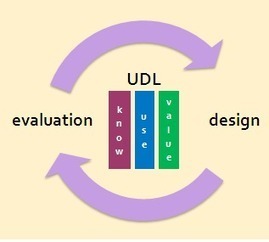
Don Glass, an independent education and evaluation consultant, and a former UDL Fellow at Boston College and CAST has been interested in how we can be as inclusive as possible in the gathering and analysis of data, as well as in the sharing and use of evaluation findings. He and his colleagues are interested in applying Universal Design to evaluation for the purpose of removing barriers, providing flexibility and promoting engagement.
They are "exploring the use of Universal Design for Learning (UDL) as a translational framework for guiding the design and evaluation of curriculum, programs, and materials. The framework moves beyond accessibility to include learning design. UDL provides a research-supported conceptual framework, as well as a well-structured heuristic for guiding inclusive design and evaluation decision-making. UDL prompts for the design of multiple, flexible options to address variability and supports expert learning across the affective, recognition, and strategic neural networks of the brain. I would locate the use of the UDL framework in the transformative evaluation paradigm, and argue that it prompts for evaluation design that aligns with many of the principles of Empowerment Evaluation."
Explore the hot tips on this subject:
> Monitor and evaluate outcomes for knowledge, use, AND values.
> Provide flexible options for data collection and sharing.
"Universal Design for Learning (UDL): Addressing the Variability of All Learners", on November 1-2, 2012.
"In this two-day institute, participants will explore these questions while learning about the principles and application of UDL. In addition to hearing presentations from leaders in the field of UDL, participants will have the opportunity to actively engage in guided practice and hands-on experiences as they work on the development of a lesson, unit of study, or action plan to integrate UDL into practice.
The institute highlights UDL, emphasizing the UDL guidelines and application to practice, including:
> Connections between learning and neuroscience
> The three UDL principles and related benchmarks and checkpoints
> The curriculum framework of goals, methods, materials, and assessment as a structure for designing lessons
> Examples of practice that illustrate alignment of UDL to curriculum
> Hands-on exploration of technologies that support UDL
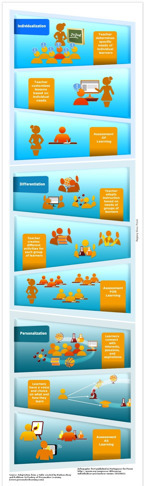
When learning is personal, teaching and learning changes. Teachers' and learners' roles change. Last January, we created a chart comparing Personalization vs Individualization vs Differentiation and a report that explained the difference between these three terms including teacher-centered vs. learner-centered approaches. This chart has been downloaded tens of thousands of times from all over the world and prompted discussions around some of these questions:
> What does personalized or personal learning mean to you?
> How do you see teachers' and learners' roles changing?
> How does a school or district know they are Ready to Transform learning?
> What is Assessment AS Learning?
> Can personalization help close the achievement gap?
> Where are the conversations, models, and examples of personalizing learning?
These questions were part of an interview from Patricia Gomes, a reporter from Porvir in Brazil who wrote an article August 12, 2012 about the chart and resulted in an article and infographic in Portuguese.
Prof. Hacker shares a unique perspective on how Angry Birds can teach us about Universal Design for Instruction and Universal Design for Learning.
"I think that Angry Birds is so fun to play because it helps develop our meta-cognitive skills. Throughout playing Angry Birds, one must pay attention to the strategies being employed, adjust one’s play as needed to achieve certain goals and objectives, and transfer what you have learned about a bird’s capabilities several levels ago to the current level.
In short, Angry Birds is a powerful metaphor for learning. As I was recently playing the game, I could not help but think: what if my classroom was more like this? Would students have a better learning experience?"
Consider the following:
> Angry Birds involves practice without penalty.
> Angry Birds offers the opportunity for constant feedback.
> Angry Birds inherently teachers that different tools have different purposes.
> Angry Birds rewards perseverance.
> Angry Birds gives no time limit.
"No wonder we are all addicted to this game! Now if only we could ensure that our classrooms are always safe spaces to practice new strategies, offer students a range of possibilities for how to succeed in their learning, give our students constant feedback, and support knowledge transfer within and among our courses."
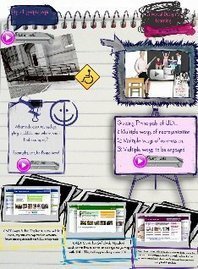
"In this Kappa Delta Pi Record article, Susan Trostle Brand (University of Rhode Island/Kingston), Antoinette Favazza (University of Rhode Island), and Elizabeth Dalton (TechACCESS) present ways that teachers can use Universal Design for Learning to make lessons accessible to students with a wide spectrum of learning styles and abilities:
> Multiple means of representation – Giving students options for perception, language and symbols, and comprehension"
> Multiple means for engagement – A constructivist approach can support active engagement through:
- Recruiting student interest
- Sustaining effort and persistence
- Self-regulation
> "Multiple means for action and expression – Varying physical action, expressive skills and fluency, and executive functions
> Multiple means of assessing understanding – This includes methods, formats, scope/range level, product and outcome, and feedback"
“Universal Design for Learning: A Blueprint for Success for All Learners” by Susan Trostle Brand, Antoinette Favazza, and Elizabeth Dalton in Kappa Delta Pi Record, July-September 2012 (Vol. 48, #3, p. 134-139), http://bit.ly/OeUOSF
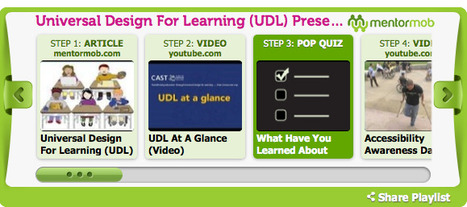
Carol Mortensen has created a MentorMob playlist on Universal Design for Learning. This playlist can jumpstart your understanding of UDL, the framework that can be used to design curriculum and lessons for all learners.
"Universal Design For Learning (UDL) is a concept born from the work of architects to develop buildings that remove physical barriers so that they are accessible to all people. From this idea, educators began to focus on removing the barriers that work against learning. UDL improves the possibility of a positive academic outcome and deliberately focuses on meeting the individual needs of the students. In addition, resources are provided through websites that support the educator implementing UDL ideals.
This playlist provides an overview of UDL along with some interactive activities to further understanding."
Thank you Carol for creating this all important playlist for teachers everywhere!
"Brown, Collins, and Guguid (1989) proposed a cognitive apprenticeship theory of learning which placed activity at the center of any knowledge acquisition process. Learning, according to this theory, is a process in which an individual is enculturated into “authentic practices through activity and social interaction” (Brown, et al., p.37)."
"The cognitive apprenticeship theory, when translated into classroom instructional practices, can support universal design for learning. As we know, UDL is based on three overarching principles: multiple means of representation, multiple means of action and expression, and multiple means of engagement. In what ways is this theory aligned with the three principles and how can it support UDL in a diverse classroom?" The table lists some alignment between UDL principles and guidelines with cognitive apprenticeship applications.
Listen to the BlackBoard archived recording of the CEM kickoff panel and open discussion about how connected education can serve the fully panoply of learning styles and needs among students today. Panelists included Kathleen McClaskey, Ira Socol and Lisa Nielsen and was moderated by Tracy Gray.
In this panel discussion, Universal Design for Learning took center stage as the framework to support all learners.
Diana Petschauer from UNH has shared a link that includes a comprehensive set of apps for iPods, iPads and Androids that could support the college students that may have challenges in reading, writing, organizing, planning, time management and vision. Each app has a description on how it can be used along with the link to iTunes to download the app.
Thank you Diana for this list that can "level the playing field" for college students everywhere!
"As a framework, UDL requires educators to think proactively about the variability of all learners. In consideration of the UDL Critical Elements, educators implementing UDL should use a backwards design instructional process that incorporates the following five steps."
> Step 1: Establish Clear Outcomes
> Step 2: Anticipate Learner Variability
> Step 3: Measurable Outcomes and Assessment Plan
> Step 4: Instructional Experience
> Step 5: Reflection and New Understanding
The Universal Design for Learning Implementation and Research Network (UDL-IRN) is a grassroots organization that supports the scaled implementation and research related to Universal Design for Learning. You can download the PDF of this UDL Instructional Process on this site.
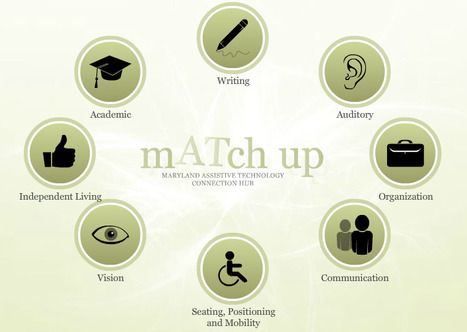
"The mATch up Tool provides information on low, mid, and high tech devices for meeting the unique needs of students. The tool was designed with a variety of users in mind – teachers, parents, administrators, and in some cases, students themselves. The idea is to provide a handy, ready-access way of gathering information on tools that might help open access to academic and non-academic settings."
Discover the tools that support students in reading, writing, communication, organization, etc.
This is an excellent video produced by Maryland Learning Links that provides an overview of Universal Design for Learning (UDL) and explores the ways teachers can use this approach to reach all of their students.
Recommend using this video to create an understanding that UDL is about the variability in learning and that by using UDL in practice, we can teach all learners.
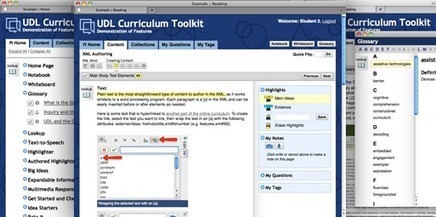
The UDL Curriculum toolkit is a web-based platform for the development of curricula and other content according to the principles of UDL.
"The UDL Curriculum Toolkit contains numerous features to support students in the learning process and to enhance all students’ learning experiences. These features include providing a) multiple ways for content to be represented, b) various multi-media options through which students can express what they learn, and c) a dynamic environment designed to accommodate diverse learning engagement proclivities. In particular, Highlights and Big Ideas features help students identify core concepts as they read; Get Started and Check My Work features assist students in thinking about and responding to questions embedded in the curriculum; and Notebook, My Notes, My Questions, and My Tags features help students organize their thoughts, develop understandings, and create original questions."
"This site hosts information about Universal Design for Learning, and it suggests free and low-cost digital tools that facilitate a UDL approach to learning, as well as tools to support learners with access challenges."
Following the principles of UDL, you will discover tools that can provide multiple representation and access to curriculum. Included are those tools that will engage learners and provide multiple means for them to express what they know. A special section on handhelds rounds out this one stop resource on UDL.
Thank you Paul for creating this resource for educators everywhere!
From the site: "Universal Design for Learning (UDL) is a framework for designing curricula that enable all individuals to gain knowledge, skills, and enthusiasm for learning. UDL provides rich supports for learning and reduces barriers to the curriculum while maintaining high achievement standards for all."
Register for the ISTE SIG event on UDL, AIM and AT: Complementary Supports for the Achievement of All Students on September 11th, 4 pm PT / 5 pm MT / 6 pm CT / 7 pm ET.
Joy Zabala from CAST will lead this presentation on UDL, AIM and AT. She currently the Director of Technical Assistance for CAST and for the National Center on Accessible Instructional Materials (AIM Center) funded by the Office of Special Education Programs, US Department of Education. The AIM Center provides knowledge development, technical assistance and leadership to assist state and local education agencies and other stakeholder increase the quality, availability, and timely delivery of accessible instructional materials to K-12 students with disabilities that hinder the use of widely used educational materials. She is a strong advocate of UDL, AT and AIM as complementary supports for the achievement of all students.
This Parent Advocacy Brief will help parents learn the basics about the UDL (universal design for learning) approach and offers helpful tips for talking with your school about it.
Most parents will agree that both teaching and learning today are full of enormous challenges. Teachers face classrooms full of students with a wide range of abilities, speaking an array of languages, and coming from very diverse backgrounds.
Students face increased learning expectations as the nation's schools work to improve their academic achievement and enhance their long-term success. For students with learning disabilities (LD), learning in today's environment is daunting, even when provided with specialized instruction, accommodations, and assistive technology."
Fortunately, there is an approach to teaching and learning that can reduce these challenges, for all students, not only for those with LD. This approach, called Universal Design for Learning (UDL), is a concept that, if embraced by the field of education, can dramatically change the school experiences and success of students with LD.
Multiple means of representation is a fundamental principle of Universal Design for Learning. As of today, there’s a promising new free option for presenting information in a wide variety of ways.
First knowmia is an online site that offers a collection of some 7000 curated videos organized under main headings or searchable using key words.
It is also is a free app for the iPad where a teacher can create video lessons. You can design each step in a lesson, record illustrations as you draw them, and create sophisticated animation sequences with a simple stroke of a finger. Here are some main features of this app:
+ Build your lesson out of smaller steps (like slides) so it's easy to manage and organize your lesson + Create each step of your lesson on a separate whiteboard so you can seamlessly introduce new concepts + Record everything that you do on the whiteboard as well as your voice to create the lesson step-by-step + Use the shape tool to quickly draw common shapes + Type text with any font/size directly on the whiteboard
Chris Bugaj is offering a six week course on UDL and AT starting September 10th and ending October 19th. Don't miss out on this great course that can jumpstart your school year!
"The principles of Universal Design for Learning provide educators with a framework to plan lessons to make instruction accessible to every student. In this course, we will work through six weeks of online activities. All of the activities are designed to further the team goal of experiencing free technology to help teachers plan lessons in a way that makes the content accessible to the widest possible audience. Throughout the course, participants will learn practical methodologies for representing content using multiple modalities, providing the means for students to demonstrate what they know using a variety of tools, and engaging learners using high-interest, authentic practices."
"Universal Design for Learning (UDL) is a framework for planning inclusive classrooms. Inclusive education has several goals:
> Deep, creative, critical thinkers
> Self-motivated, self-disciplined learners
> Self-aware, confident students
> Compassionate, cooperative leaders and
> Community members with the skills and understandings to work with and relate to diverse others (Dr. Jennifer Katz, 2012)
UDL proposes to accomplish these goals by creating welcoming, emotionally safe classrooms. All children can recognize that everyone has unique ways of being smart, and that living in community means using our talents to support one another.
UDL makes schools academically inclusive by helping teachers plan instruction so that all learners can participate at their own level, whether that is introductory or challenging. In practice, this means classrooms from grade K-12 will involve learning in many ways – through movement, art, music, literature, and nature – and students have the opportunity to show what they know in ways that fit their strengths."
Thank you Deborah for your insight on UDL and inclusion!
"In her book Teaching to Diversity, Dr. Jennifer Katz synthesizes the research, and 16 years experience of teaching in inclusive classrooms and schools, to provide answers to several questions:
> How do I make inclusion work for ALL students?
> What are the foundational best practices of a truly inclusive learning community?
> How does one create such a community?
The author pulls together, in an organized way, the key pieces of what she learned and implemented from exploring and using universal design for learning (UDL) in her classrooms. Katz describes a three-block model of universal design and suggests a step-by-step approach to implementing it in the classroom."
"Universal design's focus is that barriers to learning are removed and all students have equal access to the curriculum. Reducing the number of students in the margins. Sounds good. Hard to argue.
The flipped classroom affords time to teachers so they can spend more time with students and have more of an opportunity to discover the barriers to learning. When you teach high school science in a full year school (one that is an IB school for example) it is hard to get to know the 200 students you teach. So time is gold.
Flipping gets you that time."
Don't miss the Google Doc: UDL Applied and the Science Classroom. Thank you Jane for your insights and resources!
"No two students are the same, no two students process information the same, and therefore students deserve to have information presented in multiple ways, students should be encouraged to showcase their knowledge in multiple ways, and students should be motivated in multiple ways."
Melissa tells the story of UDL and includes video of UDL and the three principles along with the tools that can help support a diversity of learners in the classroom: the CAST Lesson Builder, UDL Curriculum Self-check and Book Builder.
Here is an excellent video produced by CAST to help understand learner variability
"Learning Goal Participants will be able to explain how the Universal Design for Learning (UDL) framework helps educators address systematic learner variability.
Essential Questions > Why are curricula limited if they are designed for the 'average' learner? > What makes learner variability systematic? > Why is it important for educators to know about systematic learner variability?"
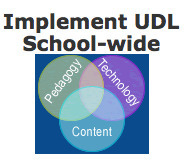
HIAT (High Incidence Accessible Technology) offers a set of resources, planners, videos and examples in assisting schools to implement UDL in schools. The three step process includes:
> Increase Awareness with Staff
> Create a PLC
> Implement UDL School-wide
What an excellent resource in starting the school year with the goal of implementing UDL!
Ira Socol from SpeEdChange introduces "The Freedom Stick". Here is some of his thoughts on what we need to do to empower learners from this time forward.
"It is time for Universal Design for Learning to be put in the hands of every student. It is time for every student to be given the opportunity to discover and experiment with a range of tools which can support their own individual differing communication needs – not just in school, but throughout their lives.
...it is now deep into the second decade of the 21st Century and the technologies and realities of the world have changed. All around the planet people carry with them – often in their pockets – highly individualizable devices which can support all the different ways humans learn and communicate. And it is time for schools to catch up with this reality.
The new and improved “Freedom Stick” (v.2.3.2) offers students and schools the ability to arrive at this ‘technological present’ at essentially zero cost."
Ira provides a comprehensive outline of what the Freedom Stick has and why you may want to give it to all your learners.
To get content containing either thought or leadership enter:
To get content containing both thought and leadership enter:
To get content containing the expression thought leadership enter:
You can enter several keywords and you can refine them whenever you want. Our suggestion engine uses more signals but entering a few keywords here will rapidly give you great content to curate.


 Your new post is loading...