Your new post is loading...

|
Scooped by
Mel Riddile
May 25, 2014 9:30 AM
|
The quality and number of education apps has increased over the last few years. The following guide identifies apps that students and parents can use to stay on top over summer vacation.
|
|
Scooped by
Mel Riddile
May 14, 2014 9:03 AM
|
Resources by Topic:
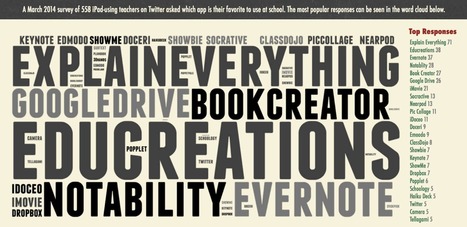
Favorite Apps
Best Practices
Engaging Activities
If you’re a high school teacher looking for iPad resources targeting your needs, you’ve come to the right place. Students
Looking for some great professional learning with iPads this summer. Join Wes Fryer at one of his iPad Media Camps! - JE "Registration for iPad Media Camps in Summer 2014 is available, including early-bird pricing! Locations this summer include Illinois, Texas, Kansas and Alabama. These workshops are geared specifically to K-12 classroom teachers. College/university faculty can also benefit from the workshop’s focus on iPad-based multimedia products students can create to demonstrate what they know and can do. (The June 16-18, 2014, session is for elementary teachers only, however.)"
Via John Evans
I can remember spending almost a full period on one short paragraph while reading about endothermic and exothermic reactions in science class. We spent time highlighting, underlining, making connections to things we already knew, asking questions in the margins, defining words and more. The room might as well have smelled of smoke— these kids were thinking, brains-on-fire style! They were struggling…PRODUCTIVELY! I was hooked, and unbelievably, so were they. I heard several kids exclaim, “Ohhhhhhh, I get it.”
|
|
Scooped by
Mel Riddile
April 29, 2014 9:15 AM
|
I can remember spending almost a full period on one short paragraph while reading about endothermic and exothermic reactions in science class. We spent time highlighting, underlining, making connections to things we already knew, asking questions in the margins, defining words and more. The room might as well have smelled of smoke— these kids were thinking, brains-on-fire style! They were struggling…PRODUCTIVELY! I was hooked, and unbelievably, so were they. I heard several kids exclaim, “Ohhhhhhh, I get it.”
|
|
Scooped by
Mel Riddile
April 24, 2014 11:07 AM
|
This list includes some of my favorite ways to use the iPad for student (and teacher) presentations. Whether you decide to have students make their own Tellagamis or try using SlideShare for Power...
|
|
Scooped by
Mel Riddile
April 17, 2014 6:04 AM
|
I enjoy discussing iPad and other edtech resources with my colleague and friend Sylvia Duckworth almost every week through Twitter. Sylvia is a leader in the French teaching community in Canada, an...
It's long been prescribed that when your iPhone's battery is running poorly that you close out all the running apps to help preserve battery life (we've mentioned it before). That makes sense if you're using a computer, but as writer (and former Genius Bar technician) Scotty Loveless points out, that's simply not the case in iOS.
Via John Evans
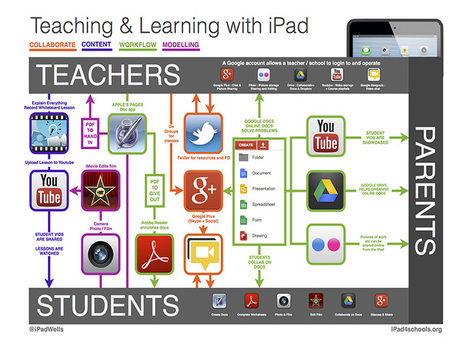
"Using tablets in the classroom–whether iPads, Androids, or surging Windows devices–is largely a matter of workflow. If you can forgive a mixed metaphor, the traditional classroom sees the teacher as the both the director and the bottleneck of all productivity. They create assignments, assess proficiency, respond to assessment data, and refine planned instruction in light of constantly changing circumstances. This is challenging in any context, but in 1:1 and mobile learning environments, it’s even more complex. With tablets, every student has both an information portal and a digital printing press. This means they can reach both communities and potential collaborators. The above graphic from @ipadwells addresses this issue with a helpful graphic that visualizes a workflow, while offering up representative apps for each step of the process."
Via John Evans
"Publishing student video that is created with iPads can be a challenging process, especially with younger students. Even schools that are Google Apps typically decide to turn off YouTube uploads to the student accounts. However, with the use of a handful of free applications, students can create video content on iPad, share their creation with a teacher, and then have the teacher upload to their YouTube channel or a class YouTube channel. "
Via John Evans
|
|
Scooped by
Mel Riddile
March 23, 2014 3:10 PM
|
This article by Edudemic is the best summary of the 5 issues facing iPad rollouts I’ve read to date. But... many school principals I’ve met who NEED to read this wont as it’s 1300 words. And so, he...
|
|
Scooped by
Mel Riddile
March 21, 2014 4:46 PM
|
This picture was drawn in response to a post called 'Drawing On A Napkin: Is This How iPads Function In A Traditional Classroom?' by the esteemed Terry Heick. Mine was not drawn on a napk...
|
|
|
Scooped by
Mel Riddile
May 23, 2014 10:47 AM
|
Apple's Official Guide To Teaching With Apps
|
|
Scooped by
Mel Riddile
May 14, 2014 8:50 AM
|
A list of some of the The Best Free Web Tools for Engaging Students in 1:1 Classrooms, as presented at the Iowa 1:1 Conference in April 2014.
Via John Evans
|
|
Scooped by
Mel Riddile
April 29, 2014 6:33 AM
|
"Team Shake is an iPad app for randomly selecting names to create teams or to select an individual name. On Team Shake you can create rosters by manually entering names or by importing a list of names. When you are ready to choose teams just select the number of teams that you want created, shake your iPad, and then each person is randomly assigned to a team."
Via John Evans
|
|
Rescooped by
Mel Riddile
from Digital Delights for Learners
April 15, 2014 9:32 AM
|
Collective Wizdom - An R&D Platform for Researchers, Academics and Students.
Via Ana Cristina Pratas
|
|
Scooped by
Mel Riddile
April 7, 2014 1:39 PM
|
Digital app, picture book combination may help improve children's communication
|
|
Scooped by
Mel Riddile
March 26, 2014 1:27 PM
|
A month ago when I was at Learning Technologies, Europe's leading showcase of technology supported workplace learning, I got the opportunity to briefly talk
|
|
Scooped by
Mel Riddile
March 24, 2014 6:20 PM
|
Evernote is one of our favorite multipurpose note-taking tools, so it's not surprising that so many apps out there work with it. These apps do everything from using Evernote for storage to making use of your Evernote notebooks to do clever new things. Here are a few of our favorites.
|
|
Scooped by
Mel Riddile
March 23, 2014 3:23 PM
|
The best educational apps for kids can be hard to find! We've made it simple for you by adding them right here, broken down by category and age.
|
|
Scooped by
Mel Riddile
March 22, 2014 7:52 AM
|
Common Sense Media’s service Graphite, which offers independent ratings and reviews on learning apps and websites, has compiled this list of its top apps and websites that help teach algebra.
|