


I recently received an email from a school administrator that is eager to bring iPads into his school but is also extremely concerned that it could grant students easy access to inappropriate material.

 Your new post is loading...
 Scoop.it! I recently received an email from a school administrator that is eager to bring iPads into his school but is also extremely concerned that it could grant students easy access to inappropriate material. 
No comment yet.
Sign up to comment
Scoop.it!

Here’s a comprehensive list of useful bookmarklets that you can easily add to the mobile Safari browser of your iPhone, iPad and iPod Touch. With bookmarklets, you can translate web pages, make them more readable, find word meanings and more.
Scoop.it!

The Win8 Metro Testbed app connects your iPad to a Windows 8 PC, giving you a taste of how the new OS works on a touch-screen device. Read this blog post by Lance Whitney on Internet & Media.
Scoop.it!

8 Great Ways to Use Air Display & iPad... 1. Dedicated Music Player 2. App Launcher, Tool Panel, Dock Holder 3. Dedicated RSS Reader 4. Twitter Monitoring 5. Dedicated Chat Screen 6. System & Resource Monitoring 7. Watching Logs 8. All of the Above
Scoop.it!
Collaborize Classroom now for the iPad. Collaborize Classroom is a free online collaborative education platform for students and teachers. Collaborize Classroom is designed to complement classroom instruction and engage students in online activities, assignments and discussions that allow for deeper participation inside and outside the classroom. The app allows students to login, vote, comment, and reply to topics for on-the-go learning anywhere, anytime. Via Ana Cristina Pratas
Scoop.it!

Today is an exciting time to be an art teacher!
Scoop.it!

Here we present 50 really useful iPad 2 tips. We cover everything from customising your Home screen through to getting more from built-in apps like Mail and Safari.
Scoop.it!

Tired of the tedious conversion process it takes to get your iOS device to play back videos? Want to watch your videos in more than just the handfull of proprietary file formats? Fortunately, there’s an app for that. You can play almost any video format under the sun on your iPad with the PlayerXtreme app. Read on to learn how.
Scoop.it!

Scanner Pro is my new favorite scanning app for the iPad. It doesn’t do OCR, it doesn’t grab phone numbers from business cards. It just scans, stores, shares and searches your paper documents, and it does it with a beautifully simple interface. The app is actually an update to the old iPhone version, but this new version (4.0) is completely redesigned and is now a universal app. And just in time, too, as the new iPad’s 5MP autofocus camera makes it a pretty great scanner.
Scoop.it!

Tablet computing and mobile devices promise to have a dramatic impact on education. A growing number of schools across the world are jumping on the digital bus and embracing iPads (less often, o...
Scoop.it!

Teaching Appz is a great new website to help teachers to find apps for iPads, iPods and other mobile devices (including Android, Playbook and web) that can be...
Scoop.it!

Skitch, a free iPad application from Evernotemakes annotating photos and screenshots painless.
|
Scoop.it!

Deferred reading app Read It Later has renamed itself Pocket, shed its price tag, and added a variety of new features.
Scoop.it!

Interested in making a screencast based on actions taking place on an iOS device? It used to be a pain in the neck. Thanks to AirPlay that pain has eased significantly.
Scoop.it!

When confronted with the question: What tech skills do you want your kids to know by the end of primary school? I was forced to reflect on my IT education and where and when I obtained it.
Scoop.it!

As incredible as it seems, it's been over a year and a half since the original iPad was released, forever changing what the world thought of tablet computers. Web Apps One area where the iPad and other tablets have lagged behind is with web apps. While Safari on the iPad is a modern, quite capable browser, many web apps are difficult to use with fingers, and can run very slow on slower processors. Over the past year, though, more and more web apps have been designed or updated to take advantage of the iPad’s features, including multitouch, gestures, and more. Let’s look at some of the best web apps today for the iPad, and if we miss your favorite, be sure to let us know in the comments below!
Scoop.it!

The History 2.0 Classroom Fundamentally I believe that an iPad can neither be good or bad. All it can ever be is an iPad. I argue instead, that when used effectively and with specific goals in mind, iPads can have a positive impact on education. Seeing that schools are investing money on these devices, the perspective to adopt is not a combative one, but rather one that explores how to effectively integrate the devices. Whether a school is 1:1, or there is a shared iPad cart, the devices can be used effectively.
Scoop.it!

As more and more team members start using the iPads for taking notes, it means that more folks are having to manage Word Docs that someone on a desktop created and shared. There are a couple very nice Word/Excel/PowerPoint apps for the iPad. The issue comes in when everything is being written in plain text or Markdown text to make sharing and posting to Web sites easier. Trying to post us a Word Doc has a lot of labor associated with it to clean up the code since there is a lot going on behind the scenes in a Word Doc.
Scoop.it!

It's amazing what an iPad can do. And it's dumbfounding when something simple doesn't seem to work at all. As with any computing device, there are tricks to getting what you want with an iPad, at least some of the time. I've pulled together the tips and tricks I find myself sharing with friends and colleagues repeatedly, the stuff that stumps people who aren't exactly technophobic. Maybe they stump you, too.
Scoop.it!

Yes, you and your child should absolutely get out in the fresh air and live life in the real world. But that doesn't discount using technology to improve your child's life.
Scoop.it!

Reflection.app has provided an alternative to using Apple TV to mirror your iPad or iPhone. Reflection allows you to mirror your iPhone 4S, iPad 2 or iPad 3 to any Mac running OS X 10.6+, wireles...
Scoop.it!

Jared Arentson of Tridom Media in Redwood Falls, Minnesota, took a series of photos which he shared with me afterwards via Dropbox.
Scoop.it!
Teachers with mobility: ActivEngage Mobile - Voting on iPads and other devices | The Whiteboard Blog
Promethean have just released ActivEngage, which will be of interest to schools that have started to roll out iPads and other mobile solutions in the class...
Scoop.it!
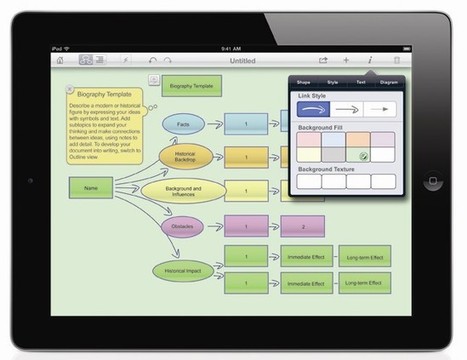
Build students' cross-curricular critical thinking and literacy skills with Inspiration Maps for iPad. Use diagramming, outlining and brainstorming tools to increase student achievement.
|





