


Any teacher can access all the students files on a device that has been “Saved to iTunes”. You can even pick up the work, mark it and hand it back to the iPad whilst the iPad is still being used by the kids (unbeknown to the user!)."

 Your new post is loading...
 Scoop.it! Any teacher can access all the students files on a device that has been “Saved to iTunes”. You can even pick up the work, mark it and hand it back to the iPad whilst the iPad is still being used by the kids (unbeknown to the user!)." 
No comment yet.
Sign up to comment
Scoop.it!
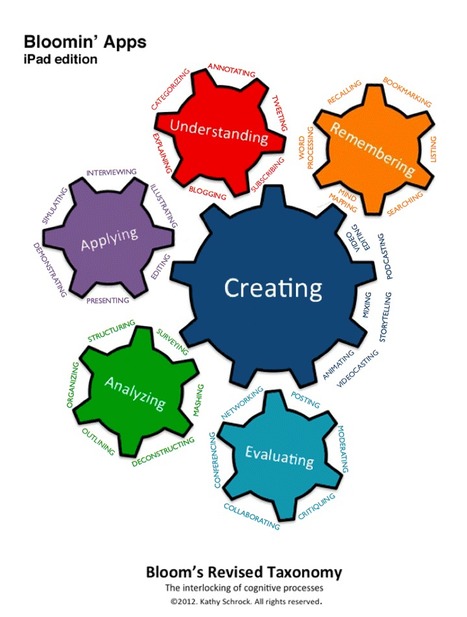
Includes all the Bloomin' versions in one place!
Scoop.it!

In just a few short years, the once novel tablet computer will outsell the entire laptop market.
Scoop.it!

Burlington High School (MA) Principal Patrick Larkin filmed the Burlington High School football team as it scored the first touchdown of the season last fall. He was not using a typical video camera; he was using an Apple iPad.
Scoop.it!

The uses for Apple's iPad are nearly infinite: education, healthcare, small business, gaming. But what about professional sports? It seems like NFL teams are starting to adopt the ...
Scoop.it!

The first large-scale use of iPads for learning in UK schools a already a success, says report...
Scoop.it!

This app enables me to access and control my desktop from my iPad. Splashtop 2 - the next generation of our remote desktop app. It's the easiest way to access all of your content from any device from anywhere!
Scoop.it!

I would feel quite confident in going out on a limb and guessing that most owners of the iPad use the device in some form to scroll through albums of images and photographs.
Scoop.it!
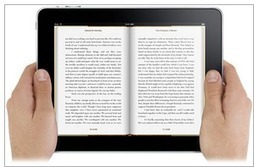
iPad is a cool versatile tool that has a huge potential in education. It is widely believed that iPad has started tranforming the face of education and revolutionizng modes of learning. Results coming out of pilot studies on the integration of iPads in the classroom seem to be promising.
Scoop.it!

FIRST SOLUTION
SECOND SOLUTION While searching for an answer to my question, I also came across a reference on how to create an ad-hoc network using the new CloudFTP device, which also does many other things, too. Note: Airport Express will also work.
Scoop.it!

An iPad app offers to double, or more, your reading speed by flashing the words at you.
|
Scoop.it!

The best part of the Education Sector's Getting to 2014 (and Beyond): Choices and Challenges Ahead is Bill Tucker's "Taking a Long View of Teacher Evaluation," and its call for a one year hiatus on value-added evaluations when Common Core...
Scoop.it!

PowerPoint and Presenting Blog - Thoughts and impressions of whatever is happening in the world of PowerPoint...
Scoop.it!
Scoop.it!

Have you ever wanted to show off that iPad game on the big screen, record a demo for your video blog, or record a tutorial of how to use an app more effectively?
Scoop.it!

Learning is rarely fun; it’s even less fun when being taught within the confines of a lecture hall or classroom. While this may be true, there’s no reason why you can’t make the ...
Scoop.it!

With some amazing iPad apps for teachers and what you can do when teaching with an iPad it is an exciting time for education, teachers and pupils.
Scoop.it!

From
pogoplug

Highly recommended! I use Pogoplug to access all my files (photos, videos, etc.) at any time from anywhere. I can connect three hard drives and an SD card at one time and access them all on my iPad through my "private cloud."
Scoop.it!

Any list of "Best Apps for Teachers" quickly gets superseded in the new releases of apps. More and more apps each week are being released to assist teachers. Some of these are simple apps that perform single tasks exceptional well while others transform the way that we present in a classroom. Here are another 10 that might help to make the classroom a place of contemporary learning.
Scoop.it!

I have been thinking of buying a keyboard for a long time now. I am fairly fast at typing on the iPad but there are still times that I would like to have a physical keyboard…to be able to feel the keys on my fingers. Over the past year I have written half of my blog posts on my iPad using Blogsy and have grown very fond of QuickOffice Pro HD. For these apps a dedicated physical keyboard is much more efficient.
Scoop.it!

Learn how to create and share screencasts and narrated slideshows online using an iPad including recorded audio synchronized to selected photos.
Scoop.it!

iOS for iPad includes a nice feature that lets you triple-click the Home button to toggle ‘White on Black’ screen mode. If you haven’t used White on Black before it essentially inverts the screen, which makes reading at night or in low light conditions less harsh on the eyes.
|






