Rapid eLearning
63.2K views | +14 today
Rapid eLearning
Création rapide de contenus eLearning
Your new post is loading...
Scooped by michel verstrepen
May 11, 2013 3:34 AM
Scoop.it!

Popcorn Maker

Popcorn Maker | Rapid eLearning | Scoop.it

This is a great video creation tool, where you can mix online videos from YouTube and other video sites with images, text, Twitter feeds, Google Maps, Wikipedia and more. You can then share your mashup online.
http://ictmagic.wikispaces.com/Video%2C+animation%2C+film+%26+Webcams


Louise Robinson-Lay's curator insight, May 11, 2013 7:56 PM

Great for media and English mash ups.

Scooped by michel verstrepen
May 11, 2013 2:16 AM
Scoop.it!

6 conseils pour réaliser vos parcours m-learning sur iPad avec Articulate Storyline

6 conseils pour réaliser vos parcours m-learning sur iPad avec Articulate Storyline | Rapid eLearning | Scoop.it

I see a lot of questions on E-Learning Heroes about designing for multiple screen sizes. Indeed, mobile design requires new approaches and rules. As architects of learning experiences, we all want to deliver content successfully through different devices...

No comment yet.
Scooped by michel verstrepen
May 10, 2013 6:36 PM
Scoop.it!

ClippingMagic

ClippingMagic | Rapid eLearning | Scoop.it

A super image editing tool which removes parts of an image when you colour the picture in green and red sections to show want you want to keep.
http://ictmagic.wikispaces.com/Photos+%26+Images


No comment yet.
Rescooped by michel verstrepen from TICE 15
May 10, 2013 5:04 PM
Scoop.it!

ClassTools.net: Create interactive flash tools / games for education

ClassTools.net: Create interactive flash tools / games for education | Rapid eLearning | Scoop.it
Create free educational games and tools in flash

Via ATICE 15
No comment yet.
Rescooped by michel verstrepen from Le petit journal de l'An@é
May 10, 2013 9:54 AM
Scoop.it!

Didapages : un logiciel pour créer des livres numériques - Educavox

Didapages : un logiciel pour créer des livres numériques - Educavox | Rapid eLearning | Scoop.it
Photo Credit : libraryman via Compfight cc Ressources et articles tirés du site TICE 74 (Académie de Grenoble). Le logiciel (...)

Via Michelle Laurissergues
No comment yet.
Rescooped by michel verstrepen from Student Engagement for Learning
May 9, 2013 5:38 PM
Scoop.it!

Great Presentations Are Like Ads by @slidecomet

Great Presentations have features that resemble great ads. It's all one big package that hit hard and strong! FREE Download with a tweet: http://goo.gl/X26Ui

Via Grant Montgomery
No comment yet.
Rescooped by michel verstrepen from Digital Delights - Digital Tribes
May 9, 2013 5:18 PM
Scoop.it!

CratePlayer - Discover, collect, play and share

CratePlayer - Discover, collect, play and share | Rapid eLearning | Scoop.it
Discover, collect, play, and share your favorite online media with CratePlayer.

Via Ana Cristina Pratas
Ana Cristina Pratas's curator insight, May 9, 2013 5:16 PM

CratePlayer is a free and simple way to organize and enjoy all of your favorite online media. You can use CratePlayer to collect media items from the web and arrange them into any number of themed crates. You can share your crates with the CratePlayer community, or keep them private if you prefer. If you're not the collector type, you can also use CratePlayer to discover and play great new music and videos curated and shared by other CratePlayers.

Rescooped by michel verstrepen from PowerPoint presentations and PPT templates
May 9, 2013 4:08 PM
Scoop.it!

Free Funnel Analysis PPT Presentation Examples | PowerPoint Presentation

Free Funnel Analysis PPT Presentation Examples | PowerPoint Presentation | Rapid eLearning | Scoop.it
If you need to prepare a funnel analysis PowerPoint presentation then the following are examples of funnel analysis PPT presentations and slide designs that you

Via FPPT
No comment yet.
Rescooped by michel verstrepen from GooglePlus Expertise
May 9, 2013 11:51 AM
Scoop.it!

How do you edit videos for Google Hangouts?

This is exactly what you don't want to have happen. You make an amazing interview with someone using Google Hangouts, but it drags on and on and on until eve...

Via Jaana Nyström
No comment yet.
Rescooped by michel verstrepen from Content Strategy |Brand Development |Organic SEO
May 9, 2013 8:44 AM
Scoop.it!

3 Keys to Activating an Audience with Smarter Content

3 Keys to Activating an Audience with Smarter Content | Rapid eLearning | Scoop.it
Effective content marketing should leverage tools and technologies that track and make actionable data relating to your audience (target vs. actual), content (forms and stories), and points of distribution (devices, sites, context).

Via Level343
No comment yet.
Rescooped by michel verstrepen from Educational Technology News
May 7, 2013 7:11 PM
Scoop.it!

Before and After: How To Fix 3 Dreadful eLearning Design Errors

Before and After: How To Fix 3 Dreadful eLearning Design Errors | Rapid eLearning | Scoop.it

"The challenges for designing eLearning courses are more than just developing course content. Distractions are everywhere and if you plan to attract and keep learners, there are certain design strategies you need to focus on. Your course needs to be easy to navigate, appealing to the eye without being cluttered and contain quality graphics. Here are three possible problems with your eLearning design along with suggestions of ways to improve the structure, content and graphics."


Via EDTECH@UTRGV
eduPLEX's comment May 8, 2013 5:55 AM
eduPLEX has an eTeacher course that is completed on-line. We teach you all the tricks to make learning self-directed and user- friendly. www.eduplex.com.au
Rescooped by michel verstrepen from JPBlog Technoselect
May 7, 2013 12:59 AM
Scoop.it!

Bunkr : la start-up française qui veut tuer PowerPoint

Bunkr : la start-up française qui veut tuer PowerPoint | Rapid eLearning | Scoop.it
Bunkr est un outil qui permet de collecter des contenus du web dans une bibliothèque avant de les organiser dans une présentation en HTML5.

Via JP Fourcade
No comment yet.
Scooped by michel verstrepen
May 11, 2013 2:17 AM
Scoop.it!

7 trucs pour éviter les désastres technologiques avec vos présentations visuelles

7 trucs pour éviter les désastres technologiques avec vos présentations visuelles | Rapid eLearning | Scoop.it

Il y a quelques jours, j’ai lu une publication sur le site Open Forum que j’ai trouvé particulièrement utile pour tous ceux qui doivent donner des présentations et ne veulent pas être pris au dépourvu avec la technologie ou les problèmes courants. Comme le dit si bien la Loi de Murphy (Wikipédia pour plus de détails), si quelque chose peut mal tourner, soyez certain que cela sera le cas...

No comment yet.
Scooped by michel verstrepen
May 10, 2013 8:43 PM
Scoop.it!

Comment créer un PowerPoint efficace pour vos parcours e-learning

While other forms of visual presentations have cropped up—such as Prezi and Empressr—PowerPoint remains the presentation software of choice.
No comment yet.
Rescooped by michel verstrepen from PowerPoint presentations and PPT templates
May 10, 2013 5:09 PM
Scoop.it!

Free Presentation Templates for SlideShare | PowerPoint Presentation

Free Presentation Templates for SlideShare | PowerPoint Presentation | Rapid eLearning | Scoop.it
SlideShare is one of the most popular websites to share presentations online and you can use it to showcase your PPT presentations or demonstrate your expertise

Via FPPT
Reese Fowler's curator insight, May 12, 2013 9:10 AM

I can sequentially explain to Julie how much I care for her. Ah love...

Rescooped by michel verstrepen from Education Technology - theory & practice
May 10, 2013 10:48 AM
Scoop.it!

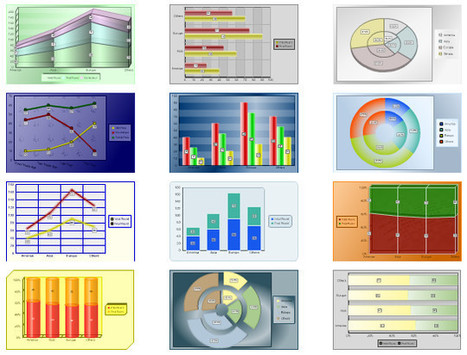
45+ Free Online Tools To Create Charts, Diagrams And Flowcharts | Free and Useful Online Resources for Designers and Developers

45+ Free Online Tools To Create Charts, Diagrams And Flowcharts | Free and Useful Online Resources for Designers and Developers | Rapid eLearning | Scoop.it
Charts and graphs are the best ways to represent information and relationship between two interlinked entities.

Via Timo Ilomäki
No comment yet.
Rescooped by michel verstrepen from PowerPoint presentations and PPT templates
May 9, 2013 5:51 PM
Scoop.it!

Free OODA Loop PowerPoint Presentation Template & Diagram | PowerPoint Presentation

Free OODA Loop PowerPoint Presentation Template & Diagram | PowerPoint Presentation | Rapid eLearning | Scoop.it
OODA Loop is very popular in Command & Control theory. In this simple model of command and control process, aka as OODA Loop, OODA is an acronym for

Via FPPT
Daniel Banocy's curator insight, July 26, 2013 5:49 PM

I am downloading this to create a 6 segmented cirlce to show a process

Rescooped by michel verstrepen from PowerPoint presentations and PPT templates
May 9, 2013 5:19 PM
Scoop.it!

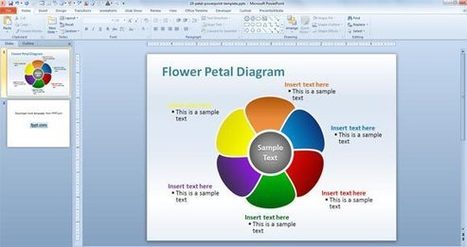
FREE Editable Flower Petal PowerPoint Template | PowerPoint Presentation

FREE Editable Flower Petal PowerPoint Template | PowerPoint Presentation | Rapid eLearning | Scoop.it

Editable Petal Diagram for PowerPoint is a free PowerPoint template that you can download to make awesome presentations and diagrams in Microsoft PowerPoint.


Via FPPT
No comment yet.
Rescooped by michel verstrepen from PowerPoint presentations and PPT templates
May 9, 2013 5:14 PM
Scoop.it!

3D Circular Flow Diagram in PowerPoint using Shapes | PowerPoint Presentation

3D Circular Flow Diagram in PowerPoint using Shapes | PowerPoint Presentation | Rapid eLearning | Scoop.it

Circular diagrams can be used in many different situations, for example if you need to show a flow diagram in your organization or business presentations. Circular diagram applications include context diagrams, diagrams for mind mapping, audit flow diagram, circular process flow diagrams, data flow diagrams and more


Via FPPT
No comment yet.
Rescooped by michel verstrepen from Teaching in Higher Education
May 9, 2013 1:53 PM
Scoop.it!

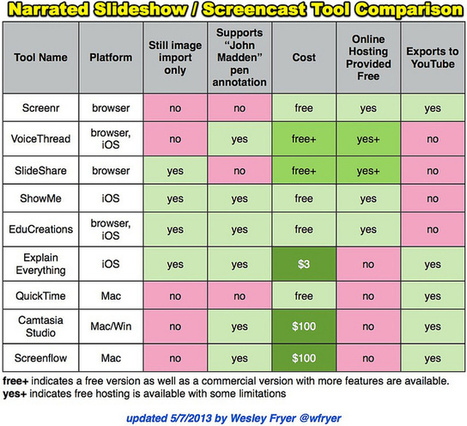
Narrated Slideshow – Screencast Tool Comparison

Narrated Slideshow – Screencast Tool Comparison | Rapid eLearning | Scoop.it

A screencast is a digital recording of a computer screen with audio narration. Screencasts can include telestrator (‘John Madden pen’) annotations. Narrated slideshows include audio recordings synchronized to images without hand-drawn annotations.

Screencasts and narrated slideshows can be created with two kinds of tools:

1. Browser-based: Create an account on the website and use a modern web browser like Google Chrome or FireFox to record, save and share it.

2. Client-based: Download and install software on a computing device to record and save.


Via Baiba Svenca, Rosemary Tyrrell, Ed.D.
Alfredo Corell's curator insight, May 11, 2013 10:12 AM

screencast tool comparisons. The table is extremely simple and useful for begginers in screencasting.

Carmenne Kalyaniwala's curator insight, May 14, 2013 3:06 AM

Great comparison !!

Katie Jane's curator insight, August 13, 2013 10:55 AM

This looks like it would be something that could be really handy for prodjects for class. that way we could not only have all of the information in front of us to see, but also hear whats going on as well.

Rescooped by michel verstrepen from apps for libraries
May 9, 2013 11:28 AM
Scoop.it!

5 Great Video Tutorials on How to Create Podcasts Using Audacity

5 Great Video Tutorials on How to Create Podcasts Using Audacity | Rapid eLearning | Scoop.it

Via aikker
No comment yet.
Rescooped by michel verstrepen from Digital Candies 21 Century Learning by @goodmananat
May 8, 2013 6:45 PM
Scoop.it!

Flubaroo: Automated Google Docs Self-Grading Quizzes

Flubaroo: Automated Google Docs Self-Grading Quizzes | Rapid eLearning | Scoop.it

Via Susan Oxnevad, Anat Goodman
Susan Oxnevad's curator insight, March 3, 2013 1:13 PM

A truly remarkable teaching tool is one that can collect information to evaluate student performance and provide students and teachers with immediate feedback for modification, reteaching and challenge.

Scooped by michel verstrepen
May 7, 2013 5:59 PM
Scoop.it!

Educaplay : créer des activités pédagogiques multimédia

Educaplay : créer des activités pédagogiques multimédia | Rapid eLearning | Scoop.it

Educaplay est  un site qui propose de créer ses propres activités éducatives en ligne avec une apparence professionnelle à partir d'un simple navigateur web. Les activités éducatives multimédia créées avec Educaplay sont réalisées avec la technologie flash. Aucune compétence informatique n'est nécessaire, l'accès estgratuit, seul un enregistrement est demandé.

No comment yet.
Rescooped by michel verstrepen from Web Analytics and Web Copy
May 7, 2013 5:49 PM
Scoop.it!

WYSIWTF

WYSIWTF | Rapid eLearning | Scoop.it
Arguing for “separation of content from presentation” implies a neat division between the two. The reality, of course, is that content and form, structure and style, can never be fully separated.

Via paulo oliveira
No comment yet.