
Rapid eLearning
63.1K views |
+7 today


 Your new post is loading...
 Scoop.it! 
From
remarqbl

Des idées pour créer des infographies sans trop avoir à se creuser la tête ! Le but est de publier des contenus visuels attirants qui seront viraux. Via Fabien Fournillon 
Scoop.it!

Nobody likes high-stakes testing. The problems are well documented. But maybe games can help to change the way we approach assessment.
Scoop.it!

We have scoured the web looking for the most inspirational and useful resources for anyone looking to improve their presentation skills; the #PreziTop100 is the result of all this hard work. Via Baiba Svenca

Baiba Svenca's curator insight,
May 30, 2014 1:34 PM
Prezi team have assembled a vast list of resources (articles, blogs, videos, podcasts, presentations, books) that may help you become a better presenter. Put this on your to-do list! 
Alfredo Corell's curator insight,
June 3, 2014 6:46 PM
Prepared by the Prezi team you have loads of articles, blogs, videos, etc... every thing you need to be a better prezi user!!!
Scoop.it!

One of the great things about working with the built-in goodies in HTML5 is the fact that these can be combined to create interesting interactive experiences. Via Stéphane Barbati
Scoop.it!

Joe Campanaro, the creator of our much-loved "Creating a Panning HTML5 Background" tutorial series, is back with a three-part video tutorial showing you how to create animated banner ads in Animatron.... Via Stéphane Barbati
Scoop.it!

Screen recording can be useful when you need to record a how-to video to help someone learn how to use a program, record a game walkthrough, or prepare for a presentation. Record here means you can create a video of whatever you are doing on your desktop, save the recording as a video file and send it to a friend or upload it on YouTube. Via Frédéric DEBAILLEUL
Scoop.it!

This is a collection of best free bootstrap editors that help you boost your web development productivity. Bootstrap has becoming one of the most popular responsive frameworks available. Via kiru
Scoop.it!

Quel type d'évaluation que vous voulez créer ? Via Canopé Beauvais, Ms Buffard, Juergen Wagner, Alyne Piazza De rudder

Murielle Godement's curator insight,
April 11, 2014 8:50 AM
QCM intégrables (ENT, blog ou site) ou envoie par mail avec suivi des résultats
Scoop.it!
From
korben
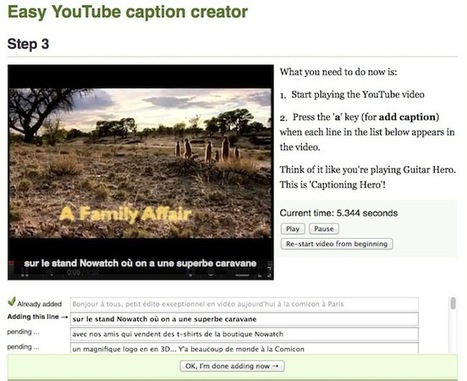
Voici l'outil le plus simple et surtout celui qui me fait gagner un temps de fou lorsque je sous-titre ma vidéo... Ça s'appelle Easy YouTube caption creator, et c'est un site web qui fonctionne de la manière suivante. Vous entrez l'URL de la vidéo, vous copiez/collez ou écrivez le texte des sous-titres totalement en vrac en faisant un retour à la ligne tous les 10 mots environ... puis c'est là que la magie intervient. Le site vous proposera de lire la vidéo et d'appuyer sur la touche "a" à chaque fois qu'une phrase arrive. Et hop, à la fin, ça vous proposera de télécharger le .sub qui va bien. Bref, un régal et surtout plus aucune excuse pour ne pas sous-titrer vos petites vidéos. Via Jean-Charles Blondeau, Bhushan Thapliyal, 173 Sud

173 Sud's curator insight,
May 12, 2014 4:04 PM
There's an overview of this tool on YouTube. Note: this tool is no longer being developed as YouTube's automatic captioning has somewhat overtaken this tool. If you already have a transcript and if the audio in your video file is clear enough, YouTube can probably work out the timings automatically.
Scoop.it!

E-Learning Heroes: Step-by-step tutorials for building better courses, fast answers to your e-learning questions, free downloads for your e-learning projects. Via Dr. Tom D'Amico (@TDOttawa)
Scoop.it!
Review of microphones and accessories for picking up quality sound when recording a video. http://cr8.lv/wcsshphyt Via Ileane Smith

LucaVanin's curator insight,
October 29, 2014 9:07 AM
Sempre sul tema della scelta del microfono giusto. Un post più completo del precedente. 
Mark Weil's curator insight,
October 15, 2015 4:09 AM
I like that the speaker Will was straightforward and thorough with explaining different mic options and how to apply different techniques to help the recording process. It interested me that Will demonstrated the muff or "dead cat" showing that the usual use is for wind noise reduction but it may be used for reducing noise in certain vocal overtones.
Scoop.it!

Create and view beautifully informative animated maps, for free!
|
Scoop.it!

May 1, 2014
Scoop.it!

Scoop.it!

Wpclipart est une belle ressource éducative qui propose une collection de plus de 50000 cliparts, photos et images libres de droit (ne comprenant pas d'images inappropriées) et qui est destinée en priorité aux écoliers et étudiants, mais qui peut,... Via Freewares&Tutos
Scoop.it!

Sylvia Crozemarie's curator insight,
May 30, 2014 1:08 PM
Educlipper est un outil de curation façon Pinterest dédié aux enseignants et plus largement au monde de l’éducation. EduClipper va vous permettre de collecter très facilement des ressources en ligne que vous allez pouvoir « épingler » sur des tableaux virtuels ou encore classer dans des collections. Vous allez également pouvoir créer des tableaux pour une classe. Le tout est bien sûr partageable facilement par mail ou sur les réseaux sociaux.
Scoop.it!
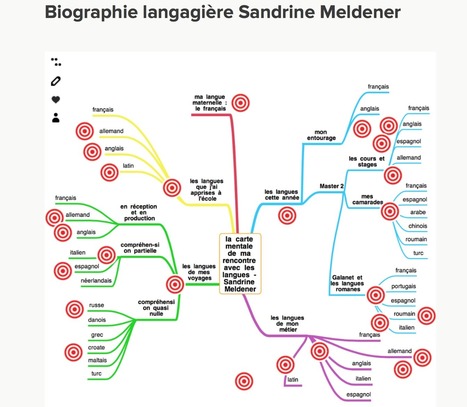
Les outils utilisés: Framindmap pour créer une carte mentaleThinkling pour créer une image interactiveSouncloud pour incruster du son, YouTube pour incruster de la vidéo, Slideshare pour incruster un diaporamaPenio pour présenter une page internet unique http://www.scoop.it/t/classemapping
Via Lucas Gruez, Fabienne De Broeck, Françoise Chatelain

pbernardon's curator insight,
November 22, 2014 4:52 AM
Une belle réalisation de Sandrine Meldener, merci pour le partage et la démonstration de la richesse d'un tel support pour partager ses connaissances.

Willem Kuypers's curator insight,
November 24, 2014 12:21 PM
Joli exemple d'une integration avec mindmap. 
PierrePilon's curator insight,
November 28, 2014 10:15 AM
Simplement créatif et intelligent. Je répète constamment que de distribuer une carte heuristique seule est généralement une mauvaise idée. Évidemment si vous avez participé à son élaboration, c'est autre chose. Si c'est un sujet que vous maîtrisez déjà, ça peut aller. Généralement, la carte, pour prendre toute sa valeur, doit être racontée afin que les idées simplement évoquées par des mots clés prennent tout leur sens. Ici, on le fait en ajoutant textes et voix. Ça, ça fonctionne.
Scoop.it!

Here is a list of unorthodox strategies to deliver a killer presentation or pitch to anyone. A little bit of confidence, some tricks from the pros, and some general techniques can turn you into the presenter that others aspire to. Via José Carlos
Scoop.it!
Baiba Svenca's curator insight,
May 19, 2014 2:23 PM
Pimbl is a new presentation tool in beta that is open for sign up requests. No more information is available at present, you just need to try it.
Scoop.it!

Adobe has recently released a new free app for story telling called Adobe Voice. This app helps you create stunning animated videos in minutes. No filming — just talk to tell your story. Pick from over 25,000 beautiful iconic images to show your ideas and Voice automatically adds cinematic motion and a soundtrack. Via Andrea Zeitz

iCoachP's curator insight,
May 20, 2014 3:14 PM
This is pretty awesome. Great for business OR student presentations alike!
Scoop.it!

"The OER world map is an operational service, which allows to:
Scoop.it!

Scoop.it!

“ L'Ergonomie web est une étape à part entière dans la création d'un site. Découvrez les meilleures pratiques à adopter pour rendre votre site attractif.” Via Emilie Faffe, Atisy Joëlle

Emilie Faffe's curator insight,
April 2, 2014 2:20 PM
Un article très intéressant, en effet l'ergonomie web relève du bon sens.
Au delà de l'aspect esthétique, le site (l'interface web) doit être efficace et efficiente au regard des utilisateurs.
Les critères ergonomiques peuvent être mentionnés dans le cahier des charges. Le chef de projet web peut s'appuyer sur les 8 critères ergonomiques de Bastien & Scapin : - Guidage - Charge de travail - Contrôle explicite - Adaptabilité - Gestion des erreurs - Homogénéité/cohérence - Signifiance des codes et dénominations - Compatibilité
Scoop.it!

Bonjour tout le monde ! Aujourd'hui, je suis en congé et j'ai enfin de le temps d'effectuer une réelle veille d'informations complète avec mon logiciel de veille (que je dois également mettre à jou... Via Véronique Duong, juandoming
|







Watch this before you start your next presentation!
Hmmm....again, some good things here, but much of this seems directed at business pitch-type presentations. For example, this lists data-rich presentations as something you should avoid. You need to FOCUS and EMPHASIZE data rich presentations.
10 Most Common Rookie Presentation Mistakes