|
Rescooped by
michel verstrepen
from Educational Technology and Mobile Lerarning
August 25, 2015 7:21 PM
|


No comment yet.
Sign up to comment

 Your new post is loading...
 Scoop.it! No comment yet.
Sign up to comment
Scoop.it!

We are super-thrilled to announce the launch of all-new Adobe Captivate 9. It is power-packed with tons of new features, functionalities, enhancements, and thousands of goodies to surprise you! Take a sneak peek at what’s in store for you: It’s truly one tool, with infinite possibilities. And now with the addition of Adobe Captivate Draft, a brand new storyboarding iPad app, your eLearning course creation process is going to be absolutely seamless. This storyboarding tool came to life, as we re Via Mayra Aixa Villar
Scoop.it!
Scoop.it!

GIFs are one of the best things Internet has given to the mankind, they are 3 to 5 second animations playing in the loop, motivating you, making you laugh, smile and get out of your boredom, they really are a GIF(t) to the human race in the true sense. They are taking the place of Emoticons to expre… Via Dr. Tom D'Amico (@TDOttawa)
Scoop.it!

Every second counts. Intelligent playback of highlights cuts the fluff and saves you time. Smooth conversation flow and one-click social sharing help you connect with friends. Easy-to-use platform makes creating and sharing highlights a breeze. Via Olivier JADZINSKI
michel verstrepen's insight:
Un outil de plus pour enrichir des vidéos (hébergées sur YouTube) : Vibby permet de mettre en valeur des passages de la vidéo et d'y associer des commentaires. Chaque passage mis en valeur est repéré par un bandeau de couleur bleue dans la bande de défilement, le commentaire s'affiche automatiquement dès que la lecture arrive sur un passage "enrichi". Le résultat final pourra être partagé via un simple lien, via les réseaux sociaux ou via un code d'intégration. Vibby reste très simple et basique comparé par exemple à EduCanon déjà présenté ici : http://sco.lt/884cJl

Yves Carmeille "Libre passeur"'s curator insight,
August 9, 2015 6:01 AM
Un outil de plus pour enrichir des vidéos (hébergées sur YouTube) : Vibby permet de mettre en valeur des passages de la vidéo et d'y associer des commentaires. Chaque passage mis en valeur est repéré par un bandeau de couleur bleue dans la bande de défilement, le commentaire s'affiche automatiquement dès que la lecture arrive sur un passage "enrichi". Le résultat final pourra être partagé via un simple lien, via les réseaux sociaux ou via un code d'intégration. Vibby reste très simple et basique comparé par exemple à EduCanon déjà présenté ici : http://sco.lt/884cJl 
vgpascal's curator insight,
August 10, 2015 2:05 AM
Un outil de plus pour enrichir des vidéos (hébergées sur YouTube) : Vibby permet de mettre en valeur des passages de la vidéo et d'y associer des commentaires. Chaque passage mis en valeur est repéré par un bandeau de couleur bleue dans la bande de défilement, le commentaire s'affiche automatiquement dès que la lecture arrive sur un passage "enrichi". Le résultat final pourra être partagé via un simple lien, via les réseaux sociaux ou via un code d'intégration. Vibby reste très simple et basique comparé par exemple à EduCanon déjà présenté ici : http://sco.lt/884cJl 
Christelle Quesne's curator insight,
August 10, 2015 6:00 AM
Un outil de plus pour enrichir des vidéos (hébergées sur YouTube) : Vibby permet de mettre en valeur des passages de la vidéo et d'y associer des commentaires. Chaque passage mis en valeur est repéré par un bandeau de couleur bleue dans la bande de défilement, le commentaire s'affiche automatiquement dès que la lecture arrive sur un passage "enrichi". Le résultat final pourra être partagé via un simple lien, via les réseaux sociaux ou via un code d'intégration. Vibby reste très simple et basique comparé par exemple à EduCanon déjà présenté ici : http://sco.lt/884cJl
Scoop.it!

How do you revamp your old eLearning courses so that your learners are not bored to death? You can follow the tips below.
Scoop.it!

Learn how to troubleshoot the most common problems with Articulate Storyline and Studio software projects
Scoop.it!
michel verstrepen's insight:
Flippity is well worth a closer look, especially for practitioners that use, and/or are considering using, Google Docs.

Brendon Breen's curator insight,
August 7, 2015 12:51 AM
Flippity is well worth a closer look, especially for practitioners that use, and/or are considering using, Google Docs.
Scoop.it!

A new report from the Engaging News Project shows that users prefer modular, image-heavy homepage designs. Via Bruno Renkin
Scoop.it!

10 tips - UX design for eLearning content. Often UX design for eLearning is not conisdered as much as ID which can cause good eLearning content to fail. Via Mark Smithers
Scoop.it!

Here's a free PowerPoint template. This simple interactive template simulates a back and forth conversation. Download the free template. Via WebTeachers

elearning at eCampus ULg's curator insight,
July 23, 2015 7:07 AM
Cela peut être amusant pour des cours de langue et autres simulations ;-)
Scoop.it!

Say goodbye to long videos that no one watches, and hello to Microsoft Hyperlapse.Microsoft Hyperlapse is a new technology that creates smooth and stabilized time laps...
Scoop.it!

This blog shares how to import final quiz questions from MS-Excel into your e-learning courses using Articulate Storyline.
|
Scoop.it!

Plusieurs géants de l’illustration se disputent désormais le marché des banques d’images sur Internet, aux côtés des acteurs historiques du secteur. Via Arobasenet, Cédric Debacq
Scoop.it!

Here's a quick rundown of the ten most powerful forms of visual content available to instructional designers. Via EDTECH@UTRGV, Eva Buyuksimkesyan

Bernard Guévorts Authentis's curator insight,
August 16, 2015 6:48 AM
Augmentez votre créativité... voici quelques idées...
Scoop.it!

Getting free stock photos is one things. being able to use them is another. This post shows how to customize free stock photos and use on your slides. Via WebTeachers
Scoop.it!
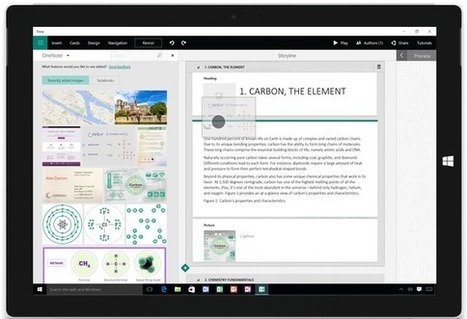
Heard of PowerPoint, that popular (or not-so-popular) presentation program? Microsoft's own alternative, called Sway, is now available on Windows 10 devices and Apple products. Via Dr. Tom D'Amico (@TDOttawa) , Juergen Wagner

Tony Guzman's curator insight,
August 10, 2015 2:23 PM
This free tool from Microsoft, which competes with PowerPoint, is available for free and can be used on Windows 10 devices. Anyone tried this out yet? 
Quentin Cammack's curator insight,
September 30, 2022 1:54 PM
Microsoft Sway is a Microsoft application program that can take a enhancing approach to your normal presentation. This involves in adding things including text and videos to create an interactive interface. This will make it a more simple option for all people who do not want to use PowerPoint.
Scoop.it!

Web UI design is built upon many common repeatable patterns and best practices, but not many “carved in stone” rules. Design is an art form, and as such, “good” or “bad” design is often subjective to users.
Scoop.it!
michel verstrepen's insight:
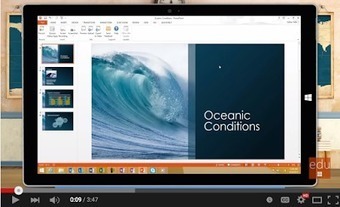
Office Mix is an excellent PowerPoint add-in that allows practitioners to create engaging and interactive presentations using multimedia materials including...

Jose Erigleidson's curator insight,
August 5, 2015 6:44 PM
Office Mix is an excellent PowerPoint add-in that allows practitioners to create engaging and interactive presentations using multimedia materials including...
Scoop.it!
Scoop.it!

9 essential design tactics that will magically transform ho-hum eLearning courses into scintillating works.
Scoop.it!
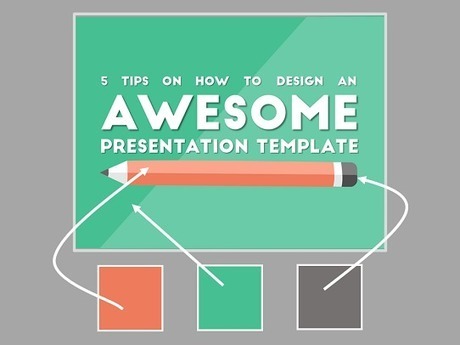
There are some fundamental truths to making really awesome presentation templates, and I am going to guide you through them in five easy steps. Via Baiba Svenca

Flaviu Fesnic's curator insight,
August 6, 2015 3:00 AM
5 great tips from Presentation Panda for those who design their own presentation templates. 
Muga's curator insight,
August 10, 2015 4:47 AM
5 great tips from Presentation Panda for those who design their own presentation templates. 
Roger L. Gill's curator insight,
August 30, 2015 7:49 AM
More great info on creating awesome presentations.
Scoop.it!

Video is Hard. Raw Shorts is Easy.Make an Awesome Explainer Video Today. It's Free. Via Smaragda Papadopoulou
Scoop.it!
I created this video with the YouTube Video Editor (http://www.youtube.com/editor) Via Club de TeleMatique
|