


Rapid eLearning
63.2K views |
+0 today
 Your new post is loading...
 Scoop.it! 
[Infographic] The Hype Versus Reality of HTML5 DeploymentReadWriteWebWhat do we really know about HTML5? It is a Web based standard with the potential to create cross-platform apps that can run anywhere, everywhere. 
Scoop.it!

Voilà une nouvelle qui risque de faire plaisir aux graphistes ! Alors que les dernières versions de Photoshop ont été décriées par les fans comme n’apportant pas de véritables innovations, ou qu’elles surchargeaient l’interface avec des fonctions peu intuitives, il semble d’après les premiers retours des testeurs, que la version Cs6 corrige le tir et risque bien de remporter l’adhésion des fans d’Adobe...
Scoop.it!

Transformer un fichier HTML en un fichier PDF c’est possible ! Notamment gratuitement avec un site comme Convert HTML to PDF. L’inverse est également possible (c’est ce que je découvre) avec PDF to HTML Free Online.
Vous sélectionnez le PDF à transformer en HTML, vous saisissez une adresse email et vous cliquez sur « Send ». Vous recevez quelques secondes plus tard un mail dans lequel vous n’avez plus qu’à récupérer le fichier en question (en cliquant sur un lien). C’est simple, rapide et en plus la conversion est plutôt réussie !
Convert HTML to PDF : http://www.htm2pdf.co.uk/
PDF to HTML Free Online : http://www.pdftohtml.net/ Via 173 Sud
Scoop.it!
This video will show teachers how to make simple screencast videos for students to use in and out of class. The tutorial highlights Screenr, a web-based screencasting application that allows you to record 5 minute, watermark-free videos of your screen and upload directly to YouTube. Via Peggy George
Scoop.it!

Don't know whether your visitors are going to be able to use Flash or HTML5 for video and audio playback? Don't guess, take a look at the jPlayer ...
Scoop.it!
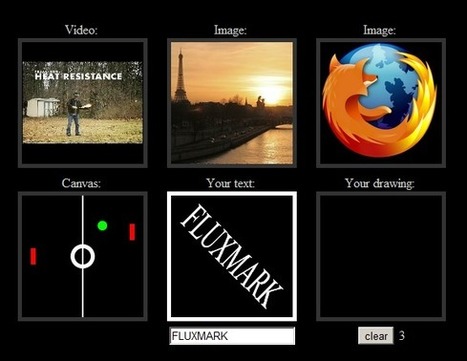
Logiciel gratuit HTML5 Dynamic Content Injection 2012Licence gratuite Exemple code original - Webmaster Voila 6 codes très réussis , exemples de ce que l’on peut faire avec HTML5 Dynamic Content Injection : Images , vidéos, dessins, jeux ect.. Via blasco IA
Scoop.it!
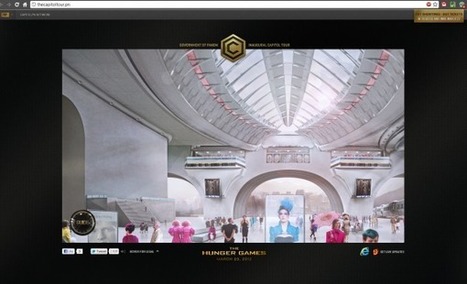
Dans le cadre de la sortie prochaine du film The Hunger Games par les studios LionsGate, Microsoft a développé un mini site dédié à l'univers du long...
Scoop.it!

In a recent post, I shared my recent webinar with the E-Learning Guild and some of the conversation we had around rapid elearning. In today's post we'll look at another part of the conversation where we discussed what skills ...
Scoop.it!

Present a live, interactive webinar or presentation quickly and easily with this superb online tool. Setup is simple and you just share the url with your audience. The video is recorded so it can be watched again. Get your class presenting to other children/parents. You may even be able to persuade you head teacher to conduct a staff meeting virtually!
Scoop.it!

The need of online video players is considerable in modern times as the growth of visual media is fetching mammoth in modern times. The targeted group of.
|
Scoop.it!
Fini les gifs ringards ou kitch avec Clipets vous pourrez animer une photo. L'application est gratuite pour Windows et vient de Microsoft Research
Scoop.it!

From
codiqa

Build with 100% jQuery Mobile components. Take your idea, prototype your app, and output a high-quality, fully functional and standards-compliant jQuery Mobile website. No black-box code. No external libraries. No hassle. Via Nicolas Weil
Scoop.it!

Luminance HDR, anciennement Qtpfsgui est un logiciel Open Source qui fonctionne sous Windows, Mac OS ou Linux. Il sert à créer des images HDR (High Dynamic Range).
Pour arriver à un résultat, il faut réaliser plusieurs clichés d'une même scène avec des temps d'exposition différents (Bracketing). Ce qui permet d'obtenir des détails pour les zones sombres et à la fois pour les zones claires. Pendant les différentes prises de vue, la stabilité de l'appareil doit être si possible maintenue pour obtenir le même cadrage. Ensuite, les photos pourront être combinées grâce au logiciel Luminance HDR, qui formera une seule photo à grande gamme dynamique (HDR) ou si vous préférez, avec une sensation visuelle accrue de la lumière, en un mot la luminance...
Multilingue & Gratuit
Luminance HDR : http://qtpfsgui.sourceforge.net/ Via 173 Sud
Scoop.it!

Scoop.it!

When it comes to recording your PowerPoint Presentations, or videos in general for that matter, there are quite a few choices of software to use; Camtasia, CamStudio and Jing to name a few. But when it comes to editing... Via Baiba Svenca

Melissa Marshall's curator insight,
August 15, 2013 10:13 AM
This is basically what I did to make my videos: use Camtasia to record your existing powerpoint presentations.
Scoop.it!

YouTube announced Wednesday it's rolling out a new feature that lets users edit the visual quality of videos with a click of a button.
Scoop.it!

VCASMO is a multimedia presentation solution for personal photo-video slide show, business presentation, training, academic teaching, sales pitching, seminar, conference, press release meeting, live event. Features of VCASMO: Collaboration of multimedia and slideVCASMO is neither a normal video nor a photograph album site. The most intuitive feature of VCASMO is the presentation playback screen. VCASMO has 2 screens: the left for video and the right for slides. Moreover, it is not only the video is playing but also music can playing with the slides/image/photos in synchronize. Anyone can easily create a slideshow with music, synchronized video and PowerPoint presentation or more. Of course, you can simply use it to create photo album or a video player. RSS and ATOM supportLatest presentations and user uploads can be received through RSS or ATOM in your own RSS/ATOM reader. OthersVCASMO provides necessary social communication features for users to easily communicate with their friends. For instance: "Tell your friend", presentation share permission. Objectives of VCASMO: As a tool for new communication experienceEveryone can sign up for an account in VCASMO, and can easily upload photos, videos, music and PowerPoint presentation to the server. An original and creative presentation can be built easily and instantly. A user can create a private presentation for their own enjoyment or they can create one to share with the public. As a tool for presentationDesigners' portfolios, photographers' portfolios, corporate profiles, product introductions, etc. The usage of VCASMO depends on its users. Therefore, anybody can find a use for VCASMO, from professionals to enterprises. eLearning coursewares for academicsTeachers can move the classroom to VCASMO, and create teaching presentations to benefit all the students of a school. One of the dreams of VCASMO is to be a platform for communication and the sharing of knowledge. Welcome in the new Age of #Curation http://bit.ly/CurationKing & http://bit.ly/curationglog by http://bitly.com/ecurator @ https://twitter.com/#!/web20education - wish you all Lucian http://xeeme.com/ecurator/ . I invite to subscribe for NEW #edtech20 #socialmedia #Curation newsletter http://bitly.com/edtech20newsteller register to join free http://bitly.com/docedtech20 #edtech20 #socialmedia #curation project http://web20education.bo.lt/g6538 and Install free our #mlearning app http://bitly.com/edtech20mLearningapp .Like and collaborate on facebook http://on.fb.me/likeedtech20facebookpage and Circle on Google Plus http://bitly.com/circleedtech20googlepluspage and Subscribe free to gr8 #edtech20 blogs http://bitly.com/feededtech20blogs related to new web 2.0, social media Via LucianeCurator
Scoop.it!

Robin Good: I have had a bit of hard time myself believing the prices I was reading on the home page of Kozzi.com. This online image library, first of all gives you 365 high-quality, high-resolution images to download at no cost. Just hop over on their site and you can a top pick download without needing to pay anything.
Then, if Kozzi has tickled your fancy enough, you may want to consider signing up for a Designer Plus account, and for 1.6$/month you can now download 25 high quality images a day. Five bucks a month give you access to 75-a-day downloads, and for some 11.4€/mo you can downoad up to 250 images a day.
I know, it's hard to believe, but I have gone on the site, registered myself and everything worked as promised. I may say that the collection is not obviously as broad and rich as some of the popular commercial online stock libraries, but I think that the huge difference in price more than justifies it.
Kozzi provides some great, beautiful images, as well as vector clip art, and video clips. For each image it provides detailed metadata and separate downloads for all resolutions from 441 X 294 to a whopping 7.7MP 5496 X 3664 size.
Kozzi FAQ: http://www.kozzi.com/faq ;
Must check-out resource.
More info: http://www.kozzi.com/ ; Via Robin Good

's comment March 21, 2012 1:08 AM
Thank you for the review of Kozzi.com. Educators and bloggers alike have discovered Kozzi.com to be the ultimate professional resource for images.
Not only do we have images now but we also have Video as well. Kozzi.com is currently traveling the globe to bring you the best stock photography and video that we can provide. Our team just returned from the following places and you wil see lots of new stock form them. Antarctica, Romania, The Philippines, and Argentina. Wait till you see the awesome Icebergs and Penguins. there is a little bit of video online from Antarctica now. here is the link to some. http://www.kozzi.com/free-photo/24743739/video-of-icebergs-in-antarctica.html Again thank you for spreading the Kozz! We are excited to bring the best for free or minimal cost if you need a lot of files. James 
's comment July 2, 2012 3:31 PM
Kozzi changed their price policy. So what is written in this article about their prices is not valid anymore. Now you have to buy credits and 1 image of reasonable resolution is now costing 2 credits = 2 USD. Kozzi has become just one of many photo brokers with almost equal pricing. Kozzi lost absolutely their advantage here.

Robin Good's comment,
July 3, 2012 1:54 AM
Thank you Arumbai for this very useful update. It was expected that Kozzi would soon steer away from their initial approach, which was just an innovative approach to get more people to pay attention and try out their offer.
Thanks again for your helpful contribution!
Scoop.it!
Vibop is a new YouTube app that allows you to create personalized video clips that can be "embellished" with preset themes, decorative graphics, introductory captions and visual effects.
You can also add your own photos, use existing clips or record a live video in front of your webcam. Video features include the ability to add many different filters, to auto-adjust bad quality-video, brighten dark images and fix shaky camera footage.
At the end of the process your video is automatically uploaded to your own video channel. Via Robin Good, Let's Learn IT, Heiko Idensen

Alex Briscese's comment,
March 20, 2012 7:00 AM
I tested vibop and it's a useful tool to make quick enrichments to your videos: It's a pity that the themes are only available for the iphone app and not for the web app integrated in youtube (as expected) .
Regarding intro, editing & effects functionalities, they're both in the iphone and web app. 
Orientation Professionnelle's curator insight,
December 20, 2023 6:13 PM
koop ozempic Nederland https://ozempickopen.com/ https://ozempiccomprar1mg.com/
Scoop.it!

L’application en ligne Prezi (voir l’article sur l’analyse de Prezi) dynamisera vos présentations. Les spécificités qu’il propose (navigation, zoom) permettent d’envisager des utilisations en classe, dans des contextes pédagogiques bien précis, et notamment en SVT. De plus, les outils de partage ouvrent des voies intéressantes vers une utilisation en dehors de la classe... Via Lucas Gruez
Scoop.it!

Dynamisez vos cours par des images interactives !
Dynamisez vos cours par des images interactives ! Des SVT à l’histoire des arts, créez des schémas, tableaux, photos dynamiques où légendes et commentaires sont directement associés aux zones pertinentes de l’image. À vous de jouer !
Via Gust MEES, Laurent Blanquer
Scoop.it!
|






