
When you implement a video player, it is good to use cache to store played video fragments. Therefore, user doesn't need to download manifest or data chunks from server multiple times. It saves network consumption for your users and reduce the latency since they don't need to download from server all the time. Meanwhile, using cache reduces server load for content provider as well. If you use Smooth Streaming Client, here is how you could implement a cache plug-in to cache data.
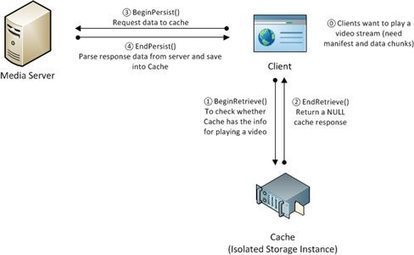
The IIS Smooth Streaming Client provides the ISmoothStreamingCache interface to support offline scenarios. Here is how it works in high level.
When user starts to play video, Silverlight Smooth Streaming Client will check with Isolated Storage Instance (this isolated storage is within Silverlight player) to see whether there is video manifest or data chunks available to read. If not, Isolated Storage Instance will return a NULL as CacheResponse. Now, client knows there is no cache available for retrieving, then, it will go ahead to talk to server for getting manifest/data chunks, and stored it in the cache for next-time use.
Via Nicolas Weil, Ludovic Bostral


 Your new post is loading...