


If you need to prepare a funnel analysis PowerPoint presentation then the following are examples of funnel analysis PPT presentations and slide designs that you
Via FPPT

 Your new post is loading...
 Scoop.it! If you need to prepare a funnel analysis PowerPoint presentation then the following are examples of funnel analysis PPT presentations and slide designs that you Via FPPT 
No comment yet.
Sign up to comment
Scoop.it!

SharePoint Document Preview 2010 provides a graphical preview for various documents in SharePoint, including documents from the MS Office suite. Via FPPT
Scoop.it!

Here we will show you how it is possible to replace the color of an image or picture in PowerPoint by using recolor feature in Microsoft PowerPoint 2010. Via FPPT
Scoop.it!

Easy Web Content Presenter (EWC Presenter) is an HTML5 based web app for creating banners, Interactive Infographics, animations, web presentations and demos. Via SlideHunter
Scoop.it!

Learn how to replace all the fonts used in a all the slides of a PowerPoint presentation in MS PowerPoint 2010 Via FPPT
Scoop.it!

Some business meetings are arranged for 30 minutes only, and then the PowerPoint presenter can be eventually available for questions or exchange ideas with the audience Via FPPT
Scoop.it!

You can download this free Ruler PowerPoint Template with Editable Shapes to make awesome presentations in PowerPoint for Maths and Geometry. You can also download this free ruler PPT template to make other complex PPT presentations on engineering as well as measuring or surveyor PowerPoint presentations Via FPPT
Scoop.it!
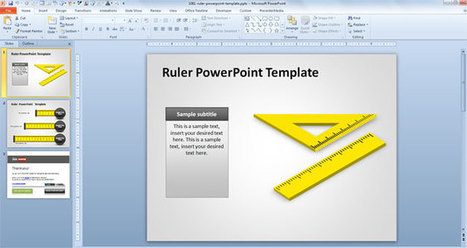
Free Ruler PowerPoint Template is a free PPT presentation template that you can download with squads and rulers for PowerPoint. You can download this free ruler PPT template to make presentations on measures as well as engineering PowerPoint presentations or to be used in architecture and other presentations as concept slide designs Via SlideHunter
Scoop.it!

In PowerPoint you can make images look transparent by changing the transparency level. Here we will show you how to change the transparency level of your pictures in PowerPoint to make them transparent.
Scoop.it!

Delivering effective Seminar Presentations that resonate with your audience demand some sort of skills that are required to be rehearsed and learnt. If you really desire Preparing for and Presenting Seminar Presentations, you have to develop techniques and skills that will take you into the arena of presenter extraordinaire.
Scoop.it!

There are various ways that will help you in preparing a successful presentation by overcoming presentation nerves. To get started, glance at some of the best techniques:
Scoop.it!

Mother's Day PowerPoint themes with PPT templates for Moms, mothers, friends. More free Mother’s Day powerpoint backgrounds for free download here at http://www.free-power-point-templates.com/tag/mothers-day.
Scoop.it!

In FPPT.com we are committed to submit new PPT templates every new day and designs that you can download and use in your PPT presentations. Our files are available as a free .zip that you can download containing a .ppt file inside. It is well known that the common template file type is .pot but for simplicity we have used .ppt so anyone can download the templates and use it. If you require it to be a template by nature, just rename the file name to .pot and job done.
Via FPPT
|
Scoop.it!
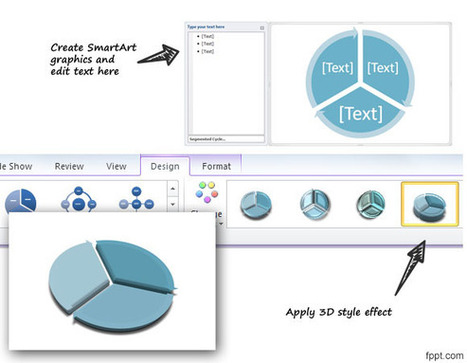
Circular diagrams can be used in many different situations, for example if you need to show a flow diagram in your organization or business presentations. Circular diagram applications include context diagrams, diagrams for mind mapping, audit flow diagram, circular process flow diagrams, data flow diagrams and more Via FPPT
Scoop.it!
Scoop.it!

It often happens that people aren’t able to physically attend a presentation. A few ways of overcoming this problem is to share a video presentation using services like PresentationTube, Present.me and SilkSlides. Via SlideHunter
Scoop.it!

Learn how to change the shadow properties in PowerPoint presentations to achieve nice title styles Via FPPT
Scoop.it!

PowerPoint has emerged as an effective tool for communication with large number of audience in one go. These presentations can be widely used by people regardless of their field. Via FPPT
Scoop.it!

The term hype is often used in popular debate about this kind of self-inflating media coverage, but the concept has never made it into the scientific discourse, mainly because of its implicit value judgements... Via FPPT
Scoop.it!

Fortunately PowerPoint lets us choose from a variety of charts that you can insert into your slide designs. Moreover, you can copy and paste the charts from Excel or link to the Excel spreadsheet as source so every time you update the chart in Excel it is automatically updated in your presentations. Andrew Abela from Extreme Presentation has created this awesome chart hierarchy that can be helpful to choose a good chart for your presentation Via FPPT

Louise Robinson-Lay's curator insight,
April 26, 2013 5:23 PM
A great way to share information in your slides.
Scoop.it!
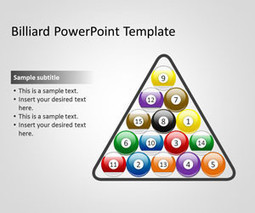
Free Billiard PowerPoint Template is a free PowerPoint template that you can download for presentations. The free billiard PPT template contains original slide designs with billiard balls ready to be used in your presentations. Via SlideHunter
Scoop.it!

An effective Sales Presentation plays an important role in the sales procedure as it can enhance the reputation of an organization. Here are some effective methods available that can easily make your Presentation a winning one:
Scoop.it!

As a presenter, identifying and overcoming presentation barriers is crucial to get success for which you should have the ability to recognize and rectify it. Lets take a look at the common problems faced by individuals and tips to overcome these difficulties.
Scoop.it!

PPT Templates Flower garden free download as PowerPoint Background or for birthday background presentations. Download other free flower powerpoint themes and slide designs here at http://www.free-power-point-templates.com/category/objects/flowers" by fppt-templates-powerpoint on Polyvore
Scoop.it!

Charteo is a web service which offers a comprehensive set of options to select and download presentation sets. At Charteo you can select professionally made slides for your presentations and download them for editing in MS PowerPoint Via FPPT
|




