Just another WordPress.com site. Skip to content. Home · About · ← Delicious.com – [Web 2.0 Tools for Teaching & Learning] · Web 2.0 Tools for Educators | Into the Driver's Seat | Scoop.it → ...

 Your new post is loading...
 Scoop.it! Just another WordPress.com site. Skip to content. Home · About · ← Delicious.com – [Web 2.0 Tools for Teaching & Learning] · Web 2.0 Tools for Educators | Into the Driver's Seat | Scoop.it → ... No comment yet.
Sign up to comment
Scoop.it!

A lively discussion on the fate of Moodle 1.9 can be found at: http://moodle.org/mod/forum/discuss.php?d=196713. Personally, I've invested so much time and space to Moodle 1.9.15 that it is difficult for me at this point in time to migrate to ...
Scoop.it!
In this episode I am showing some useful apps for school trips, tips and tricks on how to find and install them from the market as well as how to find offlin... Via andreas hofer
Scoop.it!
Listening and speaking activities about an excerpt of a first season episode of the TV series The Good Wife. Advanced level. Via Mª Jesús García S.M.
Scoop.it!

Social media provides a variety of tools, commonly referred to as Web 2.0, that educators can use to engage students and enhance essential skills (communication, collaboration, creativity, media literacy, technological ...
Scoop.it!

Web 2.0—Web-based education basics–includes blogs, wikis, class internet homepages, class internet start pages, twitter, social bookmarks, podcasting, photo sharing, online docs, online calendars, even Second Life—all ...
Scoop.it!
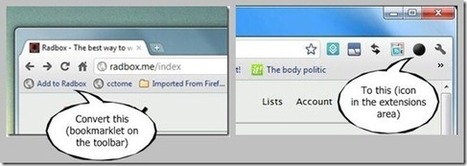
If you use Chrome you know that extensions are laid out neatly to the right of the address bar. One thing about having all of your extensions accessible via small icons that are grouped together in the same place is that it makes sense from both a user experience and organizational standpoints. However, you may be using bookmarklets on your Chrome toolbar or your bookmarks folder as well that you may have wished could be moved or grouped with the other Chrome extensions. This post will show you how to do exactly that. Via Frédéric DEBAILLEUL
Scoop.it!

Here’s a little known but groovy trick that lets you send your friends a link to any specific spot in a YouTube video.
1. Go to the exact area on the video and pause. 2. Grab the URL. 3. Share the URL and it will send them to that exact area on the video.
Schools now can do this with YouTube Edu so the video is not blocked in your district. Via Barbara Bray, Marcelo Nolasco
Scoop.it!

Hace unos días proponía el uso de Pinterest en el aula con varias ideas en esta entrada, Murales de Fotos: 9 formas interesantes de usar Pinterest en el aula. Via Labtic.Unipe
Scoop.it!

Have you heard the online instructor [cheekily] described as a ‘guide-on-the-side’, contrasted with the traditional professor, known as the ‘sage-on-the stage’? I've heard this term often...
Scoop.it!

Things that you always wanted to know about the web but were afraid to ask. Learn about the web & browsers in this interactive experience created by Google & illustrated by Christoph Niemann. Via Richard Jones
Scoop.it!

YouTubeMP3 is advanced youtube to mp3 converter which allows you to convert and download YouTube videos. For example you can use YouTubeMP3 to convert your favorite YouTube videos to mp3 files! Via Ana Cristina Pratas, Pilar Pamblanco, Fabiana, Roselink |
Scoop.it!

You've set your assignment on the course page as an upload option (for tips and demonstrations on how to do this, click here), students have completed and uploaded them... so what do you do now? This tutorial shows two ...
Scoop.it!

Scoop.it!

When was the last time you used a tape recorder or a slide projector? That's what we thought. In the age of technology, we can do just about everything online or with our smartphones. Whether its shopping or learning, students are using modern technology to make their experiences virtual. Via EduClick_España, Donna Browne
Scoop.it!

Thousands of Free Lesson Plans in Math Social Studies Art Language Arts Music Physical Education Reading Writing Geography Science Projects Science Lesson Plans and Thematic units. Via Dr. Tom D'Amico (@TDOttawa) , michel verstrepen
Scoop.it!

Another quick tutorial here for relative newcomers to Moodle design: this one demonstrates how to use a nice image icon and introductory spiel for your unit/topic blocks. More for the appearance and aesthetics side of things, ...
Scoop.it!

websites—nothing more. Students read websites, clicked a few links, and/or researched a topic. Web 2.0—Web-based education basics–includes blogs, wikis, class internet homepages, class internet start pages, twitter, ...
Scoop.it!
Web 2.0 News Tip A Click on the title above takes you to the original page of this article! Feb 22, 2012 Engadget / Daniel Cooper27 Shares. Samsung's R&D department has been working overtime as it strives to break the ...
Scoop.it!

The ubiquity of infographics in popular media has nearly reached a saturation point in terms of interest and novelty. Print and online outlets, such as GOOD, Visual.ly, Mashable, and The New York Times, have promulgated these graphics out to readers who are eager for crisp designs and concise messaging. It is surprising, therefore, that infographics still remain scarce in K-12 classrooms. Education has yet to catch up to the public fascination with visual displays of information. Perhaps this is because infographics do not fit neatly into district-defined, test-focused curricula. Infographics by their nature are interdisciplinary, combining layers of text, statistics, and creativity. Via Frédéric DEBAILLEUL
Scoop.it!

Thanks to Six Things website for the crash primer on Pecha Kucha. The kind of creative, smart, snappy and fun... Via Rita Simons Santiago
Scoop.it!

While it comes to website designing, we all pay the maximum attention to the color, graphics and images of a site. However, free fonts are very important part of any design. Via Paulo Castro Verbena
Scoop.it!
This episodes explains how to organize video with the help of playlists. Moreover, it shows you how to use your mobile phone in combination with playlists as... Via andreas hofer |