


Use these tools to actively involve students in the classroom.
1. WordPress.org A free and open source software that makes personal publishing as easy as word processing. Make your life and...
Via Petra Pollum

 Your new post is loading...
 Scoop.it! Use these tools to actively involve students in the classroom. Via Petra Pollum No comment yet.
Sign up to comment
Scoop.it!

Ok, I'll be honest. I get very nervous when I hear education reformists and politicians tout how "incredible" the flipped classroom model, or how it will "solve" many of the problems of education. It doesn't solve anything. It is a great first step in reframing the role of the teacher in the classroom. It fosters the "guide on the side" mentality and role, rather than that of the "sage of the stage." It helps move a classroom culture towards student construction of knowledge rather than the teacher having to tell the knowledge to students. Even Salman Khan says that the teacher is now "liberated to communicate with [their students]."
Scoop.it!
Are Families internet vendors a Moodle training course Go over In which gives you a video tutorial centred course Which can be are able of conveniently Develop into merged. Adds character to your expecting to exploit All the ...
Scoop.it!

Nik Peachey, digital guru and author of our Tech Tools for Teachers series, talks about the highs and lows of his personal experiences of education and explains how a lazy workaholic (his own words) came to get so interested in learning technologies. He also imparts some valuable advice on becoming a materials writer and gives tips on the wonders of self publishing online through blogs and e-books. Via Nik Peachey 
Nik Peachey's curator insight,
December 23, 2012 4:18 AM
This is the text of an interview I did for the OneStopEnglish website when I was selected as author of the month.
Scoop.it!

Possibly quite unfashionable, but eminently sensible (OMHO) food for thought on PPP
Scoop.it!
Instalación y configuración básica de Mahara 1.3 para poder integrarla con Moodle 1.9 y Moodle 2.0 Tutorial de configuración de la integración para SSO ent...
Scoop.it!
Watch on Posterous All apps shown are available in the App Store: Instant Poetry HD Storyrobe Lifecards Screen Chomp Show Me Toontastic Morfo Popplet Flip It! Via Louise Robinson-Lay
Scoop.it!

Vocaroo is a web-based service which allows you to record your own voice and to publish it online or send it to someone via email.
Vocaroo is as simple as it can get. You click on the Record button and hit Stop when you are done. Your recording is immediately available, for email forwarding or for being embedded on any web site.
The recording is also available for immediate download in both .WAV and .Ogg audio formats.
Vocaroo is in beta and is free to use.
FAQ: http://vocaroo.com/faq.php
Find put more: http://vocaroo.com Via Robin Good
Scoop.it!
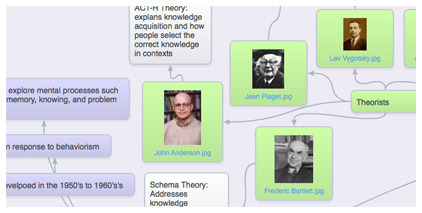
Robin Good: SpiderScribe is a new web-based mindmapping tool which allows you to easily connect notes, images, files, events and even geographic locations.
Key features include: Support for: Text, Images, Files, Events and Maps Zoom in/out Private/Public map access Easy map sharing Quick search inside maps Navigator panel for managing large maps Duplicate Maps Print Maps Export Maps to Images Embed maps into your website Auto-align
Check this video introduction: http://www.SpiderScribe.net/videos/VideoIntroduction.php
Find out more: http://www.SpiderScribe.net/ Via Robin Good
Scoop.it!

The flipped classroom provides avenues for teachers to become facilitators of learning and move away from the sage on a stage approach to teaching. The foundational concepts of instructors guiding students or facilitating their progress are based on the idea that the instructor is no longer at the center of the interaction and application of knowledge. The instructor remains available to students as a facilitator of resources, a resource who should frequently check students for understanding for their learning. The teacher, when necessary will provide guidance in how to process the information for a unit of study. The facilitators role in a flipped classroom changes dramatically in that the teacher becomes a source to students in how to better use the resources, process information and how to apply the core concepts to real life situations. Via Peggy George
Scoop.it!

Web 2.0—Web-based education basics–includes blogs, wikis, class internet homepages, class internet start pages, twitter, social bookmarks, podcasting, photo sharing, online docs, online calendars, even Second Life—all ... |
Scoop.it!

... Collaboration in teaching and learning.
Scoop.it!

Running a blog with your students is about as far from a traditional teaching method as you can get, and chances are nobody taught you how to do it. That’s why teachers who blog with students are usually those nonconformists types, radicals, free spirits, taking paths less traveled…well, not so much anymore. It’s actually become quite popular, but it certainly hasn’t hit mainstream levels, partly because it’s not as simple as using a chalkboard and textbook. Via Nik Peachey
Scoop.it!

Cellphones have not been well received in the educational arena because they are considered a distracting "toy" . But cellphones are an essencial item in the screen agers' lives. Do you doubt about this statement? Look at the infography below: Via Nik Peachey
Scoop.it!

A technology integration (InTec) specialist in Columbia, SC created this blog to share web sites, teacher tools, and technology ideas that teachers can use in their classrooms, making learning fun, interactive, and engaging.
Scoop.it!
Scoop.it!
Digitales Lernen muss anders aussehen. Computer und das Netz sind heute allgemeingegenwärtig, nur leider nicht in der Schule und im Unterricht. Der Weg, den Apple geht, ist vollkommen richtig. Vergesst die Bücher ... Via Lovey Wymann
Scoop.it!
Robin Good: If you consider, like I do, "infographics" as visual presentation tools, I strongly suggest you to browse through this excellent slideshow by Robin Richards, which provides an overview of why infographics are important, gives a glimpse of their history, application and creation and gives a good insight on what makes them truly effective.
Recommended. 9/10
Original presentation: http://www.slideshare.net/ripetungi/why-are-infographics-important
Via XPLAIN, Robin Good
Scoop.it!
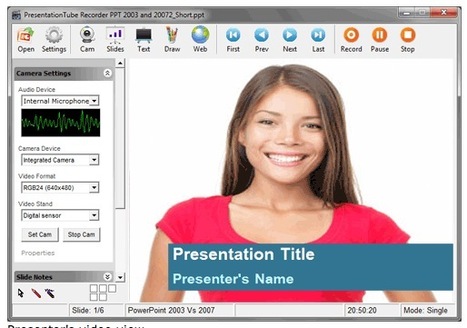
Robin Good: PresentationTube is a Windows PC software plus a web-based service which allows you to record your own screen, add synched voice-over and publish it online.
Key features include: Record your voice in sync with slides Record your webcam video Upload support for PowerPoint files Upload support for video files in .wmv, .flv, or ,avi Whiteboard tools Scrollable sidebar with all slides High-speed video uploader Embed code Share on Facebook and Twitter
Examples: http://presentationtube.net/index_watch.php
Software requirements: MS PowerPoint® or PowerPoint Viewer 2000/03/07/10
Freeware for personal or educational use only.
Download Windows software: http://presentationtube.net/index_record.php
Find out more: http://presentationtube.net/ Via Robin Good 
Alaa Sadik's comment,
February 23, 2012 2:25 PM
Actually you can record not only voice but even your video view over the slides.

Robin Good's comment,
February 23, 2012 2:40 PM
Thanks for mentioning that. I have added it to the features.
Scoop.it!

Here’s a little known but groovy trick that lets you send your friends a link to any specific spot in a YouTube video. Via tom jackson
Scoop.it!

You can also install the Evernote Web Clipper extension and save portions of websites or just some text from a blog post that you want to use somewhere else. You can also connect Evernote to your Twitter favorites and ... |






