Moodle: a brief introduction to types of forums. A brief introduction to the four types of forums in Moodle. ... Moodle: using it as just a discussion board ». Creative Commons Licensed Attribution-Non-Commercial-Share Alike © 2012 Program for ...

 Your new post is loading...
 Scoop.it! Moodle: a brief introduction to types of forums. A brief introduction to the four types of forums in Moodle. ... Moodle: using it as just a discussion board ». Creative Commons Licensed Attribution-Non-Commercial-Share Alike © 2012 Program for ... No comment yet.
Sign up to comment
Scoop.it!

Publishing content online in eye-catching formats is easier than ever. Use these easy-to-use tools to publish, share and celebrate student work.
Scoop.it!

In an excerpt from his book with fellow teacher Katie Hull Sypnieski, blogger Larry Ferlazzo looks at a few basic ways to reach students who are learning English as well as the subject at hand. Via Patty Ball
Scoop.it!

There are millions of images available on the web, but not all of them can be reused on your blogs and websites since they may be copyrighted. CCFinder solves this by searching the web (Google, Yahoo and Bing) for Creative commons licensed images.
Scoop.it!

Moodlerooms is an organization that combines tools, expertise, a proven process and a partner network to create a solution to help expand, support and share the world's most widely used online learning platform, Moodle.
Scoop.it!

Here's a menu of lesson ideas, lesson plans, warmers, fillers, prompts, and more for EFL / ESL CONVERSATION CLASSES. Via Rita Simons Santiago
Scoop.it!
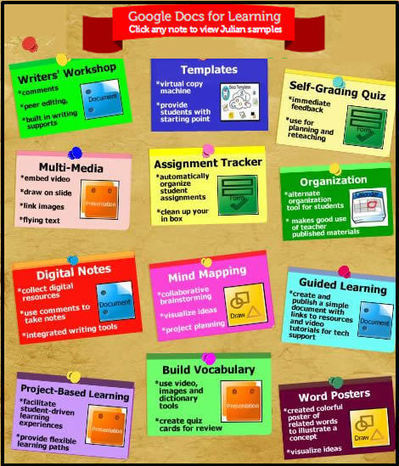
These days a good way to capture the attention of an audience is to present information visually. For this reason, I created a glog of popular ways to use Google Docs for Learning to share with the teachers at our middle school. Just look at the glog, find something that interests you, and click on a link to see snippets of samples implemented by our teachers. Via Jacqui Sharp 
Lindsay Herron's curator insight,
June 14, 2013 7:59 PM
Awesome ideas for using Google Docs, with links to tutorial videos, examples, and more. 
Brandon Fourie's curator insight,
June 1, 2017 6:08 AM
I love how Google Docs can be used!
very easily used in the classrooms for group tasks.
Scoop.it!
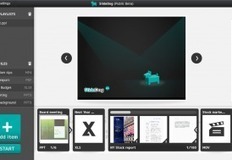
Robin Good: SlideDog is a Windows PC-only downloadable software which allows you to assemble a seamless slideshow that is made up by multiple presentations as well as from files coming from different apps, including PDFs, videos and images.
With SlideDog you can use playlists to play multiple slide shows one after the other. You can also add other files and media such as videos, web pages, Presi presentations, spreadsheets and documents. A playlist can also be saved to disk for easy playback at a later time.
Key features:
1) Support for PowerPoints, PDFs, videos, Prezi presentations, web pages, excel spreadsheets, word documents, flash animations and images.
2) SlideDog plays the files included in the playlist by using the most appropriate tools available. Some of the files will be played directly by SlideDog, while others will be played through an external application such as PowerPoint or the PowerPoint Viewer, though it will seem to viewers as all these files are played by one application. To achieve this SlideDog launches the files in the playlist in fullscreen without displaying the computer desktop or application specific loading screens to the viewers.
3) SlideDog uses a PowerPoint like multi-monitor output to provide meta information to the speaker during the presentation. It is able to show a normal presentation window on one screen, while showing an overview on the other one providing information like thumbnails of the next slides, slide notes and timers.
Free to download.
More info: http://slidedog.com/ ; Via Robin Good
Scoop.it!

Just noticed the Moodle 2.2.2 build was made available on the download page of Moodle.org a few hours ago as of course it is already the scheduled release day.
Scoop.it!

You can use this simple free tool to create your own magazine based around a topic. You don't have to write anything, you can collect and curate information and links to videos, images and articles from around the web. Via Nik Peachey
Scoop.it!

20 excellent “Make Me Moodle” tutorials from @hamptonk - Here’s a great collection of Moodle tutorial...
Scoop.it!
A verb is a word that describes an action or occurrence or indicates a state of being.Know about the types of verbs with examples.
Scoop.it!
Reporting an issue in the Moodle tracker - one of a series on how to use the Moodle tracker... Via Gisele Brugger, michel verstrepen |
Scoop.it!

Services like Dropbox, Microsoft SkyDrive or Spideroak make life more comfortable by offering file synchronization and sharing options that would otherwise be... Via Freewares&Tutos
Scoop.it!

Wild About Wikispaces in Education - Learn about wonderful wikispaces featers and view a glog of sample wikis used in our elementary school district. Via Stephanie Sandifer
Scoop.it!

These studies show whether iPads help make learning fun or waste money. Via David Miller, Jean Jacoby, michel verstrepen
Scoop.it!

Udemy is a website that enables anyone to teach and learn online. Udemy tries to democratize online education by making it fast, easy and free to create online courses. Via Patty Ball
Scoop.it!

Fremdsprachen und Neue Medien: The Flipped Classroom - Infographic http://t.co/Xf6YfkcY...
Scoop.it!

get unlimited traffic go back to the home page brought to you by www.trafficworld.net.
Scoop.it!

The Internet Second Language Collective is a free-to-use community website where English language teachers can share their home-made teaching materials with each other. Via Roselink |