


You're all invited to the first Moodle MOOC in the world on WizIQ: http://www.wiziq.com/course/20705-teaching-with-moodle

 Your new post is loading...
 Scoop.it!
|

|
Rescooped by
Juergen Wagner
from Presentation Tools
June 9, 2013 2:06 PM
|
Scoop.it!

I always needed a fast way to do this. I hope it helps
|
|
Rescooped by
Juergen Wagner
from Learning technologies for EFL
June 9, 2013 4:09 AM
|
Scoop.it!

Windows/Web: LaMP, or Lingual Media Player, is a neat program for learning a new language through watching videos—one of the best ways to become more efficient in a foreign language.
|
|
Scooped by
Juergen Wagner
June 8, 2013 1:14 AM
|
Scoop.it!
weitere - ebenfalls kostenlose, dabei hochkarätige Webinare unter http://tinyurl.com/fobionline
|
|
Rescooped by
Juergen Wagner
from Interesting stuff for ESL EFL teachers
June 8, 2013 12:59 AM
|
Scoop.it!

With new programs and standards emerging, digital badges are helping students prove what they've learned in--and outside--school.
March was a big month in the world of digital badging. The MacArthur Foundation showcased winners of its Badges for Lifelong Learning competition at the Digital Media and Learning Conference in Chicago--one year after awarding those winners $2 million worth of development grants. The city of Chicago itself announced that badging would be a key component of its Summer of Learning program, which is being called the largest citywide learning campaign in the country. And after 18 months of development and testing, the Mozilla Foundation, maker of the Firefox web browser, unveiled version 1.0 of its Open Badges Infrastructure (OBI) specification.
|
|
Rescooped by
Juergen Wagner
from Moodling for Languages
June 8, 2013 12:57 AM
|
Scoop.it!

Using the new template feature in Moodle 2.5 to set up a scaffold or answer frame for students using the Quiz essay question.
|
|
Rescooped by
Juergen Wagner
from Education & Numérique
June 7, 2013 2:07 PM
|
Scoop.it!

Tutoriels réalisés pour le CRDP de Franche-Comté sur l’utilisation de l’outil de veille Diigo faisant partie d’un dossier “Enseignant veilleur”.

Excellents tutoriels sur Diigo, l'outil de curation/veille/gestion collaborative de signets..

Tout simplementle meilleur tuto en français qu'il m'ait été donné de lire sur Diigo
|
|
Rescooped by
Juergen Wagner
from Education & Numérique
June 7, 2013 5:01 AM
|
Scoop.it!
Internet et les outils numériques évoluent à grande vitesse, et modifient de façon profonde nos modes d'accès à l'information. De fait, ils facilitent la veille et le partage des savoirs. Ce diaporama illustre les évolutions de mes pratiques de veille.
|
|
Rescooped by
Juergen Wagner
from NUMÉRIQUE TIC TICE TUICE
June 7, 2013 4:58 AM
|
Scoop.it!

La plupart du temps que je surfe sur internet, j’aime trouver une info rapidement. Mon reflex est d’appuyer sur la touche (“control F”) pour effectuer une rechercher par mot clé sur une page. De cette façon, je vais bien plus vite en besogne pour trouver une information sur une longue page: (typiquement une page du type wikipédia). Pour rappel, le raccourci “Ctrl F” ou “Control F’ est disponible sur tous les navigateurs. Pour passer à une vitesse supérieure il faut penser à ajouter des extension sur votre navigateur (Chrome). En effet, on peut vouloir cherchez plusieurs mot clés sur une même page soit en permanence, soit à la demande. Voilà donc trois extensions Chrome qui réalisent permettent de surligner plusieurs mots à la fois sur une page.
|
|
Rescooped by
Juergen Wagner
from EdTech Tools
June 6, 2013 1:31 AM
|
Scoop.it!

|
|
Rescooped by
Juergen Wagner
from Mobile Learning & mobile devices
June 5, 2013 12:26 PM
|
Scoop.it!

FOR translating a 22-minute video from English into Spanish at short notice, 7Brands Global Content, a professional-translation firm based in New York, quoted...
|
|
Rescooped by
Juergen Wagner
from Technology Enhanced Learning in Teacher Education
June 9, 2013 5:07 AM
|
Scoop.it!

Excerpt from review article by VentureBeat:
"Upload your script, choose some backgrounds, and magically created a professional-looking storyboard of your movie. Or the graphic novel version of your text-based anything.
Amazon Studios released Storyteller today to allow writers and filmmakers to quickly, easily — and cheaply — storyboard their scripts.
Roy Price, Amazon’s director of Studios said: “Storyteller provides a digital backlot, acting troupe, prop department, and assistant editor — everything you need to bring your story to life.”
You start by uploading a script to Amazon Studios — or by playing with one that’s already there. Then simply page through the script paragraph by paragraph. Storyteller will try to match up characters, props, and background with the words in each chunk of text, and it does a surprisingly good job.
But if you don’t like what Storyteller gives, you can choose from its library, or even upload your own custom background or characters. Currently, the software has a library of thousands of props, characters, and backgrounds..."
Read full review article: http://venturebeat.com/2013/06/07/amazon-launches-storyteller-to-turn-scripts-into-storyboards-automagically/
Learn more and try out Storyteller: http://studios.amazon.com/storyteller


Du synopsis au storyboard en passant par studio.amazon.com/storyteller
|
|
Rescooped by
Juergen Wagner
from 21st Century Concepts-Technology in the Classroom
June 8, 2013 12:58 AM
|
Scoop.it!

|
|
Rescooped by
Juergen Wagner
from Education Technology - theory & practice
June 7, 2013 2:09 PM
|
Scoop.it!
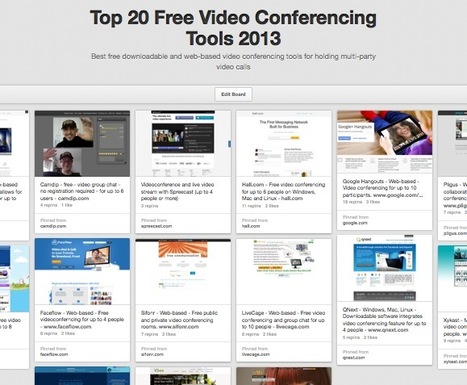
Best free downloadable and web-based video conferencing tools for holding multi-party video calls

|
|
Rescooped by
Juergen Wagner
from 21st Century Concepts-Technology in the Classroom
June 7, 2013 8:11 AM
|
Scoop.it!

Backchanneling is an important skill in the 21st century education. By definition, backchanneling is interacting with the primary activity through participating in a secondary activity. For instance,...

If they aren't backchanneling about the class, they may well be texting, facebooking, surfing....engage them with a backchannel!
|
|
Rescooped by
Juergen Wagner
from Le FLE, c'est chouette!!!
June 7, 2013 5:00 AM
|
Scoop.it!

Pour familiariser l'enseignant avec la plateforme Moodle voici une approche qui présente le principe de l'intervention pédagogique accompagné par une illustration que vous pouvez réaliser vous-même pas à pas.

Pour les enseignants ou formateurs qui veulent passer à l'e-learning, voici quelques scénarios pour Moodle 2 pour optimiser leurs pratiques.

Deux tutos très abordables pour l'utilisation de Moodle et en français! L'un sur les manipulations de bases, l'autre avec des exemples de scenari. Enfin une ressource qui permet une approche simple de Moodle et qui ravira ceux qui veulent une première approche avec cette plateforme. A partager sas modération.
|
|
Rescooped by
Juergen Wagner
from Moodle Best LMS
June 7, 2013 4:56 AM
|
Scoop.it!

What is the Moodle Course Creator Certificate?
The MCCC is a way for you to demonstrate your skills in using Moodle as a teacher. The assessment contains a course project, a short narrative document, and an online exam. You will be assigned an MCCC-certified mentor-assessor to help guide you through this process. When you pass the certification you are given a code that lets you (or anyone else you give it to) download your personalised certificate as a PDF from this site.
The MCCC is not a training course, it assumes that you already know what you need to know and just want to be assessed and certified. However, Moodle Partners may provide training courses that allow you to fulfill the project and narrative elements of the MCCC - please talk to your Moodle Partner about this.
|
|
Scooped by
Juergen Wagner
June 6, 2013 3:20 PM
|
Scoop.it!

Digital Storytelling with Glogster EDU A part of teaching is storytelling. As a teacher, you tell the story of the world around you. The history, the mechanics, the reasoning behind everything that...

A great tool for digital storytelling with several sharing possibilities. Students can work collaboratively on these projects; they can create e-portfolios with Glogster; they can use a variety of media to create their projects which works well with differing language levels, it can also be used for their own learning. It's worth exploring as it has a lot of potential for both formal and informal learning.
|
|
Scooped by
Juergen Wagner
June 5, 2013 2:11 PM
|
Scoop.it!
Join Moodle MOOC no WizIQ: http://www.wiziq.com/course/20705-teaching-with-moodle Then join one of the 3 courses and follow each of the weekly topics of the ...




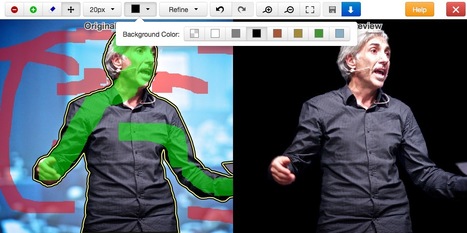




Wished I had got on to this sooner
very useful, thorough, experiential.
Sooo wish I had time to participate in this mooc! But I will check in regularly to harvest some nice ideas... So have fun!