


Via Robin Good

Moodle and Web 2.0
176.9K views |
+2 today
Filter by date
Tags
 Your new post is loading...
 Scoop.it! 
Scoop.it!

Bring comics to the classroom with educational software that helps students create, share and collaborate on comics - without drawing a line. Use Bitstrips for Schools to teach reading comprehension, writing and digital literacy. Via jemp, Krisha Kerr, Pilar_Mun 
jemp's curator insight,
January 28, 2013 10:36 AM
Although Bitstrips is already included in this collection of sites, the Bitstrips for Schools has some added features you might have missed. Check out the suggested activites. Unfortunately, this version is not paid which may put it out of some teachers' reach.
Scoop.it!

If you use technology to bolster your understanding of a particular topic, use critical thinking and problem-solving skills to tackle tough questions, or simply collaborate across networks (online and in-person), then you've got some of the skills... Via Luísa Lima
Scoop.it!
You can now give students voice feedback about their writing in Google Docs. This short video will show you how. You will need to teach students how to hit t... Via Laura Spencer, Let's Learn IT 
Dico Krommenhoek's curator insight,
June 20, 2013 3:12 AM
Een erg praktische toevoeging in Chrome aan Google Docs. Scheelt bergen tijd aan correctie. Wel even je leerlingen leren dat ze "open met..." en dan Voice comment moeten klikken.
Scoop.it!

e-Learning platforms can be a little confusing, and finding out the features amongst the jargon can be difficult. Here at Webanywhere we've put together three videos highlighting the features and benefits of using Moodle. Via Instituto Mexicano de Comunicación Intercultural, Rui Guimarães Lima
Scoop.it!

Best flashcards for your computer or smartphone. Study online or with an app. Via Manuel F. Lara, Ana Lara
Scoop.it!
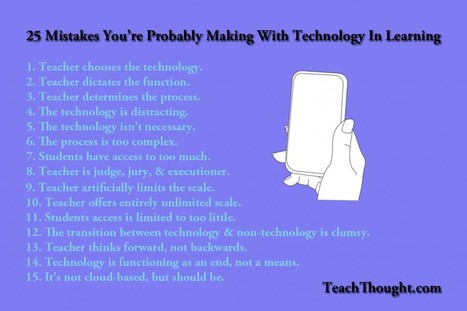

Steve Whitmore's curator insight,
June 18, 2013 8:01 AM
It is always improtant to think about the purpose and the student's technological abilities. I see all too often with adult learning presenters overestimate the abilities of the learners. 
Ness Crouch's curator insight,
July 4, 2013 6:09 PM
Hands up if you have done this? I know on a couple of these points I've specifically done this, mainly because of the learning needs of my class.
Scoop.it!
Juergen Wagner's insight:
Contrary to the above notice the webinar will not be hosted by myself (Jürgen Wagner) but by Shona Whyte (Université de Nice). Thank you, Shona! Further Free Webinars: http://tinyurl.com/fobionlien
Scoop.it!

ABSTRACT:
What considerations support the decision to either augment or replace an institution’s existing learning management system (LMS) with a cloud-based, Web 2.0 technology tool to support students’ learning? The use of instructional technologies should be evaluated against a backdrop of pedagogical objectives, and students’ selection of tools to support their learning can result in a more collaborative, constructive, and authentic learning experience. Instructors must balance the benefit of introducing new technology tools into the curriculum with the additional load—for instructors (supporting the tool) and students (learning the tool).This paper describes the experiences of an online graduate program in instructional technology at Georgia Southern University (GSU) and the program faculty who have chosen to move beyond the LMS. Via juandoming
Scoop.it!

Zhanat Shanbatyrova's comment June 15, 2013 5:57 PM
Thanks a lot for this very information and the information on Facebook page and Twitter.
|
Scoop.it!


Ludmila Smirnova's curator insight,
June 20, 2013 10:10 AM
Visual learning, critical thinking, creative learning skills can be developed trough crearing inforgraphis. See the tools!
Scoop.it!

Susan Wegmann's curator insight,
June 19, 2013 11:14 AM
Video ANT - create your own ANT bed. Fantastic tool! 
EnglishWizards's curator insight,
June 19, 2013 7:45 PM
Look forward to working out how to make use of this tool.
Scoop.it!

CECI Jean-François's curator insight,
June 19, 2013 2:18 AM
Une collection fabuleuse d'outils web2.0 pour tous les usages et particulièrement pour l'éducation :-) 
miracletrain 夢想驛站's curator insight,
June 19, 2013 7:31 PM
Very impressive, need to spend some time to review them all.
Scoop.it!
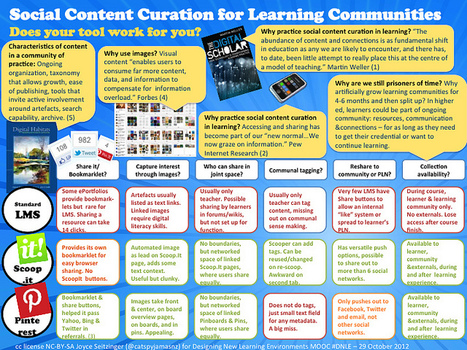
An infographic I created for a MOOC at Stanford: Designing New Learning Environments. Made with too little space, too little skills, too little time and too little research. Lots of fun though. Via catspyjamasnz, Luísa Lima, Begoña Iturgaitz 
Kirsten Wilson's curator insight,
June 19, 2013 11:26 AM
Interesting take on a few forms of curation that can be used. Infographic is, as the creator remarked, a little crowded, however the information is useful. 
Begoña Iturgaitz's curator insight,
June 19, 2013 12:22 PM
do we know the actual size of what we're traying to make?
Scoop.it!
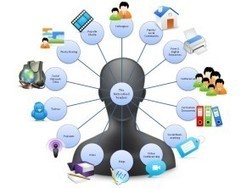
It's summer and a fabulous time to kickstart your PLN (Personal Learning Network) using the power of social media and your colleagues. Via juandoming 
malek's curator insight,
June 19, 2013 5:10 PM
I like the notion that your colleagues (in real life and online) are a more effective resource than the internet at large.
Scoop.it!
Scoop.it!
Juergen Wagner's insight:
Sehr empfehlenswertes Webinar mit 44 TeilnehmerInnen -
Scoop.it!

Make a video online for free with GoAnimate! Make videos for YouTube and Facebook, create business and educational videos, make animated e-cards and more! Via Marie-Hélène Fasquel-Erhart
Scoop.it!
Scoop.it!
See on Scoop.it - Moodling with Moodle Give your students a vote by including a choice activityDiane Goodman's insight:From webanywhere: How to create a Moodle. Via AgileBelma
Scoop.it!

Glogster EDU assists teachers in providing dynamic teaching experiences. Make your interactive poster easily and share it with friends by mixing images, text, music and video. Learn all about glogging in this thorough tutorial series. Via Marie-Hélène Fasquel-Erhart
Scoop.it!
Scribd is the world's largest social reading and publishing site. (Manual Moodle 2.4 para #docentes http://t.co/TMDpqSsAXh) |







StartMeeting, a cost-effective multi-feature web conferencing and collaboration service has introduced StartMeeting Studio, a free tool which allows you to record your own presentations, tutorials or screencasts, archive them online or download them and share with your readers across key social media channels.
StartMeeting Studio is effectively a free but effective screencasting tool which allows you to record both your computer screen activities as well as your own voice.
During recording you can pause and restart the recording at any point. The final recording is immediately available after you press the Stop button, can be viewed right away or downloaded as an .flv file.
Works across Macs and PCs.
You don't need to have any previous account with StartMeeting to use this. Just sign-up and go.
My comment: Very easy to use. Effective, reliable out of the box. Good extra bonus the ability to download the recording.
Free to use.
Try it out now by signing up here: https://www.startmeeting.com/user/signup
More info: https://www.startmeeting.com/
FAQ: http://www.startmeeting.com/faq
My review from a year ago: http://collaborationtools.masternewmedia.org/p/1489987300/cross-platform-screen-sharing-and-audio-conferencing-for-up-to-1000-people-startmeeting
Related / Similar tools: http://pinterest.com/robingood/best-screencasting-tools-2013/
This appears to be a very powerful tool.