


To free up some time and get to the innovative learning, you need to strongly consider a plan to flip your classroom. Here are a few tips and reasons.
Via juandoming, Wilmer Ramírez

 Your new post is loading...
 Scoop.it! To free up some time and get to the innovative learning, you need to strongly consider a plan to flip your classroom. Here are a few tips and reasons. Via juandoming, Wilmer Ramírez No comment yet.
Sign up to comment
Scoop.it!

New to Moodle? Here are some quick 5 steps tutorials to get you started.
Scoop.it!
The all new SnapPages is the easiest way to create a website. It combines simplicity and power in a way that gives you the best of both worlds. http://snappages.com
Scoop.it!

Kaylin Burleson's curator insight,
July 14, 2013 1:27 PM
Even though you may use Edmodo daily -handy to have

Susan's curator insight,
July 15, 2013 8:35 AM
Edmodo is great. The best things about it are that you create a safe place for your students and it's totally free! 
carldowse's curator insight,
July 18, 2013 3:27 PM
Covers the basics in setting up and using this user-friendly virtual learning environment
Scoop.it!
Let's talk about the power of visual communication and the age of infographics. Here's why infographics are so appealing and popular. Via José Carlos, michel verstrepen 
Dolly Bhasin 's curator insight,
July 13, 2013 11:47 PM
If one adds participation along with Visual aids, the results are more astounding!

Dave Wood's curator insight,
August 27, 2013 1:23 AM
A video presenting the data about the power of visual aids. How much more of a coaching session will your clients retain/remember if you incorporate visuals during the process? Not to mention the increased insight and understanding.
Scoop.it!
From
vimeo

Vimeo is the home for high-quality videos and the people who love them. Via PublishME, Thierry Ruissy 
PublishME's curator insight,
July 9, 2013 11:17 PM
Great for Education, closed or open sharing between users. Get the free app today. Http://www.publishmeapp.com
Scoop.it!

From
roget
Normalement, quand on veut envoyer un fichier très lourd à un correspondant, la première chose qu’on a à l’idée est de trouver un service en ligne qui permet de charger le fichier sur un serveur quelque-part sur la planète, puis d’envoyer l’adresse du fichier à au correspondant pour qu’il puisse le télécharger dans la foulée. Via Frédéric DEBAILLEUL
Scoop.it!


Alfredo Corell's curator insight,
July 15, 2013 5:53 AM
A review about the uses of scoop.it in the classroom. 
Ra's curator insight,
July 21, 2013 9:47 PM
Curating as a group, students identify their own input with their initials. Allows for a synthesis of ideas. 
GwynethJones's curator insight,
August 13, 2013 2:05 PM
SO true! This is my FAV new Curation tool....well, add Scoopit to MentorMob & you have a dynamic duo!
Scoop.it!

Si no quieres depender de las limitaciones de WinRAR y WinZIP, aqui te dejo 7 alternativas gratuitas que hacen lo mismo. Via Paco Álvarez Pérez
Scoop.it!

Here are my top ten tips for language teachers starting out with Edmodo, my favourite Web 2.0 tool for use with learners. DO obtain parental permission if you are using it with young learners, even though it is private; DO get ... Via AgileBelma
Scoop.it!

Mobile learning is changing the way employees learn and train as well as how companies do business. Via Edumorfosis, juandoming
Scoop.it!

"Social media in real life" by Sarah Andersen of Doodle Time via Rosa Golijan |
Scoop.it!

Gizmodo Via Michel
Scoop.it!
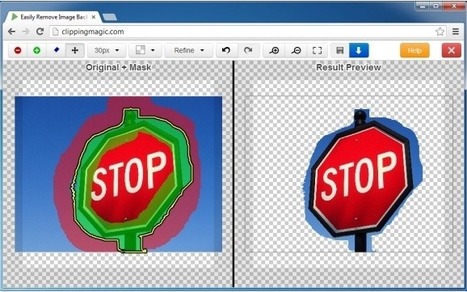
Clipping Magic is a free web app for quickly and easily removing image backgrounds. When using images for PowerPoint presentations, blog posts and other projects, one may require removing their background so that they may blend in with the colors of your presentation slide, blog or canvas. However, removing a background image isn’t easy and being a PRO at PhotoShop is not possible for everyone. Via Baiba Svenca 
Fernando Rodriguez's curator insight,
July 16, 2013 1:18 AM
Great tool!! can save a lot of time and effort. Too bad it does not yet work on Safari!!
Scoop.it!
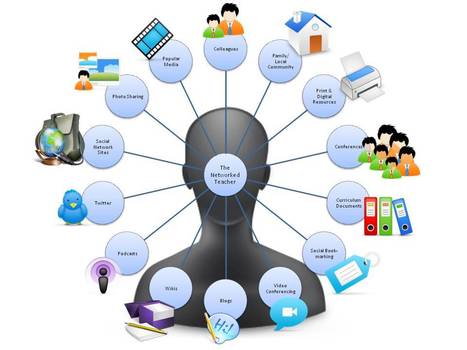
A wonderful visual depiction of how educators can tap into their networks to expand and continually improve their teaching practice from a trove of rich resources. Illustrated by Langwitches, the image refers to Alec Couros’s original post exploring question, “What does the network mean to you?” Via Anne Whaits, Evdokia Roka 
Leslie Minton's curator insight,
July 17, 2013 11:49 AM
Great visual of how networks are created to support how best to utilize them in education. 
Lara Strickland's curator insight,
August 13, 2013 8:06 AM
Depicts exactly what I am exploring at the moment as part of my #H812 studies and MA in Online and Disctance Education. Chosen however not to 'network' Facebook as I tend to use it socially rather than professionally.
Scoop.it!

What is AirPlay? AirPlay is a technology that Apple baked into their more recent devices to allow them to wirelessly mirror the content of one screen to another. This content can be music, movies, ... Via David Miller 
Viljenka Savli (http://www2.arnes.si/~sopvsavl/)'s curator insight,
July 14, 2013 3:57 AM
Useful to know how to use it to mirror the content of the screen. 
Richard Lawler's curator insight,
July 17, 2013 9:26 AM
Cool - can't underestimate the need for "101" type guides for educators. 
Stefan Gisler's comment October 23, 2013 3:46 PM
Apple TV is great. Unfortunately there's only a optical audio output so I have to use analog - digital audio converter to connecting to a PA or Hi-Fi. Airport Express looks like a nice solution for this but it is very unstable and has a big latency. So the only solution for me at moment is WHDI (wireless HDMI-Connection to the beamer).
Scoop.it!

Google Apps Learning Center for new users to Google Apps. Here you can get started with Gmail, Google Calendar, Google Docs and Google Sites. Printable guides, instructional videos and tutorials! Via Frédéric DEBAILLEUL, Aulde de Barbuat
Scoop.it!
Constructivist Learning andConstructivist Learning and Web 2.0 ToolsWeb 2.0 Tools A presentation by Natalie Stevens,A presentation by Natalie Stevens, in partia (Constructivist Learning and Web 2.0 Tools http://t.co/JlpdjTy4N9... Via Instituto Mexicano de Comunicación Intercultural, Rui Guimarães Lima
Scoop.it!

Welcome to the Digital Literacies Toolkit. This interactive learning tool was designed and developed byeLanguages in Modern Languages at the University of Southampton with support from the university Student Centredness Fund. The purpose of this set of learning resources is to help students: explore the educational uses of Web 2.0 tools and services;familiarise themselves with a range of useful applications for study-related purposes;highlight good practice in the use of social software and the internet, in general. Please use the buttons on the right for further information and to send us feedback. Via Shona Whyte
Scoop.it!

To begin using this tool selection decision tree, choose what you would like to achieve in Moodle with the available tools and resources.
- I want to provide information to students about the course and/or what they need to do to successfully complete the course.
- I want to create content in collaboration with my students with the potential for all students to create a part of the information for the course.
- I want to be able to communicate with students and make sure that they understand topics and/or the requirements of the course.
- I want to find out how well my students are doing and, in some cases, allocate marks to their work for their overall grade in assessment. Via Miloš Bajčetić
Scoop.it!
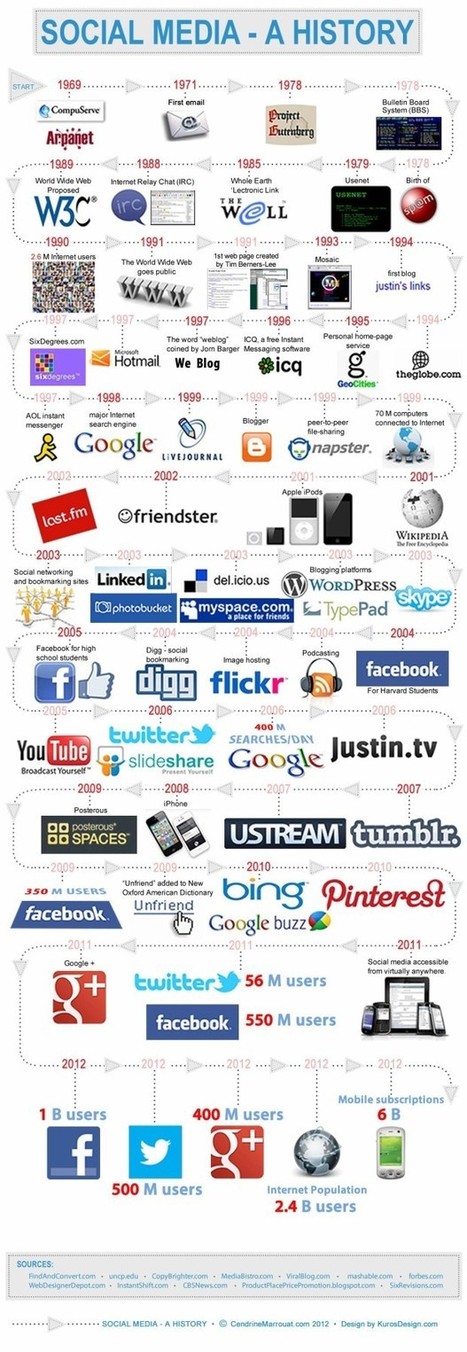
Do you know the history of social media? Think we'll remember Facebook in 20 years? This detailed timeline is a must-see.
Social media began decades before the Facebook era. It started, more or less, with CompuServe and Arpanet back in 1969. A couple years later, the first-ever email was sent. It has evolved over the past few decades into a powerful tool, as seen in this social media history timeline. With so much that’s happened over the past few decades, we can only guess what’s coming next for social media. Via Lauren Moss, Elena Elliniadou, Lynnette Van Dyke 
Charles Rein's comment,
July 24, 2013 3:38 PM
From the land of "Wired Telephones" USA, we can now look at how explosive Global growth and the potential 5-7 billion people who will always use a Smart or Cell device
Scoop.it!

David Donat's curator insight,
July 24, 2013 3:26 PM
Una bona presentació de la "Flipped Classroom": no és un mètode pedagògic, sinó una manera més d'enfocar l'aprenentatge, que pot anar bé en algunes ocasions i que en d'altres no tant. Es pot plantejar com un recurs més, combinable amb qualsevol altre. La meva opinió és que els alumnes són tan diversos que no hi ha cap metodologia "ideal". Cadascun necessitarà eines i processos diferents i per tant, quantes més dinàmiques i metodologies s'utilitzin (i més flexibles siguin) millor s'atendrà a cadascun d'ells. No cal dir que amb ratios de més de 30 adolescents per aula tampoc es poden fer miracles. 
Bárbara Mónica Pérez Moo's curator insight,
July 25, 2013 12:10 PM
Dara para mucho, vamos iniciando! |






