


Via Yuly Asencion

 Your new post is loading...
 Scoop.it! No comment yet.
Sign up to comment
Scoop.it!

See the Glog! QR codes in Education: qr codes education | Glogster EDU - 21st century multimedia tool for educators, teachers and students Via Elke Höfler
Scoop.it!
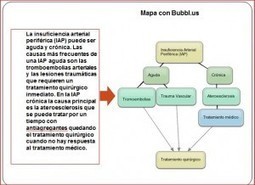
Qué es la Web 2.0 ? Es un conjunto de herramientas gratuitas que nos permiten interactuar con el resto del mundo y compartir entre todos nuestras experiencias, nuestras dudas, nuestros logros formando parte de la lamada ...
Scoop.it!
"Tarde pero llego he preparado la última versión estable de Moodle V 1.9.19 y 2.4 en modalidad potable..." Via Fernando Seijo
Scoop.it!

En el presente estudio se identifican los estilos de aprendizaje y su relación con ciertas características de navegación de algunos estudiantes de un curso en línea de posgrado en el entorno de la plataforma Moodle. Estos dos componentes podrían ayudar a considerar las características de aprendizaje de los estudiantes, y, en este sentido, a orientar el proceso de enseñanza-aprendizaje. Además, puede ser importante en la generación de conocimientos teórico-prácticos que posteriormente permitan profundizar en el tema. La investigación confirmó la existencia de relaciones significativas entre algunas características de navegación y un estilo de aprendizaje en particular, lo cual indica que debería estudiarse de manera más sistemática no solo la navegación, sino también los estilos en relación con algunas características de navegación.
Scoop.it!
Free evening webinars by invited practitioners and trainers in different languages (English, French, German), hosted by Jürgen Wagner from Saarbrücken. Via Shona Whyte
Scoop.it!

This guide brings together some of the best tips on using Twitter in the classroom. We’ve sourced some of the best education blogs from the web to bring you these useful resources from influential bloggers. Our tips come from Jeff Dunn from Edudemic and Christopher Pappas from eLearning Industry plus other education bloggers who really know what they are talking about. 
Marie-Ann Roberts's curator insight,
November 15, 2013 8:24 AM
Essential reading to make Twitter for learning more effective. 
Dr. Francisco Raso's curator insight,
November 17, 2013 3:58 PM
Para un uso más responsable de Twitter en el aula... 
karin arentsen's curator insight,
November 27, 2013 3:34 PM
Comme je ne sais rien de twitter, mais les élèves l'utilisent souvent... Ce site donne plusieurs idées comment utiliser twitter en classe.
Scoop.it!

andreas hofer's curator insight,
November 14, 2013 6:34 AM
Google Tour Builder as a new piece of software that lets you quickly create online presentations about field trips, excursions and even imaginary voyages. Tour builder lets you combine Google Earth, photos and videos as well as text to create engaging presentations.
Scoop.it!

Könnten Sie sich vorstellen, an Fortbildungen mit Kolleginnen und Kollegen aus der ganzen Welt teilzunehmen ohne Ihre eigene Wohnung zu verlassen? Via Lavinia Ionica
Scoop.it!

The PresentersWall is your interaction tool and gives the audience her voice back. Let your audience vote, rate, ask and react via their own smartphone, tablet or laptop. Our interactive wall is a combination of a voting system and a Twitterwall. In this way your audience can vote and respond on questions or statements to create an interactive discussion. Via Baiba Svenca 
juanjovilar's curator insight,
October 18, 2013 5:17 AM
Magnífica forma de interactuar con cualquier audiencia a través de nuestros teléfonos, tabletas o portátiles. 
Alfredo Corell's curator insight,
November 15, 2013 8:05 PM
Involve your audience into your presentation by using PresentersWall
Scoop.it!

Moodle 2.6 is coming very soon, if you haven't tried it out you might want to jump over to QA.moodle.net to explore a little and get your feet wet. There is a laundry list of new features, changes,... Via Donna Thompson, Gisele Brugger |
Scoop.it!

Moodle 2.6 brings a lot of exciting new features for teachers, students and administrators. This page highlights a few of the most interesting.
Full details of the release, with technical information, can be found in the Moodle 2.6 Release notes Via Miloš Bajčetić, Rui Guimarães Lima
Scoop.it!

PDF Online Reader is a free online tool that allows you to view and annotate PDF files directly in your web browser. The online PDF viewer can also highlight text and add hyperlinks.
Demonstrated by @woodrowbound at our TeachEat. Super simple tool and allows students to annotate and comment on an online PDF'ed document and then download.
Good set of editing tools and easy to use. Via gideonwilliams
Scoop.it!
Welcome to XtLearn.net Moodle. Browse through the courses on our site to see how XtLearn collections can be used in your Moodle Course to enhance your students experience.
Scoop.it!

Starting your first prezi is exciting—the blank canvas contains so much potential, creat... Via Baiba Svenca, Heinz Krettek 
Tanja Elbaz's curator insight,
November 23, 2023 6:12 PM
Scoop.it!

Speed reading apps have replaced expensive programs that chain you to a series of exercises, rather helps you to improve your reading skills with content you're already planning on reading. Via Rhondda Powling 
Rhondda Powling's curator insight,
November 15, 2013 1:09 AM
Being able to quickly read something has become a very handy skill with the amount of information around today. Many students are looking for ways to improve their reading speed as well as comprehension. There are currently quite a few speed reading apps being developed for mobile devices like smartphones and tablets, to try and assist peole in coping with their reading. This post offers a review of 8 apps. Four are for iOS and the others are for Windows, Android, a well as web-based. Some apps offer training exercises, others use the content that you might already have. They are either free or quite cheap.
Scoop.it!
Juergen Wagner's insight:
Andere Webinare des LPM: http://v.gd/webinars
Scoop.it!
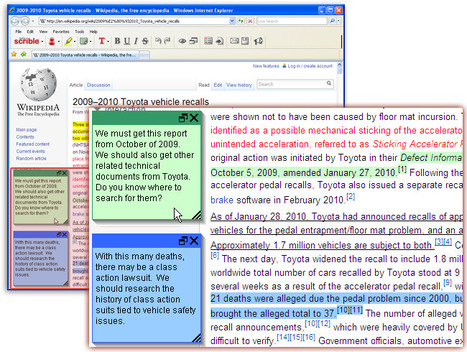
Even though the world uses the Internet to research nearly everything for work, school and home (job postings, press releases, Wikipedia articles, medical info, etc.), most folks still use old-school ways of annotating, organizing and sharing online info (printing to mark by hand, copying/pasting into Word, etc.). It's archaic, laborious and a waste of time. We're changing that. We're bringing Web-based research into the Internet Era by empowering people to mark up web pages in the browser and manage and collaborate on them online. And that's just the start... We've got much more planned in a variety of areas to help people manage the mounds of info they're pulling off the Web everyday. Via Frédéric DEBAILLEUL, juandoming, Javier Sánchez Bolado
Scoop.it!

Cometdocs is a desktop application that converts xps files to PDF. It also adds converting option to Windows Context menu for convenience. Via Frédéric DEBAILLEUL
Scoop.it!

Scoop.it!

Juergen Wagner's curator insight,
November 13, 2013 3:17 AM
Die Präsentation von Axel Braun als PDF: please rescoop Weitere Webinare des LPM: http://v.gd/webinars |






