Moodle uses the TinyMCE editor as a default. With version 2.6 this has had a makeover and there are some changes in the way it works.
Via Miloš Bajčetić

 Your new post is loading...
 Scoop.it! Moodle uses the TinyMCE editor as a default. With version 2.6 this has had a makeover and there are some changes in the way it works. Via Miloš Bajčetić No comment yet.
Sign up to comment
Scoop.it!

Moodle provides great possibilities of customizations.
Scoop.it!

PDF documents have become a standard for almost for all purposes. When the PDF was first introduced, it was difficult to make any manipulation to the documents due to lack of proper Via GSeremetakis, John Purificati 
Louise Robinson-Lay's curator insight,
December 26, 2013 9:26 PM
There are some handy tools here for working with PDF files. One of the links ( the PDF to page flip one) has since been shut down but the others are very useful. 
Alfredo Corell's curator insight,
December 28, 2013 6:02 PM
easy and useful tools for pdf use and improvement
Scoop.it!

En esta sección encontrarás más de 150 herramientas gratuitas que permiten crear materiales didácticos (información, ejercicios, actividades, etc.) sin nec... Via Diana de Iriondo
Scoop.it!
Comment créer des parcours d'apprentissage en ligne incluant des éléments multimédia interactifs : Simplebooklet et service similaire. Via Catherine Ricoul
Scoop.it!
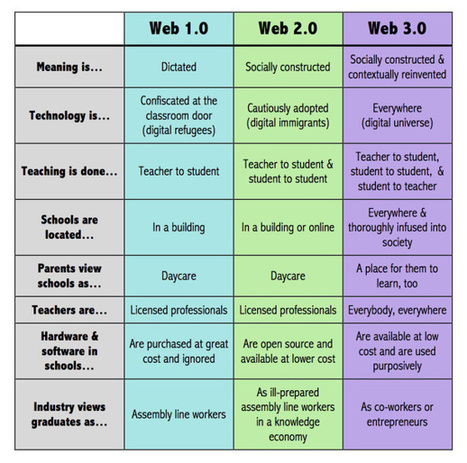
We'll reach a new state of web skills when we reinvent technology tools to better enhance our personal learning. We'll be at 3.0 when schools are everywhere and not viewed as daycare. Via Gust MEES, Petra Pollum 
Ginger Jewell's curator insight,
March 3, 2017 9:47 AM
I'm not sure I would define it this way. How would you fill in column three?
Scoop.it!

Pixiclip's web-based whiteboard makes it easy to create and share sketches online Via Ana Cristina Pratas 
Luís Cálix's curator insight,
December 23, 2013 5:59 PM
Pixiclip funciona como uma tela em branco online onde se pode fazer esboços, escrever, anotar sobre uma imagem, gravar enquanto fala e, no final, partilhar com quem quiser. As ferramentas são mínimas e básicas, o processo de criação é muito simples, tal como o registo do utilizador. Simples e funcional!
Scoop.it!

In this video, learn how to award and manage badges in Moodle. Badges can be awarded manually or automatically, based on criteria selected by the teacher or administrator. Via AgileBelma, Miloš Bajčetić
Scoop.it!

“ Prezi es una de las herramientas más creativas que ha surgido en años. Se trata de un software para presentaciones con una interfaz de usuario con zoom, o Zooming User Interface (ZUI) que hace quedar a Power Point como un primo lejano y anticuado.” Via Silvano Poblano Morales, Francesc clavera i riera
Scoop.it!

Looking to save some time? These Gmail tools will help you make it happen. Thanks to ye olde undo and more! Via Dr. Tom D'Amico (@TDOttawa)
Scoop.it!

"So, what are QR Codes, you ask? Well, you know what barcodes are, like when you buy something at the store and the clerk scans a code to enter the item and amount into the till? The QR (Quick Response) Code is kind of like that, except that it offers much more information. Quite often the QR Code will give you a link to a website, or a text message, image, etc. To read the QR Code, you need to install a QR Code Reader onto your device. There are many available for free. I like using i-nigma, seen below. Simply open the app, point it at a QR Code and your device will do the rest. Try it with the code above. It should take you back to this blog." Via John Evans 
Melissa Marshall's curator insight,
December 21, 2013 7:08 PM
A QR Code Reader has been added to the App List for 2014 at Prendiville. This is a great little article on what QR (quick-read) codes are, what they can do, and some suggestions to teach with them/ Treasure-hunts, fact-finding and excursions will never be the same! 
Martha D's curator insight,
January 16, 2014 7:48 AM
Wondering how to use QR codes in your classroom? Here are some great ideas. 
Gary Harwell's curator insight,
January 19, 2014 11:34 PM
SWe've used this in classes and the students loved it.
Scoop.it!

Popplet es una aplicación en la nube que permite de forma gráfica estructurar y organizar información, crear mapas conceptuales, galerías, muros virtuales, recopilación de recursos, líneas de tiempo, etc.Permite incluir textos, imágenes, vídeos y dibujos. Puedes ordenar tus ideas e irlas enriqueciendo con imágenes, dibujos y vídeos. Via Gumersindo Fernández 
Sonia Garcia Izaguirre's curator insight,
April 28, 2014 9:19 PM
Una muy buena herramienta para crear mapas conceptuales, bitacoras de trabajos y lo mejor que todos pueden colaborar en el trabajo, ya nadie puede decir que no puede colaborar :). Sitio web: http://popplet.com Tutorial de uso: http://www.youtube.com/watch?v=D624wGdcH14 Ejemplo: http://popplet.com/app/#/18276
Scoop.it!

I had the pleasure of being at SLATE (technology conference here in Wisconsin) the last two days, and beside the wonderful people I got to connect and re-connect with, there was also one session th... Via Cornélia Castro |
Scoop.it!

A minimalist markdown blogging solution. Welcome to an Easier Way to Blog. Via Ana Cristina Pratas, Javier Sánchez Bolado 
Metta's curator insight,
January 1, 2014 9:57 AM
Looks simple and compelling. Pretty much like Medium (visually).
Scoop.it!

Pédagogie inversée, classes inversées · Les outils qui rendent possible la classe inversée · Apprentissage collaboratif et web2.0 · Le iPad en classe, s'ouvrir aux changements de pratique ...
Scoop.it!
Moodle provides great possibilities of customizations.
Scoop.it!

Continuamos nuestro cursillo particular para dominar Blogger, aprendiendo cómo funciona su código para entender la plantilla y los cambios que en ella podemos hacer. Via Gumersindo Fernández
Scoop.it!

Migrating a Moodle to a new server is something that most of us have to do at some point. A server with more resources and newer operating system is the best way to keep your Moodle running at its best, it ensures reliability and security. The database transfer tool will allow you to copy your existing database over to your new server using the web interface. To do this you need to fill in the details of the target database (making sure it has external access). Via Miloš Bajčetić
Scoop.it!
Short demo of the Moodle 2.6 Annotate PDF assignment submission feature Via Miloš Bajčetić, Moodle_UK 
Moodle_UK's curator insight,
December 14, 2013 9:20 AM
A useful taster and introduction to the Annotate PDF function, from the original Moodle Fairy - Mary C
Scoop.it!
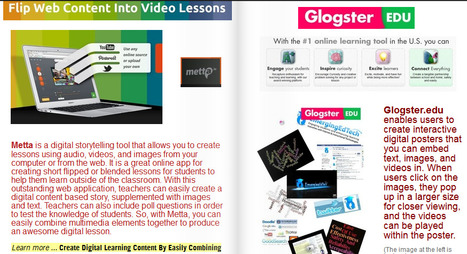
Creating digital learning content has never been easier. In these pages you'll find eleven tools that make it fun to bring together different types of digital media - text, images, audio, video - to "mash up" your own online learning materials. Via Baiba Svenca, Rafael Scapin, Ph.D., michel verstrepen 
Mike Dilger's curator insight,
January 13, 2014 2:17 AM
To create your own digital content is a big step but not one out of reach for any of us. These tools allow you to create resources for online use in the classroom OR give you an idea of what is possible. Investigate some of the possibilities and then discuss with me and we'll see what can be done with a little thought and planning. 
Anisa Dedej's curator insight,
January 18, 2014 5:42 AM
La creazione di contenuti digitali didattici non è mai stato così facile. In queste pagine troverai undici strumenti che rendono divertente per riunire i diversi tipi di media digitali - testi, immagini, audio, video - a "mash up" i propri materiali didattici on-line.
Scoop.it!
Scoop.it!

Rubrics are a way to assess work using criteria. The assessor sets up a series of statements that reflect the different levels of criteria fulfilment and then assesses the work using a rubric grid.
From version 2.2 moodle supports rubric grading. This requires several steps, explained below. This guide uses Assignment for the rubric grading example. Via Miloš Bajčetić |