


Sadly this is my last post as an active member of the Moodle community. Thank you for teaching me so much. I'll still be around the traps lurking.
Via Donna Thompson, Moodle_UK

 Your new post is loading...
 Scoop.it! Sadly this is my last post as an active member of the Moodle community. Thank you for teaching me so much. I'll still be around the traps lurking. Via Donna Thompson, Moodle_UK
Scoop.it!

Teachers all over the world are flipping their classrooms. Instead of doing homework and projects at home, students watch lectures and videos. Via Angela Matthews, JP Hale, Danita Russell, michel verstrepen 
LundTechIntegration's curator insight,
April 1, 2014 12:14 PM
Great resources for flipping or allowing students to create lessons to teach.
Scoop.it!
Much is written about using Twitter for research, but what about using it in learning and teaching? It has plenty of applications there as well. This worksho... Via Pepe Torres, Susan
Scoop.it!
From
roget

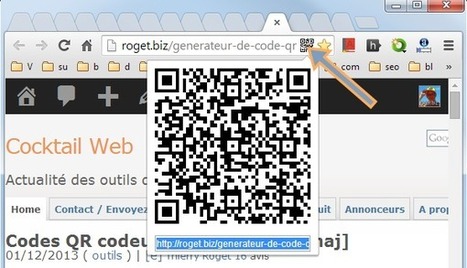
“comment transférer un lien, une photo, ou un texte via un code QR entre un ordinateur et un smarphone” Via Elena Pérez, Blandine Lécuyer
Scoop.it!

Una de las diferencias más notables de la versión de moodle 1.x a la 2.x, tanto a nivel técnico como a nivel de usuario, radica en el modo en que se gestionan los archivos, que está basado en una filosofía totalmente distinta a la que conocíamos: si en moodle 1.x los archivos estaban asociados a un curso en concreto, ahora en moodle 2.x quedan asociados al recurso en el que haya sido incluido. Via Gumersindo Fernández
Scoop.it!

Look no further than this guide to what the Creative Commons Licenses mean for you as the user and as the creator. And it's done in plain English! Via Ana Cristina Pratas, Roselink 
Glyndwr E-learning's curator insight,
April 2, 2014 4:17 AM
Moodle allows you to choose the licence type for files that you upload - this useful post explains the differences between the various Creative Commons licences
Scoop.it!
From
imgur
Imgur is home to the web's most popular image content, curated in real time by a dedicated community through commenting, voting and sharing. Via Dr. Susan Bainbridge, R.Conrath, Ed.D.
Scoop.it!

Juergen Wagner's curator insight,
March 29, 2014 5:58 AM
Das grenzüberschreitende Projekt machte schon Furore beim Colloque CyberLangues 2013 in Belleville-sur-Saône und wurde vom DFJW ausgezeichnet mit dem Tele-Tandem-Preis. Nun die erneute Anerkennung eines richtungweisenden Projekts. Leider konnte Christophe Jaeglin nicht an der Preisverleihung teilnehmen, so dass nur Stephanie Wössner die Auszeichnung entgegennahm. http://www.bitkom.org/de/themen/73155_78404.aspx
Scoop.it!
Via Patric Lougheed
Scoop.it!

Dave Wood's curator insight,
April 18, 2014 3:41 PM
Some really useful tips about structuring information and the impactful use of visuals. I haven't been a huge fan of Prezi because they can be just too "busy" and disorientating when they incorporate too much spin as they move from image to image. These tips give good advice about how to keep it simple for best effect. I've used Prezi as a way of presenting the notes from a visual group coaching session back to the participants. 
Tanja Elbaz's curator insight,
November 27, 2023 11:01 AM
Scoop.it!

I haven't used paper textbooks in my school for a few years now, as I've decided to go digital. Using my blog as a digital teaching and learning environment has drastically reduced the amount of paper consumption. You are more than welcome to check the following article that includes 8 Paperless Classroom examples. Via EDTECH@UTRGV |
Scoop.it!

From
moodle
How can guests post in a forum? is a question which comes up fairly regularly so I thought I would post a suggestion with the above title in the hope Mr Google and community members might get to it in future.
The simple answer is: guests cannot post in forums, even though you can edit permissions to allow them to. It does not work. However, that is not very helpful if your organisation has a course open to guests and you would like visitors who are not a part of your Moodle to contribute to a forum. Perhaps you have a open course with examples of a new study programme and you want prospective clients to ask questions, for example?
A workaround is to create a new role, the Forum poster role and to give this role to one account which you create uniquely for the purpose of allowing visitors to post in forums in your guest access course. The role is quite restricted; the user cannot change the name or password and can only post in forums, not do quizzes, add to wikis and other logged-in user activities. Via Miloš Bajčetić 
Moodle_UK's curator insight,
April 1, 2014 5:22 AM
Useful tip and a reminder of the settings where a role can be assigned.
Scoop.it!
From
moodle
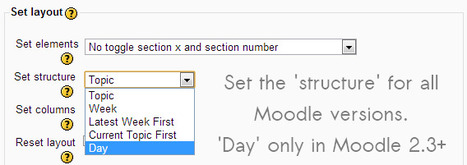
An interchangeable topic or week (day for 2.3.1+) based format that solves the issue of the 'Scroll of Death' when a course has many topics / weeks. All sections except zero have a toggle that displays that section. One or more sections can be displayed at any given time. Toggles are persistent on a per browser session per course basis but can be made to persist longer by a small code change. Full installation instructions, code adaptions and credits are included in the 'Readme.md' file.
If you have a course with more than fifty two sections then currently the toggle persistence will not work for the fifty third section and above. Then you need to upgrade to the Moodle 2.5 version+. Via Miloš Bajčetić
Scoop.it!

Si nos preguntamos qué tipo de herramienta es Edmodo, seguramente la primera respuesta que nos surge es la siguiente: una plataforma educativa. Comenzaremos comparándola con Moodle, puesto que es, probablemente, la plataforma educativa más utilizada e interesante del momento. Compartimos aquí el análisis. Via Net-Learning, juandoming 
António Leça Domingues's curator insight,
October 2, 2016 5:26 PM
Comparativo entre duas plataformas de aprendizagem online.

claudia.rizo2001@gmail.com's curator insight,
January 5, 2025 11:59 AM
Este enlace puede servir de gran ayuda a los docentes. En él, se encuentran las diferencias existentes entre dos plataformas que se utilizan cada día más a menudo entre el profesorado y los estudiantes. En ellas, se puede intercambiar material didáctico de una manera más eficiente y efectiva, acelerándose el proceso de enseñanza-aprendizaje. Además, estas herramientas suelen motivar mucho al alumnado porque, gracias a ellas, trabajan con dispositivos digitales.
Scoop.it!

Suite à notre piqûre de rappel concernant les techniques magiques du #Hashtag sur Twitter, je me suis rendu que nous n’avions jamais évoqué le sujet des Twitter cards sur ce blog ! Une faute professionnelle que j’assume totalement et que j’aimerais rattraper aujourd’hui. Pas plus tard qu’hier j’ai encore vu une question sur un forum concernant les boutons qui pouvaient s’afficher sur les tweets. Via Frédéric DEBAILLEUL
Scoop.it!

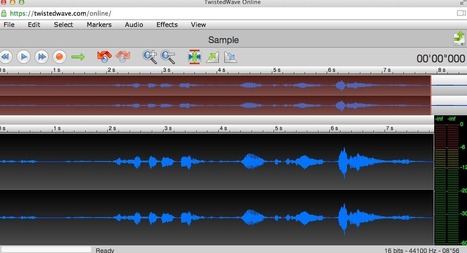
SoundBible es un directorio de sonidos y efectos sonoros bajo diferentes licencias libres para descargar y usar en cualquier proyecto. Cuenta con un buscador y permite escuchar los audios antes de descargarlos en cualquiera de los formatos disponibles, MP3 o WAV Via Angel Acción Lamas, Gumersindo Fernández, Ana Lara
Scoop.it!

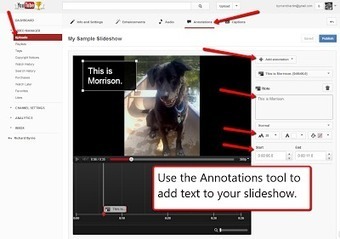
YouTube is a popular website for uploading your own videos for the whole world to see. Many people are familiar with YouTube, so if you upload a video it is likely many people will see it. But of course, we don't want people who speak your... Via Patty Ball
Scoop.it!
From
list
Listly List - Tools for flipping your class - Been for Education, Ask3, Educreations - Teach what you know. Learn what you don't., ScreenChomp, Make'em Curious With Your Video Lessons, Home | Swivl, Home, Movenote, Home " Edynco, YuJa | Social learning and video collaboration made simple, Curriculet, Zaption - Interact With Video, EDpuzzle, Playback - Screencast Creator for Dropbox, and Alchemy Smartbinder | Create, deliver and share great-looking digital lesson plans Via Marta Florkiewicz-Borkowska
Scoop.it!

Informationstechnologie in der Schule #Didacta http://t.co/l2T6EeHMcB @aixconcept #Scook @MobilingaGmbH #XPLAIN @CoboCards Via Klaus Meschede
Scoop.it!
Dave Wood's curator insight,
April 18, 2014 3:41 PM
Some really useful tips about structuring information and the impactful use of visuals. I haven't been a huge fan of Prezi because they can be just too "busy" and disorientating when they incorporate too much spin as they move from image to image. These tips give good advice about how to keep it simple for best effect. I've used Prezi as a way of presenting the notes from a visual group coaching session back to the participants.
Tanja Elbaz's curator insight,
November 27, 2023 11:01 AM
Scoop.it!

Dictation is a free online speech recognition software powered by Google Chrome. You can use Dictation to write emails and documents in the browser with your voice
"Speech Recognition in the Browser With Dictation, you can use the magic of speech recognition to write emails, narrate essays and long documents in the browser without touching the keyboard. To get started, just connect the microphone to your computer and click the Start Dictation button.
Jim Lerman's insight:
This app works very well. It's not quite up to the standards of Dragon Naturally Speaking, but then again, it is free. Via Jim Lerman, Lavinia Ionica, Shona Whyte 
Luz Marina Martínez Peña's curator insight,
March 31, 2014 5:27 PM
Esta herramienta es muy útil, cuando se está escribiendo un texto científico, pues nos permite ir desarrollando una idea de manera muy rápida, sin preocuparnos por tener que escribir. 
Thierry Ruissy's curator insight,
April 11, 2014 10:17 AM
Marche correctement et permet de dialoguer en français |











"while Moodle is continuing to evolve, it is no longer as dynamic as it used to be" @moodleman waves goodbye