


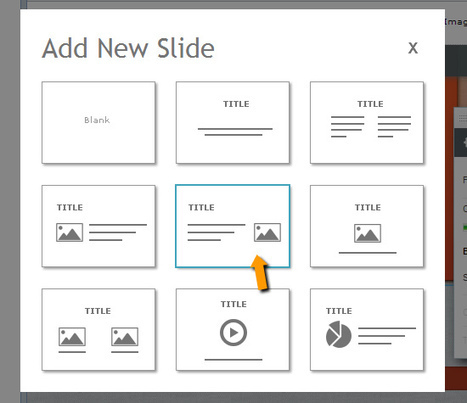
Creating Presentations does not have to be hard or frustrating. In five minutes you can create a professional engaging presentation that you can publish and share online and view on any device web or mobile.
Via Luísa Lima

 Your new post is loading...
 Scoop.it! Creating Presentations does not have to be hard or frustrating. In five minutes you can create a professional engaging presentation that you can publish and share online and view on any device web or mobile. Via Luísa Lima No comment yet.
Sign up to comment
Scoop.it!

Create your Free player with the AudioPal editor. Use text-to-speech, mic, or upload mp3! Easily embed the flash player in any html site. Make your website interactive with an mp3 player! Via Tom Perran
Scoop.it!
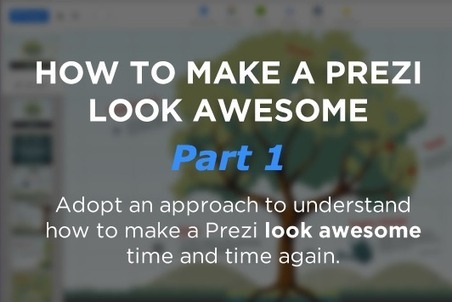
The folks at gtcreate know how to make a Prezi look awesome and blow audiences away becau... Via Baiba Svenca 
Baiba Svenca's curator insight,
June 7, 2014 12:33 PM
A must-read article for Prezi beginners. It is a step-by-step guide to creating a perfect prezi. Don't forget to read Part 2 after you've done Part 1. 
BI Media Specialists's curator insight,
June 16, 2014 11:14 PM
I love teaching Prezi to my students! I can't wait to share these tips with them to create wonderful culminating projects!
Scoop.it!

From
ictpost

The term is audacious: Web 2.0. It assumes a certain interpretation of Web history, including enough progress in certain directions to trigger a succession. What forms of the Web have developed and become accepted enough that we can conceive of a transition to new ones? Many people—including, or perhaps especially, supporters—critique the “Web 2.0” moniker… Via Dr. Susan Bainbridge, Katharina Kulle
Scoop.it!

Classcraft is a free online educational role-playing game that teachers and students play together in the classroom. Acting as a gamification layer around any existing curriculum, the game transforms the way a class is experienced, throughout the school year. Explore the different sections below to get a better understand of how Classcraft works. Via Todoele
Scoop.it!
There have been some very interesting discussions about potential changes ongoing on the Moodle.org forums by some Moodle HQ staff Here are some you may want to go look at and take part in! Via Miloš Bajčetić
Scoop.it!

eduCanon permet de créer directement en ligne des quizz à partir de vidéo en y intégrant des questions à choix multiples directement pendant la lecture. Cet outil web fonctionne avec des vidéos publiées sur YouTube et Vimeo. Via Annick Gesnel 
HG Académie de Rennes's curator insight, June 6, 2014 1:53 AM
Le service est gratuit et en ligne. Il permet d'associer des informations textuelles, des questions sous la forme de quizz à une vidéo en provenance de Youtube ou de Viméo. La vidéo est automatiquement mise en pause le temps que l'élève lise ou réponde aux questions. Une solution simple et efficace pour mettre à distance des exercices en lignes comme dans le cadre d'une classe inversée par exemple.
Scoop.it!

From
evernote
Evernote ist ein großartiges Werkzeug für Lehrer und Schüler, um sich Notizen zu machen, Lehrpläne zu organisieren, gemeinsam an Projekten zu arbeiten, Bilder von Tafeln und Whiteboards zu machen und vieles mehr. Via Guido Knaus
Scoop.it!
A lot of talk about the future of the internet sounds almost hippie-spiritual or faux-philosophical. The Internet is not the same as the world-wide-web. But the Internet-of-Things and the Semantic Web - all parts of Web 3.0, are beginning to be very important to our learning environments. Here is a summary of key features, ranging from access, creativity, and information architecture.
Via Ana Cristina Pratas, juandoming, Edumorfosis, Edith Irizarry, Timo Ilomäki, Christiane Moisés, Javier Sánchez Bolado 
Laybet Colmenares Zamora's curator insight,
June 3, 2014 3:50 PM
Esta perspectiva general nos puede ayudar a mejorar las acciones para adaptarnos guardando
Scoop.it!

E-Learning Heroes: Step-by-step tutorials for building better courses, fast answers to your e-learning questions, free downloads for your e-learning projects.
Scoop.it!

How’s this for an approach to learning about how to implement flipped teaching and learning: look to cases where the use of these techniques have been asse Via Luísa Lima, Juergen Wagner, Elke Höfler
Scoop.it!
How’s this for an approach to learning about how to implement flipped teaching and learning: look to cases where the use of these techniques have been asse Via Luísa Lima |
Scoop.it!
This video is a companion to the article of a similar title on EmergingEdTech [URL: http://www.emergingedtech.com/2014/06/create-powerful-lessons-in-minutes-... (3 Minute Teaching w/Tech Tip Video – Create Powerful Lessons in Minutes with Blendspace... Via AgileBelma, Javier Sánchez Bolado
Scoop.it!

Haiku Deck themes keep your decks looking stylish and cohesive from beginning to end, with a professionally designed combination of font, image filter, and color palette for your charts and graphs. Via Baiba Svenca
Baiba Svenca's curator insight,
June 7, 2014 12:48 PM
Check out six new free themes by Haiku Deck, available in both web app and iPad app. 
Marja Oilinki's curator insight,
June 8, 2014 4:37 AM
Haiku Deck on helppo tapa luoda visuaalisesti näyttäviä dioja. Kuvahakuominaisuus on mainio. Haiku on helppo käyttää, rajoituksena vain se, että formaatti on melko joustamaton. Muistiinpanodiojen tekemiseen en tätä käyttäisi, mutta virikedioihin, ideoiden esittelyyn, mihin tahansa, missä tärkeintä on luoda tunnelmaa.
Scoop.it!
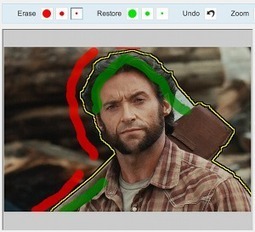
Free online background remover to remove the background from any image or photo. The fastest way to remove backgrounds online. Via Gust MEES, Amélie Silvert
Scoop.it!

The latest release of Moodle took 6 months, 104 developers and resolved over 500 issues. It’s been interesting to hear about first the implementation of automated testing and now visualize the growth since 2.5. If you’re interested in Moodle 2.7 Development by the Numbers check out Michael de Raadt’s post here or the image below.
Via Miloš Bajčetić, Rui Guimarães Lima
Scoop.it!
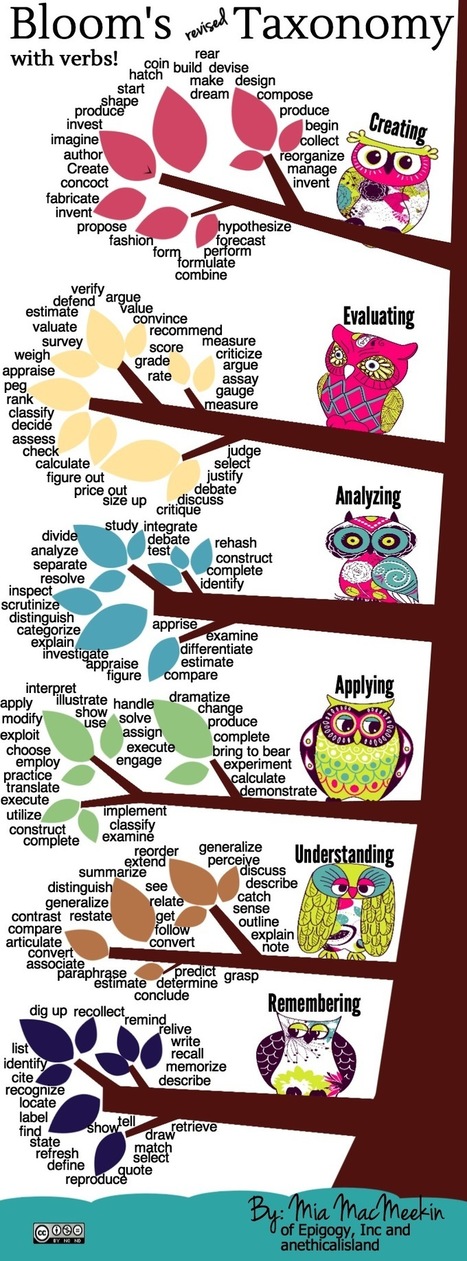
Need some extra verbs? Here you go! ~Mia Via Marta Torán, Rui Guimarães Lima, Ramon Aragon, Gumersindo Fernández, Marylin Alvarez 
Jim Lerman's curator insight,
August 20, 2016 12:55 PM
I'm on a personal campaign to add 2 levels above Creating to Bloom's Cognitive Taxonomy (don't forget he wrote about 3 domains of learning...Cognitive, Affective, and Psychomotor). I believe our field tends to overemphasize the Cognitive domain at the expense of the other 2, and to the detriment of learners.
Anyhow, the 2 levels above Creating that I'm concerned about are: Reflecting and Sharing. My reasoning goes like this:
Reflecting - Once we go through all 6 levels (and they are not hierarchical, a learning sequence can start or end with any of them), if we want students to enhance their metacognition, it is important for us to build in reflective experiences. Such experiences enhance students' abilities to be more self-aware of how they learn and the strategies that do or don't work well for them. Sharing - We teachers often remark that our knowledge of a particular topic solidifies when we teach it to someone else...the act of sharing brings out our awareness of nuances, relationships, perceptions, modes of expression/communication, and our interpersonal skills of working with others; all things that are very important to people's success in our current era. Our students deserve to become proficient in sharing effectively.
My 2 cents. 
Steve Whitmore's curator insight,
August 22, 2016 8:43 AM
Could these verbs be worked into Socio-Emotional Learning Goals and Objectives?
Scoop.it!
Screencast of Moodle learning activities designed to let our participants "learn social" and experience "social presence" Via Miloš Bajčetić
Scoop.it!

From
www
Give a voice to your audience with live polls and questions for Prezi. Set up your account in less than 1 minute and easily engage your audience. Via Baiba Svenca 
Ed Bremner's curator insight,
June 5, 2014 4:57 AM
Seems like Prezi just gets better and better. Adding the ability to allow chat between people, whilst they edit..... you can now give them polls and questions as well. Just so cool. Can't wait for the opportunity to try this out. eib 
Rosemary Tyrrell, Ed.D.'s curator insight,
June 5, 2014 1:34 PM
Great little addition for Prezi users to create polls right within Prezi. 
Tanja Gvozdeva's curator insight,
October 25, 2014 2:15 PM
Sli.do is a great assistant when you present with Prezi. It lets you have instant audience interaction via real-time polls. Basic account is free but your data are public and they are retained for 1 week, however, it is a useful application for classroom activities. Sli.do also works with Google Glass and Eventbrite.
Scoop.it!

If you're looking for an easier way to turn the content in your head into a beautiful presentation, Slidebean has launched to give users presentation tools.. Via Baiba Svenca, Amélie Silvert
Baiba Svenca's curator insight,
June 4, 2014 1:24 PM
This is a great Slidebean review that will help you understand how the tool works and whether you want to try it. You have nothing to lose - Slidebean is free! Watch the video tutorial and learn how to work with the tool. Link to Slidebean
BI Media Specialists's curator insight,
June 16, 2014 11:16 PM
I am always on the lookout for new programs to teach students. This one looks like it could be next on my list. Thanks!!
Scoop.it!

Microsoft Office remains the gold standard in office applications. Sure, Office alternatives exist, but Microsoft's file formats dominate. People with access to Office tend to have an easier time than those who lack it, because while alternatives like LibreOffice can export to .doc or .xls, the formatting isn't 100% compatible. Still, many people flinch at buying Office because it's… Via Alfredo Calderón
Scoop.it!

This is something a learner wants to know when she is practicing communication skills. She doesn’t want to wait for a face-to-face workshop to get feedback on her progress. And she doesn’t have to, because there is so much you can do online! As a designer of a blended skills training you need tools to facilitate it. An easy and secure upload of video is the most important condition. In Moodle you can use PoodLL. Let’s see how this works. Via Miloš Bajčetić |






