 Your new post is loading...

|
Rescooped by
Juergen Wagner
from Moodle Best LMS
July 8, 2014 12:56 AM
|
In the olden days of paper, I used to have a (blue) mark book into which I would add my classes and their grades for different activities during the school year. When I first started teaching, we had to hand write the students' names but as the years progressed, we got printouts of class lists, although sadly they never quite matched up to the rows in the mark book mixed One useful feature was that I could make notes about individuals in a column against their name. This could be anything from statments about their level of achievement or educational difficulties to reminders to me for Parents' Evenings (quiet/long brown hair/glasses etc..)
Moodle has a class notes feature in Notes, and I was wondering how many teachers make use of it and if so, what you think of it. Do you use it in an innovative way or do you see it as somewhat limiting? Does it display well?
Any teacher in a course can make notes on one or more students from Navigation>Participants>Notes (as long as admin has enabled it in Advanced Features) You can then select either one student to make a note about or add the same note to several students - useful if you have to add a common attainment target levels, for example.
As a teacher, you can add three types of notes: course notes are seen only in that course and can be seen by teachers who share the course with you, so if you share a class with another teacher that might have its benefits. Prof Plum can see his own course notes and those of colleague Ms Wilson here:
Via Miloš Bajčetić
After many requests for a drawing feature, we’re happy to announce that Mural.ly now allows you to sketch your ideas out on sticky notes (and we’re pretty excited about it).
Via Baiba Svenca
|
|
Rescooped by
Juergen Wagner
from les TICE
July 5, 2014 2:51 PM
|
Les Outils du Web 2.0 est un journal pour partager mes découvertes de l'univers du web 2.0
C'est aussi une sélection de mes meilleurs sujets publiés sur les annuaires:
du réseau Allweb2.com
Outilsveille.com
Outilscollaboratifs.com
Outilstice.com
Outilswp.com
Via Carmen Vera
|
|
Rescooped by
Juergen Wagner
from Teaching Scoops
July 5, 2014 2:47 PM
|
Screencasting is getting a lot of attention as a tool for teachers when using the flipped classroom model. Certainly, screencasts are a great tool for teachers to create presentations for their students to view at home. But I think that screencasting is most powerful when it is used as a student creation tool. Screencasts take a typical presentation a step further by requiring higher order thinking skills; not only do students create the presentation, but they also have to explain their thinking. Through trial and error, I’ve discovered several tips that can help streamline the process and ensure that students get the most from this learning experience.
Via Peggy George, Frans Paffen
|
|
Rescooped by
Juergen Wagner
from Technology to Teach
July 4, 2014 8:39 AM
|
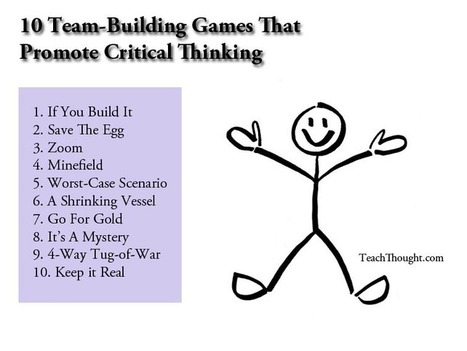
10 Team-Building Games That Promote Collaborative Critical Thinking
Via Amy Burns
|
|
Rescooped by
Juergen Wagner
from Content Curation World
July 4, 2014 8:38 AM
|
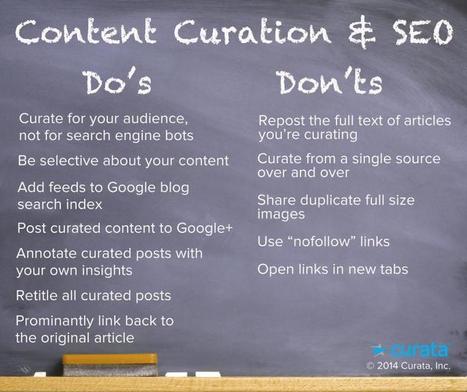
Google has introduced its new algorithm, Panda 4.0, in an effort to reward high quality, original content in the search engine's rankings. But, this doesn't mean marketers should stop curating
Via Robin Good
|
|
Rescooped by
Juergen Wagner
from Medien – Unterrichtsideen
July 3, 2014 5:54 AM
|
Endlich wieder kostenlose Postkarten versenden
Via Guido Knaus
|
|
Rescooped by
Juergen Wagner
from Web 2.0 for juandoming
July 3, 2014 5:39 AM
|
Esta es una lista de Herramientas 2.0 que se pueden utilizar sin necesidad de realizar registro. Considero que son muy adecuadas para el trabajo con los alumnos más pequeños además de ser fantásticas para comenzar a desarrollar en el aula la Competencia Digital. En la lista he puesto el nombre de la herramienta (deberéis buscarla en Internet ya que no he añadido enlaces). También he puesto información sobre "Para qué sirve" y "Qué se obtiene con ella". En esta web, en la sección Actividades Musicales 2.0 encontraréis ejemplos de algunas de las actividades que he realizado en clase con algunas de estas herramientas.
Via Gumersindo Fernández, Salva Moreno, juandoming
|
|
Rescooped by
Juergen Wagner
from mOOdle_ation[s]
July 2, 2014 4:36 AM
|
|
|
Rescooped by
Juergen Wagner
from Tools web 2.0
July 1, 2014 12:21 PM
|
|
|
|
Scooped by
Juergen Wagner
July 8, 2014 9:30 AM
|
Peggo is a Digital Video Recorder (DVR) that records MP3s of your favorite online videos.
Peggo's packed with great features like integrated search, automatic silence removal, audio normalization, subtrack offsets, and artist and title tags.
Peggo automatically removes unwanted silence from the beginning and end of videos so you get a beautiful MP3 with just the good stuff. In addition, Peggo also normalizes the volume of every recording to the same, comfortable level so you never have to reach for the volume dial between MP3s again.
|
|
Rescooped by
Juergen Wagner
from HandyTools For EFL Teachers
July 7, 2014 11:10 AM
|
|
|
Rescooped by
Juergen Wagner
from @Tecnoedumx
July 5, 2014 2:49 PM
|
To counter common misconceptions and bring clarity to discussions about “Flipped Learning,” the governing board and key leaders of the Flipped Learning Network (FLN) announced a formal definition of the term. They also released the Four Pillars of F-L-I-P™ and a checklist of eleven indicators that educators must incorporate into their practice.
Via Nik Peachey, Wilmer Ramírez
|
|
Rescooped by
Juergen Wagner
from Teach and tech
July 4, 2014 4:48 PM
|
If at any time you decide you don’t want to keep getting the blog posts, Unsubscribing is a snap (and you keep the eBook, of course)!
Via Luísa Lima
Presentación desarrollada para el marco del evento de Virtual Educa Medellín 2013, revisada y ajustada en Octubre para el marco del evento de Bogotá es TIC organizado por la alcaldía de Bogotá.
Via Juan Jesús Baño Egea
FlatIcons.net is a free flat icon maker, Create your own royalty free flat icons for your web projects! Sell them, give them away and use them! No limits. Just choose an icon shape ( Over 2,500 ), click it and customize!
Via Bhushan Thapliyal
|
|
Rescooped by
Juergen Wagner
from My favourite ESL Resources
July 3, 2014 5:51 AM
|
|
|
Rescooped by
Juergen Wagner
from TIC & Educación
July 3, 2014 5:38 AM
|
|
|
Rescooped by
Juergen Wagner
from Technology Advances
July 2, 2014 11:55 AM
|
|
|
Rescooped by
Juergen Wagner
from El Aula Virtual
July 2, 2014 1:16 AM
|
Some people wonder what they may need to do in order to access interactive Moodle content on a mobile device.
Via Fernando Seijo
|























Good advice/ideas!
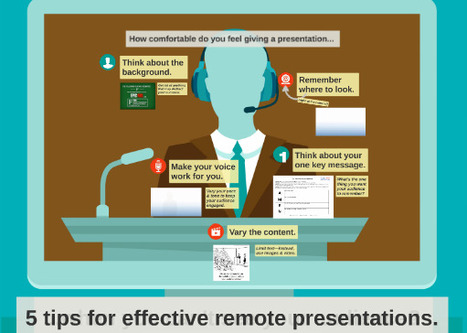
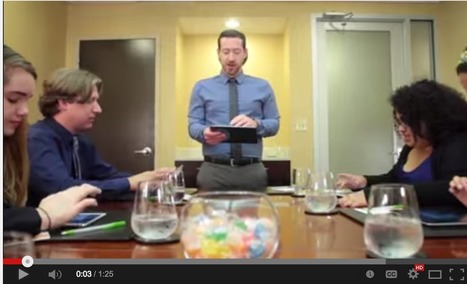
In today's connected world we're more and more often brought to communicate "virtually", a few tips how to make it a bit more engaging
This is a solution to a common presentation problem.