


Learn what features developers and users are raving about in Moodle 2.8.

 Your new post is loading...
 Scoop.it! Learn what features developers and users are raving about in Moodle 2.8. No comment yet.
Sign up to comment
Scoop.it!

Willem Kuypers's curator insight,
February 24, 2015 3:30 PM
Trois outils intéressant pour créer dans petites animation-vidéos.
Scoop.it!
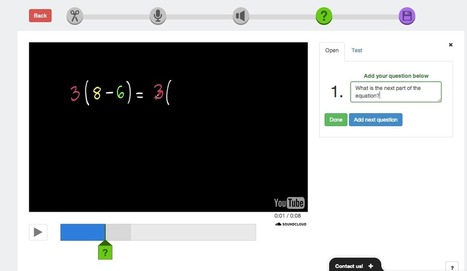
Free Technology for Teachers: How to Create & Distribute Flipped Lessons Through EDPuzzle | @scoopit http://sco.lt/... vía @rmbyrne Via Evelyn Izquierdo, Yuly Asencion, Javier Sánchez Bolado 
ITTC_TEFL's curator insight,
February 19, 2015 5:21 AM
Interested in the #flipped #ELT classroom? This is a great tool to add commentary and questions to youtube videos.
Scoop.it!

Time for the next tech-isode in my new “Tech It Up Tuesday” series in which I will share an edtech tool, app, site or other resource that can be utilized in the educational setting.
Regardless if it’s print or digital format, many students and adults alike love reading comics. But did you know this form of recreational reading can also be a powerful teaching resource? Yep, it’s true! I don’t know about you, but there’s nothing better than captivating another’s attention using comic strip style visuals and/or humor as the vehicle. Well, the survey says….. A super cool tool that provides students with the opportunity to do just that is Bitstrips for Schools. Most importantly, this web-based resource also enables them to demonstrate knowledge and creativity about a particular topic, regardless of artistic ability, using a fun setup.
Via Jamie Forshey
Scoop.it!

„Sprich nicht frei, das macht einen so unruhigen Eindruck. Am besten ist es: Du liest deine Rede ab. Das ist sicher, zuverlässig, auch freut es jedermann, wenn der lesende Redner nach dem Auftakt der ersten Sätze misstrauisch hochblickt, ob auch noch alle da sind.“ Via Guido Knaus
Scoop.it!
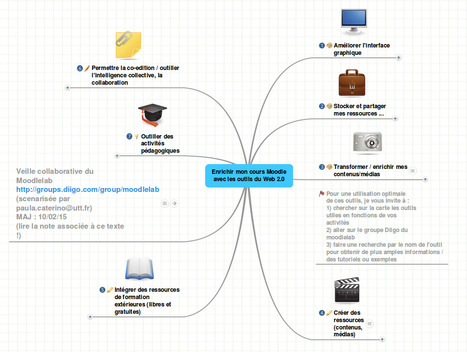
Cette carte mentale est Issue des travaux de veille et d'indexation du Moodlelab (http://groups.diigo.com/group/moodlelab) 
Marco Bertolini's curator insight,
February 17, 2015 5:56 AM
Une foule d'outils indispensables pour enrichir vos cours en ligne sur Moodle !
Scoop.it!
Scoop.it!
Scoop.it!

Les diaporamas sont très souvent utilisés dans nos enseignements afin d’être les supports visuels de nos cours. Support obligatoire des conférences, animations institutionnelles, le diaporama possède à l’évidence des qualités pour diffuser l’information. C’est un exercice intéressant de communication qui permet de synthétiser les apports de contenus, d’énumérer plus facilement des points importants, de structurer un exposé. Via michel verstrepen, Juergen Wagner 
HG Académie de Rennes's curator insight, February 17, 2015 2:58 AM
Alain Michel : "Cet article très complet nous explique d'abord comment bien "penser" ses présentations sur Prezi en mettant l'accent sur l'aspect primordial de la conception d'un vrai scénario avant de se lancer dans la création proprement dite. En quelques mots, le fait de "raconter une histoire" (storytelling) permettra de susciter l'intérêt, d'où une implication plus grande des apprenants. La seconde partie de cet article présente l'interface et les fonctions essentielles de Prezi pour permettre aux nouveaux utilisateurs débuter. Cet article est également téléchargeable au format PDF." 
Bernard DIVIALLE's curator insight,
February 21, 2015 10:18 AM
Utilisation pédagogique du storytelling : l’émotion comme vecteur d’acquisition des connaissances 
Christelle Quesne's curator insight,
August 10, 2015 6:13 AM
Cet article très complet nous explique d'abord comment bien "penser" ses présentations sur Prezi en mettant l'accent sur l'aspect primordial de la conception d'un vrai scénario avant de se lancer dans la création proprement dite. En quelques mots, le fait de "raconter une histoire" (storytelling) permettra de susciter l'intérêt, d'où une implication plus grande des apprenants. La seconde partie de cet article présente l'interface et les fonctions essentielles de Prezi pour permettre aux nouveaux utilisateurs de débuter. Cet article est également téléchargeable au format PDF.
Scoop.it!

Tricks You Need to Know About Moodle Email Plugin
Scoop.it!

Here’s a quick video by Brian Tittl which illustrates how to add and link to a file through any text area in Moodle (in a web page, label, or course description). An easy way to add new files to any where you can add text in Moodle (if you don’t just want to add it as a resource in a Topic). Via Miloš Bajčetić
Scoop.it!

"For generations, a picture was worth a thousand words. Now, in the social network age, a picture is worth a few hundred likes, some +1's, a handful of retweets, stumbles, tumbles, pins, and shares of all sorts. Oh, and those original thousand words ..." Via Leona Ungerer |
Scoop.it!

AudioPal is a free service that anyone can use to create short audio messages to embed into blog posts. AudioPal offers three way to create messages. You can record using the microphone connected to your computer. You can record by calling AudioPal's phone system. Or you can create a message by using AudioPal's text-to-speech function. In the video that is embedded below I demonstrate how to use AudioPal's text-to-speech function and how to embed your messages into your blog. Via Gumersindo Fernández
Scoop.it!

Qu’apportent ces outils à l’enseignant de mathématiques qui souhaite mieux en compte dans sa pédagogie la diversité des raisonnements et les besoins des élèves (...) Via Elise Chomienne 
Elise Chomienne's curator insight,
February 19, 2015 10:00 AM
Témoignage d'un professeur sur ses pratiques pédagogiques avec une tablette
Scoop.it!

To flip your class, there are certain technology tools teachers need to master. These fit into the following four categories Video Creation Tools: There are a variety of Video Creation ... Via Peggy George 
Becky Roehrs's curator insight,
February 18, 2015 7:30 PM
I like the list of Windows/Mac and apps for creating videos and adding interactivity to videos 
mediafrance's curator insight,
February 21, 2015 11:03 AM
Infos über alle Tools, die es zur Realisierung eines Flipped Classrooms braucht!
Scoop.it!
EDpuzzle is a neat tool that allows you to add your voice and text questions to educational videos. On EDpuzzle you can search for educational videos and or upload your own videos to use as the basis of your lesson. EDpuzzle has an online classroom component that you can use to assign videos to students and track their progress through your video lessons. In the video embedded below I demonstrate how to use the main features of EDPuzzle. Via Gumersindo Fernández
Scoop.it!

Make a video online with wideo! Create professional marketing videos. Try out our video templates. Create explainer videos. Via Ana Cristina Pratas 
Gust MEES's curator insight,
February 17, 2015 1:43 AM
Make a video online with wideo! Create professional marketing videos. Try out our video templates. Create explainer videos. Learn more: - http://www.scoop.it/t/21st-century-tools-for-teaching-people-and-learners/?tag=animation 
Alison Rostetter's curator insight,
February 21, 2015 12:54 PM
I'm always on the lookout for a good, easy-to-use video/animation maker as 'home-made' videos often inject some life into grammar and, when you learn something with pictures, I think it makes the learning more memorable.
Scoop.it!

Ihr PC wird immer langsamer? Mit diesen Tools erkennen und beheben Sie alle Fehler und optimieren das System. Via Elke Höfler
Scoop.it!

Salut tout le monde, c'es ulyssethevip pour une nouvelle astuce ! Via Elena Pérez |






