Plugins: Questionnaire: by Mike Churchward. Custom Survey Creation http://t.co/gA362nValG
Your new post is loading...
From
moodle
Plugins: Questionnaire: by Mike Churchward. Custom Survey Creation http://t.co/gA362nValG No comment yet.
Sign up to comment
Set up a menu on a Moodle site: http://www.integrating-technology.org
If you are a college student, there’s a high chance that you bring at least one of these three devices to class with you: a laptop, a smartphone or a tablet. It doesn’t matter which type of mobile device you are accessing online materials with; it’s what you are using it for that is contributing to the chokehold of available bandwidth, particularly on campus where understandably students make up the largest population. But it’s not really their fault; we are all suckers for bandwidth-hungry materials such as videos, music, high-resolution images, movie files and live streams.
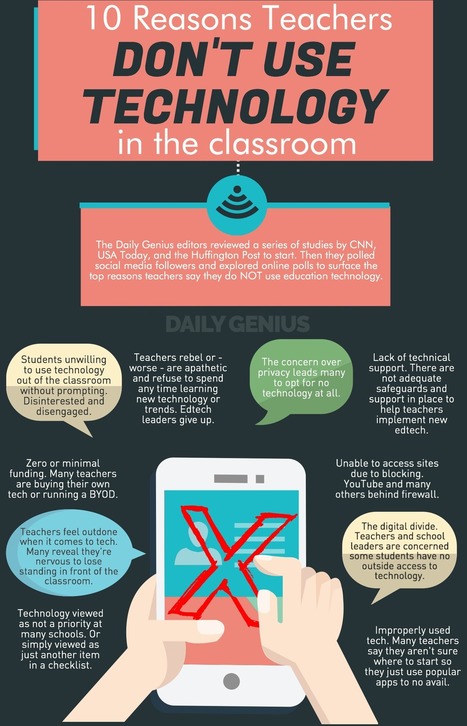
There are plenty of reasons teachers do not use education technology. It’s expensive. It’s hard to always find a reason to implement edtech into a particular lesson. That’s all true and valid, really. But what are the other big reasons that teachers don’t use technology in the classroom? We did a little digging through surveys, … Via juandoming
I created this video with the YouTube Video Editor (http://www.youtube.com/editor)
Don’t do this; don’t do that! Yes, there are a number of “don’ts” connected with good presentations. If you keep these “don’ts” in mind, beyond any doubt your … Via Baiba Svenca, Wilmer Ramírez
María Dolores Díaz Noguera's curator insight,
June 28, 2015 1:01 PM
Diseñando vídeos...Ofslides — Convert PPT to Video Presentation | @scoopit via @baibbb http://sco.lt/...
Nick Urban's curator insight,
July 17, 2015 3:40 PM
For teachers interested in transforming their social studies classroom from the traditional mode to a more digitally based curriculum will find this fascinating. The ability to convert old PowerPoint presentations into videos that can be directly uploaded to YouTube are a tremendous offering. Creating and crafting your own podcast channel via YouTube is a terrific way of allowing your lessons to go home with the class and allows you more time in class to spend engaging students in the content!
The school year is coming to a close, and preparation for next school year is about to begin. If you are planning on handing out a paper syllabus to your stu... Via Dr. Tom D'Amico (@TDOttawa)
A tutorial on how what Dropbox is and how to get started using it to share your files and sync your devices. Via R.Conrath, Ed.D.
From
irights
In den letzten Jahren wächst ein Trend: „Open Educational Resources“, kurz OER, sind Lehr- und Lernmaterialien, die kostenlos und unter einer freien Lizenz veröffentlicht werden. Man findet sie vielerorts. Eine kommentierte Auswahl von 15 empfehlenswerten Angeboten zum Einstieg hat Jöran Muuß-Merholz zusammengestellt. |
Tips and Resources for Using Free Video Conferencing Tools in Your Classroom Video conferencing and chat tools can be a wonderful instructional resource, as most educators know. You can bring the outside world and guests into your classroom, enable a Via Nik Peachey
Apollo B. Gabazira's curator insight,
June 18, 2015 12:01 AM
Certainly the new paradigm to doing bisiness - whether in the claassroon or company board room ..... We have to get used to this
Yves Carmeille "Libre passeur"'s curator insight,
March 18, 2016 4:12 AM
Some useful tips and links here.
"While video usage is growing in the classroom, it's far from pervasive, according to a new survey from Kaltura ..." Via Leona Ungerer
Fifty Ways to Teach with Technology: Tips for ESL/EFL Teachers - Kindle edition by Paul Raine. Download it once and read it on your Kindle device, PC, phones or tablets. Use features like bookmarks, note taking and highlighting while reading Fifty Ways to Teach with Technology: Tips for ESL/EFL Teachers. Via Yuly Asencion
Presentation by Kristina Hoeppner (Catalyst IT) at the Europortfolio webinar on 3 June 2015 about the open source software Mahara and how people can ... Via Sigi Jakob
Tim Hopper's curator insight,
June 11, 2015 3:02 AM
Good to view and consider in relation to UVic eP project.
“ Dr. Christian Spannagel von der PH Heidelberg stellt in seinem Referat die Methode des `Inverted oder Flipped Classrooms` vor. Die Vorlesung oder Unterrichts...” Via Guido Knaus
There are so many ways to use technology in the classroom. This video shows not only how to use technology in the classroom but 2-step innovation secret. Via Deb Gardner, Jamie Forshey
After years of leading workshops on blogging I have found that many people benefit from having a glossary of terms that they can refer to. Likewise, if you’re blogging with your students it is helpful if there is a common understanding of the terminology used in your blogging activities. Embedded below is the glossary of terms of that I created a couple of years ago for participants in my workshops. You can also click here to view and download the document. Via Gumersindo Fernández
Safely and securely backchannel your classroom discussions. We provide educators full control of chat activities and provide students with a tool that makes learning engaging. Via Nik Peachey, Yuly Asencion
Kathy Lynch's curator insight,
July 31, 2015 8:54 AM
Thx Nik Peachey Check out this formative assessment system for BYOD. Compare it to Socrative and Kahoot
Carmen Chavez, Ph.D.'s curator insight,
July 31, 2015 10:37 AM
Nice backchannel tool designed specifically for education.
Craig Van Ham's curator insight,
March 24, 2016 9:09 PM
Nice backchannel tool designed specifically for education.
Juergen Wagner's insight:
http://de.padlet.com/wagjuer/webinars Webinar calender (DE, EN, FR, ES)
From
mashable
Google Chrome is an incredibly power-hungry browser. A new update may fix that. Via Dr. Tom D'Amico (@TDOttawa) |
Your new post is loading...