Moodle and Web 2.0
176.9K views | +0 today
Moodle and Web 2.0
The use of ITC in the foreign language classroom
Curated by Juergen Wagner
Your new post is loading...
Rescooped by Juergen Wagner from EDUCACIÓN 3.0 - EDUCATION 3.0
September 25, 2015 8:19 AM
Scoop.it!

Zaption - Interact & Learn with Video Lessons

Zaption - Interact & Learn with Video Lessons | Moodle and Web 2.0 | Scoop.it
Zaption provides free interactive video tools and ready-to-use video lessons to engage learners. Our video platform is perfect for K-12, higher ed & training.

Via Javier Sánchez Bolado
No comment yet.
Rescooped by Juergen Wagner from Learning & Technology News
September 25, 2015 8:18 AM
Scoop.it!

20 + Things you can do with QR codes in your school

20 + Things you can do with QR codes in your school | Moodle and Web 2.0 | Scoop.it

QR codes are possibly one of the most underused useful features of new technology. Perhaps one of the main reasons for this is that many people see them as a form of barcode and wrongly believe that they can only be produced by companies, but the reality is anyone can produce a QR code within seconds.


Via Nik Peachey
Nik Peachey's curator insight, September 25, 2015 5:02 AM

My latest blog post on using QR codes.

Edina kurdi's curator insight, September 25, 2015 11:12 AM
Just recently created my first qr code, it was fun, let's see how it will work in class...
Rescooped by Juergen Wagner from ESL, EFL interesting stuff. ESL Pêle Mêle.
September 24, 2015 6:00 AM
Scoop.it!

Some Excellent Web Tools to Give Students A Voice in Class

Some Excellent Web Tools to Give Students A Voice in Class | Moodle and Web 2.0 | Scoop.it
September 24, 2015
At the core of progressive pedagogy is the empowerment of students by giving them a voice in class and making them part of the decision making. Unlike traditional instruction where...

Via Javier Sánchez Bolado, Juergen Wagner, Amélie Silvert
No comment yet.
Rescooped by Juergen Wagner from EDUCACIÓN 3.0 - EDUCATION 3.0
September 24, 2015 3:01 AM
Scoop.it!

Some Excellent Web Tools to Give Students A Voice in Class

Some Excellent Web Tools to Give Students A Voice in Class | Moodle and Web 2.0 | Scoop.it
September 24, 2015
At the core of progressive pedagogy is the empowerment of students by giving them a voice in class and making them part of the decision making. Unlike traditional instruction where...

Via Javier Sánchez Bolado
No comment yet.
Rescooped by Juergen Wagner from Teach and tech
September 24, 2015 2:47 AM
Scoop.it!

Practical Ed Tech Tips - YouTube

Directions, tips, and tricks for using popular ed tech apps and sites.

Via Luísa Lima
No comment yet.
Rescooped by Juergen Wagner from 21st Century Technology Integration
September 23, 2015 10:30 AM
Scoop.it!

Everything about Google Apps for Education - free eBook

Everything about Google Apps for Education - free eBook | Moodle and Web 2.0 | Scoop.it
Our free resource full of tips and tricks for using Google Apps for Education. Including time-saving shortcuts, uncovered hacks, and Chromebook tricks for classrooms.

Via Dr. Tom D'Amico (@TDOttawa) , Jamie Forshey
Rescooped by Juergen Wagner from EFL-ESL, ELT, Education | Language - Learning - Teaching - Educating
September 22, 2015 6:08 PM
Scoop.it!

The 10 commandments for new teachers

The 10 commandments for new teachers | Moodle and Web 2.0 | Scoop.it
From the power of Google to ditching the monotone, secondary teacher Lulu Kuper shares her proven tips on how NQTs can get the best from their students

Via Scoopingaddress
Scoopingaddress's curator insight, September 22, 2015 4:38 PM

And this one... "Freezing a load of home-cooked meals can save time, money and your health."

is here :

>>> http://www.theguardian.com/teacher-network/2015/sep/01/how-to-survive-first-year-practical-guide-new-teachers

... damn' true !

Rescooped by Juergen Wagner from TIC & Educación
September 22, 2015 1:45 AM
Scoop.it!

Top 100 Tools for Learning 2015

This list has been compiled by Jane Hart from the votes of over 2,000 learning professionals worldwide. The results of the 9th Annual Survey.

Via Gumersindo Fernández
No comment yet.
Rescooped by Juergen Wagner from Technology and language learning
September 22, 2015 1:43 AM
Scoop.it!

Lesson plans and activities for exploiting video

Lesson plans and activities for exploiting video | Moodle and Web 2.0 | Scoop.it

There are now more than 40 step-by-step lesson plans as well as chapters on different approaches and paradigms for exploiting video, such as how to use video in blended learning, task based learning (TBL) or content and language integrated learning (CLIL).


Via Nik Peachey, Yuly Asencion
Nik Peachey's curator insight, August 31, 2015 3:07 PM

Download some free samples from my book.

metalshrewd's comment, September 8, 2015 10:49 PM
Its remarkable :)
Jean-Marc Everard's curator insight, September 9, 2015 5:36 AM

La vidéo en formation : l'intérêt continue d'augmenter. Voici quelques idées sur la façon de l'exploiter.

Rescooped by Juergen Wagner from Moodlicious
September 21, 2015 4:21 PM
Scoop.it!

How to Backup Moodle - Everything You Need to Know

How to Backup Moodle - Everything You Need to Know | Moodle and Web 2.0 | Scoop.it
Site backup is something that can allow the administrator of any website to save all the things that are associated with Moodle site. There are chances for you to restore these backup so that it is possible for you to bring the site back when backup can be done. It is highly recommended to do regular backups so that it is possible for reducing the loss of the information even when there is some kind of worst problems with the website and also for speeding up the overall recovery process. It is always good for the individuals to make use of such kind of the backup methods that can help them in keeping all the things related with the website in much safer manner so that there is no need for them to worry when they are having some issues for the website.

Via Patric Lougheed
No comment yet.
Rescooped by Juergen Wagner from E-Learning-Inclusivo (Mashup)
September 20, 2015 10:15 AM
Scoop.it!

Five reasons your school’s NOT transforming | LEARNING & IPADS

Five reasons your school’s NOT transforming | LEARNING & IPADS | Moodle and Web 2.0 | Scoop.it
So, maybe you're on Twitter, your colleagues are on Twitter, you're excited about ideas around new learning and your Principal might mention these themes in staff meetings. So why's no real change happening in your school? All this 21st century learning talk is happening but you're still performing standardised tests, teachers are still teaching from the front…

Via juandoming
No comment yet.
Rescooped by Juergen Wagner from E-Learning-Inclusivo (Mashup)
September 20, 2015 12:58 AM
Scoop.it!

BlogBooker: Blog to PDF converter

BlogBooker: Blog to PDF converter | Moodle and Web 2.0 | Scoop.it

BlogBooker produces a high-quality PDF Blog Book from all your blog's entries and comments. Archives can be generated from any blog running on WordPress, LiveJournal (and derivatives), Tumblr, Twitter, Typepad or Blogger.


You submit an export file provided by your blog system to BlogBooker.Your file is verified and all linked images are fetched. Entries, Comments and Images are assembled into a high-quality PDF.PDF is provided without any restriction and thus can be submitted for printing to third-parties.


Via Edumorfosis, juandoming
No comment yet.
Rescooped by Juergen Wagner from Creative teaching and learning
September 19, 2015 12:07 PM
Scoop.it!

The four biggest mistakes that teachers make when integrating technology | The Edvocate

The four biggest mistakes that teachers make when integrating technology | The Edvocate | Moodle and Web 2.0 | Scoop.it

"The way teachers integrate technology in their classrooms impacts the way it is received and comprehended by students ..."

©


Via Leona Ungerer
No comment yet.
Scooped by Juergen Wagner
September 25, 2015 8:18 AM
Scoop.it!

Learning2gether with the Fall Blog Festival

Learning2gether with the Fall Blog Festival | Moodle and Web 2.0 | Scoop.it
Download mp3: On Monday September 21 Learning2gether joined forces with the Fall Blog Festival organized by Nellie Deutsch. The annual Fall Blog Festival #fallblogfest is a one day blog festival ev...
No comment yet.
Rescooped by Juergen Wagner from Mobile Learning & mobile devices
September 25, 2015 8:16 AM
Scoop.it!

Die hungrige Datenkrake: Das weiß Google über Sie

Die hungrige Datenkrake: Das weiß Google über Sie | Moodle and Web 2.0 | Scoop.it
Sie mailen mit Googlemail, bearbeiten Texte mit Google Docs, orientieren sich mit Google Maps, sehen Videos auf Youtube, surfen mit Chrome, suchen im Web mit Google und analysieren den Traffic Ihrer Website mit Google Analytics? Dann hat Google viele Daten über Sie gesammelt. Wir sagen, wie Sie Ihre Privatsphäre trotzdem schützen.

Via Elke Höfler
No comment yet.
Rescooped by Juergen Wagner from Moodle Best LMS
September 24, 2015 5:59 AM
Scoop.it!

Want to avoid the “Scroll of Death”? Use the Collapsed Topics Plugin now for 2.9

Want to avoid the “Scroll of Death”? Use the Collapsed Topics Plugin now for 2.9 | Moodle and Web 2.0 | Scoop.it
If you’re teaching a course with a good deal of content spread over many weeks, it can be difficult to format your organization of the information without subjecting your students to scrolling… and scrolling… and scrolling (sometimes known as the “Scroll of death”). A super popular course format plugin that addresses this issue is Collapsed Topics by Gareth Barnard. Gareth has recently updated the plugin for Moodle 2.9 and, by all accounts, it is better than ever.

Via Miloš Bajčetić
No comment yet.
Rescooped by Juergen Wagner from tipsmoodle
September 24, 2015 2:56 AM
Scoop.it!

Using Badges in Moodle

Using Badges in Moodle | Moodle and Web 2.0 | Scoop.it
The Harvard Business Review named elearning badges as one of the most innovative trends to watch in 2013, and two years later, lms badge functionalities have only gotten better. A digital Moodle badge is essentially an online recognition of your achievements and skills. If a user has a number of certifications, for example, they can receive and display lms badges online to recognize their achievement or competency. Moodle badges can be given out based on a number of different achievements or criteria. With the ability to track a recipient’s communities of online interaction, a Moodle badge will show the work completed, and the outcomes learned to achieve said badge.

Moodle Badges are a great motivation and engagement tool to award students for their progress and hard work. It is a simple, yet effective way of accrediting learning. Moodle Badges motivate students who have received them to work hard to gain more, and they motivate other students to work hard to gain their own badges. Badges can be managed at either the course or site level.

Badges come in two varieties. First, there are site badges. These can be used across Moodle, and are offered for activities that are site-wide, such as completing a set of courses. Second there are course badges, which are awarded for activities within a specific course.

Students can view each other’s badges by going to the “Participants” tab on the Navigation bar, and clicking on the user’s course profile. Teachers can both add, and manage badges in their courses, as long as the administrator has enabled course badges in Administration>Site administration>Badges settings. Teachers can also add their own badges, with a title, issuer (i.e. teacher) detail, badge expiry date, and criteria for receiving the badge.

If you are managing your own Moodle badges, you can do so by going to Navigation>My profile>My badges. You can also view all available course badges at Navigation>Current course>Badges. You can see what badges other students in the course has, by going to Navigation>Participants, and clicking on the user’s profile.

Via Miloš Bajčetić, Gisele Brugger
Armando's curator insight, August 30, 2015 6:40 AM

Using Badges in Moodle

vgpascal's curator insight, September 25, 2015 3:03 AM

Cet article ne traite pas de la portabilité des badges en dehors de Moodle.

Josep M Torra Colom's curator insight, September 26, 2015 4:12 AM

añada su visión ...

Rescooped by Juergen Wagner from ESL, EFL interesting stuff. ESL Pêle Mêle.
September 23, 2015 10:31 AM
Scoop.it!

Play Utopia by Amélie Silvert - Free Games on TinyTap

Play Utopia by Amélie Silvert - Free Games on TinyTap | Moodle and Web 2.0 | Scoop.it
What is a utopia?

Via Amélie Silvert
Amélie Silvert's curator insight, September 23, 2015 7:42 AM

Use tinytap to engage your ESL learners. Although designed for the younger ones, you can very well make the exercices more challenging than tapping and clicking.

Rescooped by Juergen Wagner from Creative teaching and learning
September 23, 2015 10:26 AM
Scoop.it!

Web 2.0 presentation tools: A quick guide

Selected Web 2.0 presentation tools


Via Leona Ungerer
No comment yet.
Rescooped by Juergen Wagner from TIC & Educación
September 22, 2015 6:07 PM
Scoop.it!

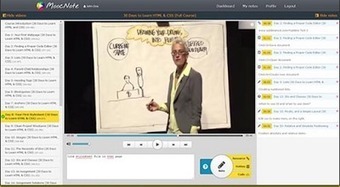
A New Educational Tool for Adding Notes to Videos (Ideal for Flipped Classrooms)

A New Educational Tool for Adding Notes to Videos (Ideal for Flipped Classrooms) | Moodle and Web 2.0 | Scoop.it
MoocNote is a new web tool ideal for flipped classrooms. Using MoocNote, you will be able  to build your own video library by importing videos from YouTube, Dropbox, or Google Drive. You can also use MoocNote's video plater interface to add notes to your videos. All of your notes link back to the appropriate place in the videos and are collected into one central place which you can access anytime, anywhere.

Via Gumersindo Fernández
No comment yet.
Rescooped by Juergen Wagner from Moodle Best LMS
September 22, 2015 1:44 AM
Scoop.it!

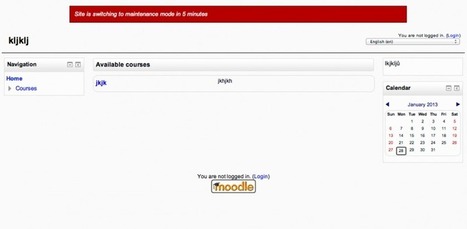
How to use Maintenance Mode in Moodle

How to use Maintenance Mode in Moodle | Moodle and Web 2.0 | Scoop.it
Updates, upgrades, new features, new development… these are just a few of the many tasks that need to be done in order to keep your Moodle experience fresh and compelling.

It is always good practice to schedule routine maintenance and upgrade events during times when the fewest (or no) users will be accessing the LMS (this, obviously, isn’t possible in the rare emergency event). The best way to ensure users are not on the system during these periods is through a high quality communication strategy.

During the maintenance period, it is also a best practice to set your site into Maintenance Mode, to prevent anyone except administrators from accessing the LMS. From Moodle.org:

An administrator can put the site into maintenance mode in Administration > Site administration > Server > Maintenance mode.

Users accessing the site when it is in maintenance mode will continue to see a normal homepage, but they will receive a notice that the site is currently under maintenance if they try to access course materials. (Note: this message to users can be customized to best fit your site and style).

Via Miloš Bajčetić
No comment yet.
Rescooped by Juergen Wagner from iGeneration - Humane Use of Technology in an AI world (Pedagogy & Digital Innovation)
September 22, 2015 1:42 AM
Scoop.it!

A Simple Tool to Create Stunning Video Animations for Your Class

A Simple Tool to Create Stunning Video Animations for Your Class | Moodle and Web 2.0 | Scoop.it

Via Dr. Tom D'Amico (@TDOttawa)
Michel Santiago del Pino's curator insight, September 22, 2015 6:50 AM

Una herramienta simple para crear vídeo animaciones para tu clase.

Christl's curator insight, September 22, 2015 9:44 AM
Account erforderlich
Rescooped by Juergen Wagner from Moodle Best LMS
September 20, 2015 2:06 PM
Scoop.it!

Moodle 2.9 Highlights Quiz - Moodle Tuts

Moodle 2.9 Highlights Quiz - Moodle Tuts | Moodle and Web 2.0 | Scoop.it
Moodle 2.9 introduces multiple enhancements to the Quiz activity, including conditional quiz questions, an attractive print layout, ability to add section headings and more.

Via Miloš Bajčetić
No comment yet.
Rescooped by Juergen Wagner from Digital Delights for Learners
September 20, 2015 8:25 AM
Scoop.it!

Standards Planner Tour - The free and easy to use Lesson Planner

Standards Planner Tour - The free and easy to use Lesson Planner | Moodle and Web 2.0 | Scoop.it
Standards Planner quickly organizes teachers lesson plans to the Common Core and other standards, as well as provides thousands of resources and material for the classroom. Create, share, and collaborate with your peers.

Via Ana Cristina Pratas
No comment yet.
Rescooped by Juergen Wagner from Teach and tech
September 20, 2015 12:55 AM
Scoop.it!

A Simple Tool to Create Stunning Video Animations for Your Class ~ Educational Technology and Mobile Learning

A Simple Tool to Create Stunning Video Animations for Your Class ~ Educational Technology and Mobile Learning | Moodle and Web 2.0 | Scoop.it

Via Luísa Lima
No comment yet.