Your new post is loading...
Google makes the Chrome browser and Google makes Gmail. Naturally, you have some great Chrome extensions to make your Gmail experience better.
Via Juan Jesús Baño Egea

|
Rescooped by
Juergen Wagner
from Medien – Unterrichtsideen
August 2, 2017 4:48 AM
|
Wegen einer Krankheit kann Jacqui Kenny ihre Wohnung kaum verlassen. Trotzdem lieben Tausende ihre Reisefotos. Wie geht das?
Via Guido Knaus
|
|
Rescooped by
Juergen Wagner
from TIC & Educación
August 2, 2017 4:46 AM
|
Data backup is one of the most important aspects of modern computing. How would you feel if you lost a lifetime of photos, all your treasured videos, every important document you own, and your entire media collection just because your hard drive died?
Of course, you might get lucky and be able to salvage some content, but it’s a risk not worth taking. You need to make regular backups.
Via Gumersindo Fernández
|
|
Scooped by
Juergen Wagner
August 2, 2017 2:27 AM
|
Source: Top 6 plugins for gamification in Moodle #moodle #gamification - Moodle World Online courses can be made more engaging, interactive and exciting for the learner’s by inducing a small tint of gamification. Gamification is the process to engage, motivate and enhance the learner engagement by using game mechanics and games. Out of box Moodle…
Do you use Gmail as your go-to email service? These 9 IFTTT applets can couple with your Gmail account to automate your daily Gmail experience.
Via Juan Jesús Baño Egea
|
|
Rescooped by
Juergen Wagner
from Moodle Best LMS
August 1, 2017 1:51 PM
|
Are you also looking to start teaching online MOOC course with Moodle as your online learning management system? Getting all the ingredients right in place to create your first Moodle course for MOOC’s is difficult task for Moodle users. How do you create a Moodle course for MOOC courses?
Dr. Ahmad Mikati – Course Chair and Coordinator at Arab Open University, created an astonishing presentation for creating MOOC like online Moodle courses. The presentation covers the basics of creating a Moodle course which can reach an unlimited number of participants with an open access via the web.
Via Miloš Bajčetić
|
|
Rescooped by
Juergen Wagner
from El rincón de mferna
August 1, 2017 6:58 AM
|
This is a quick use tool that does not require you to sign up with them. You can simply paste the sentences you want to analyze for readability and it will give you the results. This tools analyses readability based on ease of reading, passive voice, use of adverbs and more. It also categorizes sentences as hard or very hard to read. It also highlights complex words that have simple alternatives.
Via Juan Jesús Baño Egea
Good curation tools like Scoop.it and Pinterest are useful for teachers and educators across the globe. Here is an infographic showing how can a educators use Pinterest for educational tasks.
Via Ramon Aragon, Javier Sánchez Bolado
Free resource of educational web tools, 21st century skills, tips and tutorials on how teachers and students integrate technology into education
Via Dr. Tom D'Amico (@TDOttawa)
|
|
|
Rescooped by
Juergen Wagner
from Medien – Unterrichtsideen
August 4, 2017 3:02 AM
|
Wer mit dem Internet aufgewachsen ist, sei besser im Umgang mit Programmen und Daten aus dem Netz – heisst es. Doch das ist eine Illusion.
Via Guido Knaus
|
|
Rescooped by
Juergen Wagner
from tefl methods
August 3, 2017 9:11 AM
|
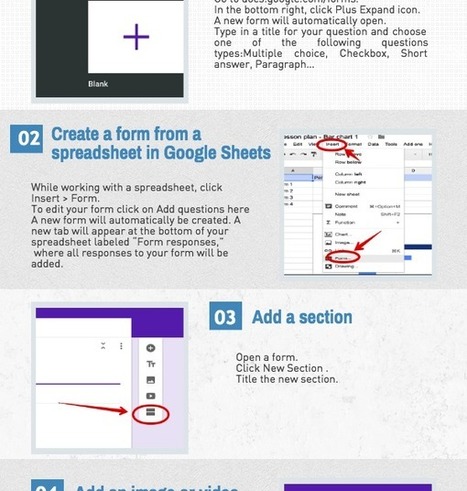
"Here is a great resource full of interesting ways to use Google Forms with your students. This presentation is prepared byTom Barret. Check it out share with us what you think of it ..." ©
Via Leona Ungerer, Juergen Wagner, Inna Piankovska
"Here is a great resource full of interesting ways to use Google Forms with your students. This presentation is prepared byTom Barret. Check it out share with us what you think of it ..." ©
Via Leona Ungerer
If you want to implement a flipped learning approach that makes a successful impact, then you might want to start by taking a look at your school's homework culture.
Via Peggy George
|
|
Rescooped by
Juergen Wagner
from Medien – Unterrichtsideen
August 2, 2017 2:30 AM
|
Edmodo makes all your school communications easier. Our classroom experience is one of the reasons teachers rely on Edmodo year after year. Edmodo's
Via Guido Knaus
Free resource of educational web tools, 21st century skills, tips and tutorials on how teachers and students integrate technology into education
Via Maria Margarida Correia, Timo Ilomäki
|
|
Rescooped by
Juergen Wagner
from Moodle Best LMS
August 1, 2017 1:51 PM
|
Every day more MoodleCloud sites are being set up, and this means more teachers, trainers and other educators are creating courses and content for their learners. Perhaps you’re one of them?
We’ve already blogged about how to share your Moodle course with others around the world. In true open source spirit, we say “It’s good to share!”
Via Miloš Bajčetić
Kiddom is the easiest way to plan, assess, and analyze learning. With Kiddom, teachers use one collaborative learning platform for assessment, curriculum development, messaging, and reports.
Via Nik Peachey
|
|
Rescooped by
Juergen Wagner
from Moodle Best LMS
August 1, 2017 6:58 AM
|
The H5P Moodle plugin is here! It is still quite a new plugin, but has excellent functionality!
See the H5P website for information about the amazing interactive options.
When you first download the plugin, you will need to install the content types that you want to use. Here are some tips that may help you get going.
Via Miloš Bajčetić
|
|
Rescooped by
Juergen Wagner
from TIC & Educación
August 1, 2017 6:56 AM
|
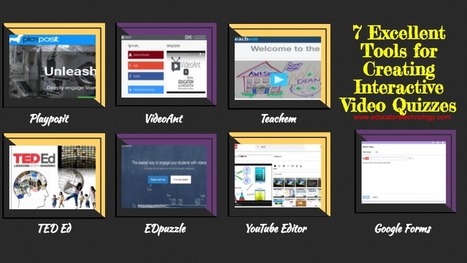
A few days ago we featured a collection of some of the best web tools teachers can use to create non-traditional quizzes and today we are sharing another collection but this time for creating video quizzes. These are tools you can use to design quizzes based on selected video content. They allow you to import video clips, add a variety of interactive features to them (e,g different question types, comments, notes, links etc) and share them with your students. Some of these tools include the option to track student progress and access stats on how students are interacting with your video quizzes.
Via Gumersindo Fernández
"YouTube as educational technology is a set of videos that show teachers how YouTube can be used as an effective teacher technology. Invite Russell to speak ..."
Via Leona Ungerer
|